0:28
Explore
00:00:00 / 00:22:13
- Length
- 0:22
- Scenes
- 20 · 1.1 s avg
- Product on screen
- 0:03
- Voiceover
- No
- Views
- 506K on X
as of November 13, 2026
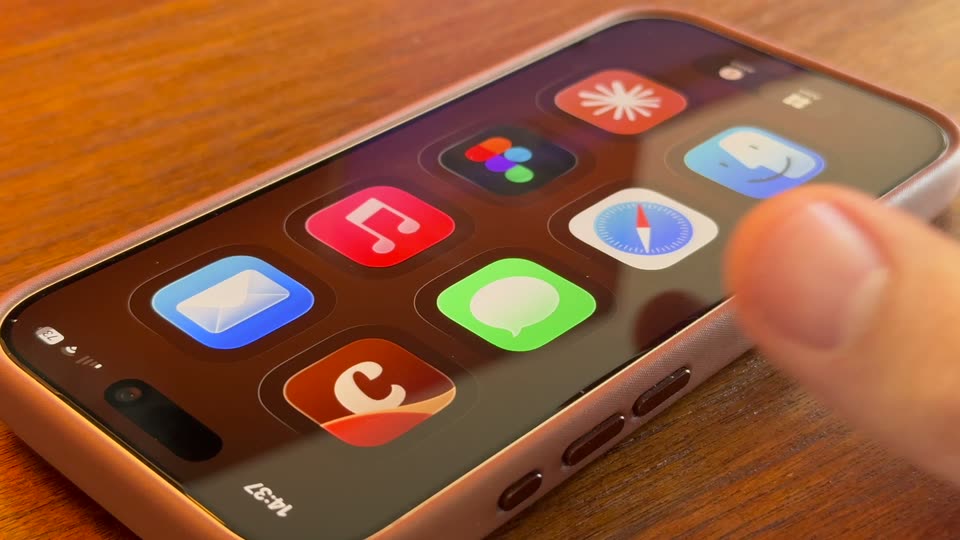
Choclift’s 0:22 launch film runs 20 scenes, about 1.1 s each. The product shows up at 0:03. There is no explicit call to action. The video is a rapid montage of live desk shots, UI close-ups and 3D renders of the app grid, bookended by a warm opening and black logo cards. Its signature moves are the hard 134 BPM cuts, the chocolate props that echo the brand, and warm wood tones set against purple UI accents.
Footage neededEstimated needs: 3 capture groups — your screens or recordings · 1 official logo — reused across the film · 12 filmed passages — shoot, supply or replace · 2 3D passages — build or supply
Is this your launch? to your site or press kit.
More like this





Phil Traut ᯅ - I just launched a free App that lets you open Mac Apps…from your iPho, scene by scene
· 20 scenes as text
01 · Hook · 0:00–0:01
Top-down view of a smartphone flat on a wooden desk, screen showing a grid of app icons. A laptop keyboard fills the right edge and an opened chocolate bar with gold foil sits top left. The frame stays locked-off with a faint handheld drift.
Camera: Static
02 · Hook · 0:01–0:01
A copper-cased phone rests on a wooden table, its screen angled toward the camera showing a grid of app icons. A finger sweeps in from the right and taps the Music icon, then the custom C icon, in quick succession.
Camera: Static
03 · Hook · 0:01–0:02
A close-up of a laptop screen on a desk beside a red lamp shows a purple striped macOS wallpaper. A tilted Pinned apps window with a grid of app icons scales and fades into view over the desktop.
Techniques: 3D mockup
Camera: Static
04 · Hook · 0:02–0:03
A left hand lifts a wrapped chocolate bar off the desk while a right hand rests on the trackpad. On the MacBook, a Messages chat window zooms into a photo of a broken chocolate bar, enlarging it across the screen.
Techniques: UI zoom
Camera: Static
05 · Product intro · 0:03–0:04
A Finder window for a folder named choclift sits in 3D perspective against a gray backdrop, its files and folders using chocolate-bar icons. A cursor hovers over a workflow file and clicks it, highlighting the filename in blue.
On-screen text: “CHOCOLONELY”
Techniques: 3D mockup, Cursor demo
Camera: Static
06 · Demo · 0:04–0:04
A rose-gold phone lies tilted on a wooden table, its home screen full of app icons. A finger taps the display, sliding between icons, while the camera holds a fixed, angled shot.
Techniques: 3D mockup
Camera: Static
07 · Demo · 0:04–0:06
A hand types on a laptop keyboard while the screen shows a Figma canvas; a second hand rests near a chocolate bar and a phone on the desk, with a red chocolate box at the right edge. The on-screen design settles on large serif drag & drop lettering.
Camera: Static
08 · Demo · 0:06–0:07
A hand reaches in from the right and taps the screen of an iPod lying flat on a wooden desk, next to a laptop and an unwrapped chocolate bar. The camera stays locked off.
Camera: Static
09 · Demo · 0:07–0:08
A hand reaches toward a smartphone on a wooden desk as a laptop beside it shows a window shifting from a stacked overview to a single image panel. An orange grid artwork hangs on the wall behind the setup.
Camera: Static
10 · Demo · 0:08–0:09
A close-up of an orange phone on a wooden table shows its grid of app icons. Two fingers enter from the top and press down on the screen, the fingertips in sharp focus while the icons stay soft. The background glows in warm orange bokeh.
Camera: Static
11 · Demo · 0:09–0:10
A MacBook sits angled on a desk with an acoustic panel wall and a red book behind it. On screen, a browser window showing a warped app grid closes, leaving the centered Pinned apps window over the purple pill wallpaper.
Camera: Static
12 · Demo · 0:10–0:11
A tight close-up of a grid of colorful app icons on a white panel pulls back to reveal the panel standing upright on a wooden desk, with a phone and a white lamp beside it.
Techniques: 3D mockup
Camera: Static
13 · Demo · 0:11–0:12
A desk shot frames a monitor and a pink-cased iPhone lying flat, both showing a grid of app icons. The monitor window switches to a Choose Application list with a search bar and Add buttons while the phone stays still.
Camera: Static
14 · Demo · 0:12–0:13
An angled close-up of a macOS application list under a search bar. Rows of app icons and names scroll upward past Add buttons on the right, a cursor drifting with them, while shallow focus blurs the screen's edges.
Techniques: Cursor demo
Camera: Static
15 · Demo · 0:13–0:14
A locked-off desk shot holds a monitor showing a macOS Pinned apps window, where a Choose Application list of rows collapses into an eight-app grid. A physical iPhone in a pink case rests on the desk in front, with a lamp and foil wrapping at the left.
Techniques: Cursor demo
Camera: Static
16 · Demo · 0:14–0:17
Top-down locked-off shot of a rose-gold iPhone lying on a dark wood table. The home screen swipes sideways, swapping pages of colorful app icons such as Mail, Music, Messages, Telegram and WhatsApp.
Camera: Pull out
17 · Demo · 0:17–0:18
Top-down shot of a phone in a rose case lying on a wooden table. The home screen brightens from dim to full color, then a hand enters from the right and taps an app icon before withdrawing.
Camera: Pull out
18 · Outro · 0:18–0:19
A top-down phone on a wooden table shows a red screen with a large white choclift wordmark. A hand at the right edge withdraws as two chocolate pieces appear beside the phone.
Camera: Static
19 · Outro · 0:19–0:20
A black frame holds a static logo lockup: the word 'choclift' in large cream italic slab-serif type, centered, with small gold uppercase 'PHIL TRAUT'S' set above the middle. The frame is locked-off with no motion.
On-screen text: “PHIL TRAUT'S”, “choclift”
Camera: Static
20 · Outro · 0:20–0:22
On a black background, a large dark gray choclift wordmark with a small Phil Traut's line sits behind the orange Available Now text. The wordmark fades out, leaving the orange text centered and still.
On-screen text: “Available Now”
Camera: Static