1:20

Neomatter — AI for In-House Legal Teams
Neomatter · B2B · Nov 2026
Checkmk · Nov 2026 · 1:08 · Full motion · AI-annotated
studio Astra Motion
Checkmk’s 1:08 launch film runs 30 scenes, about 2.3 s each. The product shows up at 0:09 and 2 features are revealed, with social proof. There is no explicit call to action; a voiceover carries the film. A dark, glassy product film for CheckMK built on tilted 3D dashboard planes that the camera glides across, punctuated by flat kinetic-type cards and a recurring teal hexagon logo. It opens on the pain of fragmented monitoring, names the product, tours the stack and two features (integrations, AI), lands on a 70% cost claim and a wall of client logos, and closes on the logo with its tagline.
Is this your launch? to your site or press kit.
Neomatter · B2B · Nov 2026
Ageospatial · Fintech · Sep 2026
Posthog · Sep 2026
Films whose music sounds like this one, voice left out
Extropic · Modern electronic
OpenCrawl · Modern electronic
Shopify · Electronic
A browser window on a mountain desktop slides up into frame as a second tab opens, and the page switches from an infrastructure monitoring hero to a cloud infrastructure hero with two buttons.
Camera: Static
A dark browser window over a snowy mountain wallpaper shows the uptimechecks.com page, with a white-and-green headline and three stat cards for uptime, response time and checks per minute. Red notification badges on the open tabs count upward.
Camera: Static
A dark browser window on a mountain desktop shows an observability dashboard with stat cards. A yellow-dotted alert card reading HTTP 5xx spike hovers top right while the window and page content drift upward, layers sliding at different speeds.
Techniques: Parallax
Camera: Static
A field of alert cards floats in 3D perspective against a dark, red-lit background, tilting and receding as the camera pushes through. The cards blur to the edges as the white headline “Nobody reads anymore” fades in at center.
On-screen text: “Nobody reads anymore”
Techniques: 3D mockup, Parallax
Camera: Push in
A teal hexagon logo with a dark arrow mark holds center on a black background streaked with green light. It slides left as the word checkmk assembles beside it from extruded 3D letters, then the lockup flattens and holds.
On-screen text: “checkmk”
Techniques: Kinetic type
Camera: Pull out
A dark monitoring dashboard fills a tilted monitor in a dim room, its line charts and hexagon map glowing red, orange and blue. The camera eases gently toward the screen while the Astra Motion logo holds in the top corner.
Techniques: 3D mockup
Camera: Static
A dark monitoring dashboard sits in 3D perspective on a black stage, angled with the left edge nearer. The view eases rightward as the top-left wordmark settles, revealing the hosts list, two hexagon stat panels and a blue cost bar chart along the bottom.
On-screen text: “ASTRA MOTION”
Techniques: 3D mockup
Camera: Static
A dark monitoring dashboard rendered in 3D perspective, tilted at an angle with a depth-of-field blur on the right edge. Hexagonal charts and red, yellow, and blue line graphs fill the screen as the camera drifts slowly across the surface.
On-screen text: “ASTRA MOTION”
Techniques: 3D mockup
Camera: Static
A dark monitoring dashboard with red, yellow and blue line graphs is shown at a tilted 3D angle. The camera slowly pans across the screen, the lines and labels drifting with slight motion blur, while a white brand logo holds in the top left corner.
On-screen text: “ASTRA MOTION”
Techniques: 3D mockup
Camera: Static
A dark Kubernetes dashboard is framed at a tilted 3D angle, a blue hexagon ship-wheel logo on the left and a cluster status table with green bars below. The view drifts slowly across the rows while a small studio watermark holds in the top-left corner.
Techniques: 3D mockup
Camera: Push in
A virtual machine dashboard floats in 3D space, tilted at a steep angle on a dark background. The camera slowly orbits and pushes in, the perspective flattening until the table faces the viewer. A small studio logo holds in the top left corner.
Techniques: 3D mockup
Camera: Push in
A dark monitoring dashboard, tilted in 3D perspective, rotates from a steep side angle toward a head-on view on a black background. A purple line graph and process legend fill the panel, a green glow rims its left edge.
On-screen text: “ASTRA MOTION”
Techniques: 3D mockup
Camera: Push in
A tilted 3D view of a dark monitoring dashboard holds still. A purple line graph fills the background as a centered tooltip lists per-service memory values. A white ASTRA MOTION wordmark sits top-left.
On-screen text: “ASTRA MOTION”
Techniques: 3D mockup
Camera: Push in
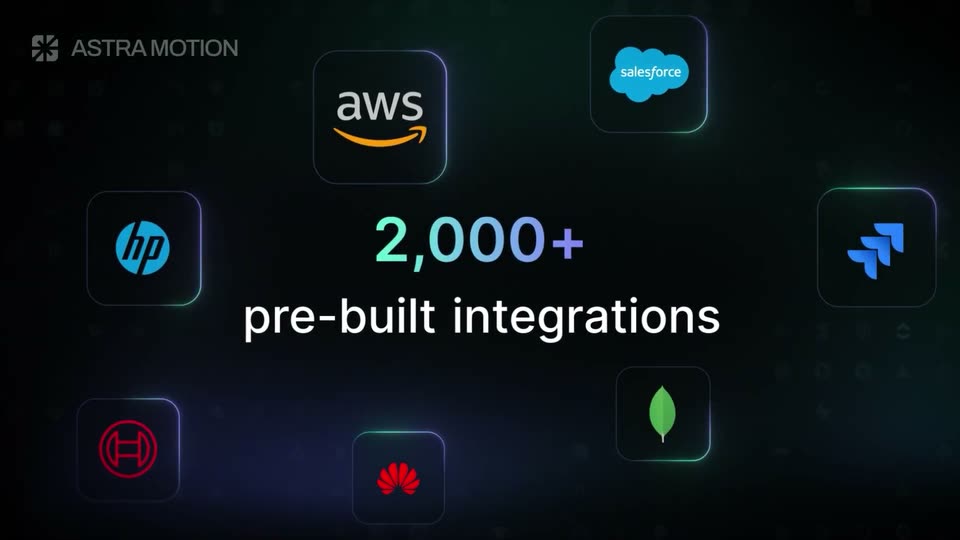
A gradient '2,000+' headline holds center on a dark grid, with 'pre-built integrations' fading in beneath it. Rounded tiles carrying brand logos (aws, salesforce, HP, Huawei, a red H, a green leaf, a blue arrow) drift and slide around the text at varying speeds.
On-screen text: “2,000+”, “pre-built integrations”
Techniques: Parallax
Camera: Static
A dark monitoring dashboard sits in 3D perspective, tilted and receding into a black background, its green tables and CPU charts glowing. The camera holds a locked-off angle as the interface stays static, the angled plane filling the frame from a low left vantage point.
On-screen text: “2,000+”, “pre-built integrations”, “salesforce”, “aws”
Techniques: 3D mockup
Camera: Push in
A dark monitoring dashboard fills the frame, a multi-colored line chart titled Time usage by phase spikes across a time axis. The camera pans right and zooms in, dropping the top toolbar from view, with shallow depth of field blurring the edges.
Techniques: UI zoom
Camera: Pan
A dark analytics dashboard sits in 3D perspective, tilted to the right, with four stacked line charts labeled by time range. The camera slowly pans across the screen, revealing lower charts and a time axis. Jagged orange, blue, and pink lines trace the data.
On-screen text: “ASTRA MOTION”
Techniques: 3D mockup
Camera: Pull out
A dark monitoring list in 3D perspective scrolls upward, rows of yellow WARN and red CRIT tags with service names gliding past. A thin teal rectangle draws itself around one CRIT row while the view slowly pushes in.
Techniques: 3D mockup
Camera: Push in
A dark list of metric rows, each with a menu icon and a purple sparkle, sits in 3D perspective, angled to the right. A green line flashes across the middle, then a white cursor slides in and hovers, highlighting one row as the camera pushes in.
Techniques: 3D mockup, Cursor demo
Camera: Push in
A dark monitoring dashboard shows a service list on the left and a host status card on the right. The view zooms onto the right panel as a Generating response line types out, then a Summary block with body copy and a metrics table fades in.
Techniques: UI zoom
Camera: Pull out
Dark AI assistant screen with a serif greeting and orange starburst icon above a rounded input field. Prompt text types out letter by letter with a blinking cursor while a mouse arrow slides in from the lower right toward the orange send button, with a Sonnet 4.6 selector at the field's bottom edge.
Techniques: Cursor demo
Camera: Static
A dark chat panel fills the frame, a glowing orange send button centered. A large white cursor arrow glides in from the lower right and presses the button, which flares brighter. The prompt line and a Sonnet 4.6 model label sit blurred to the left.
Techniques: Cursor demo
Camera: Static
A dark Claude chat view shows a user prompt about Checkmk alerts above a Summary answer with a metrics table. The interface starts soft and slightly offset, then sharpens and settles into a locked-off frame as the text comes into focus.
On-screen text: “ASTRA MOTION”
Camera: Static
On a near-black background with faint blue and teal angular panels, the word Get in white bold sans scales in at center, then gives way to stack in teal bold sans scaling in. A small gray ASTRA MOTION logo lockup stays fixed in the top-left corner throughout.
On-screen text: “Get”, “stack”
Techniques: Kinetic type
Camera: Static
A small glowing hexagon in the center scales up into a large dark hexagon on a honeycomb background. The gradient text IT Observability grows with it and holds centered, while the Astra Motion logo stays in the top left.
On-screen text: “ASTRA MOTION”, “IT Observability”
Techniques: Kinetic type
Camera: Static
On a dark blue-to-teal gradient, two glassy 3D bars rise to equal height under a headline that fades in word by word. The green bar then shrinks to a third of the purple bar's height as “up to 70%” and a down arrow fade in between dashed reference lines.
On-screen text: “Lower your total cost of ownership”, “Per-host monitoring costs”, “up to 70%”
Techniques: Kinetic type
Camera: Pull out
A dark scene opens on the gradient headline “Trusted by” above a rounded panel; its glowing teal border and the 3x3 grid of white client logos fade in from dim to full brightness. Wavy light streaks drift along the left and right edges.
On-screen text: “Trusted by”, “Lower your total cost of ownership”
Camera: Pull out
A row of white G2 award ribbons stands on a dark cracked floor in 3D perspective. The camera tracks right, racking focus from a Leader badge to a High Performer badge while the neighboring badges blur at the edges.
Camera: Static
Three white G2 award badges stand on a dark cracked floor in 3D perspective with shallow depth of field. The center badge is sharp, reading High Performer with an orange chevron, then blurs and refocuses as Best Relationship with a teal chevron while the flanking badges drift out of frame.
Techniques: 3D mockup, Parallax
Camera: Pull out
A teal hexagon logo with an up arrow sits centered on black, then slides left as the thin checkmk wordmark fades in beside it with a soft glow. Below, the tagline Unified IT Observability for the Hybrid World types in word by word in teal and white.
On-screen text: “ASTRA MOTION”, “checkmk”, “Unified IT Observability for the Hybrid World”
Techniques: Kinetic type
Camera: Pull out