1:48

Introducing Oz: the orchestration platform for cloud agents
Warp · Developer tools · Feb 2026
Cardboard · Feb 2026 · 0:54 · AI-annotated
Cardboard’s 0:54 launch film runs 38 scenes, about 1.4 s each. The product shows up at 0:14 and 3 features are revealed. The call to action lands at 0:47 (87% in), over a voiceover. The video intercuts a warm, dimly lit live-action narrative with near-black, 3D-tilted product screens, cutting fast between the character, macro objects, and interface panels. Its signature moves are whip cuts, rack-focus reveals, and lowercase condensed captions that carry the voiceover across both worlds.
Is this your launch? to your site or press kit.
Warp · Developer tools · Feb 2026
Clipping Hall of Fame · May 2026
TovenAI · Fintech · Aug 2026
A person in a light tee and pink shorts plays an upright piano in a dim room, seen from the side under a small lamp. Flowers and a framed photo sit to the right. A yellow caption reads 'you've got hours or' at the bottom.
On-screen text: “you've got hours or”
Camera: Push in
A hand holds a small black SD card steady in the center of frame, the card sharp against a soft blurred interior background. A yellow caption at the bottom shows the line in two parts.
On-screen text: “you've got hours or”, “days of incredible footage.”
Camera: Static
A hand holds a SanDisk Extreme 128GB SD card in sharp focus at frame center, thumb gripping the lower edge, against a softly blurred warm interior. The frame stays locked off while a caption reads at the bottom.
On-screen text: “days of incredible footage.”
Camera: Static
A hand pinches a SanDisk Extreme 128GB SD card between thumb and finger, held in sharp focus against a soft blurred background. The frame stays locked-off while a yellow caption sits at the bottom.
On-screen text: “days of incredible footage.”
Camera: Static
A hand pinches a SanDisk Extreme 128 GB SD card in sharp focus against a warm, blurred background, a black rounded object resting just below the fingers. The locked-off shot uses shallow depth of field; a caption reads days of incredible footage.
On-screen text: “days of incredible footage.”
Camera: Static
A thumb holds a SanDisk Extreme SD card at an angle over a pale, out-of-focus surface. The card stays in sharp focus with shallow depth of field as the frame drifts slightly, revealing faint linear texture on the left.
Camera: Static
A close-up finger pushes a 128 GB SanDisk SD card into the side slot of a silver laptop on a desk. The camera stays locked off with shallow focus on the card. A small white caption, and you have, fades in at the bottom.
On-screen text: “and you have”
Camera: Static
A man in a light T-shirt sits in a dim wooden interior, looking downward with a slight smile. The frame stays locked on his face while yellow subtitle text appears at the bottom.
On-screen text: “and you have”, “the perfect story”
Camera: Push in
A shallow-focus row of colorful app icons sits in 3D perspective on a black field, angled away to the right. A cursor rests beside the After Effects tile as a tooltip hovers above it, while the caption holds at the bottom.
On-screen text: “the perfect story”
Techniques: 3D mockup
Camera: Static
A man in a dim room looks down in tight close-up, then the shot cuts to a soft-focus bookshelf of red and purple spines. Yellow captions appear in sequence at the bottom edge.
On-screen text: “the perfect story”, “floating around”, “in your head.”
Camera: Static
A 3D list of sound-effect names (Wind, Long Whoosh) whips past in a blur, then settles flat on a black list where a yellow bar highlights one row, while a small caption appears at the bottom.
On-screen text: “in your head.”, “but here's”
Techniques: 3D mockup, Speed ramp
Camera: Push in
A man with curly hair in a pale t-shirt sits in profile in a dim room, looking downward, while a blurred figure stands in the background. A small caption fades in at the bottom of the frame and then disappears.
On-screen text: “but here's the problem.”
Camera: Push in
Close-up of a man with brown hair and stubble, his eyes shifting as he speaks, against a dark blurred interior. Yellow caption text sits at the bottom center and swaps with the voiceover. Locked-off frame.
On-screen text: “you're spending 90%”, “of your time”
Camera: Static
A macro close-up of a video editing timeline fills the frame, with purple, pink and teal clips and a file label drifting past as the camera tracks sideways. Small white subtitle captions appear at the bottom center.
On-screen text: “of your time”, “just finding”, “the right clips”
Techniques: UI zoom
Camera: Push in
A man in a grey t-shirt looks down in a dim room lit with pink light. A bright magenta bar and horizontal slats flash across the opening frame. Small yellow captions read the voiceover along the bottom.
On-screen text: “the right clips”, “dragging them around.”
Camera: Static
A man in a dim, warm-lit room speaks to camera, then a fast whip cut throws us into a blurred editing interface where white clip labels and a diagonal yellow bar streak across the frame. A yellow subtitle sits at the bottom.
On-screen text: “dragging them around.”
Camera: Static
A man in a dim brick room scratches the back of his neck, then the shot cuts to a tilted close-up of a scrolling sound list, one row highlighted yellow.
On-screen text: “dragging them around.”, “1”
Techniques: UI zoom
Camera: Static
Tight close-up of a dark audio level meter: a green bar sits below a thin yellow line, flanked by white scale numbers from -18 to -42. The frame begins soft and out of focus, then sharpens as it locks off.
Camera: Static
A tight shot of a green level meter with a yellow line cuts to a man in a grey t-shirt seated in a dim room, brick wall and wooden door behind him. A yellow caption at the bottom adds a new phrase each half second.
On-screen text: “what if you”, “had a friend”, “who knew all”
Camera: Static
A search interface floats in 3D perspective against a dark backdrop, racking from soft blur into focus as “usecardboard.co” is typed and “used cars” suggestions list below. A yellow caption at the bottom reads “who knew all”, then “inside out?”.
On-screen text: “who knew all”, “usecardboard.co”, “inside out?”
Techniques: 3D mockup
Camera: Static
A blurred dark-blue backdrop frames the product home screen, where the greeting “What are we editing today, Ishan?” scales in above a media input field and three example thumbnails. The tagline “inside out?” and the URL “usecardboard.co” fade out along the bottom.
On-screen text: “inside out?”, “usecardboard.co”
Techniques: Kinetic type
Camera: Static
A dark, blurred backdrop frames the app's start screen. The greeting headline scales in above a prompt box and three example thumbnails, while a media file list slides in along the right edge.
Techniques: Kinetic type
Camera: Static
A dark product home screen fades in from black over a textured backdrop. The centered greeting and dashed drop zone settle with a slight scale-down, while a vertical list of media files with a green plus button holds at the right edge.
Techniques: Kinetic type
Camera: Static
Locked-off shot of the Cardboard start screen on a dark, blurred background. A centered panel holds a prompt field and a row of six media thumbnails beneath the greeting headline, while the tagline “introducing cardboard.” sits at the bottom of the frame.
On-screen text: “introducing cardboard.”
Camera: Static
A dark, locked-off product screen holds the white status line “Analyzing your footage” above a rounded prompt box with a text request and a circular send button, set over a dim grid of video thumbnails.
Camera: Static
A dark chat interface fills the locked-off frame. A message about analyzing the voiceover sits at the top with a blinking caret, while a status line switches from “Searching content” to “Setting up subtitles”. Yellow subtitles caption the voiceover along the bottom.
On-screen text: “an ai video editor”, “that lives in your browser.”
Camera: Static
A dark editor UI opens on a close-up of the AI chat panel, then pulls back to reveal a grid of video clips on the left and a timecoded timeline across the bottom. A yellow caption sits at the lower edge.
On-screen text: “that lives in your browser.”
Techniques: UI zoom
Camera: Static
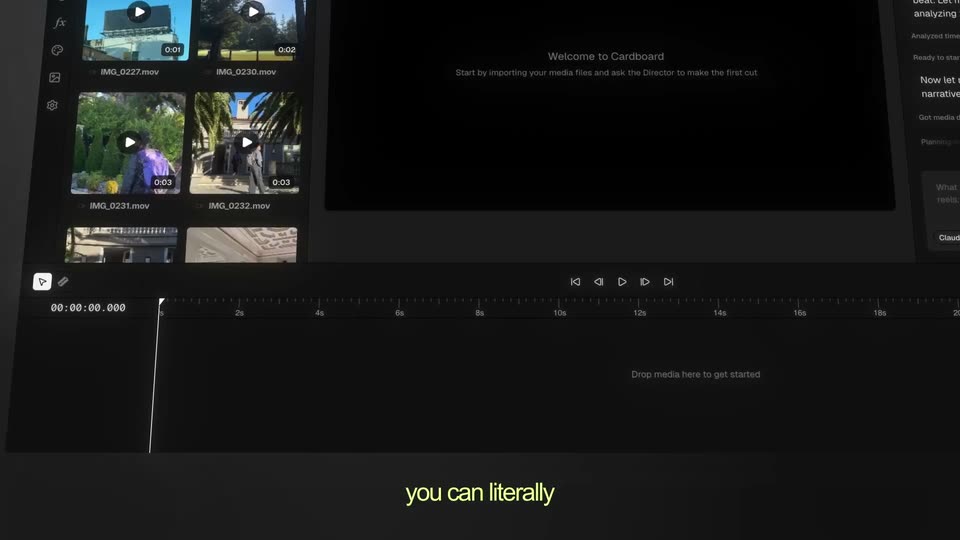
The Cardboard editor, with its media grid, preview window and timeline, is set in 3D perspective and the camera drifts across it while a chat panel opens on the right. A yellow caption fades in at the bottom.
On-screen text: “you can literally”
Techniques: 3D mockup
Camera: Pan
A dark Media Library panel sits in 3D perspective, angled toward the right. The words bench press type into the search field, two video thumbnails fade in below, and a hand cursor hovers over the first clip while yellow captions appear at the bottom.
On-screen text: “search your”, “footage by description”, “in plain english”
Techniques: Cursor demo
Camera: Pull out
A dark AI video editor fills the frame. The view starts on the top toolbar and the Director prompt box, then slides down to reveal media thumbnails and an audio timeline with a green waveform. A yellow caption reads a 60 second vlog.
On-screen text: “a 60 second vlog.”
Camera: Static
A dark video editor fills the frame: a media bin with two clip thumbnails and timecodes sits above a timeline showing a green audio waveform on the AUDIO 1 track. A yellow caption reading a 60 second vlog holds at the bottom, then clears as the playhead rests at zero.
On-screen text: “a 60 second vlog.”
Camera: Static
A tilted 3D view of a video editor's timeline: media thumbnails sit above while a video strip and green audio waveform fill the tracks, then a purple captions track drops in as the frame reframes upward.
Techniques: 3D mockup, UI zoom
Camera: Static
A dark AI chat panel types out a request to change the music, above a video timeline with purple clips and thumbnails. White lowercase captions appear at the bottom in sync with the voiceover.
On-screen text: “the music”, “doesn't hit”
Camera: Static
A dark video-editor UI starts zoomed into the Director chat panel, where a user asks to swap the music, then pulls back to reveal the media bin and a multi-track timeline with green audio waveforms. Olive-yellow lowercase text types out at the bottom.
On-screen text: “generate an”, “original soundtrack”
Techniques: UI zoom, Kinetic type
Camera: Static
A dark video editor interface fills the frame, showing a media bin of clip thumbnails at top and a multi-track timeline with purple caption blocks and green audio waveforms below. A small yellow caption at the bottom reads “it's actually.” then changes to “fits your vibe.”
On-screen text: “it's actually.”, “fits your vibe.”
Camera: Static
A mirrored file-export dialog hovers over a man in a dim room, then dissolves as a fine grid and a large 0.0 counter scale in across his chest. The man lowers his gaze, ending on a clean shot of him alone.
On-screen text: “0.0”, “hoqx3”
Techniques: Kinetic type
Camera: Push in
A man in a gray t-shirt sits at an upright piano in a dim room, hands on the keys as he plays. A patterned lamp glows behind him, foliage fills the window to the left. The camera slowly pushes in on his profile.
Camera: Static
On a black field, a dashed circular loader spins at center, then the white Cardboard wordmark appears to its right. The mark holds before cutting to the centered URL, while a small made with cardboard caption stays pinned to the bottom.
On-screen text: “made with cardboard”, “usecardboard.com”
Camera: Static