
0:39
Explore
Black Forest Labs - We just shipped the Kontext Komposer + Kontext-powered Presets Tra
Black Forest Labs · Jul 2025 · 0:25 · AI-annotated
- Length
- 0:25
- Scenes
- 18 · 1.4 s avg
- Product on screen
- 0:00
- Features shown
- 5
- Call to action
- 0:21 · 84%
- Voiceover
- No
- Views
- 121K on X
as of November 13, 2026
00:00:00 / 00:25:52
- Length
- 0:25
- Scenes
- 18 · 1.4 s avg
- Product on screen
- 0:00
- Features shown
- 5
- Call to action
- 0:21 · 84%
- Voiceover
- No
- Views
- 121K on X
as of November 13, 2026
Black Forest Labs’s 0:25 launch film runs 18 scenes, about 1.4 s each. The product is on screen from the first frame and 5 features are revealed. The call to action lands at 0:21 (84% in). The video is built as a bookend: a dark forest title card opens and closes the piece, with a rapid preset montage in between where each feature is introduced by a centered white title over full-bleed generated imagery. Signature moves are the wipe and cross-dissolve from source photo to generated result, the fixed Generate more button with a cursor, and the persistent 15+ Kontext Presets kicker.
Footage neededEstimated needs: 1 capture group — your screens or recordings · 1 official logo — reused across the film · 13 filmed passages — shoot, supply or replace · 1 graphic passage — draw or supply · 2 3D passages — build or supply
Is this your launch? to your site or press kit.
More like this




Black Forest Labs - We just shipped the Kontext Komposer + Kontext-powered Presets Tra, scene by scene
· 18 scenes as text
01 · Product intro · 0:00–0:04
White text lines fade in over a dark forest lake with three silhouetted figures: “Introducing Kontext Presets”, then “No prompt needed”, then “Just Upload” with a dashed drop zone, and a group photo appears inside the zone.
On-screen text: “Introducing”, “Kontext Presets”, “Black Forest Labs”, “No prompt needed”, “Just”, “Upload”
Techniques: Kinetic type
Camera: Pull out
02 · Product intro · 0:04–0:05
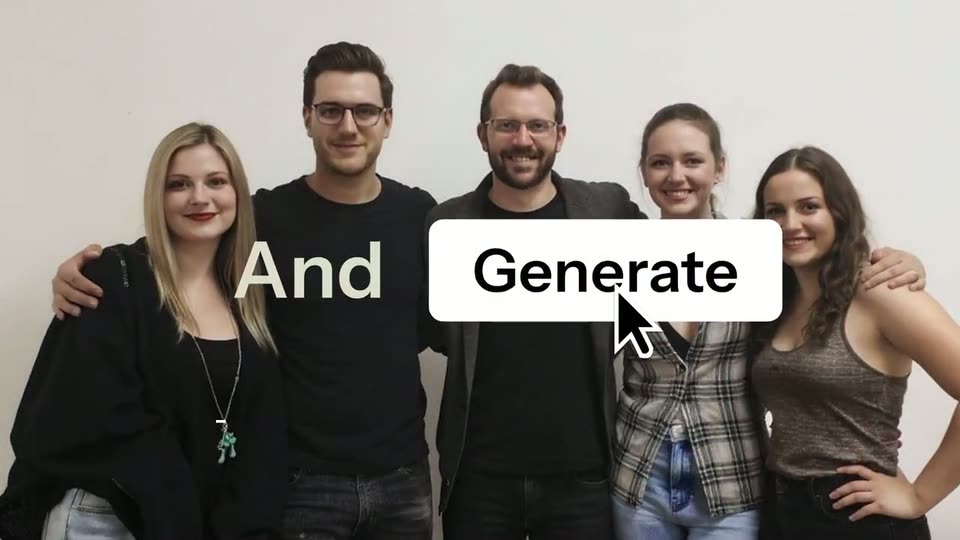
Five people stand arm in arm against a plain wall. Overlaid words swap from Just Upload to And Generate; the right word sits in a box that shifts from dashed outline to solid fill, with a white cursor arrow pointing at it.
On-screen text: “Just”, “Upload”, “And”, “Generate”
Camera: Static
03 · Feature reveal · 0:05–0:06
Five people pose against a white wall with the word “And” and a white “Generate” button plus cursor overlaid. The image wipes right to left into a generated version of the same group in a forest, wearing period costumes, as “Kontext Preset” and “Komposer” appear bottom left.
On-screen text: “And”, “Generate”, “Kontext Preset”, “Komposer”
Techniques: Masking
Camera: Static
04 · Feature reveal · 0:06–0:06
Five friends stand arm in arm, smiling at the camera. The photo cross-dissolves from a misty forest to a sunlit Colosseum as their outfits shift between modern and costume. A white label and wordmark sit in the lower left.
On-screen text: “Kontext Preset”, “Komposer”
Techniques: Morph
Camera: Pull out
05 · Feature reveal · 0:06–0:07
A photorealistic group of five people in pirate costumes stands on a ship deck under a full moon, a treasure chest of gold at the right. A previous Venetian slide wipes out from the left edge to reveal the full frame. White text sits static at the bottom left.
On-screen text: “Kontext Preset”, “Komposer”
Techniques: Masking
Camera: Static
06 · Feature reveal · 0:07–0:08
A horizontal strip of generated photos pans, opening on five people posed on a pirate ship deck under a full moon, with a treasure chest of coins at the right edge. A second photo with a sword-wielding figure slides in from the left. The preset title holds in the lower left.
On-screen text: “Kontext Preset”, “Komposer”
Camera: Pull out
07 · Feature reveal · 0:08–0:12
A 3x2 grid of AI group photos scrolls upward, swapping in new scenes like astronauts and a subway, while a black Generate more button with a cursor arrow sits fixed at the bottom.
Techniques: Cursor demo
Camera: Pull out
08 · Feature reveal · 0:12–0:13
A 2x3 grid of generated group photos sits above a gray 'Generate more' button with a cursor. The grid dissolves away and a close-up portrait of a woman and a man in white fades in to fill the frame.
Techniques: Cursor demo
Camera: Pull out
09 · Feature reveal · 0:13–0:15
A painted portrait of a couple in front of a house pulls back to a wide view, then cuts to a 3D render of the same house with a dashed path. White feature text stays centered over both images.
On-screen text: “15+ Kontext Presets”, “Move Camera”, “Product Photography”
Camera: Pull out
10 · Feature reveal · 0:15–0:16
A brown leather tote bag is shown across three staged settings, a light wooden table, a dark studio backdrop, and an outdoor checkered blanket holding a wine bottle. The shots cut quickly while the white text overlay stays fixed in the center.
On-screen text: “15+ Kontext Presets”, “Product Photography”
Camera: Pull out
11 · Feature reveal · 0:16–0:17
A leather tote bag with gold line art cross-dissolves through three settings: a plaid picnic blanket holding a wine bottle, a paint-splattered workbench, and an outdoor shot over a woman's face. Static white text reads 15+ Kontext Presets above Product Photography.
On-screen text: “15+ Kontext Presets”, “Product Photography”
Camera: Pull out
12 · Feature reveal · 0:17–0:18
A vertical wipe turns a photo of a toddler and a dragon plush into an illustrated fantasy poster, then the view widens to place the poster beside a matching book cover. Two white captions stay fixed in the center.
On-screen text: “15+ Kontext Presets”, “Movie Poster”
Techniques: Masking
Camera: Pull out
13 · Feature reveal · 0:18–0:19
A 3D-rendered movie poster of a fairy in a pink gown and a green dragon fills the frame under a yellow DRAGONHEART title. White overlay text reads 15+ Kontext Presets and Movie Poster. A white bar wipes in from the left edge, then the poster crossfades to the next preset as the label swaps to Reinight.
On-screen text: “15+ Kontext Presets”, “Movie Poster”, “Reinight”
Techniques: Masking
Camera: Static
14 · Feature reveal · 0:19–0:20
A close-up of a woman with a chin-length bob and bangs against a dark bokeh background. The lighting on her face shifts from neutral to magenta and blue neon. White text reading Relight and 15+ Kontext Presets sits centered over her face.
On-screen text: “15+ Kontext Presets”, “Relight”
Camera: Pull out
15 · Feature reveal · 0:20–0:21
A blonde woman in a black turtleneck and pink jacket is centered on a white dotted background. A vertical split divides the frame, the right half falling into a dark, moody relit grade. White text '15+ Kontext Presets' and a large 'Relight' hold still over her face.
On-screen text: “15+ Kontext Presets”, “Relight”
Techniques: Split screen
Camera: Pull out
16 · Feature reveal · 0:21–0:21
A close-up of a woman with bangs in warm low light carries the captions, then cross-dissolves to a dark forest where three figures stand among tall trees. The headline text swaps from a preset name to a free-trial call to action across the cut.
On-screen text: “15+ Kontext Presets”, “Relight”, “Try all presets for free on”, “Reliaht”
Camera: Static
17 · CTA · 0:21–0:24
A dark forest clearing shows three silhouetted figures among ferns beneath tall trees. Centered cream text reads “Try all presets for free on” above a large static URL, with the Black Forest Labs logo in the lower left.
On-screen text: “Try all presets for free on”, “bfl.ai/play”
Camera: Pull out
18 · CTA · 0:24–0:25
A dark forest at night frames three seated musicians. Cream text sits centered, a small line above a large URL, with the Black Forest Labs logo bottom left.
On-screen text: “Try all presets for free on”, “bfl.ai/play”
Camera: Static