0:25
Explore
beehiiv 🐝 - Introducing beehiiv AI ✨ Coming live from Uranus
beehiiv · Jul 2023 · 1:19 · AI-annotated
- Length
- 1:19
- Scenes
- 30 · 2.7 s avg
- Product on screen
- 0:09
- Features shown
- 4
- Call to action
- 1:17 · 97%
- Voiceover
- Yes
00:00:00 / 01:19:41
beehiiv’s 1:19 launch film runs 30 scenes, about 2.7 s each. The product shows up at 0:09 and 4 features are revealed. The call to action lands at 1:17 (97% in), over a voiceover. The video opens with a flat-vector space gag (rolling year counters, sliding line reveals, a beehive HQ on a planet), cuts to a logo reveal, then holds one long 3D-tilted editor walkthrough on a pink-blue gradient where a blue arrow cursor and blue caption pills drive every AI action, and closes with a hot-pink montage of sliding white feature cards before a one-line CTA and end logo. Pacing is steady at about 108 bpm with quick 1 to 2 second cuts in the intro and recap and longer, zoom-driven持有
No filming indicatedEstimated needs: 1 capture group — your screens or recordings · 1 official logo — reused across the film · 10 graphic passages — draw or supply · 4 3D passages — build or supply
Is this your launch? to your site or press kit.
More like this
1:13
HyperFrames - script based editing is live in HyperFrames Studio edit long-form an
HyperFrames · Oct 2026
0:54
Introducing Pika 1.0, An Idea-to-Video Platform
Pika · AI · Nov 2023
beehiiv 🐝 - Introducing beehiiv AI ✨ Coming live from Uranus, scene by scene
· 30 scenes as text
01 · Hook · 0:00–0:00
A stylized blue and purple planet with small purple dots sits on a black space background. A large gray year number is revealed by two horizontal lines that slide vertically, while a blue caption pill reads It's the year 2040 at the bottom.
On-screen text: “2025”, “It's the year 2040”
Techniques: Masking
Camera: Static
02 · Hook · 0:00–0:02
On a black starfield, a large gray year counter rolls from 2038 to 2040 as a pink rocket tower rises from a blue and purple planet at the bottom. A blue caption pill holds the line 'It's the year 2040' while small purple dots drift across the frame.
On-screen text: “2038”, “It's the year 2040”, “2040”
Techniques: Masking, Kinetic type
Camera: Push in
03 · Hook · 0:02–0:02
A pink stacked-bar logo sits centered over a large dark-gray 2040 on black, its bars drifting apart vertically. Pink star dots float in the void and a blue-and-pink planet rises at the bottom edge beneath a blue caption pill.
On-screen text: “2040”, “and beehiiv has become”
Camera: Static
04 · Hook · 0:02–0:05
A pink UFO hovers above a blue and pink planet, casting a pink beam of light. Large dark grey numbers 2040 fade in behind it against a black starfield. A blue caption bar at the bottom cycles through three lines of white text.
On-screen text: “2040”, “and beehiiv has become”, “the first interplanetary”, “newsletter company”
Camera: Pan
05 · Hook · 0:05–0:06
Flat space scene on black with pink star dots; a pink curved line sweeps across as a ringed brown planet, a blue planet and an orange cratered moon drift into view. A blue caption pill at the bottom reads 'newsletter company', then 'launching their new headquarters'.
On-screen text: “newsletter company”, “launching their new headquarters”
Camera: Push in
06 · Hook · 0:06–0:08
A flat blue planet floats on a black starfield with slowly drifting pink dots. A pink pennant flag bearing the Beehive logo is planted on its top and flutters side to side. A blue pill caption at the bottom reads “on Uranus.”
On-screen text: “launching their new headquarters”, “on Uranus.”
Camera: Static
07 · Hook · 0:08–0:09
A flat blue planet with a pink flag sits on a black starfield of pink dots. The frame zooms in onto the planet's surface as the bottom caption switches from 'on Uranus.' to 'Now let's write a newsletter'.
On-screen text: “on Uranus.”, “Now let's write a newsletter”
Camera: Static
08 · Product intro · 0:09–0:12
A pink beehive with floating envelope icons sits on a blue field. A white cloud grows from its top and fills the frame, revealing the beehiiv logo, then an AI mark with a sparkle. Bottom captions swap in place to narrate.
On-screen text: “Now let's write a newsletter”, “using beehiiv's”, “new AI tools”, “to tell those back on earth”
Techniques: Masking
Camera: Pull out
09 · Product intro · 0:12–0:13
The beehiiv AI logo, black mark with a gradient AI and two sparkles, holds centered on white and scales up slightly. A blue pill caption at the bottom swaps from “to tell those back on earth” to “all about it”.
On-screen text: “to tell those back on earth”, “all about it”
Camera: Static
10 · Demo · 0:13–0:14
A pink rounded button labeled Start writing with a pencil icon sits centered on white, a small sparkle twinkles at its right edge. It then gives way to a blank document editor card with a top toolbar and a blue arrow cursor at the lower right, while a blue caption pill stays at the bottom.
On-screen text: “all about it.”
Techniques: Cursor demo
Camera: Static
11 · Demo · 0:14–0:17
A white document editor on a pink-blue gradient shows a greeting sentence, with blue caption pills at the bottom reading 'I'll get started' then 'with an intro.' The view zooms into the dark toolbar as a cursor opens a sparkle menu listing AI writing options.
On-screen text: “I'll get started”, “with an intro.”
Techniques: UI zoom, Cursor demo
Camera: Push in
12 · Demo · 0:17–0:21
A tilted writing-app mockup floats on a blue-to-pink gradient. The cursor opens the Tone of voice dropdown and selects Excited tone, and the pink-highlighted sentence rewrites itself into an excited version. A blue caption at the bottom mirrors the voiceover.
On-screen text: “But let's change the tone”, “make it a bit more exciting.”
Techniques: 3D mockup, UI zoom, Cursor demo
Camera: Pull out
13 · Demo · 0:21–0:28
A white editor card floats on a blue-to-pink gradient. A cursor clicks Simplify in a dark toolbar, and the pink-highlighted paragraph rewrites itself shorter. The view zooms onto an empty line, where a slash menu opens and the cursor hovers over AI Image. Blue caption bubbles track the voiceover.
On-screen text: “Hm, let's simplify a bit.”, “I'd love to show everyone back on Earth what the office looks like.”
Techniques: Cursor demo, UI zoom
Camera: Push in
14 · Demo · 0:28–0:29
The image-generation interface scrolls down, revealing a dark prompt box with placeholder copy and an Image style dropdown above a white canvas. A cursor hovers mid-panel, and a blue caption pill at the bottom reads “what the office looks like.”
On-screen text: “what the office looks like.”
Techniques: Cursor demo
Camera: Static
15 · Demo · 0:29–0:32
A dark prompt card fills the frame while a cursor types a long prompt. The view pulls back to reveal a chat message above; the cursor picks a style from the dropdown, clicks Generate image, and a small dark pill with three dots fades in on the right.
Techniques: UI zoom, Cursor demo
Camera: Pull out
16 · Demo · 0:32–0:34
A white document card on a pink-to-blue gradient holds a paragraph and an image panel. A cursor rests on the generate button as a loading tip shows; the panel then fills with a pink beehive-shaped building on a blue planet while the card scrolls up.
Techniques: Cursor demo
Camera: Static
17 · Demo · 0:34–0:39
A white card on a soft blue and pink glow shows a pink dome building photo above typed text. A slash opens a dark block menu; the view zooms in as a cursor hovers over AI Writer, and a blue caption pill reads the line.
On-screen text: “You might be wondering”, “how we got here.”
Techniques: UI zoom, Cursor demo
Camera: Push in
18 · Demo · 0:39–0:55
Inside a white document editor, a cursor types a long prompt into a dark AI card while blue caption pills carry the voiceover across the bottom. The view zooms into the Settings menu, length is changed to six paragraphs, and Generate text is clicked.
On-screen text: “We launched in 2021,”, “took over the entire”, “newsletter market on earth,”, “solved world hunger”, “While we were at it”, “interplanetary company”, “to help those in other galaxies”, “send better newsletters too.”, “My AI writing assistant”, “can expand on the details. should be plenty.”
Techniques: Cursor demo, UI zoom
Camera: Push in
19 · Demo · 0:55–0:57
The page scrolls up, the pink ribbed 3D sphere exits the top while the heading 'So how did we get here...' settles near the top. A floating Preview panel rises into full view, showing a generated paragraph, a prompt field and a toolbar with Settings, Discard, Insert and Regenerate.
Camera: Push in
20 · Demo · 0:57–0:58
A dark text panel with a pink border sits on a white card over a blue-to-pink gradient. A hand cursor slides from the Regenerate button to the Insert button and presses it, holding the highlighted state.
Techniques: Cursor demo
Camera: Push in
21 · Demo · 0:58–1:00
A white document editor card sits on a light blue field with a soft pink glow along its lower edge. The page eases upward and zooms in to a centered full-size view, settling on a blue 'Tishotok by go' pill button at the bottom.
Techniques: UI zoom
Camera: Pull out
22 · Demo · 1:00–1:03
A white document card with body copy floats in 3D perspective on a blue-to-pink gradient. The view zooms in as a cursor opens a dark context menu, selects Translate, and a language dropdown appears while the closing line highlights pink. Blue pill captions sit at the bottom.
On-screen text: “Time to say goodbye.”, “And in Spanish.”
Techniques: UI zoom, Cursor demo
Camera: Push in
23 · Demo · 1:03–1:07
Close-up of a dark Translate-to dropdown over a newsletter editor, with a blue caption below. The frame zooms out to the full page as the body text switches from English to Spanish, then back in as a cursor selects French and the menu dims.
On-screen text: “And in Spanish.”, “And in French too.”
Techniques: UI zoom, Cursor demo
Camera: Pull out
24 · Demo · 1:07–1:11
A document editor scrolls up to a pink Publish button that pops in over the body text, a blue cursor arrow pointing at it. A cartoon UFO with a pink beam then flies across, covering the button. A blue pill caption reads And in French too. below.
On-screen text: “And in French too.”
Techniques: Cursor demo
Camera: Pull out
25 · Feature reveal · 1:11–1:12
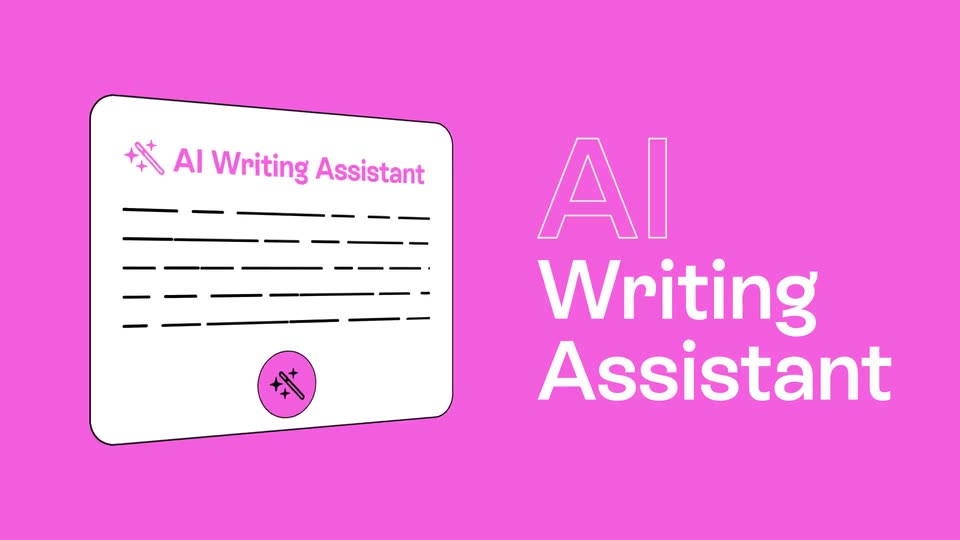
A flat pink scene shows a white document card titled AI Writing Assistant on the left and large AI Writing Assistant type on the right. The card shrinks and slides off left as the type fades, revealing a pink rounded square with a dark pink wave.
On-screen text: “AI”, “Writing”, “Assistant”
Camera: Static
26 · Feature reveal · 1:12–1:13
A rounded square card on the right rotates in 3D over a pink background, revealing an AI-generated image of a geodesic dome on a red planet. White text “AI Image Tools” sits static on the left.
On-screen text: “AI”, “Image”, “Tools”
Techniques: 3D mockup
Camera: Static
27 · Feature reveal · 1:13–1:15
A tilted white card mockup with a magic wand icon and placeholder lines shrinks and settles on the left. On the right, the outlined white AI fills in solid above the static white Text Tools on a pink background.
On-screen text: “AI”, “Text”, “Tools”
Techniques: 3D mockup, Masking
Camera: Static
28 · Feature reveal · 1:15–1:17
On a pink background, a white rounded card with a pink 'AI Translator' title and text lines slides in from the right and settles at center. A large white 'AI Translator' headline on the left fades out, and the card's lines turn into dotted bullets.
On-screen text: “AI Translator”
Camera: Push in
29 · CTA · 1:17–1:17
A flat pink background holds the white headline “Now available on,” which scales up in the center. A blue cursor arrow with a dark outline floats to the right, rotating and shrinking as the text grows.
On-screen text: “Now available on”
Techniques: Kinetic type
Camera: Static
30 · Outro · 1:17–1:19
On black, the beehiiv mark and wordmark sit centered. A blue arrow cursor sweeps across them, and as it passes the white mark fills with a purple-to-blue gradient while the wordmark solidifies to white.
On-screen text: “Now available on”, “beehiiv”
Camera: Static