0:36
Explore
Bear - Markdown Notes - Say hello to Bear 2!🎉 Packed with over 20 new features and a sparkli
Bear · Jul 2023 · 1:21 · AI-annotated
- Length
- 1:21
- Scenes
- 34 · 2.4 s avg
- Product on screen
- 0:09
- Features shown
- 4
- Voiceover
- No
00:00:00 / 01:21:10
Bear’s 1:21 launch film runs 34 scenes, about 2.4 s each. The product shows up at 0:09 and 4 features are revealed. There is no explicit call to action. The video alternates typed title cards behind a red caret with line-art mascot scenes, each card announcing one feature before its demo, and closes on the logo. Signature moves are the typing caret, the polar bear and red bird characters, and scrolling line-drawn backdrops that carry the app from phone to tablet to laptop.
No filming indicatedEstimated needs: 2 capture groups — your screens or recordings · 1 official logo — reused across the film · 22 graphic passages — draw or supply · 2 3D passages — build or supply
Is this your launch? to your site or press kit.
More like this
0:31

0:35

Canva - Yep, you heard it right. No watermarks, no paywalls, no awkward expor
Canva · Design · Oct 2025
Bear - Markdown Notes - Say hello to Bear 2!🎉 Packed with over 20 new features and a sparkli, scene by scene
· 34 scenes as text
01 · Hook · 0:00–0:01
A plain white field fills the frame as thin light-gray strokes draw themselves into curved arcs and partial circles. Short gray dashes scatter around the lines, drifting and extending as the curves sweep across the screen.
Camera: Static
02 · Hook · 0:01–0:02
Faint gray curved strokes and short dashes sit on a plain white field. A partial circle and a lower curve dissolve, leaving only a few small dashes on the left that fade to white.
Camera: Static
03 · Hook · 0:02–0:04
A white text field fills with the typed words 'Inspiration is' behind a blinking red caret, a hamburger menu sitting to the left. The camera then pulls back to reveal the field inside a tilted smartphone mockup in 3D perspective.
Techniques: Kinetic type, UI zoom, 3D mockup
Camera: Static
04 · Hook · 0:04–0:07
A line-drawn pair of hands holds a phone that scales down from a close-up of its screen to a centered view. On the white screen, a note app types out the words letter by letter behind a blinking red caret while the thumbs rest on the keyboard.
Camera: Pull out
05 · Hook · 0:07–0:09
A sketch-style polar bear in a gray beanie and red striped scarf holds a gray phone; its eyes open, head bobs and scarf flaps as the view pulls back. The words 'Inspiration is' and 'everywhere' appear over the white background.
On-screen text: “Inspiration is”, “everywherel”
Techniques: Kinetic type
Camera: Pull out
06 · Feature reveal · 0:09–0:10
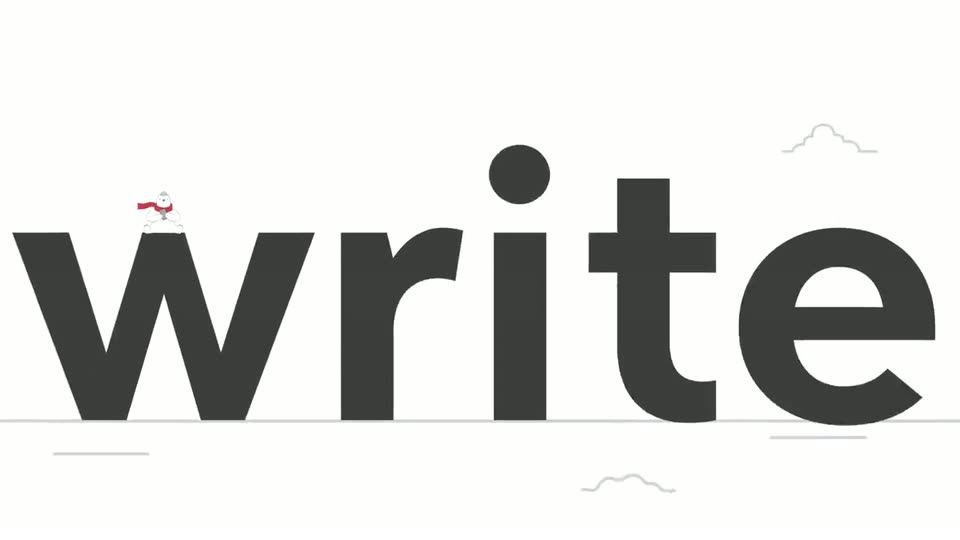
A polar bear in a red scarf and beanie sits on the first letter of a giant black word that builds letter by letter, the frame pulling back from a close-up of the W as the word completes and slides into freely.
On-screen text: “write”, “freely”
Techniques: Kinetic type
Camera: Pull out
07 · Feature reveal · 0:10–0:14
Large dark gray “write” with a small white bird on the w shrinks to center as “freely” types in with a red caret. The caret moves to the front, a “#” is added, and a light gray pill appears behind “#write” as “freely” fades out.
On-screen text: “write”, “write freely”, “#write freely”, “#write”
Techniques: Kinetic type
Camera: Pull out
08 · Feature reveal · 0:14–0:16
A red cartoon bird with a white belly walks in from the top, beak open, while the illustration scales down. A large gray pill tag reading “#write freely” shrinks and tilts as “freely” slides away, leaving “#write”.
On-screen text: “#write freely”, “#write”
Techniques: Kinetic type
Camera: Pull out
09 · Feature reveal · 0:16–0:17
A red cartoon bird with a white belly flies left across a writing app screen, carrying a gray speech bubble labeled #write. Behind it, a dark sidebar with line icons sits beside a light document filled with gray placeholder lines and an image block.
On-screen text: “#write”
Camera: Pull out
10 · Feature reveal · 0:17–0:19
Three vertical panels sit side by side: a white field, a dark icon strip, and a light document. A red bird carrying a #write tag flies right across them toward the document, while a line-drawn bear climbs a red rope on the left.
On-screen text: “#write”
Techniques: Split screen
Camera: Pull out
11 · Feature reveal · 0:19–0:23
A tilted 3D app window eases into place over a white line-art scene of mountains and a sun. A sketched polar bear at left tugs a red rope, then paws the dark sidebar as the 'My Book Ideas' page fills its table and checklist.
Techniques: 3D mockup
Camera: Pull out
12 · Feature reveal · 0:23–0:37
A line-drawn bear taps party, travel and coding tags in a note app's dark sidebar, switching the page between a cake note, a France itinerary and a code snippet. The view zooms into the Todo list, where a red bird ticks each item and flies off.
Techniques: UI zoom
Camera: Push in
13 · Feature reveal · 0:37–0:38
A red cartoon bird flies across the screen from right to left, trailing a curved white line, while the dark sidebar slides off and the white document panel settles. A red caret blinks in the page.
Camera: Pan
14 · Feature reveal · 0:38–0:47
Dark sans-serif text types out letter by letter behind a pink caret: “Turn ideas into something beautiful”. “ideas” snaps to bold, “beautiful” to italic serif with a red underline. The line pans left, then the frame pulls back to show three red-bulleted rows of gray bars.
On-screen text: “Turn ideas into something beautiful”
Techniques: Kinetic type
Camera: Pull out
15 · Feature reveal · 0:47–0:49
A dark-green serif headline, “Turn ideas into something beautiful.”, scales in over a cream field with a thin caret at its end. Beneath it, three green bullets align with gray placeholder bars, one bar tinted peach and one set in a gray pill bearing a hash.
On-screen text: “Turn ideas into something beautiful.”
Techniques: Kinetic type
Camera: Static
16 · Feature reveal · 0:49–0:49
A teal monospaced headline “Turn ideas into something beautiful.” with a blinking caret sits on a near-black field, scaling slightly. Below it, a three-row list of teal dots and rounded placeholder bars includes a green tag pill with a hash and a small orange bar.
On-screen text: “Turn ideas into something beautiful.”
Techniques: Kinetic type
Camera: Static
17 · Feature reveal · 0:49–0:50
A dark title card holds a Chinese headline with a small list icon and a blinking text cursor, above a three-row schematic of pink dots and white bars, one row carrying a hashtag pill. The line stays locked while the cursor blinks.
On-screen text: “Turn ideas into”, “something beautiful”, “让灵感更 灵动”
Camera: Static
18 · Feature reveal · 0:50–0:51
A centered Arabic headline sits on a light gray field above an abstract list of black bars, one bar highlighted yellow and a gray pill marked with a hash. A thin typing cursor blinks at the end of the headline, then disappears as the bars settle into place.
On-screen text: “قم بتحويل أفكارك إلى أشياء جميلة !”
Camera: Static
19 · Feature reveal · 0:51–0:54
A white card shows the tagline over a placeholder note list with red bullets and one green-highlighted bar. The view then pulls back to reveal the note on an illustrated laptop, with a cat's paws on the keyboard and line-drawn clouds behind.
On-screen text: “Turn ideas into”, “something beautiful”
Techniques: Kinetic type
Camera: Pull out
20 · Feature reveal · 0:54–0:55
A line-art phone over a laptop displays the tagline, then the laptop morphs into two hands typing on a phone keyboard while the text switches to Create anywhere with a blinking red cursor.
On-screen text: “Turn ideas into something beautiful”, “Create anywhere”
Techniques: Morph
Camera: Static
21 · Feature reveal · 0:55–0:56
A gray line-art illustration of two hands holds a phone against a white background. The phone screen shows a text field where the words Create anywhere type in over a drawn keyboard, then small starburst marks pop around the screen.
On-screen text: “Create anywhere”
Techniques: Kinetic type
Camera: Static
22 · Feature reveal · 0:56–0:59
Line-art hands hold a tablet while a stylus sketches a beach scene, drawing palm trees, waves, sun and clouds stroke by stroke. A small color toolbar rests at the bottom of the screen. The headline reads 'Create anywhere', with 'Create' sliding in.
On-screen text: “Create”, “anywhere”
Techniques: Kinetic type
Camera: Static
23 · Feature reveal · 0:59–1:01
A gray line-art bear is centered on a sketched beach, holding a tablet. It tilts its head, blinks and smiles in a gentle loop, then the whole drawing fades out to white.
Camera: Pull out
24 · Feature reveal · 1:01–1:02
A line-art polar bear holds a tablet and stylus, bobbing gently up and down. The background of line-drawn mountains, trees, and clouds scrolls slowly to the left.
Techniques: Parallax
Camera: Pull out
25 · Feature reveal · 1:02–1:06
A line-art bear walks right in place, holding a gray tablet and pen, while a sketched city skyline and mountains scroll left behind it at a slower speed. The backdrop then tilts diagonally as the scroll continues.
Techniques: Parallax
Camera: Pull out
26 · Feature reveal · 1:06–1:07
A line-drawn polar bear walks in place on a white background, holding a gray clipboard and pen, while the mountain and cloud line art drifts slowly to the right and small snow dots fall.
Techniques: Parallax
Camera: Pan
27 · Feature reveal · 1:07–1:08
A line-drawn bear holds a gray tablet in front of a sketched house. The tilted house at the right edge rotates and shrinks to a centered, upright view as the bear settles at the door. Loose mountain and cloud sketches clear from the white background.
Camera: Pull out
28 · Feature reveal · 1:08–1:09
A thin gray line illustration of a house holds center on a white field. The window and door lines shift upward and reconfigure into a new layout, then a gray diagonal bar slides in from the top left corner.
Techniques: Morph
Camera: Pull out
29 · Feature reveal · 1:09–1:10
A thin line-art hand holds a smartphone upright on a white background. The screen shows a house drawing with a home icon above it, then text bars and a small image placeholder. The listing scrolls up, the house sliding out of view as the text list fills the screen.
Camera: Push in
30 · Feature reveal · 1:10–1:11
A line-drawn pair of hands holds a phone on a white background. The screen switches from a text feed to a shield icon, and a label slides in from the right beside a circular button at the bottom.
Camera: Static
31 · Feature reveal · 1:11–1:13
Two line-drawn hands hold a smartphone showing a shield icon and a fingerprint symbol. The right thumb slides down to press the fingerprint icon in a slow, subtle motion, with small dots floating beside the phone.
Camera: Static
32 · Feature reveal · 1:13–1:15
A sketch-style hand holds a phone whose screen shows red corner brackets of a face-scan frame. A shield and the label fade out as a cartoon polar bear face tilts and fills the frame.
Camera: Static
33 · Outro · 1:15–1:15
A gray line-drawn hand holds a phone showing a red scan frame; the red mark grows into a circle with a white bear head, the hand fades, and the wordmark forms below.
On-screen text: “Bear”
Techniques: Morph
Camera: Static
34 · Outro · 1:15–1:21
A red circular logo with a white bear silhouette and the bold wordmark Bear holds center on a plain white field. Beneath it, the gray tagline Write naturally types out letter by letter behind a blinking red caret, which then fades out.
On-screen text: “Bear”, “Write naturally”
Techniques: Kinetic type
Camera: Static