0:49
Explore
ty - Meet AutoRouter, the most intelligent way to pick models You’re wast
AutoRouter · Oct 2026 · 0:44 · AI-annotated
- Length
- 0:44
- Scenes
- 19 · 2.3 s avg
- Product on screen
- 0:03
- Features shown
- 5
- Call to action
- 0:38 · 86%
- Voiceover
- No
00:00:00 / 00:44:20
AutoRouter’s 0:44 launch film runs 19 scenes, about 2.3 s each. The product shows up at 0:03 and 5 features are revealed. The call to action lands at 0:38 (86% in). The film is a rapid montage of UI micro-demos, each feature introduced by a word-by-word headline that flashes a pink-purple gradient before locking to solid black, all cut to a 129 BPM pulse. Signature moves: gradient-tinted type flashes, depth-of-field focus pulls on scrolling model lists, and a small gradient arc that recurs as a visual thread.
No filming indicatedEstimated needs: 6 capture groups — your screens or recordings · 1 official logo — reused across the film · 2 graphic passages — draw or supply · 1 3D passage — build or supply
Is this your launch? to your site or press kit.
More like this
0:35

Viral SaaS Product Launch Video Idea | Commas Webinar
Commas · Sep 2026
1:14

Introducing Superhuman
Superhuman · Productivity · Feb 2021
ty - Meet AutoRouter, the most intelligent way to pick models You’re wast, scene by scene
· 19 scenes as text
01 · Hook · 0:00–0:01
Close-up of a white card corner on a soft pastel gradient. A small purple-pink arc at the corner grows into a thin circular ring as a white pill with a gradient border pops in on the card, reading “Routing...”.
Techniques: Morph
Camera: Static
02 · Hook · 0:01–0:03
A white title card builds the headline word by word: “The” enters in a pink-to-purple gradient, then “optimization” and “layer” follow, and “for AI.” completes the line. The gradient tints fade to solid near-black as the type locks in place, holding still for the rest of the beat.
On-screen text: “Routing...”, “The optimization layer for AI.”
Techniques: Kinetic type
Camera: Static
03 · Feature reveal · 0:03–0:05
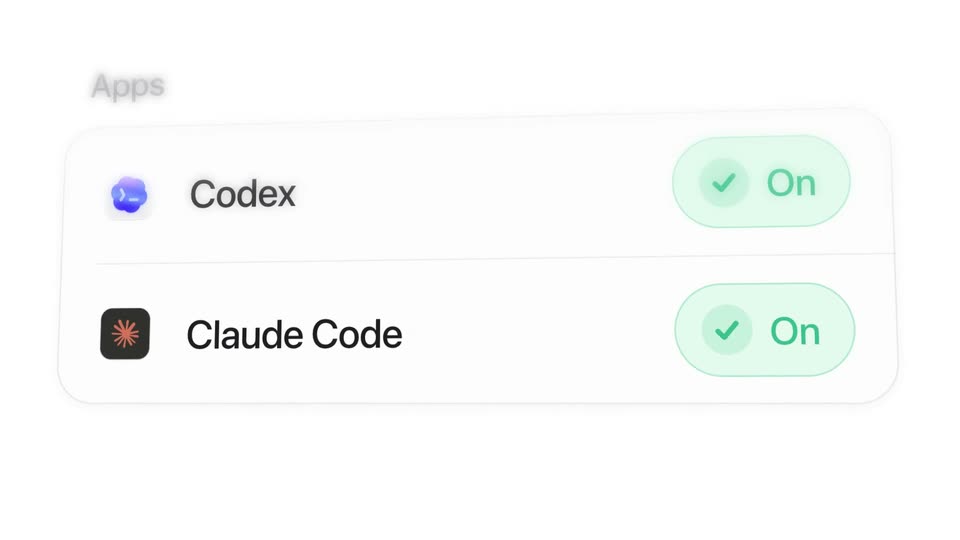
A small Apps label sits top-left on a plain white background above a rounded settings card listing Codex and Claude Code with app icons; their black and gray Enable buttons turn into green On pills with checkmarks.
On-screen text: “The optimization”, “layer”
Techniques: Morph
Camera: Push in
04 · Feature reveal · 0:05–0:07
A blurred code document and chat bubble sit behind a model-selection dropdown that snaps into focus, the list of model names appearing as a cursor glides down and hovers on Claude Opus 5.5.
Techniques: UI zoom, Cursor demo
Camera: Push in
05 · Feature reveal · 0:07–0:11
A model picker list scrolls up through a fixed highlight pill on a white background, the selection snapping from Claude Opus 5.5 to MiniMax M3.1 Flash, then DeepSeek V4.1 Flash. A gray prompt box on the right swaps task phrases while the list blurs into a fast spin.
Techniques: Speed ramp
Camera: Static
06 · Feature reveal · 0:11–0:12
A vertical list of model names scrolls up on the left, with Qwen 3.8 pinned in a white pill carrying a purple icon and soft shadow. On the right, a gray prompt bubble reads Fix the typo in the README, the word typo underlined in purple.
Camera: Static
07 · Feature reveal · 0:12–0:15
A close-up of a light chat input panel stays locked off. The placeholder prompt cycles through four developer queries, and a pill badge on the right swaps between four model names. A small orange curve sits in the lower right corner.
Camera: Static
08 · Feature reveal · 0:15–0:18
A white task list fills in row by row under a 0 to 9m timeline, each row tagged with a model name as orange bars extend and a magenta playhead sweeps right. Bottom counters tick up, then the frame blurs and pushes in on the green Saved figure.
Techniques: UI zoom
Camera: Push in
09 · Feature reveal · 0:18–0:19
Two columns of text on a plain light background: “On your plans” over a black “$0.00”, and “Saved” over a green “$2.41”. The two gray labels slide in from the right and settle while the large amounts hold still.
On-screen text: “On your plans”, “$0.00”, “Saved”, “$2.41”
Techniques: Kinetic type
Camera: Static
10 · Feature reveal · 0:19–0:23
Three descending lines in green, purple, and gray draw across a dark dotted grid, while counters tick up from 1.0× to 1.9× and 2.9× over the captions More work on Free and More work on Pro. The numbers scale up and slide left as Credits and Tokens fade in.
On-screen text: “1.0×”, “More work on Free”, “More work on Pro”, “1.3×”, “2.0×”, “1.7×”, “2.8×”, “1.9×”, “2.9×”, “Credits, Tokens, More”
Techniques: Kinetic type
Camera: Pull out
11 · Feature reveal · 0:23–0:23
A near-black frame holds two large numerals side by side, green 1.9× on the left and white 2.9× on the right. Beneath each, a small caption with a colored dash reads More work on Free and More work on Pro, the last words fading in.
On-screen text: “1.9×”, “More work on Free”, “2.9×”, “More work on Pro”
Camera: Static
12 · Feature reveal · 0:23–0:25
A large black dollar figure rolls on a plain white background, the digits blurring as they count up from $841.11 to $842.60. A row of rounded mint-green bars rises in below, the rightmost bar turning darker green, while a small gray caption fades in beneath the number.
On-screen text: “$842.60”, “saved in the past 7 days”
Techniques: Kinetic type
Camera: Static
13 · Feature reveal · 0:25–0:27
On a pale background, the still caption $842.60 saved in the past 7 days gives way to a small pink-to-purple gradient You, which grows into the dark tagline Your workflow, with your rules. settling in below, each line carrying a faint offset echo as it lands.
On-screen text: “$842.60”, “saved in the past 7 days”, “Your workflow,”, “your rules.”
Techniques: Kinetic type
Camera: Static
14 · Feature reveal · 0:27–0:30
A white Rules list scrolls upward as the depth of field tightens on the top entry, 01 Use Qwen 3.8 for computer use. A black arrow cursor glides across the rows early on, then fades as the first rule comes into focus.
Techniques: Cursor demo, UI zoom
Camera: Push in
15 · Feature reveal · 0:30–0:33
A dark sans headline builds word by word on white, new words flashing a pink and maroon tint before settling. The line then fades as a Push to all Macs pill with an upload icon and a cursor scales in over a blurred grid of rounded squares.
On-screen text: “Your team moves faster”, “with you in control.”
Techniques: Kinetic type, Cursor demo
Camera: Static
16 · Feature reveal · 0:33–0:36
A 3D grid of rainbow-colored laptop icons recedes into the distance as the camera tilts from top-down to a low angle. A white 'Push to all Macs' button with a cursor sits at the center, scaling up, while a gradient arc sweeps overhead.
Techniques: 3D mockup
Camera: Pull out
17 · Demo · 0:36–0:38
A model picker dropdown floats over a code editor, the cursor rests on AutoRouter while the list scrolls past Claude, GPT and Gemini rows and a Routing label fades out. The view crossfades to a task card with an AutoRouter button beside a panel of on-plan and pay-as-you-go models.
On-screen text: “Push to all Macs”
Techniques: Cursor demo
Camera: Push in
18 · CTA · 0:38–0:39
A large black dollar figure over a mint bar chart blurs out of frame, then a gray striped logo settles at center as white rounded app tiles with colorful icons pop in around it on white.
On-screen text: “$842.60”, “saved in the past 7 days”
Camera: Push in
19 · CTA · 0:39–0:44
Blurred app icon tiles drift around a central wing-shaped logo that shifts from muted gray to a full green-to-orange gradient. The tiles fade out, leaving the logo centered on white, then autorouter.com fades in beneath it and darkens from gray to black.
On-screen text: “autorouter.com”
Camera: Static