2:01
Explore
00:00:00 / 01:42:04
- Length
- 1:42
- Scenes
- 61 · 1.7 s avg
- Product on screen
- 0:25
- Features shown
- 5
- Call to action
- 1:35 · 93%
- Voiceover
- Yes
- Views
- 165K on X
as of November 19, 2026
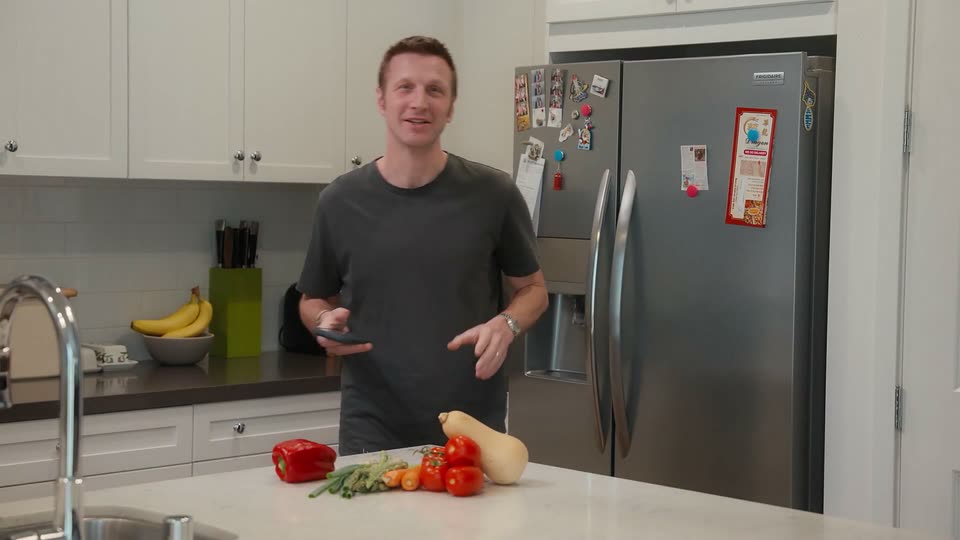
Auto’s 1:42 launch film runs 61 scenes, about 1.7 s each. The product shows up at 0:25 and 5 features are revealed. The call to action lands at 1:35 (93% in), over a voiceover. The video is a founder-led launch built as a single continuous kitchen set: a talking-head host on a sofa alternates with locked-off close-ups of a phone in hand, each feature revealed as a quick camera capture followed by an on-screen app that assembles itself. Pacing is brisk at roughly 32 cuts per minute, but the talking-head shots hold long enough to feel conversational, and the signature moves are the rack-focus phone close-ups, the self-animating UI cards, and the flat yellow title cards.
Footage neededEstimated needs: 5 capture groups — your screens or recordings · 1 official logo — reused across the film · 50 filmed passages — shoot, supply or replace
Is this your launch? to your site or press kit.
More like this
1:06


DJI – Meet DJI Pocket 2
DJI · Hardware · Oct 2020
1:31

Family - Introducing Family. Now available on iOS.
Family · Nov 2024
Similar soundtrack
Films whose music sounds like this one, voice left out
1:01

Motion Graphics Explainer Video for AI Platform | Arvist
Arvist · Upbeat electronic
2:00

Introducing Notetaker
Wispr Flow · Upbeat electronic and funk
1:00


All Bow Before the Pug Prince – Nintendo Switch 2
Nintendo Switch 2 · Upbeat pop-rock
David Evans - Today, we’re launching @autoaicam, a camera that builds personal apps, scene by scene
· 61 scenes as text
01 · Hook · 0:00–0:03
A man in a gray t-shirt sits on a dark sofa in a bright kitchen, holding a phone and talking to camera, a second man working at the island behind him. DAVE appears centered, then a cut to the second man waving at the island, labeled SAM.
On-screen text: “DAVE”, “SAM”
Camera: Static
02 · Hook · 0:03–0:05
A man in a dark blue jacket stands at a kitchen counter with an open laptop. He waves at the camera, then looks down and types, while a white name label stays centered over him.
On-screen text: “SAM”
Camera: Static
03 · Hook · 0:05–0:06
A man in a dark gray t-shirt sits on a gray couch, holding a phone and speaking to camera, while a second man works at a laptop in the kitchen behind him. The frame is locked off with a still name caption.
On-screen text: “ISAM”
Camera: Static
04 · Hook · 0:06–0:06
A man in a dark t-shirt sits on a couch in a kitchen, gesturing with both hands as he speaks, while a second man works at a counter behind him. The image begins desaturated and gains warm color.
Camera: Static
05 · Hook · 0:06–0:07
A man in a dark t-shirt sits on a gray sofa, facing the camera and gesturing as he speaks, holding a black phone in one hand. Behind him, a second man stands at a kitchen island working on a laptop. The lighting shifts from warm orange to neutral.
Camera: Static
06 · Hook · 0:07–0:12
A man in a gray T-shirt sits on a sofa in a bright kitchen, talking and gesturing, with a colleague at a laptop in the background. A dark sunglasses filter sits on his face, then swaps to floppy dog ears and a brown nose.
Camera: Static
07 · Problem · 0:12–0:13
A man sits centered on a gray sofa, holding a phone and gesturing with open palms as he speaks to camera. A second man works on a laptop at the kitchen island behind him, out of focus. The shot is a static medium frame in a bright living room.
Camera: Static
08 · Problem · 0:13–0:14
A man in a gray t-shirt sits on a gray couch in a bright kitchen, speaking, then lifts a black phone in his right hand. A second man works at a laptop on the island behind him.
Camera: Static
09 · Problem · 0:14–0:17
A hand holds a phone in a textured gray case, the square triple-lens camera plate facing the lens. The shot is a tight close-up with a blurred background and a person's shoulder out of focus to the right. The phone tilts slightly as the hand adjusts it.
Camera: Push in
10 · Problem · 0:17–0:18
Two hands hold a black phone in landscape over a wooden table; the screen shows the camera app framing bowls of grains and spices from above with a grid overlay and mode labels, the right thumb resting on the shutter button.
Camera: Static
11 · Problem · 0:18–0:18
Hands hold a phone in landscape against a blurred green forest; the camera viewfinder shows a sunlit trail and a thumb presses the round shutter button.
Camera: Static
12 · Problem · 0:18–0:19
Close-up of hands holding a phone in landscape, filming a fluffy tabby cat lying on a couch. The screen shows the camera viewfinder with the cat's face and a red record button, and a finger taps the screen. Shallow depth of field, locked-off frame.
Camera: Static
13 · Problem · 0:19–0:20
A vertical phone held in a dark room shows its camera app in video mode, framing two people clinking glasses. A yellow focus box pops onto the right face while the timer and zoom readouts stay fixed.
Camera: Static
14 · Problem · 0:20–0:21
Two hands in yellow sleeves hold a phone in landscape, its viewfinder mirroring the snow-capped peak and pink sunset sky behind. A thumb rests on the right edge of the screen, which shows a vertical row of camera icons. The frame stays locked and static.
Techniques: 3D mockup
Camera: Static
15 · Problem · 0:21–0:22
A man in a gray t-shirt sits on a couch, holding a phone and gesturing as he smiles and talks. A second man in a dark jacket stands at a kitchen counter in the soft-focus background.
Camera: Static
16 · Problem · 0:22–0:24
A man in a gray T-shirt sits on a couch and speaks to camera, smiling, in a bright kitchen. Behind him, out of focus, another man stands at the island using a laptop. The shot holds steady on the speaker.
Camera: Static
17 · Problem · 0:24–0:25
A person in a gray shirt holds a smartphone at chest height, its screen playing a video of a fluffy cat sitting on a couch arm beside a white mug. The background is a soft-focus room, and the camera stays locked on the phone.
Camera: Static
18 · Product intro · 0:25–0:26
The gray auto wordmark sits centered on a white background, then darkens to black as it scales up. A small caption reading IHATE MONDAYS appears nearby, holding still on a locked-off frame.
On-screen text: “IHATE”, “MONDAYS”
Camera: Static
19 · Feature reveal · 0:26–0:29
A man in a gray t-shirt stands in a white kitchen beside a stainless steel fridge, holding a phone. He sets a red bell pepper on the island next to tomatoes, squash, and greens, then faces the camera and speaks.
On-screen text: “auto”
Camera: Static
20 · Feature reveal · 0:29–0:30
Hands hold a smartphone over a row of vegetables on a pale counter. The shot starts soft and racks into focus on the phone, whose screen shows the camera viewfinder framing the same produce. A single continuous take.
Camera: Static
21 · Feature reveal · 0:30–0:31
Hands hold a phone pointed at vegetables on a marble counter. The screen shows the live camera view of the produce, then the bottom prompt changes from a question to a Thinking bar as the app processes the photo.
Camera: Static
22 · Feature reveal · 0:31–0:33
Hands hold a phone against a blurred background of red tomatoes. The screen shows an AI assistant card listing ingredients, then transitions to an Italian recipes view with a soup result. The camera stays locked off while the interface content shifts.
Camera: Static
23 · Feature reveal · 0:33–0:37
A hand holds a phone showing an Italian recipes app. A thumb scrolls the recipe list, then taps Garden Vegetable Risotto, opening its detail page with ingredients and instructions. The background is a blurred pile of tomatoes and squash.
Camera: Static
24 · Feature reveal · 0:37–0:38
A hand holds a phone in a bright kitchen, its screen showing a recipe page. The thumb swipes down, scrolling past the ingredients list to reveal the numbered cooking instructions, while red tomatoes blur in the background.
Camera: Static
25 · Feature reveal · 0:38–0:41
A man in a gray t-shirt walks into a white kitchen and stops behind a counter of potted plants. He holds a black phone in one hand and gestures with the other toward the plants while speaking to camera.
Camera: Static
26 · Feature reveal · 0:41–0:43
A houseplant in a cracked tan ceramic pot sits on a white counter, flanked by small seedlings on the left and pale succulents on the right. The camera slowly pushes in, tightening on the central plant until its broad green leaves fill the frame.
Camera: Push in
27 · Feature reveal · 0:43–0:44
A man in a gray t-shirt stands in a white kitchen, holding a smartphone in both hands and looking down at it while speaking. Several small potted plants sit on the marble counter in the foreground.
Camera: Static
28 · Feature reveal · 0:44–0:45
Two hands hold a smartphone showing a video call with a potted plant in the foreground. A thumb taps the round shutter button as the status line changes to a loading state, against a blurred background of houseplants.
Camera: Static
29 · Feature reveal · 0:45–0:46
A hand holds a phone in a soft-focus room; the screen shows a plant-care chat with a Plant Doctor card. A thumb taps the card while the camera holds a tight close-up on the device.
Camera: Static
30 · Feature reveal · 0:46–0:48
A hand holds a smartphone in the foreground, displaying a plant care app. The screen shows a health assessment for a Bird's Nest Fern with a score of 65 and a list of care issues, set against a blurred background of green plants.
Camera: Static
31 · Feature reveal · 0:48–0:51
A man in a gray t-shirt stands in a bright kitchen, holding a smartphone in front of his face and reading from it. He talks to camera, gesturing with his free hand. White cabinets and a stainless steel oven fill the background.
Camera: Static
32 · Feature reveal · 0:51–0:52
A man in a navy jacket sits at a table with an open laptop in a living room. The shot opens as a tight, blurred close-up of his face and settles into a clear medium frame as he looks toward the camera.
On-screen text: “164”
Camera: Static
33 · Feature reveal · 0:52–0:53
Over-the-shoulder close-up of a phone held in two hands; the camera app shows a man at a desk, and a thumb taps the shutter as the status bar switches to “Taking a look...” with a progress ring. The same man sits blurred in the background.
Camera: Static
34 · Feature reveal · 0:53–0:53
A hand holds a phone upright in a living room, its screen showing a video call and an AI chat panel. A man at a laptop sits blurred in the background. The phone screen refreshes from a garbled state into a clear chat with a Virtual Try-On card.
Camera: Static
35 · Feature reveal · 0:53–0:54
Over-the-shoulder in a blurred living room, a hand holds a phone showing a grid of outfit thumbnails. A thumb taps one, and the screen expands to a full-body try-on photo of a man in a black jacket.
Techniques: UI zoom
Camera: Static
36 · Feature reveal · 0:54–0:56
Fingers pinch a phone screen, zooming a full-body avatar in a black bomber jacket from small to large inside the try-on app. Cut to a man holding the phone, the avatar's face now filling the screen, framed over another person's shoulder.
Techniques: UI zoom
Camera: Static
37 · Feature reveal · 0:56–0:57
A man in a gray t-shirt holds a dark phone, its triple-lens camera array facing the lens, and peers at the screen. The shot stays a tight medium close-up in a bright kitchen with white cabinets and a stainless steel oven behind him.
Camera: Static
38 · Feature reveal · 0:57–1:00
A man in a gray t-shirt sits on a gray couch in a bright living room, gesturing as he speaks, then raises a dark phone with both hands to take a selfie. A second man works at the kitchen counter in the blurred background.
Camera: Static
39 · Feature reveal · 1:00–1:01
Hands hold a phone in a dark case against a blurred warm interior; the screen shows the front camera framing a man's face with a prompt bar at the bottom. A finger presses the round shutter button, then a text input field with a small thumbnail slides into view.
Camera: Static
40 · Feature reveal · 1:01–1:02
Two hands hold a smartphone showing an app over a man's selfie. A dark text card slides up to reveal a date and a paragraph of feedback, with a button beneath. The background is a soft-focus room.
Camera: Static
41 · Feature reveal · 1:02–1:04
A close-up of a phone held in two hands shows a dark chat screen with a monospace message teasing the user's hair. The shot starts soft and racks into sharp focus on the text, while a Hairstyle Hero prompt card sits at the bottom.
Camera: Static
42 · Feature reveal · 1:04–1:05
A man on a couch holds a smartphone horizontally, squinting at the screen with a grimace. In the blurred background, another man works on a laptop at a kitchen island.
Camera: Static
43 · Feature reveal · 1:05–1:06
A hand holds a phone at a slight angle in a blurred warm room. On screen, a white panel wipes in from the right, covering a chat card to reveal a create view with a yellow loading ring and a typed prompt.
On-screen text: “What do you want to create?”, “Compose a new idea below”, “My Frame Ideas”, “Claude Obsidian”, “Create a frame that takes my selfie and lets me try on different haircuts and styles to see what actually looks good on men. Use”, “Create”
Camera: Static
44 · Feature reveal · 1:06–1:07
A hand holds a phone against a blurred room; the screen cuts from a “What do you want to create?” prompt to a progress list, “Auto will notify you when your Frame is ready,” with a yellow button. The camera stays in a tight close-up on the device.
Camera: Static
45 · Feature reveal · 1:07–1:09
A hand holds a phone whose screen scrolls from a chat thread into a list of app categories. The shot begins tight on the display, then pulls back to reveal the full device in hand against a blurred blue and tan background.
Camera: Static
46 · Feature reveal · 1:09–1:09
Over-the-shoulder close-up of two hands holding a phone; the screen shows a Frames list with camera buttons, and the right index finger taps an entry, scrolling the list. The room behind stays softly out of focus.
Camera: Static
47 · Feature reveal · 1:09–1:11
Close-up of a phone in hand shows the app's Lookbook; the hairstyle card carousel swipes from a quiff to a man bun. It cuts to a man on a couch holding the phone, a suited man in the kitchen behind.
Camera: Static
48 · Feature reveal · 1:11–1:13
A man in a gray t-shirt sits on a gray couch in a bright open kitchen, holding a phone and gesturing while he speaks. A second man stands at the counter in the soft-focus background. The frame is locked off and static.
Camera: Static
49 · Feature reveal · 1:13–1:14
A blonde woman in a cream sweater holds a dark blue phone with both hands in a plant-filled greenhouse, looking down at the screen with a soft smile. The medium shot stays static, framed against blurred green foliage and terracotta pots.
Camera: Static
50 · Feature reveal · 1:14–1:17
Two hands hold a phone in front of a blurred table of potted plants. The screen shows a video call app titled Your Lookbook, with a woman in a beige cardigan in the call window and a Studia tab below. The frame stays locked off.
Camera: Static
51 · Feature reveal · 1:17–1:17
Two hands hold a smartphone in front of a blurred row of potted plants. A thumb rests on the screen, which displays a profile photo of a blonde woman, then swipes the card. The shot stays locked on the device.
Camera: Static
52 · Feature reveal · 1:17–1:19
A blonde woman in a cream sweater holds a dark phone in one hand, taps it with the other, then lifts her gaze to the camera and smiles. The background is a soft-focus wall of green leaves. The shot is a static medium close-up.
Camera: Static
53 · Demo · 1:19–1:20
A man in a gray t-shirt sits on a couch, smiling, in a bright kitchen with a blurred figure behind. The shot cuts to a hand holding a smartphone displaying a list of app frames with small icons.
Camera: Static
54 · Demo · 1:20–1:23
A hand holds a phone at a slight angle against a blurred wooden floor. On the screen, a vertical list of frame apps scrolls upward as a finger swipes along the right edge of the device.
Camera: Static
55 · Demo · 1:23–1:26
A hand holds a phone in the center, its screen scrolling a list of app templates. Around it, short clips of people using phones fade in one by one, filling the frame into a grid.
Techniques: Split screen
Camera: Static
56 · Demo · 1:26–1:32
A 4x3 grid of people using phones, with a phone file-list screen overlaid at center at the start. The grid dims as large white words BUILD IT., SHARE IT., USE IT. scale in one after another, then a cut to a man speaking in a kitchen.
On-screen text: “BUILD IT.”, “SHARE IT.”, “USE IT.”
Techniques: Split screen, Kinetic type
Camera: Static
57 · Demo · 1:32–1:35
A man in a gray t-shirt sits on a couch and speaks to camera, smiling, while a second man works on a laptop at the kitchen island behind him. The static headline USE IT. is overlaid on the locked-off shot.
On-screen text: “USE IT.”
Camera: Static
58 · CTA · 1:35–1:38
A man in a gray t-shirt sits on a gray couch, phone in one hand, talking to camera and spreading his hands open. Behind him, out of focus, a second man works at a laptop on a kitchen island. The camera holds a static medium shot.
Camera: Static
59 · Outro · 1:38–1:39
A plain yellow background holds two centered lines of black text that stay locked in place for the full shot, with no movement or reveal.
On-screen text: “One Camera.”, “Infinite Uses.”
Camera: Static
60 · Outro · 1:39–1:41
A flat yellow field holds the centered black headline “One Camera. Infinite Uses.”, then cuts to the centered “auto.inc” wordmark as the sign-off. The frame stays locked off the whole time.
On-screen text: “One Camera.”, “Infinite Uses.”, “auto.inc”
Camera: Static
61 · Outro · 1:41–1:42
A solid black frame holds for the entire scene with no visible content, serving as a transition or fade point between shots.
Camera: Static