
1:00
Explore
00:00:00 / 01:14:13
- Length
- 1:14
- Scenes
- 22 · 3.4 s avg
- Product on screen
- 0:21
- Call to action
- 1:08 · 91%
- Voiceover
- Yes
- Views
- 510 on YouTube
as of November 20, 2026
Arden’s 1:14 launch film runs 22 scenes, about 3.4 s each. The product shows up at 0:21, with social proof. The call to action lands at 1:08 (91% in), over a voiceover. The film cuts on a steady 125 bpm pulse between handheld founder shots, dark green motion graphics and 3D UI mockups, building from the spreadsheet problem to a full agent walkthrough. Signature moves are the drifting spreadsheet and app-icon motifs, the green Arden cursor tracing through live dashboards, and the glowing timeline that strings stat cards into one outcomes path.
Footage neededEstimated needs: 2 capture groups — your screens or recordings · 1 official logo — reused across the film · 3 filmed passages — shoot, supply or replace · 4 graphic passages — draw or supply · 2 3D passages — build or supply
Is this your launch? to your site or press kit.
More like this
1:28

Capveon - AI that discovers, understands, and wins government work
Capveon · Government · Oct 2026
0:45

Polymarket - Against all odds. Polymarket’s U.S app is now being rolled out to t
Polymarket · Dec 2025
Similar soundtrack
Films whose music sounds like this one, voice left out
1:10
HeyGen Avatar 6: Show Up as Your Best Self, Every Time
HeyGen Video Podcast · Electronic dance
1:11

Topaz Labs - 1/7: 📢 Big release! Introducing Astra 2 🚀 Our next-gen creative model
Topaz Labs · Electronic Dance Music
1:36

Jimini et le Conseil National des Barreaux | IA juridique
Jimini · Modern electronic
Arden YC Launch, scene by scene
· 22 scenes as text
01 · Hook · 0:00–0:01
A man in a navy zip sweater stands before a stone wall and a tall green plant in a bright office, speaking to camera and gesturing with both hands. The handheld shot drifts gently around him as he talks.
Camera: Pull out
02 · Hook · 0:01–0:11
A man in a navy quarter-zip stands in an office talking to camera while several spreadsheet windows float and drift around him at different depths. They fade out, then a rounded pill badge with an orange Y icon and the word Combinator slides in at left.
On-screen text: “Y Combinator”
Techniques: Parallax, Masking
Camera: Push in
03 · Problem · 0:11–0:14
On a near-black background with a faint green glow, the word “Today,” scales up in green at center, then gives way to the sentence “Internal audit teams are scrambling,” which slides in word by word, white with “scrambling” in green.
On-screen text: “Today,”, “Internal audit teams are scrambling.”
Techniques: Kinetic type
Camera: Static
04 · Problem · 0:14–0:15
A white headline with a green final word sits centered on a dark background, then slides away as a rounded-square icon holding a radial burst of bars fades in at the upper left, joined by a second icon at the bottom left and a thin curve at the top right.
On-screen text: “Internal audit teams are scrambling.”
Techniques: Kinetic type
Camera: Static
05 · Problem · 0:15–0:21
On a dark green field, rounded app icon tiles (Figma, GitHub, AWS, Slack, Linear) scale in and drift slowly. Notification cards with names like David and Rachel fade in over them, then tilted spreadsheet mockups float in front. The whole stack drifts and finally defocuses to black.
Techniques: 3D mockup, Parallax
Camera: Pull out
06 · Product intro · 0:21–0:28
A blurred dark dashboard sits behind white captions that switch phrase by phrase, key words in green. The scene cuts to a dark green gradient where the Arden mark and wordmark scale up, a tagline fades in below, then the lockup dims out.
On-screen text: “It's busy work that auditors”, “should not be doing anymore”, “Arden”, “AI platform for internal audit teams”
Techniques: Kinetic type
Camera: Static
07 · Product intro · 0:28–0:31
On a near-black green field, a rounded-square app icon with a white angular mark glows and scales up at center. Thin green circuit lines branch outward to six surrounding app icons, which brighten one by one, mapping a network of integrations around the brand mark.
On-screen text: “Arden”, “AI platform for internal audit teams”
Camera: Push in
08 · Demo · 0:31–0:33
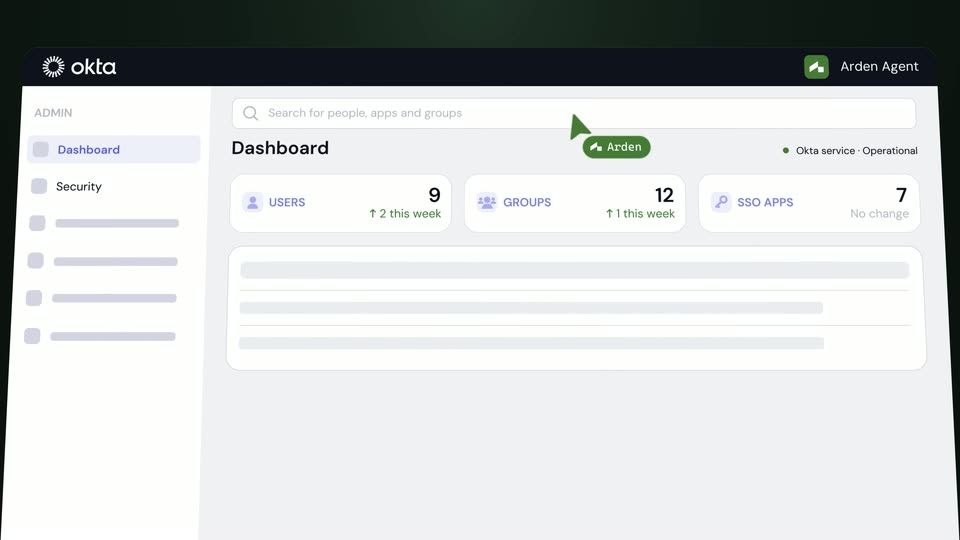
The Okta admin dashboard tilts in 3D perspective, then rotates face-on as the stat numbers tick up. A green cursor arrow lands on the search bar, a small CSV tag slides in, and a green Arden badge scales in beside it.
Techniques: 3D mockup, Cursor demo
Camera: Push in
09 · Demo · 0:33–0:35
A green cursor tagged 'Arden' types 'Authenticators' into the Okta search bar, a result dropdown opens, then the page cuts to a table whose rows fill in. The cursor drifts down and stops on a Password row marked Active.
On-screen text: “Arden”
Techniques: Cursor demo
Camera: Pull out
10 · Demo · 0:35–0:39
A green cursor labeled Arden clicks the Password Rules tab on an Okta admin screen; the panel updates to show minimum length and complexity rows. The view then reframes into a bordered card on a dark background as a Screenshot Taken badge slides in at the lower left.
On-screen text: “Arden”, “Screenshot Taken”
Techniques: Cursor demo, UI zoom
Camera: Pull out
11 · Demo · 0:39–0:41
A cream notification card fades in at the center of a dark green background, its text and buttons sliding in. A green arrow cursor glides onto the View Workpaper button, turning it light green, then leaves.
Techniques: Cursor demo
Camera: Static
12 · Demo · 0:41–0:51
A light spreadsheet of termination test results fills the frame on a dark backdrop. A chat card pops in at center; a green cursor types a prompt and clicks send, then the view zooms into the card as timestamped action steps scroll in.
Techniques: Cursor demo, UI zoom
Camera: Push in
13 · Demo · 0:51–0:52
A centered white evidence-trace card floats over a termination-report table. The card loads a header and two timestamped log lines while the table behind sharpens from a soft blur.
Camera: Pull out
14 · Demo · 0:52–0:55
A white evidence card for an orphaned account sits centered over a dimmed employee table. Inside, a vertical timeline of source records scrolls down through a Workday screenshot, an IAM log and an Okta status, then the frame tightens on the final recommendation note.
Techniques: UI zoom
Camera: Push in
15 · Demo · 0:55–0:56
A white card shows an Okta user-status table and a recommendation note over a dark, blurred dashboard. The card drifts as the view pulls back, revealing a timeline header behind it.
Techniques: UI zoom
Camera: Pull out
16 · Social proof · 0:56–0:58
A small glowing green icon sits at the center of a dark field, then a rounded pill expands around it as the label slides in to its right.
On-screen text: “Connects data”
Techniques: Masking, Kinetic type
Camera: Static
17 · Social proof · 0:58–0:59
On a dark field, a rounded badge reading 'Connects data' with a database icon holds at left. A glowing horizontal line draws out to the right from a bright node, a second node forming at its end, as faint gray caption text fades in beneath the line.
On-screen text: “Connects data”, “Hours per control down 11% of down”
Camera: Static
18 · Social proof · 0:59–1:01
A white stat card slides in from the right and settles center-left, its green bar chart growing and the value ticking from 0.3 to 0.4. Below, a glowing pill reads Connects data beside a thin line with two bright dots and the caption Hours per control: down.
On-screen text: “Connects data”, “Hours per control: down”
Camera: Static
19 · Social proof · 1:01–1:03
Two white product cards, a bar-chart card and a list card, drift apart and settle diagonally over a dark green-black background, above a glowing horizontal timeline with two nodes. A left-edge tag slides in while two captions fade in beside the timeline.
On-screen text: “Connects data”, “No more chasing”, “Hours per control down”
Camera: Pan
20 · Social proof · 1:03–1:08
White dashboard cards sit above a glowing horizontal timeline on a dark green background. The camera pans right along the line as the exceptions counter climbs to 8 and warning icons light up, ending on a 'Workpaper ready' badge that fades in at the line's end.
Camera: Push in
21 · CTA · 1:08–1:11
A man in a blue quarter-zip sweater walks slowly toward the camera while speaking, framed in a warm office lobby with glass walls and linear ceiling lights. A small caption reading Workpaper ready scales in.
On-screen text: “Workpaper ready”
Camera: Push in
22 · CTA · 1:11–1:14
A white lowercase wordmark “ardentech.ai” sits centered inside a thin rounded-rectangle outline over a soft dark green radial glow. The whole lockup slowly scales down toward the center across the clip.
On-screen text: “ardentech.ai”
Techniques: Kinetic type
Camera: Static