
1:25
Explore
iOS 26: Introducing Liquid Glass
Apple · Jun 2025 · 4:33 · AI-annotated
- Length
- 4:33
- Scenes
- 98 · 2.8 s avg
- Product on screen
- 0:52
- Features shown
- 7
- Voiceover
- Yes
00:00:00 / 04:33:25
Apple’s 4:33 launch film runs 98 scenes, about 2.8 s each. The product shows up at 0:52 and 7 features are revealed. There is no explicit call to action; a voiceover carries the film. Apple design keynote: architectural establishing shots, a presenter, then a long run of 3D UI renders. Signature move is the glossy glass material refracting light, with physical acrylic props mirroring the on-screen elements.
Footage neededEstimated needs: 7 capture groups — your screens or recordings · 1 official logo — reused across the film · 30 filmed passages — shoot, supply or replace · 2 graphic passages — draw or supply · 45 3D passages — build or supply
Is this your launch? to your site or press kit.
More like this




iOS 26: Introducing Liquid Glass, scene by scene
· 98 scenes as text
01 · Hook · 0:00–0:00
A low-angle shot of a curved glass and metal building facade under a clear blue sky. The camera pans slowly right, revealing the sweeping curve of the structure and reflections of trees and hills in the glass.
Camera: Static
02 · Hook · 0:00–0:01
A low-angle live shot of a curved glass building with a long sweeping roofline set against a clear blue sky. Green trees reflect in the mirror facade. The camera holds steady on the architecture.
Camera: Static
03 · Hook · 0:01–0:03
A low-angle view of a modern glass building with a sweeping curved metal roof. The camera drifts slowly across the facade, capturing reflections of green trees and blue sky in the mirrored panels.
Camera: Static
04 · Hook · 0:03–0:04
A low-angle tracking shot glides along a white paneled wall, revealing a glass facade with horizontal mullions and a pale blue sky beyond. The foreground wall blurs past as the camera moves, framing the angular glass structure.
Techniques: Parallax
Camera: Pan
05 · Hook · 0:04–0:05
A low-angle camera tilts up through a modern atrium, white paneled walls on either side framing a blue glass ceiling with horizontal slats. A dark blue panel on the right edge slides out of frame as the upward move begins.
Camera: Static
06 · Hook · 0:05–0:07
A top-down shot looks into a white spiral staircase, its glass balustrades and curved steel handrail forming concentric rings around a bright center. The camera rotates and sinks slowly through the coils, the circles tightening toward the middle.
Techniques: Parallax
Camera: Push in
07 · Hook · 0:07–0:09
A soft-focus shot of a curved glass and metal form drifts slowly across a white tiled floor, a copper ring arcing the upper right as translucent sheets ripple with a wavy pattern. A large still “IN” holds locked in the frame.
On-screen text: “IN”
Camera: Static
08 · Hook · 0:09–0:12
A low-angle view of a curved white architectural facade rises against a clear blue sky, its horizontal panel seams and a reflective glass band sliding down the frame as the camera tilts up.
Camera: Push in
09 · Other · 0:12–0:20
A man in a beige jacket stands in a bright store, gesturing as he speaks, with staff at display tables and a neon hello sign on the glass wall behind him. A lower-third caption names him, and the frame cuts to a tighter medium shot at the end.
On-screen text: “Alan Dye”, “VP, Human Interface”
Camera: Static
10 · Other · 0:20–0:25
A man in a beige jacket and dark glasses stands center frame in a bright showroom, gesturing with both hands while speaking. Behind him a display table holds a monitor and a neon hello sign, with green trees visible through floor-to-ceiling windows. The camera is locked off.
Camera: Static
11 · Other · 0:25–0:27
A person seated in a bright white room holds a tablet on their lap, the screen showing a mood board titled YOUTH NATURALISTS FILM with scattered photos and handwritten labels. Their free hand uses a white stylus to draw a red circle around one photo, then lifts away.
Techniques: Cursor demo
Camera: Static
12 · Other · 0:27–0:29
A hand swipes on the trackpad of a silver laptop, dragging a video window left to reveal a webpage with 3D wooden blocks and the word 'Works'.
On-screen text: “Works”, “Class 2 – Joinery”
Techniques: 3D mockup
Camera: Static
13 · Other · 0:29–0:31
Two hands hold an iPhone against a white tiled wall, camera locked off. The lock screen shows 9:41 over an orange abstract wallpaper. A Siri listening pill at the top turns into an incoming call banner for Class 2 Joinery, showing a hello message and a Decline button.
Techniques: Morph
Camera: Static
14 · Other · 0:31–0:52
A man in a beige jacket and dark glasses stands center frame in a bright store, gesturing with both hands while speaking. A neon “hello” sign and a monitor on a display table sit behind him against a glass wall, trees visible outside. The camera holds a steady medium shot.
Camera: Pan
15 · Product intro · 0:52–0:57
Glossy 3D ribbons in blue, teal and indigo undulate across the frame with shallow depth of field, a bright specular line tracing the top edge as the view drifts slowly right; a partial word fragment stays locked in frame.
On-screen text: “llo”
Techniques: Parallax
Camera: Push in
16 · Product intro · 0:57–0:59
Extreme close-up of a glossy blue 3D ring with a central hole, its curved edge filling the frame. The camera glides slowly along the surface, revealing the rounded form as a bright specular line traces the rim against a pale green background.
Techniques: Light sweep
Camera: Pull out
17 · Product intro · 0:59–1:01
A close-up 3D render holds on translucent glass time digits in sharp focus, set in front of a soft blue rounded clock face where the date reads Tue April 1 and blurs into the background. Shallow depth of field keeps the focus on the glass letterforms.
Techniques: 3D mockup
Camera: Pan
18 · Product intro · 1:01–1:03
A 3D flower logo with multicolored petals sits on a white rounded tile against a soft blue gradient, foreground petal blurred. The camera pulls back to reveal the full mark, then a white diagonal mask wipes across to expose a flat red icon with a white stripe on blue.
Techniques: Parallax, Masking
Camera: Pull out
19 · Product intro · 1:03–1:04
A blue compass disc tilts in 3D perspective against a blurred teal background as its red-and-white needle rotates and settles toward horizontal.
Techniques: 3D mockup
Camera: Pull out
20 · Product intro · 1:04–1:07
A 3D iPhone screen opens tightly zoomed on the Safari compass icon, then the camera pulls back to reveal the dock with Phone, Safari, Messages and Music icons on a blue wallpaper.
Techniques: UI zoom, 3D mockup
Camera: Pull out
21 · Product intro · 1:07–1:10
The shot opens on a tight close-up of the iPhone home screen, where the weather and Find My widgets fill the frame, then the camera pulls back to center the whole phone on a white background, revealing the full icon grid and dock.
Techniques: UI zoom
Camera: Pull out
22 · Product intro · 1:10–1:16
A man in a beige jacket and dark glasses stands center frame in a bright glass-walled showroom, speaking to camera and gesturing with both hands. Behind him, a neon hello sign and a monitor rest on a shelf. The frame is locked off.
Camera: Static
23 · Product intro · 1:16–1:18
A tilted laptop screen shows the macOS Dock in 3D perspective. The app icons magnify under the cursor, then shrink back as the pointer slides left to the Finder icon, raising its tooltip label.
Techniques: 3D mockup, Cursor demo
Camera: Static
24 · Product intro · 1:18–1:19
A black Apple Watch sits in 3D against a light gray background. The face tight-crops on the time and date as they settle, then the camera pulls back to reveal three stacked complications: a compass, a blue San Francisco weather card, and a red activity ring.
Techniques: 3D mockup
Camera: Pan
25 · Product intro · 1:19–1:20
A 3D smartwatch mockup shows an activity-ring widget with calorie, minute and hour stats, its rings filling in, then the watch shrinks and slides left as a phone screen with a red running card and matching rings expands to fill the frame.
Techniques: 3D mockup
Camera: Pan
26 · Product intro · 1:20–1:22
A row of 3D app icons with soft drop shadows, including a red gradient tile and a black tile with concentric colored rings, scrolls left across a dark band. Behind it, live-action footage shows bare feet and shoes walking on a blue textured floor.
Techniques: 3D mockup
Camera: Pull out
27 · Product intro · 1:22–1:24
A row of Apple devices, an Apple TV, MacBook, iPad and iPhone, sits in 3D perspective on a light gray backdrop. The frame pulls back from a tight crop to reveal the full lineup, each screen showing a film, a blue wave wallpaper or home-screen widgets.
Techniques: 3D mockup
Camera: Pull out
28 · Feature reveal · 1:24–1:26
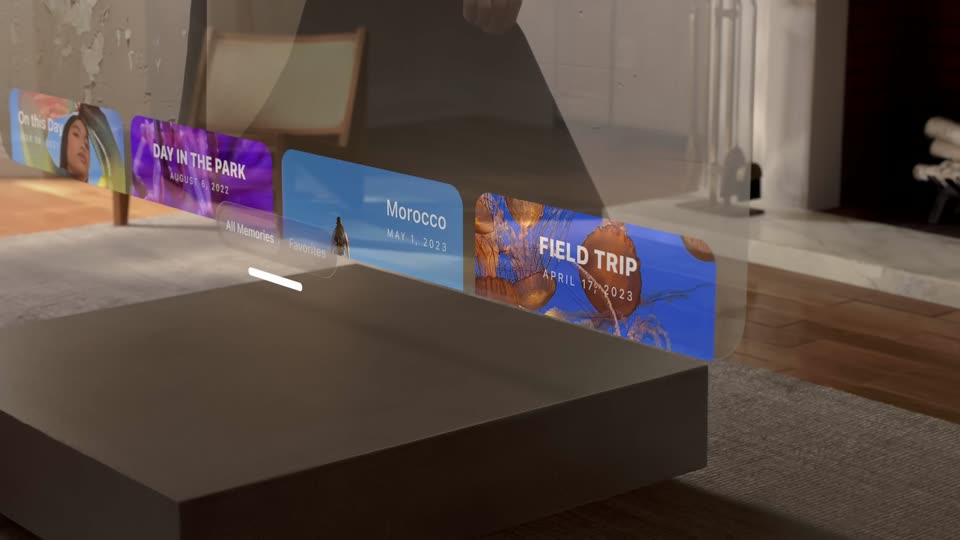
A 3D rendered living room with a wooden chair and rug; a dark square device sits in the foreground while a row of memory cards floats in perspective above it. The camera pans right across the scene.
Techniques: 3D mockup
Camera: Pull out
29 · Feature reveal · 1:26–1:28
Close-up of an iOS home screen over a defocused room photo. The central Photos icon sharpens and inflates from a squashed white ellipse into a full circle, its flower scaling up, while the Safari and Notes icons beside it stay softly blurred.
Techniques: Morph
Camera: Static
30 · Feature reveal · 1:28–1:30
A man and a woman lean over a glass table, placing small white pieces beside rows of colorful translucent blocks. Floor-to-ceiling windows behind them show trees, mountains and a rainbow arch, while their reflections sit in the polished tabletop.
Camera: Static
31 · Feature reveal · 1:30–1:32
A hand in a denim sleeve holds a clear oval lens over a printed page on a white gridded board and slides it left, magnifying the paragraph beneath.
Camera: Push in
32 · Feature reveal · 1:32–1:37
A close-up of a document view on off-white: a black paragraph addressed to Sophie with a thin blue text caret. A transparent 3D magnifying lens drifts across the lines, magnifying and warping the letters beneath it. The view then zooms in toward the body text.
On-screen text: “Hi Sophie!”, “Thanks again for offering to lead our quarterly Community Skill Swap event. Ever since we started the series, people have been asking for a coding presentation.”, “Your willingness to share this knowledge with us is both admirable and appreciated!”
Techniques: UI zoom
Camera: Push in
33 · Feature reveal · 1:37–1:39
A hand holds a phone showing a red vintage car photo. A finger taps the paperclip icon in the bottom toolbar, and a frosted menu of attachment options fades in over the image.
Camera: Static
34 · Feature reveal · 1:39–1:44
A man in a beige jacket and dark glasses stands center frame in a bright showroom, gesturing with both hands as he talks. A glass wall behind him holds a cursive hello sign and a desktop computer on a shelf, with green trees through the window to the left.
Camera: Static
35 · Feature reveal · 1:44–1:46
A near-black curved surface fills the frame, its lower rim traced by a thin line that shifts from blue to gold. The line drifts right and down as the rounded form turns slowly in the dark, a close-up of an abstract 3D material.
On-screen text: “hello”
Techniques: Light sweep
Camera: Push in
36 · Feature reveal · 1:46–1:47
Extreme close-up of a dark curved glass surface filling the frame. A thin white rim light traces the upper edge while the body fades into a deep blue-black gradient. The camera holds steady on the smooth, glossy curve as the voiceover introduces the material.
Camera: Pull out
37 · Feature reveal · 1:47–1:48
A dark translucent glass form floats on a black background, its thin white rim catching the light. The shape deforms from a rounded pebble into a narrow hourglass silhouette while the camera holds a low angle.
Techniques: Morph
Camera: Static
38 · Feature reveal · 1:48–1:50
A glossy circular disc floats centered on a dark navy field, tilted in 3D. A thin stem beneath it retracts, then soft light reflections sweep across the disc's surface, revealing its glassy curvature.
Techniques: Light sweep
Camera: Static
39 · Feature reveal · 1:50–1:53
A round iridescent glass lens hovers over the blurred title on gray, then the scene shifts to a white field where the 3D glass “Liquid Glass” letters come into focus and the camera pushes in until the type fills the frame.
On-screen text: “Liquid Glass”
Techniques: Kinetic type
Camera: Push in
40 · Feature reveal · 1:53–1:55
A blue ribbon of light runs diagonally across a white 3D space, passing under two transparent glass discs with thin blue rims. The camera pulls back and slides along the ribbon, bringing the near disc into the foreground while the far one recedes.
Techniques: Parallax
Camera: Push in
41 · Feature reveal · 1:55–1:57
On a white background, a blue line extends from the left edge, and a translucent oval with a blue rim glides rightward along it, while a thin gray line runs to the right edge. The motion is slow and continuous.
Camera: Static
42 · Feature reveal · 1:57–1:58
A glossy green blob and a clear glass ring float on a pale gray backdrop. The blob stretches into a wide capsule while the ring slides right, and the green fill flows into the ring's center.
Techniques: Morph
Camera: Static
43 · Feature reveal · 1:58–1:59
A white pill tab bar with Today, News+, Sports and Audio icons sits on a light gray background beside a circular search button. A selection ring slides from Today to Audio as the active icon and label turn red.
Camera: Static
44 · Feature reveal · 1:59–2:00
A frosted-glass camera bar floats over footage of a kayaker. The labels VIDEO, PHOTO and PORTRAIT slide across the pill, then the bar collapses to a compact pill with PHOTO between two round buttons. It cuts to a person on a pink rug with a green phone icon.
On-screen text: “News+”, “VIDEO”, “PHOTO”, “PORTRAIT”
Techniques: Kinetic type, Morph
Camera: Push in
45 · Feature reveal · 2:00–2:02
A top-down live shot of a person in a black floral garment lying on a pink carpet. A frosted-glass control bar carrying a white 'slide to answer' label and a green phone icon in a white circle slides horizontally across the frame.
Camera: Pull out
46 · Feature reveal · 2:02–2:03
A 3D phone mockup on a pale studio background shows the Now Playing screen for Seagulls by Butcher Brown. The camera pulls back to reveal the full device and the flashlight and camera shortcut buttons beneath the player card.
Techniques: 3D mockup
Camera: Pull out
47 · Feature reveal · 2:03–2:05
A close-up of the lower half of a phone tilts in 3D against a pale gray backdrop. Its music-player screen, tinted green and yellow, shifts hue as the device rotates, the gradient warming to orange. Playback controls and a now-playing card stay centered while the frame stays locked.
Techniques: 3D mockup
Camera: Static
48 · Feature reveal · 2:05–2:11
A macro view of the lock screen clock, its glassy 9:41 numerals refracting light, then the camera pulls back to reveal the phone's titanium frame, Dynamic Island and status bar. Specular highlights shift across the numerals as the frame widens.
Techniques: UI zoom, Light sweep
Camera: Pull out
49 · Feature reveal · 2:11–2:13
Two men in dark suits talk and gesture in a stone art-deco lobby; the live shot then plays inside a landscape phone mockup, the footage masked to the screen with a status bar along the edge.
Techniques: Masking
Camera: Pull out
50 · Feature reveal · 2:13–2:17
A landscape iPhone sits centered on a light gray field, its screen playing a video of two suited men in a studio while the player overlay holds a pause button, a progress bar and Info, InSight, Continue Watching pills.
Camera: Pull out
51 · Feature reveal · 2:17–2:19
A close-up of a phone's top corner on a light background. The screen shows a blurred daisy photo with two frosted buttons; the Select pill and menu circle collapse into a single three-dot circle, then re-expand, while the framing slowly zooms.
Techniques: 3D mockup, UI zoom
Camera: Pull out
52 · Feature reveal · 2:19–2:22
An Apple TV+ home screen on a tilted white device scrolls its content row leftward, swapping the Severance card for Surface and Your Friends & Neighbors posters with critic quotes, while the left sidebar menu holds still.
Techniques: 3D mockup
Camera: Pan
53 · Feature reveal · 2:22–2:23
A smartphone in 3D perspective shows a floral workshop page; the screen scrolls up from a pink dahlia on magenta to a list of class times, each paired with a Reserve button and a browser bar at the bottom.
Techniques: 3D mockup
Camera: Pan
54 · Feature reveal · 2:23–2:25
A smartphone mockup in 3D perspective shows a flower-workshop website. The page scrolls up past a list of sessions with reserve buttons, then a pink peony image and a keep-your-creations line slide into view. A browser bar at the bottom holds the URL.
On-screen text: “mentworkshop.com”
Techniques: 3D mockup
Camera: Pull out
55 · Feature reveal · 2:25–2:30
A man in a beige jacket and glasses stands center frame in a bright, glass-walled showroom, gesturing with both hands as he speaks. A cursive neon hello sign and a monitor sit on a shelf behind him. The locked-off camera frames him from the waist up.
On-screen text: “mentworkshop.com”, “Keep your creations”
Camera: Static
56 · Feature reveal · 2:30–2:38
A white tablet mockup tilts into 3D perspective on a white surface, its screen showing a blue page with an orange flower and a letter. A toolbar of orange icons along the bottom edge morphs into a translucent pill that curves to match the rounded corner.
Techniques: 3D mockup, Morph
Camera: Pull out
57 · Feature reveal · 2:38–2:46
A 3D-angled tablet on a white surface shows a document scrolling to a photo of a smiling person in flowers. A translucent menu listing file options rises over the photo, then fades, while a vertical icon toolbar stays on the left edge.
Techniques: 3D mockup
Camera: Push in
58 · Feature reveal · 2:46–2:49
A slow pan glides across a translucent glass dock holding a clock, chat and music icon, with a smaller glass pill above carrying camera and mic symbols. The dock rests on a blue-to-teal gradient, and blurred glass shapes drift in the background.
Techniques: 3D mockup, Parallax
Camera: Push in
59 · Feature reveal · 2:49–2:51
Overhead view of a light wood table where four people's hands place colored tiles and clear trays around a central screen showing a blue wave wallpaper with outlined COLOROS 13 lettering. The camera slowly pulls back to reveal more of the surrounding props.
On-screen text: “0000”
Camera: Pan
60 · Feature reveal · 2:51–2:57
A frontal close-up of a 3D iPhone mockup on a light gray background. The article screen scrolls upward: the red FOOD & WINE header and SHORT CUTS headline give way to a photo of dry pasta shapes on black, then body copy with a large drop cap.
Techniques: 3D mockup
Camera: Push in
61 · Feature reveal · 2:57–2:59
A white disc bearing a black arrow-in-circle logo lifts off the gray floor and stands upright as a white pill grows around it, then the bar widens to reveal a row of 3D drawing tools: marker, pen, ruler, pencil, and marker.
On-screen text: “R”
Techniques: Morph
Camera: Static
62 · Feature reveal · 2:59–3:01
A white pill-shaped toolbar floats in 3D on a pale gray backdrop, holding an eraser, pencil, ruler, green and red markers, a rainbow color wheel and a plus button. The pill narrows while the tools compress into a tighter cluster.
Techniques: 3D mockup, Morph
Camera: Static
63 · Feature reveal · 3:01–3:06
A 3D map interface in perspective expands downward, its search bar morphing into a panel of location shortcuts and a recents row. The camera pulls back to reveal the full panel, then cuts to a bespectacled presenter in a beige jacket gesturing in a bright showroom.
Techniques: 3D mockup, Morph
Camera: Pull out
64 · Feature reveal · 3:06–3:10
A man in a beige jacket and glasses stands in a bright room behind a table of disassembled components, gesturing as he speaks. The shot then cuts to a close-up of a phone held in a hand, showing an email compose screen titled Nibbling nightmare.
Camera: Static
65 · Feature reveal · 3:10–3:14
Close-up of a phone held in a hand, showing a draft email titled “Nibbling nightmare.” A finger taps the close button in the top corner, and a small menu with Delete Draft and Save Draft options appears right at the tap point.
Techniques: Cursor demo
Camera: Static
66 · Feature reveal · 3:14–3:16
A hand holds an iPhone steady against a plain white wall, the screen showing a furniture product page with a chair photo and a paragraph of body copy. A second hand wearing rings reaches in and taps the text. The pace is slow and steady.
Camera: Static
67 · Feature reveal · 3:16–3:18
A hand holds a phone as a finger taps text, and the small context bar expands into a vertical list of options. The view then cuts to a close-up of a music screen where the bottom tab bar shrinks as the page scrolls.
Techniques: UI zoom
Camera: Static
68 · Feature reveal · 3:18–3:22
A close-up of an iPhone's bottom corner shows the Apple Music feed scrolling up. The five-icon tab bar collapses into just Home and Search, and the Now Playing pill stays pinned above it as new sections pass by.
Techniques: Morph
Camera: Push in
69 · Feature reveal · 3:22–3:25
A close-up of an iPhone's lower screen shows the Apple Music interface. As the view scrolls up, the glass tab bar at the bottom expands from a slim now-playing pill to reveal the Home, New, Radio and Library icons, the phone's metal bezel framing the shot.
Techniques: UI zoom, Morph
Camera: Pan
70 · Feature reveal · 3:25–3:31
A man in a beige jacket and dark glasses stands in a bright glass showroom, speaking to camera and gesturing with both hands. Display tables with devices sit in the foreground; a neon “hello” sign glows on the glass wall behind him. The camera slowly pushes in.
Camera: Static
71 · Feature reveal · 3:31–3:36
An iPhone on a plain light background shows the lock screen: a photo wallpaper, the 9:41 clock, and a music widget. Notifications slide up over the screen, then the view zooms into the top of the phone as Control Center expands with its rounded modules.
Techniques: UI zoom
Camera: Push in
72 · Feature reveal · 3:36–3:38
A white glass squircle icon sits in a ring of colored oval layers on a plain white background. The assembly rotates edge-on as the ovals flatten into a vertical stack of thin discs, revealing the layered glass construction. Blurred foreground shapes drift at a different depth.
On-screen text: “Kane Brown”, “Backseat Driver”, “100%”, “Focus”
Techniques: 3D mockup, Parallax
Camera: Pull out
73 · Feature reveal · 3:38–3:40
A frosted glass app icon floats over a white background. Translucent colored ovals, stacked in a vertical column, rotate and spread into a radial pattern as the camera tilts from a side angle to a top-down view.
Techniques: 3D mockup
Camera: Pull out
74 · Feature reveal · 3:40–3:42
A 3D perspective view of floating app icons over a pastel gradient. The rainbow Photos icon sits at center, ringed by Messages, Mail, Calendar and Notes icons at different depths. The camera drifts slowly, the layers sliding at different speeds.
Techniques: 3D mockup, Parallax
Camera: Pull out
75 · Feature reveal · 3:42–3:43
A tight 3D close-up of glossy app icons, the multicolored Photos flower centered, eases back to reveal the full home screen on a tilted device. A smiling portrait wallpaper sits behind the labeled icon grid, with shallow depth of field blurring the outer icons.
Techniques: 3D mockup, UI zoom
Camera: Pull out
76 · Feature reveal · 3:43–3:44
A white wall of iPhone home screens fills the frame, each showing a different wallpaper, widget layout and app icon tint. The camera pulls back from the central portrait screen to reveal the surrounding devices.
Camera: Pull out
77 · Feature reveal · 3:44–3:46
A grid of iPhone home screens fills the frame on a white background, each in a different tint color and photo wallpaper. The central phone shows an orange interface with a smiling person. The phones drift slowly as the grid shifts.
Techniques: 3D mockup
Camera: Pull out
78 · Feature reveal · 3:46–3:47
A wall of iPhone home screens, each with a different photo wallpaper and translucent icon tint, drifts slowly downward. The grid shows light, dark and tinted layouts side by side.
Camera: Pan
79 · Feature reveal · 3:47–3:48
Three iPhone home screens stand in a row on a plain light gray background, then tilt and slide into a staggered 3D cluster, the left phone rotating toward the camera and the right one lifting up. The screens show app grids and a weather widget.
Techniques: 3D mockup
Camera: Static
80 · Feature reveal · 3:48–3:50
A 3D camera glides along a row of frosted-glass dock icons (compass, music, mail, calendar, flower, notes) over a blue to teal gradient, opening on an extreme close-up of the glass panels. The calendar widget reads Tue 1.
Techniques: 3D mockup
Camera: Pull out
81 · Feature reveal · 3:50–3:53
Two frosted-glass widgets, a calendar and a weather card, float tilted in 3D against a soft blue-to-yellow gradient. They settle flat, then the camera pulls back to reveal them on the desktop of a Mac laptop with a blue abstract wallpaper.
Techniques: 3D mockup, UI zoom
Camera: Pull out
82 · Feature reveal · 3:53–3:56
A laptop, tablet, phone and watch slide in from the right and settle into a row on a pale background, each screen showing the same blue wallpaper and weather widget. The watch lands last at the right edge.
Techniques: 3D mockup
Camera: Pull out
83 · Feature reveal · 3:56–3:59
A person in a light blue shirt stands at a wooden table, hands placing clear acrylic pieces on a white sheet. A transparent tube bent into the cursive word hello sits mid-ground, with a white board of clear cutout shapes in the foreground. The camera tracks slowly across the table.
Camera: Pull out
84 · Feature reveal · 3:59–4:02
A person in a pink cardigan places clear acrylic app icons onto a tablet on a wooden table. The scene cuts to a person in a gray shirt arranging clear acrylic letterforms on a dark reflective surface, hands moving slowly across the pieces.
Camera: Static
85 · Feature reveal · 4:02–4:05
A person in a gray shirt stands behind a glossy black table covered with clear acrylic letter and icon cutouts. They lift a transparent glasses-shaped piece into the frame while other hands arrange the shapes. The reflective surface mirrors the figures and objects in a bright office.
Camera: Pan
86 · Feature reveal · 4:05–4:07
Close-up of a laptop screen showing the macOS desktop, with a centered Spotlight Search field and four circular app icons to its right. The frame slowly zooms in on the search bar as a command-key shortcut hint fades in at its right edge.
Techniques: UI zoom
Camera: Pan
87 · Feature reveal · 4:07–4:07
A locked-off close-up of a laptop screen running the macOS Files app. The search field and its row of circular icons collapse into a header with a folder icon and grid toggle, a cursor drifting up, above a Suggestions row of file thumbnails.
Techniques: Morph, Cursor demo
Camera: Static
88 · Feature reveal · 4:07–4:09
A tight crop of the iPhone screen shows a woman in a pink shirt, then the frame pulls back to reveal the full phone in 3D on a pale blue backdrop. The lock screen dissolves into the Control Center as the wallpaper softens into color shapes.
Techniques: 3D mockup
Camera: Pull out
89 · Feature reveal · 4:09–4:10
A translucent control-center panel on the right of a blurred blue background scrolls upward. Circular Bluetooth and wireless buttons, a Focus pill, and Display and Sound sliders rise as a music card with an apple icon and playback controls holds at the top right.
Camera: Pan
90 · Feature reveal · 4:10–4:12
A two-column grid of rounded video tiles with contact photos scrolls vertically over a soft blue-green gradient, sliding the top row off frame while new tiles rise from below. Each tile carries a name and a Video Yesterday label with a camera icon.
Camera: Pan
91 · Feature reveal · 4:12–4:13
Close-up of a black tablet corner on blue shows a dark interface with a blue arrow and layout icon. A floating 3D control bar hovers above the screen, then splits into two pills, the lower one filling with red, yellow and green dots.
Techniques: 3D mockup, Morph
Camera: Static
92 · Feature reveal · 4:13–4:14
A live-action shot of a woman in a red top reading on a lakeside dock fills the frame, then the footage shrinks into the screen of a 3D phone mockup on a pale background, showing the camera app with portrait mode selected.
Techniques: 3D mockup
Camera: Pull out
93 · Feature reveal · 4:14–4:15
A 3D iPhone mockup stands upright on a plain light gray background. Its screen shows a camera view of a person reading by the water, with a dark glass control panel of six labeled icons at the bottom. The shot is locked-off and static.
Techniques: 3D mockup
Camera: Static
94 · Outro · 4:15–4:19
A bespectacled man in a beige jacket stands center frame, gesturing with both hands as he speaks. Behind him, a bright room holds display tables with product stands, a glass wall with a neon hello sign, and a desk with a monitor.
Camera: Static
95 · Outro · 4:19–4:24
A titanium iPhone stands centered on a plain light gray backdrop. The lock screen crossfades into the home screen with weather and Find My widgets and the app grid, then the camera zooms in on the icons.
Techniques: UI zoom
Camera: Push in
96 · Outro · 4:24–4:25
A close-up of iOS home screen widgets, a calendar, Photos, notes and reminders, sits over a soft green and blue gradient. The widgets fade out, leaving the plain background, then the iridescent Apple logo fades in at the center.
Camera: Static
97 · Outro · 4:25–4:28
A 3D Apple logo with a frosted white body and a soft iridescent sheen along its lower edge sits centered on a plain off-white field. The mark fades in and settles, casting a faint drop shadow below it.
Camera: Static
98 · Outro · 4:28–4:33
The frame holds on solid black for the full clip, a blank lead-in with no visible content, text, or motion.
Camera: Static