
0:50
Explore
ClaudeDevs - You can now install Claude artifacts as desktop apps on Mac and Windo
Anthropic · Nov 2026 · 0:27 · Full motion · AI-annotated
- Length
- 0:27
- Scenes
- 27 · 1.0 s avg
- Product on screen
- 0:00
- Voiceover
- No
- Views
- 10M on X
as of November 27, 2026
00:00:00 / 00:27:19
- Length
- 0:27
- Scenes
- 27 · 1.0 s avg
- Product on screen
- 0:00
- Voiceover
- No
- Views
- 10M on X
as of November 27, 2026
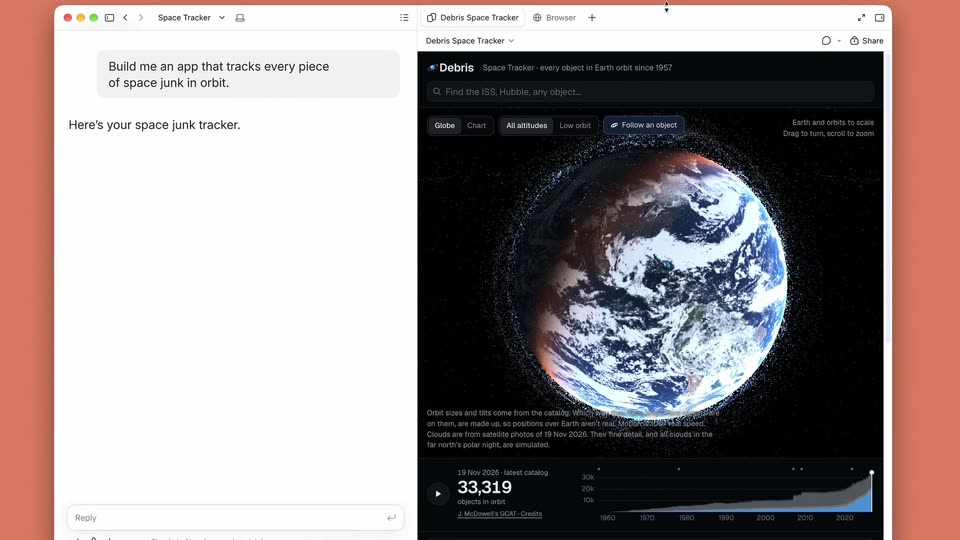
Anthropic’s 0:27 launch film runs 27 scenes, about 1.0 s each. The product is on screen from the first frame. There is no explicit call to action. One continuous desktop capture: a chat prompt builds a space junk tracker, the app is installed as a desktop window, then a fast montage swaps dozens of generated app interfaces in place. Signature moves: slow push-ins on the browser, tilted 3D window pairs over a coral field, and abrupt content swaps inside a fixed window frame, closed by a cream serif title card and the coral starburst.
No filming indicatedEstimated needs: 3 capture groups — your screens or recordings · 3 3D passages — build or supply
Is this your launch? to your site or press kit.
More like this
1:15

Manu Arora - Introducing Pages at Aceternity UI. Complete landing pages for your
Aceternity UI · Oct 2026
1:31
Teamily AI - Introducing Teamily Video Agent We give all Teamily agents a face.
Teamily AI · Nov 2026
ClaudeDevs - You can now install Claude artifacts as desktop apps on Mac and Windo, scene by scene
· 27 scenes as text
01 · Demo · 0:00–0:01
A browser window fills the frame in two panes. Left: a chat with a prompt and reply above an input box. Right: a 3D Earth globe ringed by orbiting debris points, with filter buttons and a chart below. The shot holds steady; a cursor rests at the top.
Camera: Push in
02 · Demo · 0:01–0:02
A split screen shows a chat on the left where a user asks for a space junk tracker and the app replies, beside a browser on the right displaying a 3D Earth globe ringed by orbiting debris dots. The camera slowly zooms in, tightening on the browser view.
Techniques: Split screen, Particles, UI zoom
Camera: Push in
03 · Demo · 0:02–0:03
A browser tab's context menu opens over a space-debris tracker, listing options from Share to Delete. A cursor glides down the list, pausing on Unpin and Install as app, while a 3D Earth with orbiting debris fills the right side of the screen.
Techniques: Cursor demo
Camera: Static
04 · Demo · 0:03–0:05
A screen recording of the Debris Space Tracker web app shows a 3D Earth globe ringed by orbital debris. A browser install dialog pops up in the center, then fades out as the cursor hovers over its buttons.
Techniques: Cursor demo
Camera: Pull out
05 · Demo · 0:05–0:06
A browser window on a coral background shows a chat prompt on the left and a space-debris tracker app on the right. An install dialog fades out, then the view zooms into the rotating 3D Earth globe ringed by orbiting debris.
Techniques: UI zoom
Camera: Pull out
06 · Demo · 0:06–0:07
A flat chat window on a terracotta background, holding a user prompt and a short reply, scales down toward the top-left corner while a dock of colorful app icons slides up from the bottom edge.
Camera: Pull out
07 · Demo · 0:07–0:09
A dimmed macOS desktop shows a chat window on the left and a glowing globe app icon on the right. A cursor clicks the icon, a red outlined window frame draws in on the right, and the screen brightens to full color.
Techniques: Cursor demo
Camera: Static
08 · Demo · 0:09–0:10
A macOS desktop fades in from black on a coral background. A chat window sits left; a dark DEBRIS app right shows a 3D Earth globe ringed by orbiting debris dots, a stats sidebar, and a bottom timeline.
Techniques: Particles
Camera: Static
09 · Demo · 0:10–0:11
On a coral desktop, a chat window sits behind a dark app window. The front window swaps from a ticket network graph centered on an expired webhook certificate to a green battery charge grid for vans. A dock of app icons lines the bottom edge.
Camera: Static
10 · Demo · 0:11–0:11
Two tilted macOS windows sit in 3D perspective on a coral background. The right window swaps from a crystal grid view to a protein ribbon model, while the left chat window updates its prompt. A row of dock icons lines the bottom.
Techniques: 3D mockup
Camera: Static
11 · Demo · 0:11–0:12
A coral desktop holds a white document window behind a dark app window above the dock. The front app swaps from a glowing solar orbit map with a side parameter panel to a teal wind-field dashboard centered on a Drifting card.
Camera: Static
12 · Demo · 0:12–0:12
A coral desktop holds a white prompt window and a dark Timeskip dashboard with a red radar map. The dashboard zooms onto the radar as a large orange ring and the digits 11:42 fade in at its center.
Techniques: UI zoom
Camera: Static
13 · Demo · 0:12–0:13
A dark app window on a coral desktop transitions in place from a flame graph reading 612 ms to a training calendar showing a marathon pace, its side panels and bottom table swapping to match. A white document window with a serif tagline sits at top left over the macOS dock.
On-screen text: “Building an app that tracks every piece of paper in the world.”, “Here's our space ink tracker.”
Techniques: Morph
Camera: Static
14 · Demo · 0:13–0:13
On a coral desktop, a white chat window on the left holds a prompt and a one-line reply while the app window on the right rapidly cycles through screens: an orange space-junk globe, then tide charts that swap color and profile shape, ending on a green chart with a large 2.41 m rising readout.
Camera: Static
15 · Demo · 0:13–0:14
A macOS desktop on a coral wallpaper shows a Notes window behind a front app window that rapidly cycles through a knitting chart, a coffee shop inventory grid, and a dark space junk tracker map, then a detail panel slides in on the right.
Camera: Static
16 · Demo · 0:14–0:14
A desktop app window crossfades from a geometry proof canvas with orange hexagons to a tree survey map with colored zones. A two-line caption sits at the top left, its second line updating as the window shifts left.
On-screen text: “Build me an app that tracks every piece of space junk in orbit.”, “is your space junk tracker.”
Camera: Static
17 · Demo · 0:14–0:14
A 3D angled view of a Mac desktop on a coral background. The front window's content swaps from a mechanical part editor showing a red 3D bearing assembly to a translation app with a 112 degree gauge and Japanese text. A white caption card sits behind.
On-screen text: “an app that tracks every piece of space junk in orbit.”, “junk tracker.”
Techniques: 3D mockup, Morph
Camera: Static
18 · Demo · 0:14–0:15
A dark map interface fills a centered app window on a coral background, showing green zones, magenta dots and yellow route lines with numbered markers. The top toolbar and left list swap states while a white document peeks in at the left edge.
Camera: Static
19 · Demo · 0:15–0:15
A product interface dissolves from a hexagonal map view, its center a purple hexagon reading Malik's PO 42, to a circular tree diagram of red, blue, green and orange bubbles around a striped reconciler node.
Camera: Static
20 · Demo · 0:15–0:16
Two tilted macOS windows sit in 3D perspective on a coral field, cutting from a farm plot grid with a centered plant tooltip to a word-count bar chart circled in red.
Techniques: 3D mockup
Camera: Static
21 · Demo · 0:16–0:16
Two dark dashboard windows flash in quick succession: a circular flow radar reading 68 percent with route and timeline lists, then a literature map with a paper queue panel. The cut is abrupt.
Camera: Static
22 · Demo · 0:16–0:16
A dense lab inventory screen sits over a topographic map. A periodic table grid fills the center, a reagent list runs down the left, and a measurements panel holds the right edge. The view holds still.
Camera: Static
23 · Demo · 0:16–0:17
A dark screen shows a street map overlaid with colored note paths and circular letter nodes. A left sidebar lists tracks, a top bar holds view controls, and a bottom table ranks mains by risk. The orange path extends rightward, adding a bend annotation.
Camera: Static
24 · Demo · 0:17–0:17
A roasting profile screen displays a temperature curve with labeled waypoints and a large First crack 9:12 timestamp. A row of coffee bean icons runs along the bottom, and a right panel lists live batch readings and a chat feed.
Camera: Static
25 · Demo · 0:17–0:18
A light color palette editor, with a vertical swatch list, a grid of colored cells and a red cicada card, cuts to a speech rehearsal screen showing a 'trust' slide, a blue bar chart and a block timeline.
Camera: Static
26 · Demo · 0:18–0:19
A full-screen nautical charting app shows a coastal map with a magenta sailing route and depth figures. The left sidebar lists waypoints with one row highlighted, the right panel shows departure and tide data, and the top bar holds chart tabs. The view holds steady.
Camera: Pull out
27 · Outro · 0:19–0:27
On a cream background, a black serif headline fades in line by line, then a smaller sans-serif subline appears below. The text fades out, a coral starburst mark appears at center, and the black serif wordmark Claude appears to its right, holding to the end.
On-screen text: “Build, run, and share”, “desktop apps with Claude”, “Now available in beta in Claude for macOS & Windows”, “Claude”
Camera: Static