1:07


GitCafe Beta Demo
GitCafe · B2B · Aug 2026
Airtable · Jul 2024 · 0:17 · AI-annotated
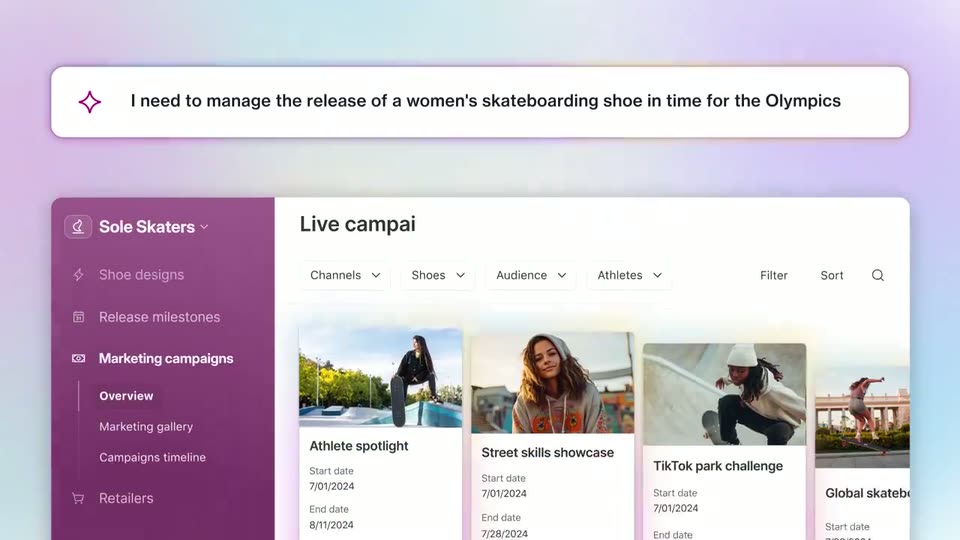
Airtable’s 0:17 launch film runs 6 scenes, about 2.8 s each. The product shows up at 0:02. There is no explicit call to action. The video is built as a repeating gesture where a top prompt bar types a need and a matching dashboard slides up from below, then the prompt swaps and a recolored dashboard rises, so every beat is the same prompt-to-app move. Its signature motions are the left-to-right text reveal, the prompt bar stretching from a small chip, the dashboards sliding up with a gentle tilt, and the sidebar hue shifting per use case over a grainy pastel gradient.
Is this your launch? to your site or press kit.
GitCafe · B2B · Aug 2026
Fixture · B2B · Oct 2026
Result · Consumer · Nov 2026
A small white rounded icon with a purple sparkle sits centered on a soft pastel gradient. It stretches horizontally into a wide white bar as a line of bold text reveals left to right beside the sparkle.
On-screen text: “I need to manage the release of a women's skateboarding shoe in time for the Olympics”
Techniques: Kinetic type
Camera: Static
A pastel gradient backdrop frames a white prompt card with a purple sparkle icon and Olympic shoe text. A cream dashboard panel slides up from below to reveal a marketing interface with a purple sidebar and a row of campaign cards.
Camera: Static
A white prompt bar with a purple sparkle icon floats above a marketing dashboard with a purple sidebar and photo cards. The first request sentence slides in, then is replaced by a second sentence that types out, while the dashboard tilts gently and a new panel rises at the bottom.
On-screen text: “I need to manage the release of a women's skateboarding shoe in time for the Olympics”, “Help me track parts and production for the Artemis mission SLS rocket system”
Techniques: Kinetic type
Camera: Static
A white prompt bar with a purple star icon types a new sentence across the top. Below it, a green and white parts inventory dashboard sits still, then a purple panel slides up over the charts and a pink-glowing card rises as the view changes.
Techniques: Kinetic type
Camera: Static
A white prompt bar with a purple sparkle icon holds a sentence at the top of a pastel gradient. Below, a webpage mockup with a purple header and a white form card slides up and settles into place.
Camera: Static
A white prompt pill sits above a soft gradient backdrop as the app window reveals beneath it. The blue sidebar and a beta-programs table fill in row by row, then the Overview item in the sidebar lights up with a blue highlight box.
On-screen text: “I want to manage customer beta programs for our AI model launches”
Techniques: Masking
Camera: Static