2:46

Manus - Introducing Manus 2.0
Manus AI · Sep 2026
Airbnb · May 2026 · 1:08 · AI-annotated
Airbnb’s 1:08 launch film runs 44 scenes, about 1.6 s each. The product shows up at 0:03 and 7 features are revealed. There is no explicit call to action; a voiceover carries the film. The video is built as a chain of short feature demos, each launched by a 3D object that morphs into a phone UI card and resolved by fast zoom punches into the interface. Signature moves are objects bursting out of the screen (groceries, ball, car), particle and water-splash transitions on white, and one continuous phone mockup that carries the whole tour.
Is this your launch? to your site or press kit.
Manus AI · Sep 2026
Slack · Productivity · Nov 2023
A miniature 3D city with a harbor, skyline and green fields rests on a curved globe-like surface under a pale blue sky. The camera glides across the model, tilting down toward the waterfront, then blurs into a fast horizontal sweep.
Camera: Push in
The camera rushes forward over a turquoise pool toward a white modern villa flanked by palm trees. Heavy motion blur streaks the whole frame, with hazy green hills and a pale blue sky behind the house.
Techniques: Speed ramp
Camera: Static
A 3D-rendered living room with a beige sofa, two wooden chairs, a coffee table and a sea view through floor-to-ceiling windows. The frame opens soft and out of focus, then sharpens while a dark vertical door mullion holds the right edge.
Camera: Push in
A 3D rendered living room with floor-to-ceiling windows and a water view fills the frame, then settles into a smartphone mockup. The phone tilts in 3D perspective as its dark bezel, notch and status bar draw in around the image. The motion is quick.
Techniques: 3D mockup
Camera: Pull out
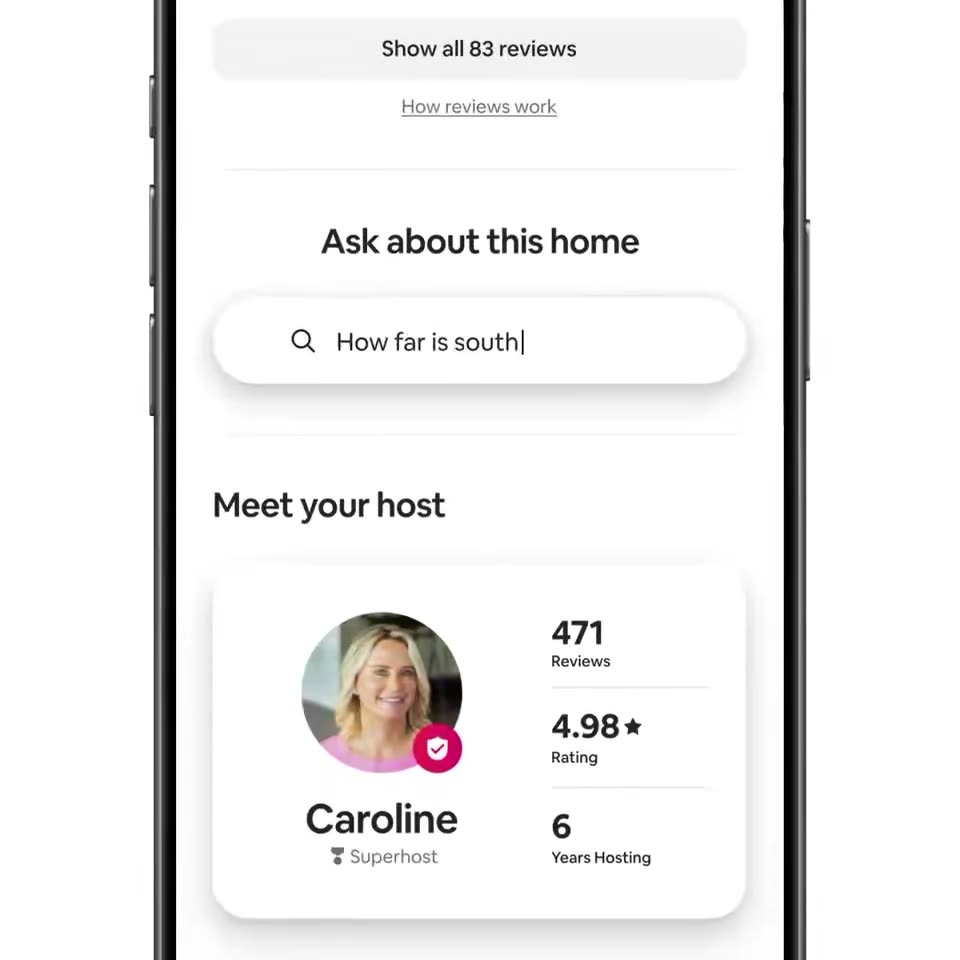
A front-facing phone mockup on a white background shows an Airbnb listing. The screen scrolls down past the photo and amenities to the host card, a question is typed into the search field, and an answer sheet slides up from the bottom.
Techniques: 3D mockup
Camera: Pan
A phone screen shows a map card sliding up. The question How far is south beach? appears at the top above a house pin labeled This home and a South Beach pin, joined by a dotted route and an 18 min car badge. A black OK button sits at the bottom.
Camera: Static
A flat front-view phone on white shows a white card. The question 'Is the pool heated?' types out letter by letter with a caret, then two rounded pool photos slide in from the right above a black OK bar.
Techniques: Kinetic type
Camera: Pan
A phone screen shows a white question card reading “Is the pool heated?” above two pool photos and a black OK button. The card fades out to reveal the home listing screen with the title “Ask about this home”, Miami, stay dates, and host details.
Camera: Pan
A phone mockup in 3D perspective shows a travel app screen: a map over a white itinerary card for a Miami stay with dates and check-in details. The camera pushes in, zooming toward the card until the 'Your stay' section fills the frame.
Techniques: 3D mockup, UI zoom
Camera: Push in
A black disc covering the frame shrinks open to reveal a Google map. A black house pin holds the center while colorful category icons pop in around it and the label Your stay fades in below the pin.
Techniques: Masking, UI zoom
Camera: Pull out
A light street map zooms out from a black home pin labeled Your stay to reveal a museum pin below, then a dotted driving route draws between them as a white chip with a car icon and 18 min slides in beside the route.
Techniques: UI zoom
Camera: Pan
Over a blurred map, Google Maps cards cycle: each new card scales in at center while the previous shrinks to the top-left corner, swapping The Bass museum for a soccer match and a spa tour. Floating category icons drift along the right edge.
Camera: Push in
A white event card on a light map lists a soccer match in Miami. The view zooms into the card's top video thumbnail until the clip of players on a green pitch fills a rounded frame on white.
Techniques: UI zoom
Camera: Push in
Grainy archival clip of a man in a blue tracksuit on a sunny field, mouth open, about to head a white soccer ball with red, blue and green swirls. The footage sits in a rounded square frame on a white background, with a blue sky and a tree line behind.
Camera: Static
A rounded-square crop of live soccer footage on a white background shows a player's legs and a ball on grass, opponent's cleats at the right, then crossfades to a second player in green cleats with a blue and red ball.
Camera: Static
Inside a rounded square on a white field, live-action soccer clips cross-dissolve at a fast pace: a close-up of feet tapping a multicolored ball on grass, then a low-angle goalkeeper in a green shirt with arms wide against a stadium and white flowers.
Camera: Static
A rounded photo card of a green pitch, with a player's legs at the left, slides left and breaks into a trail of green particles. A white football with red, blue and green swirls spins out of the card and settles at center on a plain white background.
Techniques: Particles
Camera: Pan
A motion-blurred multicolor ball whooshes out as the Sun 19 date badge, a red circle with a white numeral under bold black text, snaps into the center of a white field. The badge then fades to reveal the phone's schedule screen with the day's events.
On-screen text: “Sun”, “19”
Techniques: Speed ramp
Camera: Pull out
A front-facing iPhone mockup on a white background displays a Miami trip timeline. The app list scrolls upward under the fixed Miami header as the phone frame zooms in, cropping the device edges.
Techniques: UI zoom
Camera: Pull out
A brown paper bag rests on a plain white background. Groceries, a mango, a bread loaf, a butter block, grapes, an apple, a lime and an orange, drop from above and settle into the bag. The camera holds a low 3D angle and drifts slightly as the items land.
Techniques: 3D mockup
Camera: Pull out
A white rounded card with a grocery bag icon and the line Order groceries for your trip sits centered; it slides down as three matching cards with car, suitcase and van icons expand above and below into a vertical list on a plain off-white background.
Camera: Static
A split view shows a dated itinerary of trip events on the left and a stack of white service cards on the right, both columns scrolling upward in a quick slide as a thin vertical seam between them closes and the right labels switch to scheduled times.
Techniques: Split screen
Camera: Static
A close-up of a phone schedule app, the dark device edge at left. The vertical task list scrolls up, lifting the car, luggage, check-in and grocery cards, while a two-avatar listing card slides in at the top and a museum entry enters at the bottom.
Camera: Pull out
A phone mockup of a Miami trip itinerary floats in 3D perspective on white, then a glossy turquoise water splash surges in, swallowing the phone and revealing a small palm island with a green palm tree.
Techniques: 3D mockup
Camera: Pan
A 3D island diorama with a thatched hut and a palm tree floats on a white background. A turquoise water splash erupts around the sandy base, then calms into a flat teal pool.
Techniques: 3D mockup
Camera: Pull out
A 3D beach-hut-and-palm emoji with a two-line review sits centered on white. A rounded white card with a top tab bar, close button and a faint reviewer avatar fades in around it, the text sharpening as it settles. The view holds on the framed card.
Techniques: UI zoom
Camera: Pull out
A front-facing smartphone mockup sits centered on a white field, showing a reviews screen with a thatched-hut and palm-tree illustration, a bold two-line headline and a five-star guest review card. The device eases in from a slightly larger scale to settle into frame.
Camera: Pull out
A front-facing iPhone mockup on a white background shows an Airbnb profile screen for Natalie, with a faded duplicate sliding off behind it. The view then zooms in to crop the screen onto the travel map section.
Techniques: UI zoom
Camera: Pan
A white iPhone mockup rotates in 3D against a plain background, its screen showing a pastel world map dotted with circular contact photos at city names. The map gently zooms as the device turns.
Techniques: 3D mockup
Camera: Push in
A field of circular avatar photos of smiling people in varied sizes drifts across a white background as the camera pans and zooms through them, larger avatars moving faster than smaller ones.
Techniques: Parallax
Camera: Static
Circular portrait avatars of varying sizes scatter across a white field, then clear away as a small gold sphere grows into a centered metallic globe showing continents.
Techniques: 3D mockup
Camera: Static
A 3D globe rotates and scales up on a white background, then shrinks into a small desktop-globe icon inside a white pill button labeled All, which eases to a smaller resting size.
Techniques: Morph
Camera: Static
A white pill-shaped chip holding a globe icon and the word All sits centered on a plain white background. It scales down over the clip as a faint card outline with vertical lines emerges behind it.
Camera: Static
A silver iPhone in 3D perspective eases from a tight crop to full frame on a light gray background. The Airbnb home screen then scrolls up, past summer destination cards to hotel and experience sections.
Techniques: 3D mockup
Camera: Pull out
A rounded hotel card sits on a white background. Its photo crossfades from a red brick inn to a pink corner building while the title and star rating update below, and a heart icon stays in the top corner.
Techniques: Morph
Camera: Static
A hotel card with a pink heart floats on white, then a 3D phone tilts in around it. The device flattens to face the camera and the listing scrolls down, bringing a second hotel card into view.
Techniques: 3D mockup
Camera: Pull out
A front-facing iPhone mockup on a plain light background shows the Airbnb explore feed with a New York City hotel search. The view zooms into the The Maritime listing card, enlarging its photo and title while the bottom tab bar slides out of frame.
Techniques: UI zoom
Camera: Static
A front-facing phone mockup shows an Airbnb hotel listing, the detail card sliding up into place. The view then zooms into the 3D room render, filling the frame with porthole windows, blue sofas and patterned chairs.
Techniques: 3D mockup, UI zoom
Camera: Push in
A motion-blurred virtual room with round windows and a white column resolves into a 3D cityscape. The Empire State Building rises centered against a pale blue sky, flanked by hazy skyscrapers, as the camera settles.
Techniques: 3D mockup
Camera: Push in
A 3D render of a spired skyscraper against a clear blue sky. The camera tilts from the spire down to a low angle between two flanking buildings, and white text appears centered over the tower.
On-screen text: “Experience”, “something iconic”
Techniques: Parallax
Camera: Push in
Through a dark arch at the top of the frame, a stone gatehouse with two corner turrets stands against a blue sky. White centered text reads Experience something historic, the second line swapping words. The camera drifts upward as a new word scales in.
On-screen text: “Experience”, “something historic”, “something iconic”, “something local”
Techniques: Kinetic type
Camera: Push in
Friends toast with paper cups in a bar. The clip shrinks into a rounded card inside the Miami app screen, above a car rental return item. The white caption stays centered over the video.
On-screen text: “Experience something local”
Techniques: Morph
Camera: Pull out
A front-facing iPhone shows a Miami trip timeline. The view zooms into the car rental row, where the small red car icon grows into a 3D red SUV that drives left to right across a white background, trailing dust as the interface fades.
Techniques: UI zoom, Morph, 3D mockup
Camera: Push in
A plain white field holds a thin magenta line that draws itself into a rounded-triangle outline with a small loop at its base, the brand mark, then holds. A soft brown streak along the bottom edge fades as the mark completes.
Camera: Static