
0:37
Explore
00:00:00 / 01:59:46
- Length
- 1:59
- Scenes
- 35 · 3.4 s avg
- Product on screen
- 0:00
- Call to action
- 1:53 · 95%
- Voiceover
- Yes
- Views
- 233 on YouTube
as of November 23, 2026
Aemon’s 1:59 launch film runs 35 scenes, about 3.4 s each. The product is on screen from the first frame. The call to action lands at 1:53 (95% in), over a voiceover. The video runs as a founder-led preview: a black-card intro, one long flat UI demo with floating white cards, a second benchmark demo, a fast zooming mosaic montage, and a logo CTA. Signature moves are typewriter text on black, cards that lift out of the interface with red progress lines, and repeated cuts back to the founder at the wooden table.
Footage neededEstimated needs: 3 capture groups — your screens or recordings · 1 official logo — reused across the film · 4 filmed passages — shoot, supply or replace · 7 graphic passages — draw or supply · 2 3D passages — build or supply
Is this your launch? to your site or press kit.
More like this

1:53

Orchestrator.inc - https://t.co/JOaE2ABlJC v0.14.3 is out. Artifacts: everything your a
Orchestrator.inc · Oct 2026
1:44

Replit Missions | Pursuing outcome-based results
Replit · Developer tools · Nov 2026
Similar soundtrack
Films whose music sounds like this one, voice left out
1:50

HABU Launch Video
HABU · Electronic
1:45

The new Microsoft Planner: Manage all your tasks and plans in one simple, familiar experience
Microsoft · Upbeat modern electronic
1:43

Preorders Live Now. | OS3
OS3 · Upbeat, modern electronic music with a steady mid-tempo beat.
Aemon (YC W26) — The AI R&D Engineer, scene by scene
· 35 scenes as text
01 · Product intro · 0:00–0:02
A white Aemon logo and wordmark sit centered on black, then the locked-off frame cuts to a man seated at a wooden table, with the logo scaled up and overlaid across his chest.
On-screen text: “Aemon”
Techniques: Kinetic type
Camera: Static
02 · Product intro · 0:02–0:08
A man in a beige cardigan sits at a wooden table, hands clasped, speaking to camera before wooden slats and a black wall. A white Aemon logo and wordmark scale in over his chest, then a red-and-navy lower-third slides in at lower left with his name and title.
On-screen text: “Ray Xu”, “co-founder @ Aemon”
Camera: Static
03 · Product intro · 0:08–0:13
On a black background, white sans-serif text types out character by character to read “First AI R&D engineer,” centered in the frame. The line holds for a beat, then fades to black.
On-screen text: “First AI R&D engineer”
Techniques: Kinetic type
Camera: Static
04 · Demo · 0:13–0:22
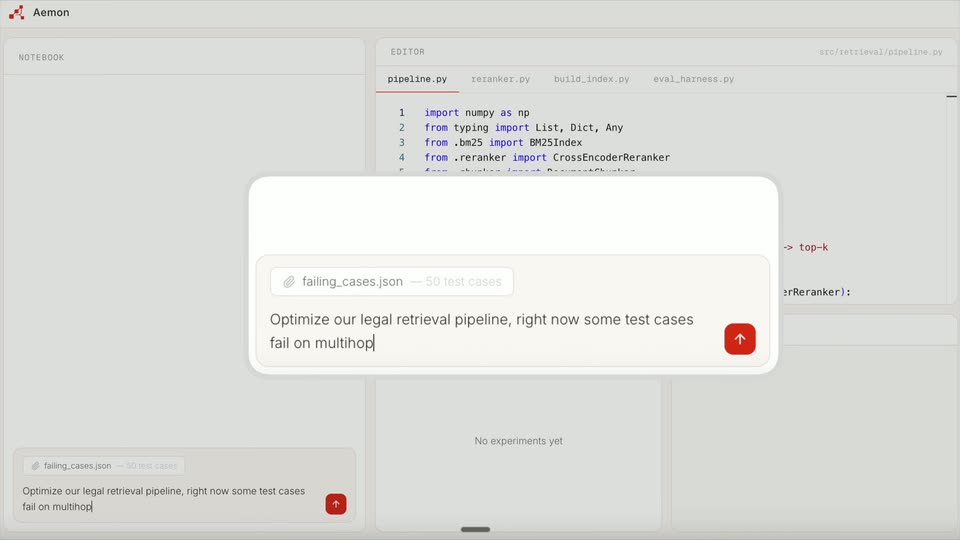
A white prompt dialog floats over the Aemon workspace, which shows a code editor, an empty experiments panel and a terminal. The typed prompt fills in word by word beside an attached failing_cases.json chip and a red send button, mirrored in the bottom input bar.
Techniques: Kinetic type
Camera: Static
05 · Demo · 0:22–0:23
Flat front-on product UI split into notebook, editor, experiments, and terminal panels. A prompt types into the chat input, then submits and pops up as a YOU message bubble with a failing_cases.json chip at the top of the notebook column.
Camera: Static
06 · Demo · 0:23–0:24
The Aemon workspace shows a notebook chat and a Python code editor. An evaluation card slides up over the chat, listing five test cases that mark green PASS, while the terminal types a cd command and shows a running dot.
Camera: Static
07 · Demo · 0:24–0:35
In a three-panel interface, a centered card adds evaluation steps one by one, mirrored in the left notebook, as a terminal progress bar fills. The card fades to expose the code editor, then a review card with action buttons appears in the notebook.
Camera: Static
08 · Demo · 0:35–0:38
A white modal titled Evaluator opens over a blurred app, its Eval Code tab showing Python source. A cursor drifts to the close icon, then the code scrolls down to reveal the evaluate function.
Techniques: Cursor demo
Camera: Static
09 · Demo · 0:38–0:44
A four-panel Aemon workspace fills the frame. The code editor flips between file tabs, the notebook feed scrolls new evaluation cards upward, and the terminal types out commands as a cursor clicks Approve & Lock.
Techniques: Cursor demo
Camera: Static
10 · Demo · 0:44–0:57
A light IDE workspace shows a notebook column, code editor, and terminal. A floating card deck scrolls through observation and diagnosis notes in the center, then fades out as the notebook list scrolls down and the editor switches to pipeline.py.
Techniques: UI zoom
Camera: Static
11 · Demo · 0:57–1:06
A three-pane developer workspace opens with a floating white note card scrolling through labeled research entries in the center. The card fades out to reveal the Python editor and terminal, while the left notebook panel fills with the same entries, ending on a red decision note.
Camera: Pan
12 · Demo · 1:06–1:14
A light app screen with a notebook column, code editor, and terminal. The central Experiments card counts up from 2 to 23 runs as its red line chart climbs from 0.54 to 0.91 and new rows scroll into the list; the terminal appends matching output.
Camera: Static
13 · Demo · 1:14–1:15
A flat multi-pane interface fills the frame: a left notebook lists colored notes, a central card shows a line chart climbing from 0.54 to 1.0 over a run list, and a right terminal types commands and prints recall figures.
Camera: Static
14 · Demo · 1:15–1:22
A four-panel developer workspace settles into place, the editor switching from a red diff to a green one. The terminal card lifts from its panel and floats up in the center of the screen, then docks back as a new result card is added to the notebook.
Techniques: UI zoom
Camera: Static
15 · Demo · 1:22–1:23
A four-panel development interface shows a code editor with a green and red diff, a notebook of experiment notes, a line chart drawing its red curve, and a terminal printing a git diff. A floating command tooltip fades out as the terminal fills in.
Techniques: Split screen
Camera: Static
16 · Demo · 1:23–1:23
A full-screen view of the Aemon interface, with a notebook column on the left, a code editor top right, an experiments chart and a terminal panel below, holds steady. The whole frame then fades to black, closing the shot.
Camera: Static
17 · Demo · 1:23–1:28
A man in a beige cardigan and denim shirt sits at a wooden table, speaking to the camera and gesturing with his hands. Behind him, vertical wood slats and a dark wall frame the shot; a small potted plant and a tablet sit on the table.
Camera: Static
18 · Demo · 1:28–1:31
A two-panel interface: the left card shows a circle-packing animation where pale green circles grow and shift inside a square, with a red progress slider advancing; the right card displays Python code with pink-highlighted lines and its own slider. Iteration counters tick upward in both panels.
Techniques: Split screen
Camera: Static
19 · Demo · 1:31–1:32
A split-screen product interface: the left panel shows a grid of twenty-six circles in a square with a live score, the right panel shows a Python code editor with pink diff highlights. The iteration counter ticks up and the highlighted code line advances as the circles shift.
Techniques: Split screen
Camera: Static
20 · Demo · 1:32–1:38
A split-screen interface shows a live circle-packing simulation on the left, where pale circles grow and rearrange inside a square until the score reads 1.0000457, while a code editor on the right scrolls and highlights red evolve blocks in sync. A results overlay fades out at the start.
Techniques: Split screen
Camera: Static
21 · Other · 1:38–1:39
A two-panel product interface, a circle-packing plot on the left and a code editor on the right, holds the frame, then dissolves to a soft-focus shot of a woman in a cream sweater seated at a wooden desk. The UI fades to a translucent overlay while the live-action room emerges behind it.
Camera: Static
22 · Other · 1:39–1:40
A man in a beige cardigan over a denim shirt sits at a wooden table before a slatted wood and black wall, speaking to camera. He gestures with open hands, then clasps them on the table. Static medium shot, even lighting.
Camera: Static
23 · Other · 1:40–1:43
Three centered words appear one after another on a black background: Hypothesize, then Experiment, then Evolve. Each word holds in place, still and locked-off, before being replaced by the next.
On-screen text: “Hypothesize”, “Experiment”, “Evolve”
Camera: Static
24 · Other · 1:43–1:45
A man in a beige cardigan sits at a wooden table in a wood-slat cafe, speaking to the camera, hands clasped then gesturing. The word Evolve holds large and still on screen throughout the locked-off shot.
On-screen text: “Evolve”
Camera: Static
25 · Other · 1:45–1:46
A glowing crystal cube sits at the center of a dark blue circuit board. Dozens of smaller blue cubes and spheres orbit it, linked by curved cyan arrows that converge inward. The frame zooms out to reveal a dark border around the animation.
Techniques: Particles
Camera: Pull out
26 · Other · 1:46–1:47
A glowing blue wireframe crystal sits at the center, linked by curved light lines to a fan of small cubes and dots on a dark circuit background. A grid of blurred live-action clips (machinery, city, server room) frames the graphic on all four sides.
Camera: Pull out
27 · Other · 1:47–1:47
A 3x3 grid of moving clips fills the frame: a desert rover, a chip in a machine, an aerial city, a green lab, a train tunnel, a drone swarm, a holographic street, and a molecular model. The center cell holds a blue 3D network of a crystal core linked by glowing lines to floating cubes and spheres. The grid eases forward as the cells play their own footage.
Techniques: Split screen, Parallax
Camera: Pull out
28 · Other · 1:47–1:48
A mosaic grid of short clips shows a Mars rover, a chip, city traffic, a green lab, a blue network globe and a factory. The camera pulls back to reveal more tiles around the central globe graphic.
Camera: Pull out
29 · Other · 1:48–1:50
A five-by-five mosaic of looping clips drifts slowly downward. Each tile shows a different technology or science scene: a dam, wind turbines, a Mars rover, a chip, a virus, a cell, a smartwatch, a rainbow cloud, a surgery robot.
Camera: Pull out
30 · Other · 1:50–1:51
A grid of small video clips showing various tech and science themes, like space, robotics, and data, pans across the screen.
Camera: Pull out
31 · Other · 1:51–1:51
A mosaic grid of dozens of short clips, mixing 3D renders, molecular models and cityscapes, fills the frame. The center tiles stay sharp while the outer edges blur radially as the grid rushes outward in a fast zoom.
Camera: Pull out
32 · Other · 1:51–1:52
A dense grid of small video clips fills the frame, each cell showing distinct tech and science imagery such as molecules, circuits, and globes. The whole mosaic pans horizontally across the screen.
Camera: Pull out
33 · Other · 1:52–1:53
A dense mosaic of dozens of small rectangular clips fills the frame, each showing a different technology or science scene such as molecules, servers, drones and robots. The grid drifts slowly across the screen with no added text.
Camera: Static
34 · CTA · 1:53–1:54
The frame cuts from a man in a beige cardigan seated at a wooden table to a black background, where the white Aemon wordmark and a connected-node icon sit at center.
On-screen text: “Aemon”
Camera: Static
35 · CTA · 1:54–1:59
On a black background, the white Aemon logo sits centered while the line Book a demo call at aemon.ai fades in beneath it. Both hold for a beat, then fade together to black.
On-screen text: “Book a demo call at aemon.ai”
Camera: Static