1:49

gurish - Today we are making infinite storage free to use for everyone. 6 mon
Aspect · B2B · Sep 2026
Adam’s 0:53 launch film runs 49 scenes, about 1.1 s each. The product shows up at 0:13. The call to action lands at 0:46 (87% in). The video is a two-act narrative: a fast-cut montage of CAD failures, then two success stories (a phone-made pendant, a laptop-made Pi case) told through extreme macro shots of hands, keys, and glowing pink UI. Signature moves: shallow depth of field, fingertip close-ups, and a pink accent that ties the interface to the physical prints.
Is this your launch? to your site or press kit.
Aspect · B2B · Sep 2026
Pops · Consumer · May 2026
Operon · Industrials
Films whose music sounds like this one, voice left out
Synthesia · Electronic Dance Music
Giga (Scout) · Electronic dance music
Result · Electronic dance music
A man with braids in a dark blue zip-up jacket types on a laptop at a wooden table in a softly lit room. The shot tightens to a close-up of his face as he looks down at the screen.
Camera: Static
Over-the-shoulder view of a person at a desk, the laptop screen showing a purple 3D CAD model of a slotted tray. The camera pushes in to a close-up of the screen, the shoulder blurring the left edge.
Camera: Static
A close-up of a 3D printer head riding a horizontal rail, the scene lit in cool blue. The lighting shifts to a warm amber glow from the nozzle as it works over the build plate.
Camera: Static
A small circular loading spinner of tapered cream segments spins in the center of a black field, a faint warm orange glow shifting around its edge.
Camera: Static
A hand presses a pink sticky note on a white desk, the index finger tapping the paper, a blue pen resting blurred in the dark background.
Camera: Static
A hand pinches a small dark blue device between thumb and finger in a tight close-up. The fingers turn the object upright as the focus racks between hand and gadget. A blurred interior with a bright window fills the background.
Camera: Static
A locked-off close-up of a hand resting on a silver laptop; the index finger taps the trackpad while the black keyboard sits soft-focused at left.
Camera: Static
Extreme close-up of a laptop keyboard, shallow depth of field blurring the upper keys. A finger enters from the top right and taps the Z key, depressing it before lifting. The motion is a single quick keystroke.
Camera: Static
A CAD sketch window with a faint grid and a thin red line sits over a rocky terrain backdrop. A gray error panel with a red circle-X icon settles in, its middle line scaling briefly, above a blue More Info link.
Camera: Static
A man with curly hair and a mustache looks down at a laptop, his face framed by the blurred edge of the screen. Shallow depth of field softens a green plant behind him. He blinks and his eyes shift slightly as he reads.
Camera: Static
A tight close-up of a macOS window titled Autodesk Fusion (Not Responding) holds still while a multicolored beach ball spinner rotates in the center, above a toolbar reading Plastic, Utilities and Manage.
Camera: Static
A man with dark curly hair looks down at a laptop, his face softly lit and partly hidden behind the blurred top edge of the screen in the foreground. The background stays a plain wall with a soft green plant out of focus.
Camera: Static
A close-up of two hands typing on a silver MacBook keyboard under warm light. The screen behind shows a macOS dock with colorful app icons. Fingers press the black keys rhythmically while the camera stays locked off.
Camera: Static
A locked-off close-up of a dark interface input bar shows white text typing out a short message with a blue caret. A plus icon sits to the left, a blue button appears top right, and a purple 3D CAD model rests below the bar.
Techniques: Kinetic type
Camera: Static
Close-up of a dark chat window. A blue sent bubble reads “It keeps hanging” with “Delivered” beneath it. In the input bar, “CAD crashed again. Can you help?” types out letter by letter with a blinking caret, as the frame racks from soft focus to sharp.
Techniques: Kinetic type
Camera: Static
A macro close-up of a fingertip pressing the return key on a dark keyboard, the keycap sinking as the finger taps and lifts. Shallow depth of field blurs the surrounding keys, and a perforated speaker grille sits to the right. The frame stays locked off.
Camera: Static
A hand reaches across a wooden desk and lifts a smartphone off the table. The screen shows a dark recording interface at first, then goes black as the phone is raised. A vintage camera and a red band sit blurred in the background.
Camera: Static
A woman with shoulder-length blonde hair looks down at a smartphone held in her hand, smiling faintly. The phone is blurred in the foreground while her face stays in sharp focus against a bright window and blue curtain.
Camera: Static
A hand holds a phone in a tight close-up, thumb on the keys, while the phrase sunflower pendant types out in a pink-outlined search bar above a white keyboard. The frame stays locked with shallow depth of field.
Camera: Static
Close-up of two hands holding a dark smartphone at an angle over a white table. The on-screen chat shows a greeting and a pink input field; the keyboard collapses and the typed phrase slides into the field as the frame stays locked off.
Camera: Static
Shallow-focus close-up of a hand holding a phone; the Adam app fills the dark screen. A pink 3D pendant spins in the center over the label 'Rendering...' and a bottom pill reads 'Start building with Adam.'
Camera: Static
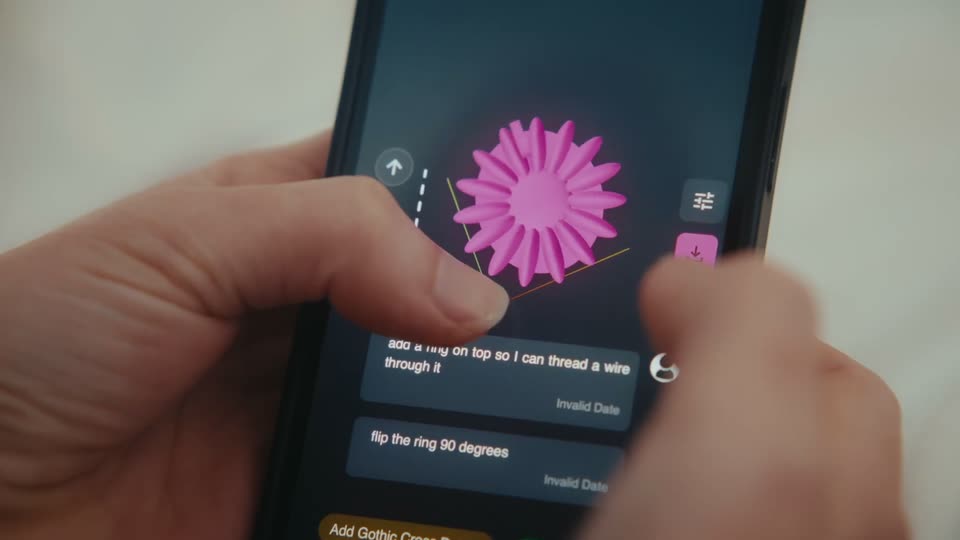
Close-up of a hand holding a phone; two thumbs tap the screen while a pink spiky 3D flower rotates above a list of prompt cards on a dark interface. Thin wire lines around the model shift as the fingers drag it.
Camera: Static
A woman with reddish-blonde hair looks down at a smartphone held in her hand, smiling as she reads the screen. The dark back of the phone, with its camera module, faces the lens. A soft white wall and a dark curtain edge sit behind her in shallow focus.
Camera: Static
A finger taps the PRINT button on a phone screen held in two hands, the button flashing from white to pink on press. Monospaced print settings in red and white fill the dark screen. The shot is a tight, slightly angled close-up.
On-screen text: “adamacad.com”
Camera: Static
Close-up of a Prusa 3D printer with pink frame accents. The black extruder head, labeled PRUSA i3, glides left to right over a metal build plate, laying down a magenta circular filament pattern. The camera stays locked off.
Camera: Static
Close-up of a black Prusa extruder head depositing magenta filament onto a dark grid build plate. The print head shifts slightly as the pink object takes shape. The frame stays locked off against a soft white background.
Camera: Static
A red-haired woman sits on a white bed in a bright room with blue curtains, holding a small 3D printed part toward the camera, then leans down and reaches across as a child's head comes into frame on the bed. A patterned blue pillow sits soft-focused in the foreground.
On-screen text: “ORIGINAL”, “PRUSA”, “Extuder”
Camera: Static
Close-up of a black 3D printer bed holding a pink segmented flexi ball. A hand in a dark sleeve enters from the right and presses the object, compressing its lobes.
Camera: Static
A hand reaches toward a pink 3D printer, then a cut shows a woman in a white shirt and dark jacket holding a red printed flower on a stick. She studies the object and speaks, framed against a white tiled wall.
Camera: Static
Over the shoulder of a person at a laptop, a 3D modeler shows a gray box that switches to a dark diamond shape. A woman in a black blazer stands blurred in the doorway, then the frame cuts to a close-up of her face against a white wall.
Camera: Static
A close-up of a woman with shoulder-length reddish hair, wearing a white shirt and dark jacket, holds a steady gaze just off camera. A white door and dark curtain frame her. She keeps a calm, faintly amused expression as the shot holds.
Camera: Static
A man with curly hair in a navy polo shirt sits in a softly lit room, gesturing with his hand toward a blurred laptop in the foreground. The locked-off medium close-up holds on his face as he points and speaks.
Camera: Static
Two people sit at a dark desk around an open laptop showing the adam app, their hands resting on the keyboard and papers. The screen shifts from a light view to a dark dashboard with a row of colorful cards while the word TRANSPORT scales in.
On-screen text: “TRANSPORT”
Techniques: Kinetic type
Camera: Static
Over-the-shoulder view of two hands typing on a laptop keyboard. The dark screen shows a 'Good Afternoon, Eve' greeting, a magenta-outlined input field with text being typed, and a row of three 3D project thumbnails. The camera stays locked off.
Camera: Static
A dark interface shows a greeting and a subtitle above a rounded input box outlined in glowing pink. Text types out letter by letter inside the box, ending with a blinking cursor, while a Public toggle with a green globe icon sits below.
Techniques: Kinetic type
Camera: Static
Extreme close-up of a finger pressing the backlit return key on a dark keyboard, blue key glow, perforated chassis at right. The fingertip descends and depresses the key in one quick motion.
Camera: Static
A man in a navy work jacket sits at a dark table, looking down at an empty pink box in the foreground. The shot is locked off at low angle, with a leafy plant and bright interior behind him. A large static caption reads return.
On-screen text: “return”
Camera: Static
Two hands in dark sleeves type on a laptop keyboard with blue backlight, the screen blurred behind showing a pink slider and a white pill. The fingers move in a steady rhythm over the keys.
Camera: Static
A close-up of a laptop screen at an angle shows a dark command bar with a glowing pink outline. White text types out a cutout request while three grey suggestion pills sit above and a pink send arrow rests at the right.
Camera: Static
A phone screen shows a dark chat titled Raspi Case. Two user bubbles read, then an AI reply types out and a Standoffs row with two pink 3D case options slides up, the left one ringed in pink. A blurred pink case sits in the background right.
Techniques: 3D mockup
Camera: Static
A laptop on a desk shows a dark design app: a chat column on the left, a pink Raspberry Pi case turning slowly in the central 3D viewport, and a parameters panel on the right. A hand rests on the keyboard while the cursor drifts across the screen.
Techniques: Cursor demo
Camera: Static
A man in a navy work jacket leans over a table, looking down at a pink wooden box with side cutouts. A fiddle-leaf fig plant frames him from the right. The camera holds a low angle near table height while caption text scales in over the shot.
On-screen text: “Raspi Case”, “Create an enclosure for a raspberry pi”, “Add some cutouts for lO ports”
Techniques: Kinetic type
Camera: Static
A macro close-up shows a finger tapping and swiping across a laptop trackpad. The keyboard sits out of focus in the upper right, and the finger moves with a shallow depth of field.
Camera: Static
A tight, angled close-up of a dark settings panel. A white hand cursor drags the pink Pi height slider knob to the right, and the value beside it counts up from 25 to 58 mm. The rows above and below sit soft in shallow focus.
Techniques: Cursor demo
Camera: Static
A man in a navy work shirt leans forward over a pink 3D-printed tray on a dark table, studying it. The low locked-off shot keeps the tray sharp in the foreground while the office, pendant light and leafy plant blur behind him.
Camera: Static
Two hands hold a small pink 3D-printed case with a green circuit board, USB ports and chips, turning it gently over a gray desk. A white caption reads 'Speak anything into existence' centered across the frame, static throughout.
On-screen text: “Speak anything into existence”
Camera: Pull out
A man in a work jacket types on a laptop at a desk as a woman leans over him and her mouth snaps open in surprise. A white URL sits centered over the pair, static. The camera is locked off; only the woman's reaction moves.
On-screen text: “adamcad.com”
Camera: Static
A woman leans over a man at a desk, pointing at a laptop screen with an open-mouthed excited expression, then both smile. The white URL sits centered over them. The desk holds a laptop, a pink box, a pen, and blueprints.
On-screen text: “adamcad.com”
Camera: Pull out
The lowercase wordmark 'adam' holds centered on a black field, the second 'a' built as a pink three-dimensional cube with a dark hole through it. The mark stays still, serving as the closing sign-off.
On-screen text: “adamcad.com”
Camera: Static