0:41

Instant - It’s here: Instant Analytics. Your complete analytics intelligence la
Instant Ai · Aug 2026
Zoho · Sep 2026 · 1:52 · AI-annotated
Zoho’s 1:52 launch film runs 47 scenes, about 2.4 s each. The product is on screen from the first frame and 6 features are revealed. The call to action lands at 1:19 (71% in), over a voiceover. The video is a keynote-style feature reel: a logo open, an Apple context setup, then six back-to-back 'Instead of X' feature blocks, each pairing a blur-in title card with scrolling device mockups, and a closing ecosystem CTA plus logo. Its signature moves are blur-to-focus word reveals, motion-blur horizontal slides, rainbow gradient type, a glowing iridescent orb, and looping vertical card scrolls over alternating white and black fields.
Is this your launch? to your site or press kit.
Instant Ai · Aug 2026
Oki Home · Nov 2026
The Zoho logo, four overlapping rounded squares in red, green, blue and yellow, sits centered on a white background with the ZOHO wordmark below it. The frame is locked off and the mark holds still for the full duration.
Camera: Static
On a white field, the gradient wordmark Apple sits centered, then the line extends rightward with introduced a new way to in dark blue, sliding in with horizontal motion blur before locking still.
On-screen text: “Apple introduced a new way to”
Techniques: Kinetic type
Camera: Static
Two lines of dark, bold text appear centered on a light background, reading 'Apple introduced a new way to interact with apps'.
On-screen text: “Apple introduced a new way to”, “interact with apps”
Camera: Static
On a near-black background with a faint warm glow along the bottom edge, the phrase builds word by word: each word sharpens from a soft blur into crisp white type until the full line is in focus.
On-screen text: “Not just through touch”
Techniques: Kinetic type
Camera: Static
A 3D-rendered hand rises from the bottom and taps the centered white headline, spawning a ring of concentric circles at the fingertip; the hand and text then fade out on the black void.
On-screen text: “Not just through touch”
Camera: Static
On black, the headline “But through” holds above a glowing rounded square whose rainbow border shifts as “AI” slides in, and “Voice. Vision. Context.” scales in word by word below. It cuts to a white field where four overlapping red, green, blue and yellow square outlines glow.
On-screen text: “But through”, “AI”, “Voice. Vision. Context.”
Techniques: Kinetic type
Camera: Static
Four rounded-square outlines in red, green, blue and yellow rotate into place as the Zoho logo on white, the wordmark dropping in beneath. The headline and color-coded OS subline fade in word by word, then a grid of pastel squares fills the frame.
On-screen text: “Zoho bringing it to work”, “iOS 27, iPadOS 27, and macOS 27 Golden Gate”
Techniques: Kinetic type
Camera: Static
A grid of pastel rounded squares sits on white as a white card scales up to hold the headline, which swaps from the first line to a bold title plus a multicolor subline. Three flat phone mockups with app icons then fade in below.
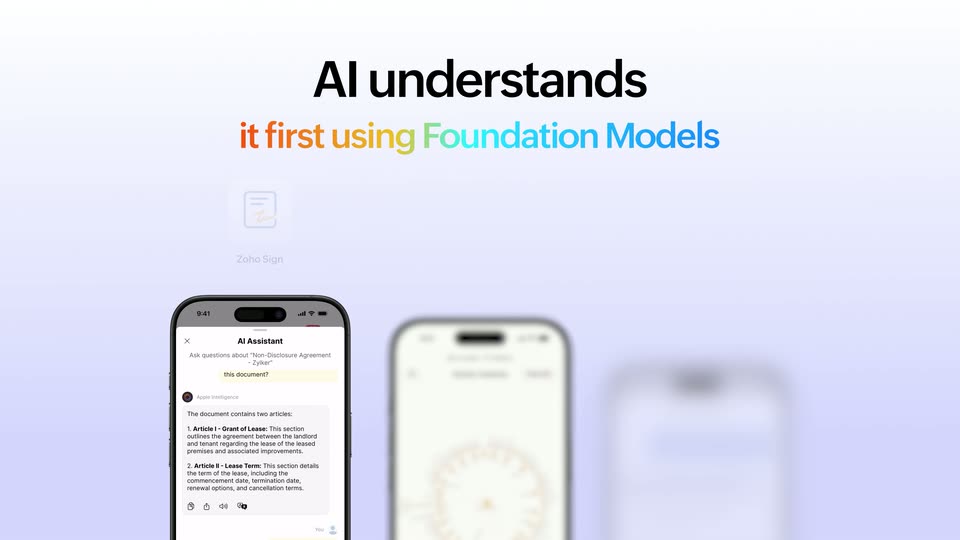
On-screen text: “Instead of reading every page...”, “AI understands”, “it first using Foundation Models”
Techniques: Kinetic type
Camera: Push in
A black headline and a rainbow-gradient subhead sit above a horizontal lineup of app icons and phone mockups in 3D perspective. The icons and phones scroll sideways while the phones sharpen from blur to focus as they reach the center.
On-screen text: “AI understands”, “it first using Foundation Models”
Techniques: 3D mockup
Camera: Pan
A white title card with a black headline and rainbow subline sits above a row of Zoho app icons. Three phone mockups slide down and blur as the icon row expands from three to six apps.
On-screen text: “AI understands”, “it first using Foundation Models”, “Zoho Tables”, “Zoho OneAuth”, “Zoho Translate”, “Zoho Analytics”, “Zoho Desk”, “Zoho Expense”, “Zoho Appgics”
Techniques: Speed ramp
Camera: Static
A light lavender gradient backdrop holds a black headline and a multicolor subline at the top. Three white app icons with fading labels sit above three angled phone mockups showing chat, traffic, and receipt interfaces.
On-screen text: “AI understands it first using Foundation Models”, “Zoho Appics”, “Radar by Zoho Desk”, “Zoho Expense”
Techniques: 3D mockup
Camera: Static
A light lavender card shows the black headline “AI understands” over a gradient line “it first using Foundation Models,” three app icons and three phone mockups; the layout slides left out of frame with heavy motion blur on the phones.
On-screen text: “AI understands”, “it first using Foundation Models”, “Zoho Analytics”, “Radar by Zoho Desk”, “Zoho Expense”
Camera: Static
A hand holds a phone in the center of a dark gradient background. The white headline appears word by word across the top while six app icons fade in around the device on both sides.
On-screen text: “Instead of opening apps...”
Techniques: Kinetic type, 3D mockup
Camera: Pull out
A hand holds a smartphone that rotates to reveal its side, while 3D app icons float into view around the device against a dark background.
On-screen text: “Instead of opening apps...”
Techniques: 3D mockup
Camera: Static
A locked-off close-up of a smiling woman in a tan shirt holding a silver iPhone at chest height, its triple-lens camera back facing the camera against a black background. The caption 'Hey Siri...' fades in over the phone as she speaks.
On-screen text: “Hey Siri...”
Camera: Static
On a black field, the white word Creating... sits centered while four Zoho app cards with speech-bubble tails fade in at the corners, each showing an icon and a short assistant message. The cards brighten from dim to full over the short clip.
On-screen text: “Creating...”
Camera: Pull out
A glowing glass lens with a horizontal rainbow light band sits at the center of a black field. Four rounded chat cards, each tagged with a Zoho app icon, float in the corners and settle into place as the lens brightens.
Techniques: Light sweep
Camera: Static
A glowing multicolor orb sits at the center of a black frame, ringed by four dark chat cards for Zoho CRM, Zoho Tables, Zoho Solo and Zoho Notebook. The grid of cards drifts slowly upward, revealing Zoho Scanner and Zoho Books cards below.
Camera: Pan
A glowing iridescent orb pulses at the center of a black void while flat UI cards and app icons for Zoho Scanner, Zoho One and Zoho Books float around it. The cards drift slowly at different depths, carrying chat prompts and an Invoices Approved panel.
Techniques: Parallax
Camera: Pan
White sans-serif text on a black background assembles word by word across two centered lines. Each word sharpens from a soft horizontal blur into crisp type, completing the sentence before holding still.
On-screen text: “Instead of manually acting on what's on your screen...”
Techniques: Kinetic type
Camera: Static
Two gray lines of text sit on a black background, then give way to a white line that builds word by word, with “Siri” rendered in a rainbow gradient.
On-screen text: “Instead of manually acting on”, “what's on your screen...”, “Siri can see, understand, and act”
Techniques: Kinetic type
Camera: Static
On a black background, the headline builds line by line, the word Siri in a multicolor gradient while the rest is white. A Zoho Notebook icon and the top of its document window rise from the bottom edge.
On-screen text: “Siri can see, understand, and act on what's in front of you using”
Techniques: Kinetic type
Camera: Static
A white headline slides up on black, with “Siri” and “On-Screen Awareness” in an orange-to-blue gradient. Below, app icons for three Zoho apps and a phone, laptop, and tablet rise and scale into place, their screens showing documents with Siri camera overlays.
On-screen text: “Siri can see, understand, and act”, “on what's in front of you using”, “On-Screen Awareness”, “Zoho Expense”, “Zoho Notebook”, “Begin by Zoho CRM”
Techniques: Kinetic type, 3D mockup
Camera: Static
On black, the earlier headline, “Siri can see, understand, and act on what's in front of you using On-Screen Awareness,” fades out. A new white line then types in letter by letter at the left, reading “Instead of typing and searching.”
On-screen text: “Siri can see, understand, and act”, “on what's in front of you using”, “On-Screen Awareness”, “Instead of typing and searching”
Techniques: Kinetic type
Camera: Static
White text is typed out on a black background, then shrinks away as the line 'Your camera becomes the input using Apple's Visual Intelligence' fades in, the last phrase in a warm-to-cool gradient, with a small app icon settling below.
On-screen text: “Instead of typing and searching”, “Your camera”, “becomes the input using”, “Apple's Visual Intelligence”
Techniques: Kinetic type
Camera: Static
White sans headline on black, the first line slides in while the rest holds, then the whole block and a small app icon below fade to black.
On-screen text: “Your camera becomes the input using Apple's Visual Intelligence”
Techniques: Kinetic type
Camera: Static
Three phone camera views sit side by side on black: a lease document, a QR code on brick, a mustard bottle. The right view swaps to a product card with the bottle, Mustard sauce (300ml), $3.50, as the tagline Your camera becomes the input using X slides in.
On-screen text: “Your camera”, “becomes the input using”, “X”
Techniques: Split screen, Kinetic type
Camera: Static
Three phone mockups sit in a row on black. The right one shows a floating window resizing over a camera view. App icons fade in above each phone as the screens switch from live capture to scan results, then the row dims to black.
On-screen text: “Zoho Scanner”, “Zoho Spatial Designer”, “Zoho Solo”
Techniques: Split screen
Camera: Static
“Instead of adapting to the app...” builds word by word with a blur-in on black, then a dark 2x2 grid icon with a resize handle rises from the bottom as “The app adapts to you with” appears, followed by “App Resizability” in red and gold.
On-screen text: “Instead of adapting to the app...”, “The app adapts to you with”, “App Resizability”
Techniques: Kinetic type
Camera: Static
On black, a white headline sits above a coral 'App Resizability' line. Below, a dark rounded dock scales up as six Zoho app icons pop in with their labels, a resize handle marking the right edge.
On-screen text: “The app adapts to you with”, “App Resizability”
Camera: Static
An orange headline and a row of app icons fade out, then white text types in over dark curves: 'Instead of launching an app...' then 'See what matters, at a glance using Extra Large Portrait Widgets,' the last line in a yellow-to-blue gradient. A tan 'Add Widget' button fades in below.
On-screen text: “The app adapts to you with App Resizability”, “Instead of launching an app...”, “See what matters, at a glance using”, “Extra Large Portrait Widgets”
Techniques: Kinetic type
Camera: Static
Three columns of portrait widget cards scroll vertically over a warm gold gradient streaked with thin light lines. Each column cycles through invoice, dashboard and app-list widgets, the frame held locked-off.
On-screen text: “See what matters, at a glance using”, “Extra Large Portrait Widgets”
Camera: Pan
A grid of application interface cards scrolls continuously upwards over a warm, abstract background with glowing, curved lines. The cards display various dashboards and lists, moving in a steady, looping motion.
Techniques: Parallax
Camera: Pan
Three columns of floating app cards in 3D perspective scroll upward over a golden gradient with light streaks. The left holds a directory dashboard, the center a dark file-suggestions panel, the right an invoices list, each tagged with an app name below.
On-screen text: “Zoho Directory”, “Zoho WorkDrive”, “Zoho Billing”
Techniques: 3D mockup, Parallax
Camera: Pan
Three columns of flat Zoho app cards scroll upward at different speeds over a cream and gold wavy abstract background. The panels show user counts, file lists, invoices and a weekly overview as they drift up and out of frame.
Camera: Pan
A plain off-white background holds a centered caption that builds word by word: 'Notice' fades in solid black, then 'what's' appears in light gray to its right. The frame stays locked off throughout.
On-screen text: “Notice what's happening?”
Techniques: Kinetic type
Camera: Static
A centered black headline on a pale gray field. The line 'Notice what's happening?' holds, then fades into 'We're not talking about technologies', words fading in one by one. The phrase then dissolves to 'We're talking about' with a blurred pink-green 'new' sliding in below.
On-screen text: “Notice what's happening?”, “We're not talking about technologies”, “We're talking about”, “new”
Techniques: Kinetic type
Camera: Static
A light gray card holds the centered headline, the lower line set in a red-to-yellow gradient. Six white pill labels naming features drift in from a soft blur and settle around the headline.
On-screen text: “We're talking about”, “new ways of working”, “On-Screen Awareness”, “Foundation Models”, “App Resizability”, “Siri AI”, “Visual Intelligence”, “Extra Large Portrait Widgets”
Techniques: Kinetic type
Camera: Pull out
On a light gray background, a black headline sits at the top. A centered list of phrases slides up line by line; the active line is red, the lines above turn gray. The list ends on 'Building databases' and the frame fades out.
On-screen text: “Try it across the Zoho ecosystem”, “Whether you're closing deals”, “Managing finances”, “Signing contracts”, “Tracking expenses”, “Taking notes”, “Supporting customers”, “Building databases”
Techniques: Kinetic type
Camera: Pull out
A frame of Zoho app icon tiles slides inward from all four edges of a light gray canvas, while the two-line headline fades in word by word from light gray to black in the center.
On-screen text: “These experiences are coming across Zoho”
Techniques: Kinetic type
Camera: Pull out
A plain light-gray background holds a centered sentence that appears in view. The gray sans-serif line reads Apple reimagined how people.
On-screen text: “Apple reimagined how people”
Camera: Static
A plain light gray card shows “Apple reimagined how people” above “interact with apps”; the second line fades in, then both blur out as “We're bringing” blurs in.
On-screen text: “Apple reimagined how people”, “interact with apps”, “We're bringing”
Camera: Static
A plain light-gray frame holds the black headline, which resolves line by line from a soft blur. Product UI cards, a phone with analytics and an invoice list, slide in from the edges to frame the centered text.
On-screen text: “We're bringing those experiences to Zoho”
Techniques: Kinetic type
Camera: Pull out
A centered black headline on white reads 'We're bringing those experiences to Zoho', surrounded by slowly drifting rounded app cards: chat bubbles, an analytics phone, an invoice list, a camera view. A tablet with a document review screen slides up from the bottom.
On-screen text: “We're bringing those experiences to Zoho”
Camera: Static
A MacBook showing a business app sits center frame while an iPad and an iPhone slide up from the bottom corners to flank it. The headline holds still above the devices as they settle into place.
On-screen text: “Work across Apple platforms”
Techniques: 3D mockup
Camera: Static
A black headline reads Work across Apple platforms above a locked-off 3D arrangement of three devices. A laptop shows a contact record with a chat panel, a tablet shows a document with an assistant card, and a phone shows a contact profile with follow-up cards.
On-screen text: “Work across Apple platforms”
Techniques: 3D mockup
Camera: Static
A near-white, faded lineup of a laptop, tablet, and phone under the headline Work across Apple platforms dissolves away. The four overlapping colored squares of the Zoho mark scale up at center, then hold with the ZOHO wordmark beneath.
On-screen text: “Work across Apple platforms”, “ZOHO”
Camera: Static