2:10

Aerogen Systems · Point-of-use contamination control
Aerogen Systems · Industrials · Nov 2026
Zed · Oct 2024 · 1:02 · AI-annotated
Zed’s 1:02 launch film runs 38 scenes, about 1.6 s each. The product is on screen from the first frame and 1 feature is revealed. The call to action lands at 0:59 (95% in). The video is cut as a mock horror trailer: locked-off serif captions on splattered paper alternate with rapid cuts of release notes, terminals, stock shots and live product UI, all paced to a steady 123 bpm pulse. Signature moves are the ink-smudge letter reveals, the walk-in legged editor glyph, and hard cuts between caption cards and product screens.
Is this your launch? to your site or press kit.
Aerogen Systems · Industrials · Nov 2026
Odin Robotics · Industrials · Oct 2026
A black frame holds the uppercase wordmark ZED INDUSTRIES in the lower center, static and locked off for the brief clip.
On-screen text: “ZED INDUSTRIES”
Camera: Static
A dim alley at night, lit by a single overhead lamp casting a cone of light down the wet pavement, fades in from black and holds on a locked-off frame before fading out. The title ZED INDUSTRIES rests centered at the bottom.
On-screen text: “ZED INDUSTRIES”
Camera: Static
A light release-notes interface scrolls upward from the version header through enhancement and bug-fix lists, showing issue links and inline code snippets.
Camera: Static
A release notes page fades in from black, filling the frame with bullet points, blue issue links and an Assets row. The shot stays locked and still.
Camera: Static
A grungy off-white paper texture fills the frame, dark stains and speckles around the edges. A dark ink smudge over the centered caption dissolves, clearing the letters of the line until it sits clean and still.
On-screen text: “BASED ON TRUE EVENTS”
Techniques: Masking
Camera: Static
A product 404 page fades in from a dark, grungy ink-splatter background. A serif “Page Not Found” heading sits above a thin line-drawn 404 with diamond nodes, while the caption “BASED ON TRUE EVENTS” stays locked in the center over the noise.
On-screen text: “BASED ON TRUE EVENTS”
Camera: Static
A locked-off shot of a dark 404 page. A blue serif “Page Not Found” heading sits above a large wireframe 404 with diamond nodes on a faint grid, with small gray helper text below. A faint letter-spaced “BASED ON TRUE EVENTS” line is centered behind the numbers.
Camera: Push in
A centered serif line, WHEN DAEMONS ARE FORKING EVERYWHERE, holds still over a distressed black-and-white paper texture. A white light burst flares and brightens in the middle of the frame behind the words.
On-screen text: “WHEN DAEMONS ARE FORKING EVERYWHERE”
Camera: Static
A high-contrast black-and-white frame with grungy ink borders. A pale ghostly figure with glowing eyes stands at center, half-hidden in shadow. The serif line holds still across the middle of the frame.
On-screen text: “WHEN DAEMONS ARE FORKING EVERYWHERE”
Camera: Static
A full-screen terminal process monitor in green and cyan monospace text fills the frame; a centered white serif caption appears over it while the view pushes closer to the rows.
On-screen text: “WHEN DAEMONS ARE FORKING EVERYWHERE”
Techniques: UI zoom
Camera: Push in
A green-on-black terminal listing processes dissolves into a white paper card with dark ink-stained edges, the terminal faintly visible under the border. The centered serif headline holds on a locked-off frame for the rest of the shot.
On-screen text: “ONE EDITOR STANDS ALONE”
Techniques: Masking
Camera: Static
A centered all-caps serif tagline sits over a grungy, splattered paper texture that shifts subtly, then the frame cuts to a dark webpage view with a left navigation column and a blue “Our Vision” heading and body paragraphs.
On-screen text: “ONE EDITOR STANDS ALONE”
Camera: Static
A dark manifesto page scrolls upward on a plain black field. Gray body paragraphs and blue section headings rise into frame; the first second shows overlapping lines that resolve into a clean, steady scroll.
On-screen text: “Mission-critical tools should be hyper-responsive”, “Real-time collaboration produces better software”, “Conversations should happen close to code”
Techniques: Kinetic type
Camera: Pan
A dark manifesto page of white body copy and blue headings scrolls upward. A large white serif line, ACTUALLY EDITORS ON STANDARD, flashes in the center over the text, then clears as the page keeps moving.
On-screen text: “ACTUALLY EDITORS ON STANDARD”
Techniques: Kinetic type
Camera: Static
On a grungy black-and-white splatter background, the line ACTUALLY EDITORS DON'T STAND stays centered and still while a large rounded square outline with a diagonal slash fades in behind it, holds, then fades out. Locked-off frame.
On-screen text: “ACTUALLY EDITORS DON'T STAND”
Camera: Static
A black line-art chair with zigzag legs on a light gray background shifts vertically, its seat and back sliding in and out of the top of the frame. The gray serif caption ACTUALLY EDITORS DON'T STAND holds centered over the legs for the middle of the shot.
On-screen text: “ACTUALLY EDITORS DON'T STAND”
Camera: Pan
A black line icon of nested rounded squares crossed by a diagonal slash sits on a flat gray field. The mark scales down slightly, revealing two angled legs at its base and the full outline of the symbol.
Camera: Pan
A grungy monochrome ink-splatter backdrop with a faint blurred vertical shape holds the frame. The caption THAT'D BE WEIRD...ANYWAYS sits centered in a thin serif, fading in, while an oversized cropped copy of the line slides out along the bottom edge.
On-screen text: “THAT'D BE WEIRD...ANYWAYS”
Techniques: Kinetic type
Camera: Static
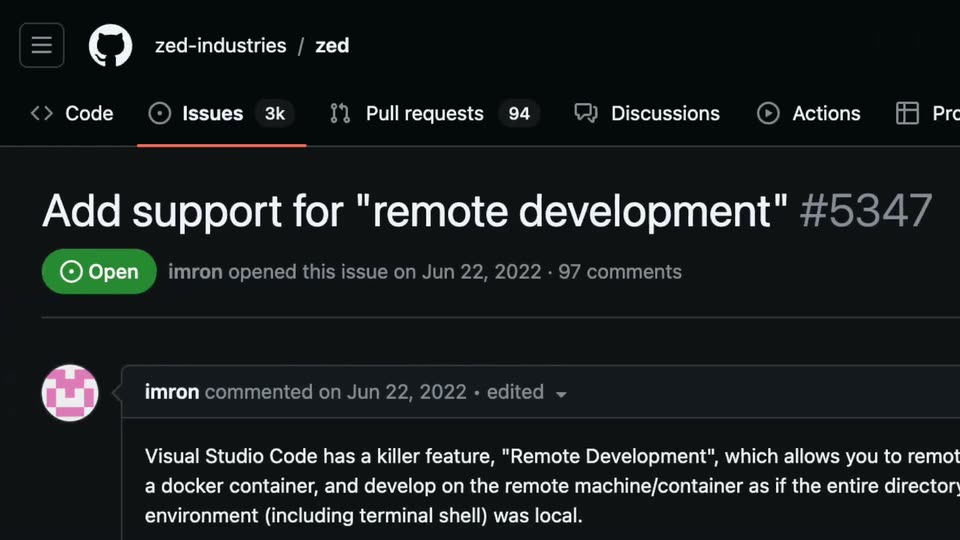
A dark GitHub issue page slides left into frame, settling on the issue 'support for remote development' #34347 with its Open label and opening comment. A small caption 'THAT'D BE WEIRD...ANYWAYS' stays still.
On-screen text: “THAT'D BE WEIRD...ANYWAYS”
Camera: Pan
A grungy off-white paper texture with dark vignetted corners and gray watercolor smudges fills the frame. Centered dark serif text holds still, the two lines settling into place over a brief dissolve.
On-screen text: “SOMETIMES SOFTWARE DEVELOPMENT HAPPENS”, “REMOTELY”
Camera: Static
A locked-off close-up of a black server's drive bays and a row of green status LEDs, with shallow focus blurring the right side. A light caption states that software development sometimes happens remotely, and a numeral 8 scales in beside it.
On-screen text: “8”, “SOMETIMES SOFTWARE DEVELOPMENT HAPPENS”, “REMOTELY”
Techniques: Kinetic type
Camera: Push in
Three glossy green Android robots stand on a flat pink background, the center one larger than the two flanking it. All bob gently up and down while a small numeral scales in. Soft shadows anchor each figure on a locked-off frame.
On-screen text: “8”
Camera: Pull out
A green single-board computer with metal ports and a row of pins rests on a white backdrop in 3D perspective, the view orbiting slowly to reveal its edges and connectors.
Techniques: 3D mockup
Camera: Push in
A dark modal panel scales and slides into the center of a dimmed code editor, its heading and two lines of white text sharpening from a soft blur. The surrounding IDE chrome, top bar and status bar, resolves behind it as the panel locks into place.
Camera: Static
A pale infographic of two bordered boxes slides horizontally across the frame. The left box, headed Your machine, lists local components; the right box, headed Your remote server, lists server components, and a blue arrow marked SSH links the two.
Camera: Pan
A dark editor window holds a centered announcement card framed by two orange jack-o-lanterns. A blue, slightly offset headline reads 'Zed's Remote Development' above body copy and a 'Go to Twitch' button. A four-field countdown ticks at the bottom while faint grid lines fill the black background.
Camera: Push in
A black and white penguin with a yellow beak and feet is centered on a brown wooden plank background, its body overlaid with the same wood grain texture. The penguin eases slightly smaller over the clip.
Camera: Pull out
A silver iMac with a blank teal screen, keyboard and mouse at its base, sits centered on a yellow gradient background. The camera steadily pushes in, cropping the keyboard and mouse out of frame until the display fills most of the shot.
Camera: Static
A dark terminal window holds a system report: a red ASCII logo sits left, red and cyan spec lines list OS, CPU and GPU right, a row of color swatches sits below, and a block cursor rests at the prompt. The frame stays static.
Camera: Pull out
A dark code editor fills the frame, showing a markdown file with ASCII-art text reading SPHERE-STREAM, three lines of LAUNCH PARTY, and a boxed Twitch link. The view zooms in, cropping the file explorer sidebar.
Techniques: UI zoom
Camera: Push in
A dark code editor fills the frame, a file tree on the left, Rust source code in the center pane, a build log in the terminal below, and an AI chat panel on the right. The view holds still.
Camera: Push in
A black line-art calendar icon marked with a Z and a diagonal slash sits on a flat gray field. Two zigzag legs extend from its base, and the whole glyph drifts vertically, the legs stepping as if walking.
Camera: Pan
A dark landing page shows a light-blue serif headline and white body copy sliding in on the left, beside a tilted 3D mockup of the Zed code editor with an open context menu on the right. The editor drifts gently as the text settles into place.
On-screen text: “Available Now in Beta”, “Zed with Remote Development”, “Open a project on any machine you can SSH into, while utilizing the remote server's power for computing.”, “Read the blog post →”
Techniques: Kinetic type, 3D mockup
Camera: Push in
A dark, mottled smoky texture fills the locked-off frame. The serif wordmark ZED REMOTING sits centered in low contrast, fading slowly into view against the murky background with no camera movement.
On-screen text: “ZED REMOTING”
Camera: Static
A grungy off-white paper texture with black ink splatter and a dark vignette fills the frame. The serif title Zed Remoting fades in and out at center, then a centered block of production credits fades in below it.
On-screen text: “Zed Remoting”, “BASED ON”, “iMOVIE AND ZED INDUSTRIES PRESENT”, “A ZED INDUSTRIES PRODUCTION IN ASSOCIATION WITH iMOVIE”, “A ZED FILM”, “Zed Remoting”, “EDITED BY ZED”, “PRODUCTION DESIGNER ZED”, “DIRECTOR OF PHOTOGRAPHY ZED”, “CASTING BY ZED M U S I C BY ZED COSTUME DESIGNER ZED EXECUTIVE PRODUCER ZED WRITTEN BY ZED”
Camera: Static
A dark Zed landing page sits in 3D perspective, a blue serif headline and two buttons on the left, an angled editor mockup with a file tree and open project dropdown on the right. The view pushes in slowly.
Techniques: 3D mockup
Camera: Static
A dark product webpage shows a headline and two buttons on the left, with two overlapping code editor windows in 3D perspective on the right. The camera zooms into the editor windows, pushing the left text out of frame.
Techniques: 3D mockup, UI zoom
Camera: Static
A solid black frame holds for the full duration of the clip. No elements, text, or motion appear; the scene reads as a blank pause or transition between segments.
Camera: Static