1:57

Gagan Biyani 🏛 - Today, we’re launching an ambitious new school called The Horowitz An
The Horowitz Andreessen Academy · Sep 2026
xAI · May 2026 · 0:31 · AI-annotated
voice //t.co/EjxjXssQtd https://t.co/iR8AW2UOgo
xAI’s 0:31 launch film runs 6 scenes, about 5.3 s each. The product is on screen from the first frame and 2 features are revealed. The call to action lands at 0:26 (82% in), over a voiceover. The video holds on a single black field, letting white type slide in, hold, and dim while one fluid red sphere and a dark two-card audio UI carry the visuals. Pacing is slow and even at about 108 bpm, with word-by-word transcript typing and the orange highlight swapping between ORIGINAL and CLONED as the signature moves.
Is this your launch? to your site or press kit.
The Horowitz Andreessen Academy · Sep 2026
Vercel · Developer tools · Jun 2026
Halmos Labs · Healthcare · Oct 2026
On black, the white headline slides in from the left, holds, then fades out. A glowing red and white fluid sphere, a voice waveform, rises from the bottom edge, settles at center and keeps undulating.
On-screen text: “Clone your voice with Grok API”
Techniques: Kinetic type
Camera: Pan
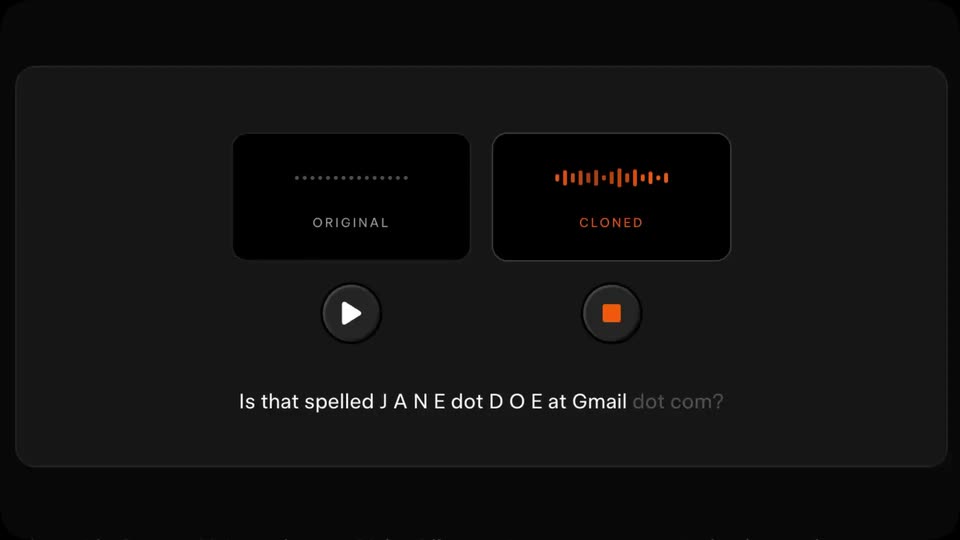
A dark panel holds two side-by-side audio cards, ORIGINAL and CLONED, each with a waveform and play/stop button; the active one glows orange. A red smoke wisp fades from the top as a caption line types the call transcript word by word while the orange highlight swaps between cards.
On-screen text: “Nice to meet you, Jane. How can I help?”, “Okay, let me make sure that I got that right.”, “Is that [email protected]?”, “Is that spelled J A N E dot D O E at Gmail dot com?”, “Let me go ahead and send an authentication code to that email, one sec.”
Techniques: Kinetic type
Camera: Pan
A dark voice-cloning UI with original and cloned cards plus a transcript line fades to black as a large white headline slides up from the bottom into the center.
On-screen text: “Or use our catalog of over 80 voices”
Techniques: Kinetic type
Camera: Pan
A white sans-serif line, “Or use our catalog of over 80 voices”, slides in and holds on a black field. It then gives way to a centered sign-off: “Available now” above the URL x.ai/news/grok-custom-voices.
On-screen text: “Or use our catalog of over 80 voices”, “Available now”, “x.ai/news/grok-custom-voices”
Techniques: Kinetic type
Camera: Static
Two lines of white text hold centered on a black field: a short headline above a long URL. The frame stays locked and still, then the type dims to a dark gray as the scene closes.
On-screen text: “Available now”, “x.ai/news/grok-custom-voices”
Camera: Static
The white Grok symbol and wordmark fade in at the center of a black field and hold still as the closing sign-off. The caption “Available now” and the URL x.ai/news/grok-custom-voices complete the lockup.
On-screen text: “Available now”, “x.ai/news/grok-custom-voices”
Camera: Static