1:18

Inbenta Encore – Cinematic Product Story Video
Inbenta · Jun 2026
Wondersearch · Nov 2026 · 0:28 · AI-annotated
Wondersearch’s 0:28 launch film runs 23 scenes, about 1.3 s each. The product shows up at 0:14 and 5 features are revealed. There is no explicit call to action. A noir problem act of masked letterforms and gold-outlined words flips into a rapid feature parade of 3D-tilted UI cards floating on black, capped by a logo bloom and brand lockup. Signature moves are type filled with moving footage, the recurring Creation of Adam hands as a metaphor for the Mac-cloud gap, and the spectrum rule that underlines every brand card.
Is this your launch? to your site or press kit.
A small white caption sits top-left over a near-black frame. Centered, the word WHERE? assembles letter by letter; each heavy letter is a mask revealing a black-and-white close-up of a person's eyes. The word holds, then the frame cuts to flat beige.
On-screen text: “11:47 PM. Your agent needs one file.”, “WHERE?”
Techniques: Kinetic type, Masking
Camera: Static
A dark, defocused office fills the frame. Small white text reads above a large bold phrase on the left and a matching phrase on the right. A gold-framed sepia clip of a person at a lamp-lit desk hovers between the two phrases, then shrinks and vanishes.
On-screen text: “It's on”, “THIS MAC”, “THE CLOUD”
Camera: Push in
Black background. The word COPY in large gold-outlined sans-serif letters sits center, a grayscale terminal clip visible through the letterforms. Above it, the white caption “Back and forth.” holds still; behind, a blurred shell command and a red error line sit out of focus.
On-screen text: “Back and forth.”, “COPY”
Techniques: Masking
Camera: Static
A darkened, blurred upload dialog sits behind the white caption “Back and forth.” while the gold-outlined word UPLOAD, filled with moving monochrome video, scales in. The background cuts to a blurred file list with a blue-highlighted row and cursor, and the word becomes SYNC.
On-screen text: “Back and forth.”, “UPLOAD”, “SYNC”
Techniques: Kinetic type, Masking
Camera: Static
A dark frame holds blurred chat text in the background while a large gold-outlined word WAT sits center, its letters filled with moving video footage. A small white caption Back and forth. locks above it.
On-screen text: “Back and forth.”, “WAT”
Techniques: Masking
Camera: Static
Classical paintings, including The Creation of Adam, The Last Supper, The Kiss and The Birth of Venus, flash in a rapid montage as vertical wipe bands sweep across the frame. A white caption sits in the lower left over the dark edges.
On-screen text: “Back and forth.”, “WAT”, “that file. Is it on you”, “You can't be in”
Techniques: Masking
Camera: Static
The Creation of Adam fresco fills the frame as a black panel on the right slides away, revealing the full composition and the rest of the top caption. Two lines of gray text sit static over the painting, one near the top edge and one near the bottom.
On-screen text: “You can't be in”, “two places at once.”
Techniques: Masking
Camera: Push in
A cropped fresco of two hands reaching toward each other sits on cracked plaster, each hand framed by yellow corner brackets. Centered dark gray text reads Your files as a faint can. scales in below, the frame locked off.
On-screen text: “Your files”, “can.”
Techniques: Kinetic type
Camera: Static
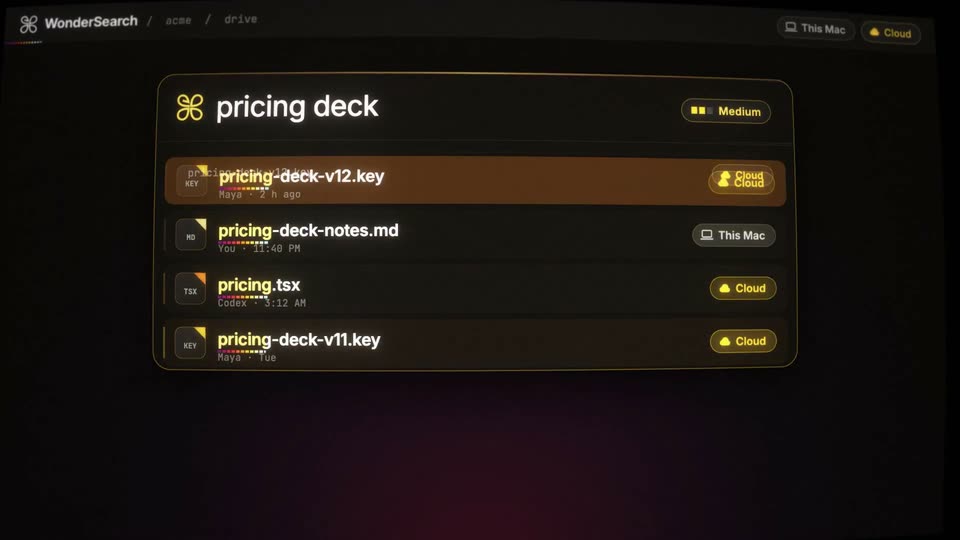
A dark search interface fills the frame at a slight 3D tilt. The query bar types “pricing deck,” a list of matching files slides in, then the view reframes onto a pricing slide preview with a three-bar gradient chart. A glowing tagline sits along the bottom.
On-screen text: “One search.”, “Your files”, “can.”
Techniques: UI zoom
Camera: Static
Two dark file-list panels in 3D perspective slide in from the edges with a trailing stack and settle into left and right views. A glowing white headline “Already there.” pulses above them. Both panels show the same list with the top file highlighted in amber.
On-screen text: “Already there.”
Techniques: 3D mockup
Camera: Static
A glowing white headline crossfades from “Already there.” to “One drive.” above a dark file-list panel. A vertical beam of light with drifting gold particles scans the list, then fades out as the text settles.
On-screen text: “Already there.”, “One drive.”
Techniques: Kinetic type, Particles
Camera: Static
On black, a butterfly mark hovers above the wordmark WonderDrive, its letters filled with footage of hands at work, then wiped to solid white as the type scales up. The tagline fades in below, a row of colored squares appears, and the card fades out.
On-screen text: “WonderDrive”, “Same drive. Your Mac and the cloud.”
Techniques: Masking, Kinetic type
Camera: Static
Glowing white text “Every agent.” holds center on black, then slides to the top as a dark WonderDrive file card slides in from the left, with a fainter Claude Code card resting behind it.
On-screen text: “Every agent.”
Techniques: Kinetic type
Camera: Static
On a black void, a tilted Wonder Drive file list floats center, flanked by two terminal cards, Claude Code left and Codex right, each showing a writing task and a pink waveform. The glowing headline at top swaps from Every agent. to Same files.
On-screen text: “Every agent.”, “Same files.”
Techniques: Kinetic type, 3D mockup
Camera: Static
A glowing yellow headline 'Same second.' sits above floating dark UI cards. A central WonderDrive file list is flanked by three smaller cards for Claude Code, Codex and Cursor, each with a writing status and a colored equalizer bar. The cards drift and tilt in 3D space against black.
On-screen text: “Same second.”
Techniques: Parallax
Camera: Static
On black, a glowing white headline reads One push. above a dark terminal card running a deploy command. The headline flips to yellow Live. as the card status turns Live, the bottom waveform fills orange, and thin concentric arcs ripple out on the right.
On-screen text: “One push.”, “Live.”
Techniques: Kinetic type
Camera: Static
A deploy status card for acme.app glows red under the headline “Broke it?” and a 500 errors tag, then the whole card shatters into scattered cube fragments as “Rewind.” appears top right.
On-screen text: “Broke it?”, “acme.app”, “Rewind.”
Techniques: Kinetic type, Particles
Camera: Pull out
A dark screen shows the glowing yellow Rewind logo with two rewind triangles above a flat terminal card. The card holds a deploy command, white acme.app title, yellow Live v41 restored status, and orange bar squares; the shot sharpens from a soft glow.
Camera: Static
On a black field, the white text One drive stays fixed at left while a gold phrase at right cycles through on your Mac, in the cloud, for every agent, then settles on everywhere. Prior lines ghost behind the active one, and the line fades to black at the end.
On-screen text: “One drive on your Mac”, “One drive in the cloud”, “One drive for every agent”, “One drive everywhere.”
Techniques: Kinetic type
Camera: Static
A reproduction of the Creation of Adam fresco fills the frame on a cracked, aged plaster surface. The camera pushes in slowly on the two reaching hands. At the gap between the fingertips a bright orange spark ignites and glows.
Techniques: Light sweep
Camera: Push in
A bright white orb glows at the center of a cracked, earthy surface. It bursts into a pixelated cloud of yellow, white and cyan pixels, the scalloped mosaic edge expanding outward until it fills the frame.
Techniques: Particles
Camera: Pan
A bright white bloom with a horizontal flare streak sits at the center of a black field. The bloom condenses into a glowing four-loop butterfly-shaped logo outline as the streak fades, leaving the neon outline alone on black.
Techniques: Light sweep, Morph
Camera: Static
A silver four-loop knot logo glows at center on black as a light sweep crosses it. Below, the title WonderDrive, a rainbow dashed rule, the tagline Coming soon. and the URL fade in and lock off.
On-screen text: “WonderDrive”, “Coming soon.”, “wondersearch.com”
Techniques: Light sweep
Camera: Static