1:12

Introducing our Shopify Integration
Lovable · Developer tools · Oct 2025
Viggle Remake · Nov 2026 · 0:54 · AI-annotated
Viggle Remake’s 0:54 launch film runs 44 scenes, about 1.2 s each. The product is on screen from the first frame and 4 features are revealed. The call to action lands at 0:49 (91% in). The video runs at a driving 152 bpm with roughly 34 cuts a minute: a titled chase opener, a chat interface tour, then four captioned feature montages that each stack before and after transforms. Signature moves are the green selection grid, vertical split wipes, and hard cut morphs that land on the beat.
Is this your launch? to your site or press kit.
Lovable · Developer tools · Oct 2025
Runway · AI · May 2026
Spline · Design · Apr 2025
POV from a car hood with a red-and-blue light bar, tracking a white sedan down a rural two-lane road. The bold title REMAKE holds centered and flashes with a horizontal white blur as the camera pushes forward.
On-screen text: “REMAKE”
Techniques: Light sweep
Camera: Push in
Point-of-view from a police car's hood, light bar glowing, driving a two-lane rural road behind a white sedan. A large white REMAKE wordmark sits centered over the windshield while a small VIGGLE logo scales in above it.
On-screen text: “REMAKE”, “VIGGLE”
Camera: Push in
A silver sedan sits on a country road beside a green field, the large white word REMAKE stretched across its body with a brief chromatic glitch that clears. The small VIGGLE logo scales in above the roofline as the view shifts to look at the car through a reflective window.
On-screen text: “REMAKE”, “VIGGLE”
Techniques: Kinetic type
Camera: Push in
Through the car window, a curly-haired man in a grey hoodie grips the wheel with both hands, his face tense. A translucent overlay of the car body fades from the lower frame over the first third.
Camera: Static
A man in a flat cap and round glasses drives a car, framed through the side window with a faint reflection. His face cross-dissolves into a French bulldog's face while his hands remain on the wheel.
Techniques: Morph
Camera: Static
Through the driver's side window, an orange tabby cat in silver armor and a white cape grips the steering wheel, a pink bow on its head. The shot cuts to a brown dachshund in a pink hoodie taking the same seat, paws on the wheel.
Camera: Static
A fluffy cream and brown cat with blue eyes sits upright in a car's driver seat, paws resting on the steering wheel. Filmed through the open window, the background shows a quiet suburban street with trees and a house, held in a steady medium shot.
Camera: Static
Two police officers in dark navy uniforms lean over an open car window, framed by the roofline. The mustached officer holds a lit flashlight toward the camera; the officer beside him turns her head to look at him. The shot is locked off against a soft sky and trees.
Camera: Static
A white prompt card sits on a cream grid. A green logo and 'What should we remake?' slide in above it. The card expands to show a dark thumbnail and the typed prompt 'Remake the fight scene'; a plus button and a green send arrow appear.
Camera: Pan
A white prompt card on a cream grid shows the typed text fight scene beside a green up-arrow button; the cursor clicks it, the card shrinks to a small loading chip, then becomes a green-bordered video of a hooded figure as two blank cards slide in from the left.
Techniques: Cursor demo, Morph
Camera: Push in
A two-panel interface: the left white panel shows a small video thumbnail with the caption 'Remake this fight scene' and a 'Making It...' status appearing above an input box. The right panel holds the same blurry clip under a green dot grid with a glowing green border.
Techniques: Split screen
Camera: Static
A two-pane interface shows a chat panel on the left and a video preview on the right. The video, a dim Japanese room with two people, brightens as a cursor drifts across it; the chat displays a thumbnail, a prompt, and an empty input field.
Techniques: Cursor demo
Camera: Static
A split view pairs a cream chat panel on the left with a video preview on the right. A cursor drags a green box over a man's head, then the preview swaps his head for a panda and renders the scene as LEGO, while chat messages type in.
Techniques: Cursor demo
Camera: Static
A split view pairs a left chat panel with a right video. The chat logs a conversation rebuilding a scene in LEGO, and the input box types 'Love it. Try Minecraft'. On the right, LEGO minifigures fight in a wooden dojo as the camera pulls back to reveal the hall.
Techniques: Split screen
Camera: Static
A split screen displays a chat interface on the left and a 3D animated LEGO scene on the right. Two minifigures walk forward in a dojo as text messages appear in the chat panel.
Techniques: Split screen
Camera: Static
A split screen pairs a chat panel on the left, where prompts and replies update line by line, with a blocky Minecraft-style dojo scene on the right where two characters turn and walk.
Techniques: Split screen
Camera: Static
A split screen pairs a chat panel on the left, where a user requests edits, with an illustrated restaurant fight scene on the right. The man in blue swaps to a panda head, then the whole scene re-renders in a bold inked comic style, matching the chat prompts.
Techniques: Split screen
Camera: Push in
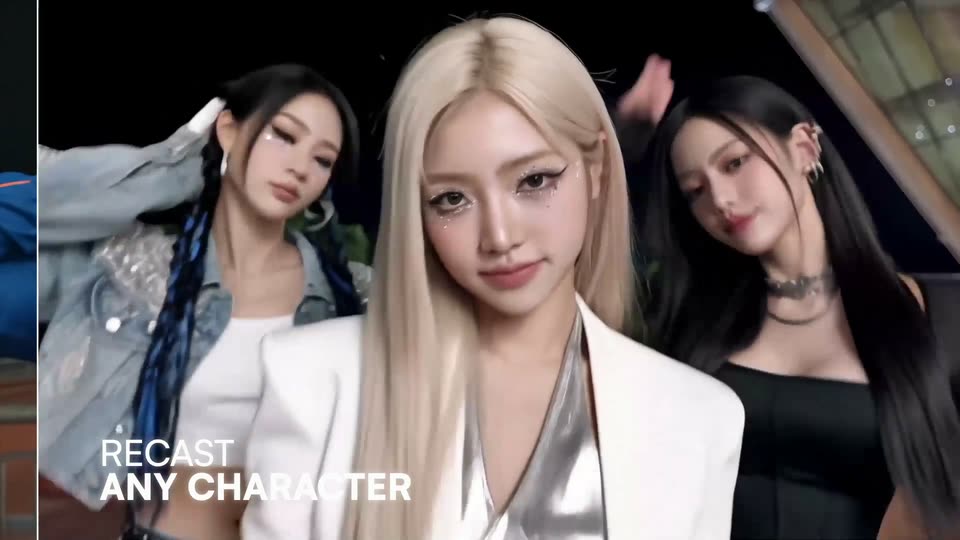
Three women hold posed stances at night, the center blonde in a white blazer facing the camera while the two dark-haired women flank her, turning their heads with a slight motion blur. The caption RECAST ANY CHARACTER sits in the lower left.
On-screen text: “RECAST”, “ANY CHARACTER”
Camera: Push in
A vertical split-screen divides a night shot of a group, the bald man in a pink headband and handlebar mustache straddling the center line. The split closes to one frame as the right figure swaps from a woman to a man in green. A white caption holds at lower left.
On-screen text: “RECAST ANY CHARACTER”
Techniques: Split screen
Camera: Push in
A bald man in a pink terry headband and tank top, wearing a large curled mustache prop, stares at the camera on a night running track and blinks once. The shot is a steady close-up with trees and floodlights blurred behind him.
On-screen text: “RECAST”, “ANY CHARACTER”
Camera: Static
On a floodlit night court, a man in a white shirt, suspenders and boots dribbles past a long-haired, white-bearded defender as a seated crowd watches. The camera tracks his drive. White text reads RECAST ANY CHARACTER in the lower left.
On-screen text: “RECAST ANY CHARACTER”
Camera: Pan
On a night basketball court, a suited man leaps toward the hoop while a long-haired man watches. The shot shifts to a purple negative grade as he lands and another suited figure holds the ball before a crowd.
On-screen text: “RECAST”, “ANY CHARACTER”
Camera: Static
A man in a gray suit and handlebar mustache sits in a black chair at center, speaking and raising his hand, while six men in Renaissance costumes stand and sit around him against a green curtain backdrop. White text reads RECAST ANY CHARACTER in the lower left.
On-screen text: “RECAST”, “ANY CHARACTER”
Camera: Static
A mustached man in a grey suit sits center in a gaming chair, hand on his head, mouth open, ringed by actors in Renaissance costume. The left group of figures swaps to famous icons, the Statue of Liberty and Frida Kahlo, while the right side holds, illustrating the recast.
On-screen text: “RECAST”, “ANY CHARACTER”
Techniques: Morph
Camera: Static
A woman in a brown dress sits in a black chair, mouth open, waving her hand, flanked by figures dressed as the Statue of Liberty, Frida Kahlo, a tiara-wearing princess, and other characters; two women in period dress sit at the edges. White headline text sits in the lower left.
On-screen text: “RECAST”, “ANY CHARACTER”
Camera: Static
A stylized animated ship deck at dusk fills the frame. A figure in white and brown tumbles through the air at upper right while a large red-clad arm grips a sword blade at lower left. The lower-left caption swaps from RECAST ANY CHARACTER to RESTYLE ANY VIDEO.
On-screen text: “RECAST”, “ANY CHARACTER”, “RESTYLE”, “ANY VIDEO”
Camera: Pan
A low-angle animated ship deck shows a man in a red shirt and a blond man on the railing. The frame splits vertically, live action footage on the left and the cartoon restyle on the right, while the caption RESTYLE ANY VIDEO sits in the lower left.
On-screen text: “RESTYLE”, “ANY VIDEO”
Techniques: Masking, Split screen
Camera: Pan
A person in a cream shirt throws a high kick at a shirtless opponent on a rain-soaked ship deck, then drops into a low crouch. A stormy sky and churning sea fill the background. White text sits in the lower left corner.
On-screen text: “RESTYLE”, “ANY VIDEO”
Camera: Pan
A teal 3D mannequin stands in a dark box-like corridor, seen from a high angle, and waves one hand while the other grips a gray ledge. The camera holds still as the figure's arm moves up and down.
On-screen text: “RESTYLE”, “ANY VIDEO”
Camera: Static
A low-angle 3D boy in a blue hoodie leans into a cardboard box, his hand reaching toward the camera. The plain teal model morphs into a comic-book style with bold outlines, halftone dots and saturated colors. White text sits in the lower left.
On-screen text: “RESTYLE”, “ANY VIDEO”
Techniques: Morph
Camera: Static
A red-haired boy in a blue hoodie leans over the rim of a cardboard box, seen from inside, and lowers a red and white spinning top toward the floor. The sky behind him is blue with soft sunset clouds. White text sits in the lower left corner.
On-screen text: “RESTYLE”, “ANY VIDEO”
Camera: Static
Inside a cockpit, a figure aims a blaster with a red sight at a large ship seen through a circular window. The handheld shot shakes as the camera tracks the weapon. A white caption sits in the top-left corner.
On-screen text: “SWAP ANY OBJECT”
Camera: Static
A battered white dish-hulled starship tilts and rotates slightly on a dusty desert plain, small figures running in the foreground and a dust cloud rising behind it. White text reads SWAP ANY OBJECT in the upper left corner.
On-screen text: “SWAP”, “ANY OBJECT”
Camera: Push in
A giant pepperoni pizza cut into the shape of the Millennium Falcon rests on a dusty desert set. A vertical wipe reveals the pizza texture from left to right, replacing the ship, while dust billows along its base.
On-screen text: “SWAP”, “ANY OBJECT”
Techniques: Masking
Camera: Push in
A giant pizza fills the frame, then the view cuts to a top-down shot of a woman lying on a patterned rug. Her outfit changes three times, each swap marked by a dotted selection grid over her body, while a ceiling fan blade sweeps across the foreground.
On-screen text: “SWAP ANY OBJECT”
Camera: Static
A dusty car interior with a man driving and a woman talking, shot against a green screen. A vertical wipe splits the frame, revealing a composited forest road on the left while the right stays green screen. White callout text sits in the top-left corner.
On-screen text: “SWAP ANY OBJECT”, “ADD ANY VFX”
Techniques: Split screen, Masking
Camera: Static
A man grips the wheel of a dusty car while the woman beside him gestures mid-conversation, shot through the windshield against a winding roadside. White text reads ADD ANY VFX in the upper left.
On-screen text: “ADD”, “ANY VFX”
Camera: Static
A performer in black is suspended by wires in a horizontal flying pose above blue crash mats, a large fan blowing on them, two crew members holding the lines against a green screen. The white text ADD ANY VFX holds top left.
On-screen text: “ADD ANY VFX”
Camera: Static
A woman in a dark jacket flies level through a bank of clouds, arms stretched forward. A green screen panel with camera rigs frames the right edge, then both it and the top-left caption fade out, leaving the full composite.
On-screen text: “ADD ANY VFX”
Techniques: Split screen
Camera: Pan
A man in a black hoodie grips a large gray T-rex head prop against a green screen, pushing it downward with visible motion blur. White X tracking markers dot the backdrop.
On-screen text: “ANY VFX”, “ADD”
Camera: Static
A man in a dark hoodie leans his face into the open jaw of a large white creature prop with rows of teeth, grinning. The handheld shot is set on a grassy field with trees behind. A green vertical bar with a small 'x' slides along the right edge.
On-screen text: “x”
Camera: Pan
A black raptor with yellow eyes stands on a grassy lawn under trees. A pale green mask slides off its head to reveal the creature, then the shot pushes in to a tight close-up of its snout and jaw.
Techniques: Masking
Camera: Pan
A plain black background holds a single line of white text centered in the middle of the frame.
On-screen text: “Remake anything on vigggle.ai”
Camera: Static
The white VIGGLE wordmark sits centered on a black background, held static as the closing sign-off.
On-screen text: “VIGGLE”
Camera: Static