
2:39
Explore
Verdun launch film
Verdun · 1:59 · AI-annotated
- Length
- 1:59
- Scenes
- 26 · 4.6 s avg
- Product on screen
- 0:41
- Features shown
- 2
- Voiceover
- Yes
00:00:00 / 01:59:00
- Length
- 1:59
- Scenes
- 26 · 4.6 s avg
- Product on screen
- 0:41
- Features shown
- 2
- Voiceover
- Yes
Verdun’s 1:59 launch film runs 26 scenes, about 4.6 s each. The product shows up at 0:41 and 2 features are revealed, with social proof. There is no explicit call to action; a voiceover carries the film. A dark, data-driven launch film built on a near-black navy field with white sans-serif headlines and thin blue and amber accents. It opens on a grainy security-camera break-in, then explains the queue problem with flat infographics before revealing the real console in a slow 3D push-in, and closes on founder talking heads and the logo. Pacing is deliberate (about two cuts per minute) with long holds, and the signature moves are the 3D camera tilts and zooms through the interface plus the line-by
Footage neededEstimated needs: 3 capture groups — your screens or recordings · 1 official logo — reused across the film · 5 filmed passages — shoot, supply or replace · 5 graphic passages — draw or supply · 1 3D passage — build or supply
Is this your launch? to your site or press kit.
More like this



Verdun launch film, scene by scene
· 26 scenes as text
01 · Hook · 0:00–0:02
A high-angle security-camera view of a dark dealership garage packed with parked cars, framed by a HUD overlay with a red record dot, a camera label and a running timestamp. A figure walks through the aisles toward an SUV while the clock ticks forward.
On-screen text: “IRONWOOD AUTO · INVENTORY GARAGE · CAM 06”, “09/24/2026 02:07:14”, “ILLUSTRATIVE SCENARIO”
Camera: Static
02 · Hook · 0:02–0:04
Grainy overhead security camera view of a car dealership garage at night, luxury cars parked in marked bays. A person in a gray hoodie walks across the lot from center to right. A camera label and ticking timestamp sit at the top, 'ILLUSTRATIVE SCENARIO' at bottom left.
On-screen text: “IRONWOOD AUTO · INVENTORY GARAGE · CAM 06”, “09/24/2026 02:07:16”, “ILLUSTRATIVE SCENARIO”
Camera: Static
03 · Hook · 0:04–0:06
High-angle security-camera view of a packed dealership garage at night. The timestamp ticks from 02:07:18 to 02:07:19 while a red INTRUDER DETECTED box scales in over a silver sedan. The frame stays locked off.
On-screen text: “IRONWOOD AUTO · INVENTORY GARAGE · CAM 06”, “09/24/2026 02:07:18”, “ILLUSTRATIVE SCENARIO”, “INTRUDER DETECTED”
Camera: Static
04 · Hook · 0:06–0:08
A static high-angle security camera view of a nighttime car inventory garage. A red SUV is outlined by a red bounding box with an INTRUDER DETECTED tag as a person sits inside it. The feed stays fixed while the timestamp ticks forward.
On-screen text: “ILLUSTRATIVE SCENARIO”
Camera: Static
05 · Hook · 0:08–0:08
A high-angle security camera view shows a car inventory garage packed with parked vehicles. A red bounding box labeled INTRUDER DETECTED frames a red SUV on the right. The feed then tightens inside a black letterbox border.
On-screen text: “ILLUSTRATIVE SCENARIO”
Camera: Pull out
06 · Problem · 0:08–0:09
A dark monitoring dashboard assembles on screen. Left side holds a large white 19 over the caption alarms awaiting review. Right side a table lists six alarm events with status tags and wait times, each row paired with a video thumbnail. The opening garage shot settles into the bottom row as a thumbnail.
On-screen text: “ILLUSTRATIVE SCENARIO”
Camera: Pull out
07 · Problem · 0:09–0:22
A dark alarm-queue dashboard splits the frame: a large counter on the left ticks upward while a six-row event list on the right scrolls as alarms clear. Headlines fade in over the counter, category tags highlight in turn, then the counter turns gold and jumps rapidly (40, 73, 118) under a TIME COMPRESSED tag.
On-screen text: “ILLUSTRATIVE SCENARIO”, “Operators clear alarms one at a time.”, “The real threat waits its turn.”, “TIME COMPRESSED”
Techniques: Speed ramp
Camera: Static
08 · Problem · 0:22–0:35
A dark infographic builds in sequence: a headline sits above an empty line chart, then a blue alarm curve draws in over a dashed capacity line, shading the backlog. Three cards then list corner-cutting tactics on the right, each with an icon and an amber tag, while captions appear beneath the chart.
On-screen text: “Monitoring centers can’t add seats.”, “Hiring takes months.”, “Spikes take minutes.”, “SO THEY CUT CORNERS”, “Mute busy cameras”, “Fewer alarms reach the queue.”, “YOU LOSE COVERAGE”, “Move operators offshore”, “Cheaper seats. Same queue math.”, “QUALITY DROPS”
Camera: Static
09 · Problem · 0:35–0:41
A white headline “Daytime: no coverage.” fades in at the upper left over a near-black field, with a caption line appearing beneath it. A 24-hour timeline bar below shows “Monitored” edges while the middle segment fills with tan diagonal hatching labeled “Not covered.” The scene fades out.
On-screen text: “Daytime: no coverage.”, “Most monitoring companies don’t offer it. There’s too much activity for human operators.”, “ILLUSTRATIVE SCENARIO”
Techniques: Masking
Camera: Static
10 · Product intro · 0:41–0:42
A dark text card with a headline and a caption line fades to black, then a small gray V logo mark fades in at the center of the frame.
On-screen text: “Daytime: no coverage.”, “Most monitoring companies don’t offer it. There’s too much activity for human operators.”
Camera: Static
11 · Product intro · 0:42–0:45
The Verdun logo settles at the top with the tagline fading in beneath, then an illustrated control room fades in below: four monitors with dashboards and camera feeds, two silhouetted operators with headsets, a night window at right.
On-screen text: “The world's most advanced monitoring center.”
Camera: Static
12 · Product intro · 0:45–0:51
A dark flat illustration shows four monitors with the console behind two silhouetted operators. Boxed labels for AI agents and operators pop in with connector lines, and a bottom caption fades in word by word beneath the static headline.
On-screen text: “The world's most advanced monitoring center.”, “+ AI AGENTS”, “ILLUSTRATION - REAL CONSOLE ON SCREENS”, “+ HIGHLY TRAINED OPERATORS”, “So your alarms never get buried in a queue.”
Techniques: Kinetic type
Camera: Static
13 · Demo · 0:51–0:52
A dark 3D room shows a row of monitors with a security interface and silhouetted operators, annotated with text labels. The camera zooms into one monitor to show a close-up of the interface.
On-screen text: “verdun”, “The world's most advanced monitoring center.”, “+ AI AGENTS”, “+ HIGHLY TRAINED OPERATORS”, “ILLUSTRATION - REAL CONSOLE ON SCREENS”, “So your alarms never get buried in a queue.”
Techniques: UI zoom
Camera: Push in
14 · Demo · 0:52–0:53
A dark security dashboard shows the Starred tab of an Alarm Queue, with three incident rows pairing grayscale camera thumbnails, severity tags and review buttons. The frame slowly pushes in on the list as the top navigation crops out of view.
Techniques: UI zoom
Camera: Pull out
15 · Demo · 0:53–0:58
A dark security console tilts in 3D, then the camera pushes into the Alarm Queue list as an AGENT VERDICT callout highlights each card's AI disposition. The view pans right and zooms into the Agent Settings panel's incident routing chips.
On-screen text: “REAL PRODUCT - CUSTOMER NAMES CHANGED”, “AGENT VERDICT”, “THIS CAMERA'S PROTOCOL”
Techniques: 3D mockup, UI zoom
Camera: Push in
16 · Demo · 0:58–0:59
A dark settings panel titled 'This Camera's Protocol' holds on screen, its Agent Settings section framed by a blue outline. A blurred black-and-white camera feed plays behind it on the left.
On-screen text: “REAL PRODUCT - CUSTOMER NAMES CHANGED”
Camera: Static
17 · Demo · 0:59–1:04
A dark list of alarm cards fills the frame, the view pushing in until one row is framed by a glowing outline. A callout tag pops in over the row, then jumps down to the explanation text.
On-screen text: “REAL PRODUCT - CUSTOMER NAMES CHANGED”, “AUTO-DISMISSED”, “AGENT'S REASONING”
Techniques: UI zoom
Camera: Pull out
18 · Demo · 1:04–1:04
A dark alarm list highlights one row, then zooms into a split detail view: a video clip on the left tracks a hooded figure reaching toward a truck with a dashed bounding box, while a chat thread and agent settings panel fill the right.
On-screen text: “REAL PRODUCT - CUSTOMER NAMES CHANGED”
Techniques: UI zoom, Split screen
Camera: Pan
19 · Demo · 1:04–1:08
A security dashboard shows a night-vision feed of a man reaching into a white pickup's window, framed by a purple zone mask and a blue AI bounding box. The view reframes to reveal an ESCALATED header and a right-hand panel holding an auto-drafted message to the property owner.
On-screen text: “REAL PRODUCT - CUSTOMER NAMES CHANGED”
Techniques: UI zoom
Camera: Push in
20 · Demo · 1:08–1:15
A dark security console fills the frame. The view zooms and pans across the interface, stopping on the event header, the pipeline timing, the drafted owner text, the live video with an AI box, and the police dispatch panel. Blue pill callouts pop in to tag each part.
On-screen text: “ESCALATED”, “REAL PRODUCT - CUSTOMER NAMES CHANGED”, “MOTION TO OPERATOR: 16 S”, “LIVE VIEW”, “POLICE DISPATCH”
Techniques: UI zoom
Camera: Pull out
21 · Demo · 1:15–1:22
A close-up of a drafted notification panel reframes into the full alarm queue list, tilted in 3D perspective, as a blue timestamped callout points to the time column. A small disclaimer caption sits at the bottom left.
On-screen text: “REAL PRODUCT - CUSTOMER NAMES CHANGED”, “DRAFTED BY THE AGENT”, “TIMESTAMPED”
Techniques: UI zoom, 3D mockup
Camera: Pull out
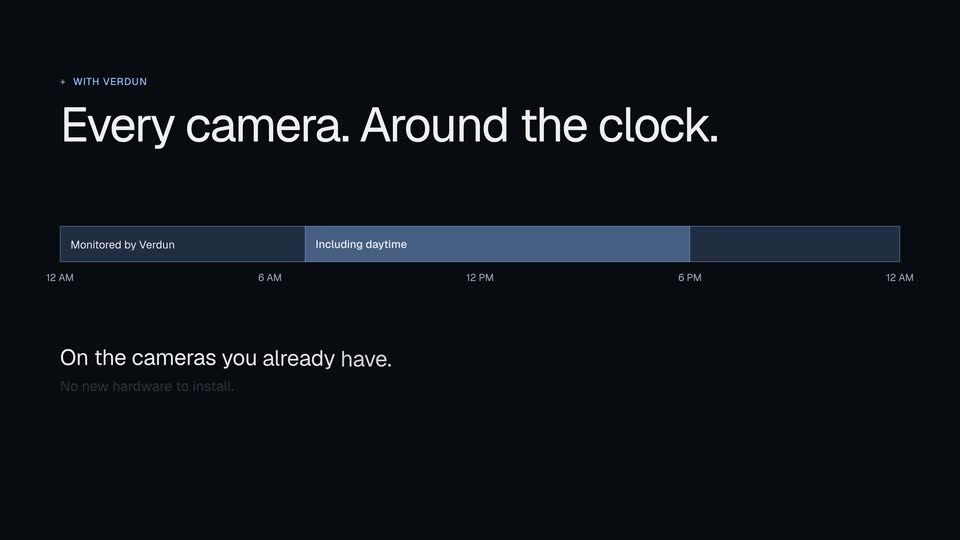
22 · Feature reveal · 1:22–1:28
A dark navy background holds a white headline that reads in, then a timeline bar fills left to right with segments labeled “Monitored by Verdun” and “Including daytime” typed in. A second line and caption appear below, and the scene fades to black.
On-screen text: “+ WITH VERDUN”, “Every camera. Around the clock.”, “12 AM”, “6 AM”, “12 PM”, “6 PM”, “12 AM”, “Monitored by Verdun”, “Including daytime”, “On the cameras you already have. No new hardware to install.”
Techniques: Kinetic type
Camera: Static
23 · Feature reveal · 1:28–1:32
A near-black plain background holds a two-line headline that fades in from dim to full brightness over the first second, then stays locked. The line 'in under 90 seconds.' carries '90 seconds' in blue while the rest is white.
On-screen text: “Every alarm reviewed”, “in under 90 seconds.”
Camera: Static
24 · Social proof · 1:32–1:33
On a dark background, the headline 'Every alarm reviewed in under 90 seconds.' holds left of center as two portrait video clips of team members fade in, each framed by thin corner brackets.
On-screen text: “THE TEAM”, “Every alarm reviewed”, “in under 90 seconds.”
Camera: Static
25 · Social proof · 1:33–1:51
Two portrait cards sit side by side on a dark field under a blue THE TEAM label. The left card plays a talking head, Sonny Tai, while the right holds a still photo of Tung Hoang. Names, titles, and credential bullets fade in beneath each card in sequence.
On-screen text: “THE TEAM”, “Sonny Tai”, “CO-FOUNDER & CEO”, “Former US Marine officer”, “Founded Actuate - computer vision for physical security”, “Tung Hoang”, “CO-FOUNDER & CTO”, “PhD, Applied Mathematics”, “National Math Olympiad Gold Medalist”, “Senior AI Engineer at WeWork, VergeSense, and LinkedIn”
Techniques: Split screen
Camera: Static
26 · Outro · 1:51–1:59
On a near-black background, the white Verdun wordmark with its V mark fades in at center, then the smaller Backed by Y Combinator line appears beneath it. The lockup holds still for several seconds before fading out.
On-screen text: “verdun”, “Backed by”, “Y”, “Combinator”
Camera: Static