3:24
Explore
David - Introducing jevgrep - a research agent CLI powered by jev from @types
TypeSafe AI · Sep 2026 · 0:30 · AI-annotated
- Length
- 0:30
- Scenes
- 15 · 2.0 s avg
- Product on screen
- 0:00
- Features shown
- 1
- Call to action
- 0:26 · 87%
- Voiceover
- No
00:00:00 / 00:30:36
TypeSafe AI’s 0:30 launch film runs 15 scenes, about 2.0 s each. The product is on screen from the first frame and 1 feature is revealed, with social proof. The call to action lands at 0:26 (87% in). The video is built as six numbered chapters that flip between cream title cards and dark HUD panels, each framed by corner brackets and a running timecode, cut at a brisk ~4 cuts per minute. Signature moves include word-by-word kinetic serif type, expanding ticked dials, and red-orange stamps that slam over data.
No filming indicatedEstimated needs: 2 capture groups — your screens or recordings · 1 official logo — reused across the film · 8 graphic passages — draw or supply
Is this your launch? to your site or press kit.
More like this

0:55

Dhanush Rambhatla - Audora is live! We’re building audiobooks where every character gets
Audora · Consumer · Nov 2026
1:48
David - Introducing jevgrep - a research agent CLI powered by jev from @types, scene by scene
· 15 scenes as text
01 · Product intro · 0:00–0:00
A cream title card holds the black jevgrep wordmark, the tagline, and a flat dark terminal mockup. The frame then blurs into a camera viewfinder, with corner brackets, a timecode, and small document icons locking focus.
On-screen text: “Find code by asking what it does.”, “JEVGREP • jg”, “01 / 06 00:00:09”
Camera: Static
02 · Problem · 0:00–0:04
A grid of sketchy file icons sits on a cream field. Red magnifying glasses and token-count labels pop onto scattered icons. A bold serif headline builds in at the lower left, 'tokens' in red. A counter at right rolls up through six figures as a red bar fills.
On-screen text: “Coding agents burn tokens just finding the right code.”, “AGENT CONTEXT SPENT”
Techniques: Kinetic type
Camera: Pull out
03 · Product intro · 0:04–0:05
Loose black serif letters and a central orange dot drift across a cream ground, assembling into the lowercase wordmark jevgrep while thin gray and orange rings expand outward from the center.
On-screen text: “jevgrep”
Techniques: Kinetic type
Camera: Static
04 · Product intro · 0:05–0:06
On a cream background, the black jevgrep wordmark with an orange dot scales down and rises to the upper center. Below it, the tagline types in word by word, the word 'asking' set in orange italic. Corner frame counters and a thin progress bar sit at the edges.
On-screen text: “jevgrep”, “Find code by asking what it does.”
Techniques: Kinetic type
Camera: Static
05 · Product intro · 0:06–0:08
On a cream background, the jevgrep wordmark and tagline sit above a black terminal that types a question about connection pooling. The view zooms into the terminal as a results table appears, framed by corner brackets and a running timecode.
On-screen text: “JEVGREP • jg”, “02 / 06 00:06:31”, “jevgrep”, “Find code by asking what it does.”
Techniques: UI zoom
Camera: Push in
06 · Demo · 0:08–0:12
On a dark dotted grid, a folder tree grows from my-repo/ as three numbered headings cycle on the left. Accepted folders glow orange with check badges while rejected ones stay gray with X marks, and a code editor window slides in over the tree.
On-screen text: “HOW IT WORKS — BEHIND jg”, “01 Walk the folder frontier”, “02 Classify files by content”, “03 Split into statements”
Techniques: Kinetic type
Camera: Pan
07 · Demo · 0:12–0:13
A dark code panel sits right of a left text column on a dotted grid. An orange highlight box marks a function, then the panel switches to a TypeScript file as the left headline changes from step 03 to 04 and an output card appears at right.
On-screen text: “JEGREP - jg”, “03 / 06 00:12:32”, “HOW IT WORKS - BEHIND jg”, “03 Split into declarations”, “Python and TS/JS parse into functions & classes, with exact line refs.”, “04 Group by root packages”, “Declarations cluster under the package they live in.”
Camera: Pull out
08 · Demo · 0:13–0:14
A dark code editor and a cream stdout card sit on a dotted grid beside a serif headline. Both panels dim as a white capsule labeled jg stdout pops in at center, ringed by short orange ticks.
On-screen text: “JEVGREP • jg”, “03 / 06 00:13:38”, “HOW IT WORKS — BEHIND jg”, “04 Emit one stdout packet”, “Summary → files → reading leads → verbatim source. No report files.”, “jg stdout”
Camera: Static
09 · Feature reveal · 0:14–0:15
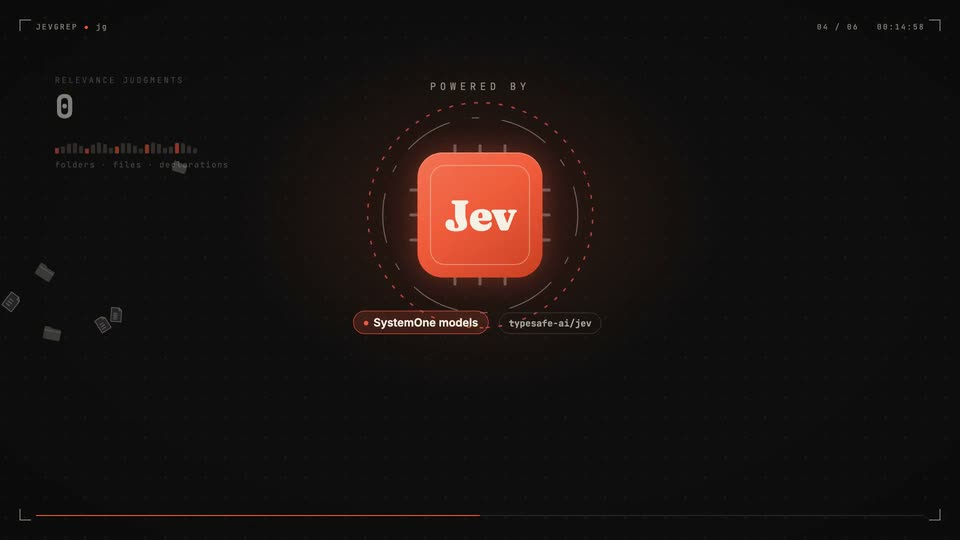
A dark grid background frames an orange rounded-square chip marked Jev in white serif, with POWERED BY above. A large orange dial ring with tick marks contracts and vanishes, the HUD frame expands to the edges, and two pill labels fade in below.
On-screen text: “JEV.GRP • jg”, “84 / 06 00:14:00”, “POWERED BY”, “System One models”, “typesafe-ai/jev”
Camera: Push in
10 · Feature reveal · 0:15–0:18
A glowing orange Jev chip sits inside dashed radar rings at center. Red document icons fly in from the right and stack beneath a rising RELEVANT count while gray documents drift down the left and a counter ticks; a serif headline and subline type in at the bottom.
On-screen text: “Fast, efficient research agents.”, “Small models judge relevance — your frontier agent spends its budget on the code.”
Techniques: Kinetic type, Particles
Camera: Static
11 · Feature reveal · 0:18–0:20
On a dark dotted grid, an orange Jev tile glides from center to the right and shrinks while curved white and orange lines draw out to a Codex card on the left. A green check pops above the Codex card with small green ticks, and the serif headline fades in below.
On-screen text: “JEGREP • jg”, “04 / 06 00:18:57”, “CODEX + jg • INDEPENDENT RESEARCH AGENT”, “where is pooling configured?”, “Codex delegates the research.”, “jg hands back verbatim source with line refs — Codex implements and tests.”
Techniques: Particles
Camera: Static
12 · Social proof · 0:20–0:21
A cream circle expands over the dark frame, opening into a beige chart. A serif headline reads in above a black bar labeled Context alone that grows to $0.10 on a dollar axis, under a tracked caption.
On-screen text: “SWE-BENCH • 10-TASK REPEAT • FULL TASK COST”, “Codex, prompted to use”
Techniques: Masking, Kinetic type
Camera: Static
13 · Social proof · 0:21–0:21
A benchmark bar chart on a cream background: the serif headline finishes as 'researcher.' fades in, the black 'Codex alone' bar grows from $0.52 to $5.84, and a short orange 'Codex + jg' bar appears at $0.05 below it.
On-screen text: “JEVGREP • jg”, “05 / 06 00:20:45”, “SWE-BENCH • 10-TASK REPEAT • FULL TASK COST”, “Codex, prompted to use jg as its researcher.”, “Codex alone BASELINE”, “$0.52”, “$0 $2 $4 $6 $8”, “$5.84”, “Codex + jg JEV RESEARCH AGENT”, “$0.05”
Techniques: Kinetic type
Camera: Static
14 · Social proof · 0:21–0:26
A cream data slide builds a horizontal bar chart: black and orange bars extend with counting dollar values under the headline. A large orange -40% stamp slams in with confetti shards, the baseline price gets struck through, and the line cheaper Codex runs on SWE-bench. types in below.
On-screen text: “SWE-BENCH · 10-TASK REPEAT · FULL TASK COST”, “Codex, prompted to use jg as its researcher.”, “Codex alone”, “BASELINE”, “Codex + jg”, “JEV RESEARCH AGENT”, “$7.62”, “$4.52”, “-40%”, “cheaper Codex runs on SWE-bench.”
Techniques: Kinetic type, Particles, Masking
Camera: Push in
15 · CTA · 0:26–0:30
Scattered black letters inside an orange ticked dial snap into the bold serif wordmark jevgrep as the dial vanishes. The tagline and a black terminal pill type out the install command, then a small gray URL line fades in beneath.
On-screen text: “Find the context. Start coding.”, “npm i -g @dzhng/jevgrep”, “github.com/dzhng/jevgrep”, “MIT · Node 22+”
Techniques: Kinetic type
Camera: Static