0:53


Mentlio Launch Video
Mentlio · B2B · Aug 2026
Tagada Pay · Nov 2026 · 2:19 · AI-annotated
Tagada Pay’s 2:19 launch film runs 66 scenes, about 2.1 s each. The product shows up at 0:15 and 9 features are revealed, with social proof. The call to action lands at 2:05 (90% in), over a voiceover. The video cuts between a locked-off talking head in a dark studio and bright UI fly-throughs, with every feature introduced by a single typed prompt and shown through fast 3D camera moves over node graphs and phone mockups. Its signature moves are giant single words flashing behind the presenter, green glow accents, and parallax pulls that flatten tilted cards into clean panels.
Is this your launch? to your site or press kit.
Mentlio · B2B · Aug 2026
Clean · B2B · Nov 2026
Neomatter · B2B · Oct 2026
A bearded man in a navy shirt sits at a wooden desk speaking into a boom microphone against a dark set. The word knowing pops in large behind him, then the angle shifts to him gesturing as a four-item task checklist slides in on the right.
On-screen text: “knowing”, “Build pages”, “Connect payments”, “Set up pixel”, “Launch funnel”
Techniques: Kinetic type
Camera: Static
A bearded man in a blue shirt gestures with one hand at a studio microphone. On the right, four rounded checklist cards fill with pink one after another, the first two sliding their color in as the clip runs.
On-screen text: “Build pages”, “Connect payments”, “Set up pixel”, “Launch funnel”
Techniques: Masking
Camera: Static
A bearded man in a navy shirt speaks into a microphone in a dark studio. A white name and green title sit to his right, while short step captions enter as added text.
On-screen text: “Build pages”, “Connect payments”, “Set up pixel”, “Launch funnel”, “Eden”, “TAGADA CEO & CO-FOUNDER”
Techniques: Kinetic type
Camera: Pull out
A bearded man in a navy shirt sits at a wooden table, speaking into a studio mic under green light. Green 'New order' notification cards float and drift around the frame at different depths. A large white '$80M+' holds to his right while a name lower-third identifies him.
On-screen text: “Eden”, “TAGADA CEO & CO-FOUNDER”, “$80M+”
Techniques: Parallax
Camera: Static
A bearded man in a navy button-up shirt sits at a desk, speaking into a studio microphone on a boom arm. He faces the camera in a medium close-up against a dark, out-of-focus background, talking directly to the viewer.
Camera: Static
A bearded man in a navy shirt talks into a studio mic against a dark, red-lit backdrop. White line icons in rounded squares, joined by circuit lines, flare with a bright glow that fades, while a light streak crosses the frame.
On-screen text: “日”
Techniques: Light sweep
Camera: Static
A bearded man in a navy shirt raises one finger while speaking into a studio microphone. White line icons for calendar, email, cart, card and sync float around him on a dark red backdrop, linked by thin circuit lines, while a red funnel icon glows at the lower left.
Techniques: Parallax
Camera: Pan
A white lowercase wordmark tagada. holds centered on a dark green gradient with a faint grid, a soft green glow drifting in the top-right and bottom-left corners, the green period settling at the end of the word.
On-screen text: “tagada.”
Camera: Static
The tagada. wordmark sits centered on a white field with drifting green glows, then a two-line headline fades in above a tilted browser mockup. Inside, a node graph of five cards linked by green lines assembles, the cards shifting from solid green to white.
On-screen text: “tagada.”, “The Performance”, “Marketer's OS”
Techniques: 3D mockup
Camera: Static
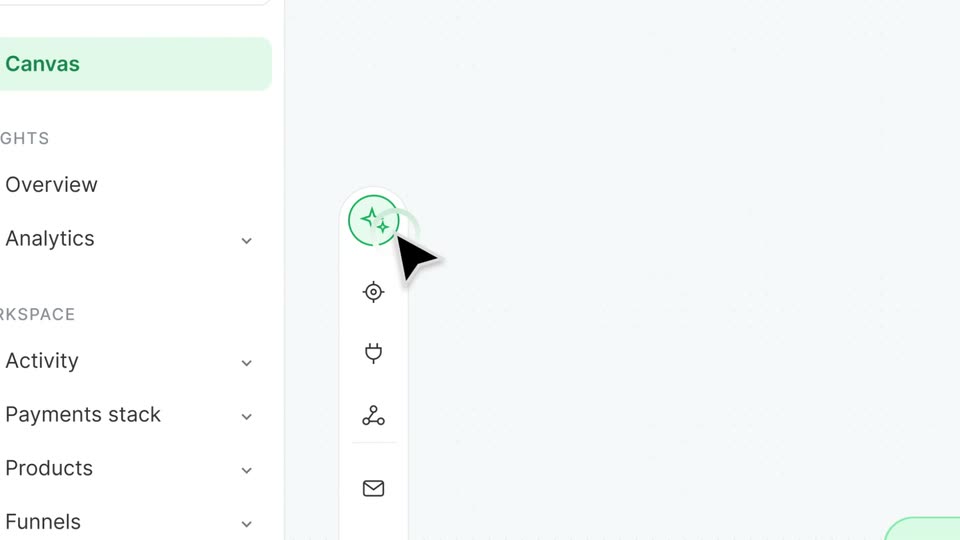
The light dashboard zooms from the full sidebar and checkout flow diagram down to the left icon toolbar. A cursor clicks the sparkle icon, and a rounded prompt bar pops open with the text “Bu” typed into it.
On-screen text: “The Performance”, “Marketer's OS”
Techniques: UI zoom, Cursor demo
Camera: Push in
A light product interface shows a left sidebar and a vertical icon rail. In the center, a rounded prompt box with a green sparkle icon types “Build me three advertorials and connect them to my funnel.” as a blinking caret, then the layout settles.
Techniques: Kinetic type
Camera: Static
A node-based flow diagram on a light canvas fades in from translucent to full opacity while scaling up. A green storefront node links to a document card and two green writing-angle nodes, then to a blue Checkout node and Paid and Failed outcomes. A vertical icon toolbar appears at left.
Techniques: UI zoom
Camera: Push in
A large black numeral 3 holds the top of a pale lavender frame while three phone mockup cards snap from a tilted, blurred offset into a clean aligned row, each showing an advertorial headline and article preview.
On-screen text: “3”
Techniques: 3D mockup
Camera: Static
Three flat advertorial cards sit side by side on a light gray field, each topped by a pill badge reading Designed, Written, Connected. The view pans right, bringing each badge and its card into frame in turn. The cards hold article mockups for a VITALIS green drink.
On-screen text: “Designed”, “Written”, “Connected”
Camera: Pan
A man in a navy shirt sits at a wooden desk before a microphone, raising one finger, while a white chat bar at the bottom types out his prompt. Three phone mockups with advertorial articles sit blurred behind him.
On-screen text: “Build me three advertorials and connect them to my funnel.”
Techniques: Kinetic type
Camera: Static
A design tool canvas shows a VITALIS advertorial page. A cursor taps the green headline, the right panel swaps to the heading inspector, and the view reframes tighter. The cursor then clicks the green Rewrite with AI button.
On-screen text: “Build me three advertorials and connect them to my funnel.”
Techniques: Cursor demo, UI zoom
Camera: Push in
A design tool screen shows a product page on the left and a typography panel on the right. A cursor types Fraunces into the font family field, replacing Geist, and the headline on the canvas switches to a serif face.
Techniques: Cursor demo
Camera: Pull out
A black “Studio” wordmark over a soft green gradient tops a design-tool window. The window shows a webpage mockup: a selected serif headline, body copy, and three green supplement jars. The view eases down to frame the canvas.
On-screen text: “Studio”
Camera: Pull out
A design editor shows a supplement landing page with a serif headline and two product jars. A prompt is typed into the bottom command bar, then the layout reflows, swapping the photo and headline to opposite sides. The view zooms in on the page as it settles.
On-screen text: “Give this layout a better flow.”
Techniques: UI zoom
Camera: Push in
A light canvas view zooms into a split-test card as its rows update from even-split visitor counts to CVR percentages, row B gaining a green Winner badge, then the camera pulls down to three linked phone mockups, the middle one outlined in green.
Techniques: UI zoom
Camera: Pan
A tilted 3D view of a product dashboard shows a flowchart of three ad-variant cards, A, B and C, linked by a green line and dots. The middle card is outlined in green. The frame drifts downward to center the three cards.
Techniques: 3D mockup
Camera: Pan
Three ad-creative cards float in 3D perspective, each showing a green ad preview with a headline and image. As the camera pulls back, the Meta panel below comes fully into view, listing the pixel ID and sent events with green checkmarks.
Techniques: 3D mockup
Camera: Static
A 3D arrangement of tilted UI cards on a pale background holds a left icon rail and several email-builder panels. The camera pushes in on the central Meta connection card, flattening it to a front-facing panel that lists Pixel, Credentials and Events sent.
Techniques: 3D mockup, UI zoom
Camera: Push in
A bearded man in a navy shirt speaks into a studio microphone, gesturing with open hands before lowering them. Behind him on a black background, white rounded cards bearing brand logos, including Stripe, NMI and Adyen plus a blue hexagon, scroll horizontally.
Camera: Pull out
A bearded man in a navy shirt speaks into a microphone at a wooden table on a dark set. A white card titled 'Payment flow' settles into the lower frame, showing logos for stripe, NMI, adyen and a blue knot mark, with a hand cursor at its corner.
On-screen text: “Payment flow”
Camera: Static
A bearded man in a navy shirt sits at a wooden table, speaking into a boom microphone and gesturing with both hands, against a dark background with plants.
On-screen text: “Payment flow”, “区”, “stripe”, “adyen”
Camera: Static
A man in a navy shirt sits at a studio mic on a dark set. On the right, a white tagadapay card with a Primary pill slides in and grows, a white cursor moves onto a green Apply now button below, and a green Live badge pops in.
On-screen text: “Live”
Techniques: Cursor demo
Camera: Static
A bearded man in a navy shirt sits at a wooden table behind a boom mic, making an OK gesture. A large pale-green 24h fills the dark background, and a white Live badge with a green dot sits on the table. Locked-off frame, steady pace.
On-screen text: “24h”, “Live”
Camera: Pull out
A bearded man in a navy shirt sits at a wooden table in front of a boom microphone, making an OK gesture. Faint 24h lettering fills the dark background while a green wavy line with a Best rate tag runs across the lower frame.
On-screen text: “Live”, “2”, “Best rate”
Camera: Static
A white background with soft blurred green gradients in the corners. A centered pill toggle shows two options, Hands off with a sparkle icon and Hands on with a hand icon. The Hands off label darkens and gains a white rounded highlight, marking it as selected.
Camera: Static
An AI routing card slides left under a Hands off / Hands on toggle as five payment provider rows appear on the right, a green highlight sweeping down. The view zooms into the card as Routing, Retries, Recovery rows with Auto pills stack in.
Techniques: UI zoom
Camera: Push in
A light settings card titled AI routing, with three Auto rows, fades out, leaving a centered segmented control. The control shows a grayed Hands off option beside a selected white Hands on pill.
Camera: Static
A two-option toggle labeled Hands off and Hands on sits centered on a pale background, the Hands on pill active. The control drifts up as a settings card fades in below, its cascading retry list of Stripe, Adyen, and NMI rows sliding into place.
Camera: Static
A pale dashboard shows a 2x2 grid of setting cards (Cascading, MID lifecycle, 3D Secure, Routing rules) under a selected Hands on toggle. The cards slide up into place as a soft green glow highlights each panel in sequence.
Camera: Static
A black cursor clicks the toggle on a routing card, flipping it from grey to green with a ripple, while the Hands on tab stays active above a list of processor cards showing Stripe, Adyen, NMI and Checkout.com rows.
Techniques: Cursor demo
Camera: Static
A bearded man in a dark blue shirt sits at a wooden desk with a boom microphone, talking to camera against a dark backdrop with a green glow. A large white word “control” glows behind him while a translucent caption pill “Built for control freaks” fades in at the bottom.
On-screen text: “control”, “Built for control freaks”
Camera: Pull out
A bearded man in a navy shirt sits at a wooden table, speaking into a microphone against a dark plant-filled set. Two translucent UI cards float in the foreground: a Payment card on the left, joined by a green line with glowing dots, to a Processor 1 card on the right. The cards and their labels slide and scale into place.
On-screen text: “Built for control freaks”, “Payment”, “$129”, “Processor 1”, “payment processor”, “Primary”
Camera: Static
A bearded man in a blue shirt speaks at a wooden desk with a microphone, dark studio behind him. A row of translucent cards linked by a green line slides left across the lower third, showing Payment, Processor 1 tagged Primary, and Processor 2 tagged Backup.
On-screen text: “Payment”, “$129”, “Processor 1”, “payment processor”, “Primary”, “Processor 2”, “payment processor”, “Backup”
Camera: Static
A bearded man in a navy shirt speaks into a studio microphone against a black background. On the right, a dark notification card with a green icon and a larger card with a green check and green amount slide in and hold.
Camera: Static
A bearded man in a navy shirt sits behind a wooden table, speaking into a boom-mounted microphone against a dark background. His hands rest flat on the table edge as he talks to the camera in a locked-off medium shot.
Camera: Static
A blurred board with soft green light blobs sits behind a centered white command bar that types out a question character by character, flanked by a green sparkle icon and a green dot button.
Techniques: Kinetic type
Camera: Static
A SaaS canvas view of a checkout flow with three phone mockups and a top command bar. A green tint fades out, an answer pill slides in below the bar, then the frame zooms into the flow diagram.
Techniques: UI zoom
Camera: Static
A white canvas holds a flow of rounded offer cards, each an email mockup (upsell, thank you, checkout, subscription), linked by lines labeled Accepted and Declined. The camera pans right, drifting from the upsell cards to the green checkout card.
Camera: Pull out
A close-up of a checkout card on a light canvas pulls back to reveal a funnel builder. Green node cards for checkout and a follow-up email connect through thin lines, with the workspace sidebar shrinking to the left edge.
Techniques: UI zoom
Camera: Pan
A pale flowchart of three phone-style cards fades in from transparent to solid. The left card holds a checkout form, the middle a green Collagen Boost upsell, the right a green Immunity Pack upsell, joined by thin connector lines with Accepted and Declined tags.
On-screen text: “Checkout”, “Upsell 1 - Collagen Boost”, “1-click”, “Upsell 2 - Immunity Pack”, “Accepted”, “Declined”
Camera: Static
A flow-builder node card labeled Offer with a downsell title and a 1-click badge sits center-right, connected by red and blue lines. Inside, a checkout preview shows a collagen jar at $24 with a green button. The node title text slides into place as the card settles.
Camera: Static
A funnel-builder interface opens zoomed in on a single downsell node, then pulls back to reveal the full node graph with checkout, thank-you and subscribe cards linked by thin lines on a dotted grid.
Techniques: UI zoom
Camera: Static
A light flowchart of the product's funnel builder, with phone mockups and cards linked by lines, sits on a pale background. The large black word funnel overlays it; the diagram fades to a faint ghost while the word stays solid.
On-screen text: “funnel”
Camera: Pull out
A bearded man in a navy shirt sits at a wooden table before a boom microphone on a black background, talking and lifting his index finger. A white chat bubble with green end icons holds the prompt text across the lower frame.
On-screen text: “Build me a post-purchase funnel: a checkout bump, two one-click upsells and a downsell.”, “AOV”, “$129”
Camera: Static
A bearded host in a navy shirt sits at a studio microphone, raising one finger beside a dark AOV card. The card's number counts up from $47 to $187, a green +45% badge scales in, and a green line graph rises.
Techniques: Kinetic type
Camera: Static
A bearded man in a blue shirt sits at a wooden table with a studio microphone, gesturing while speaking. A green order notification pops in at the bottom, then a row of month cards assembles across the frame, Jun centered and sharp while the others blur. Stat text AOV, $129, $187 and +45% appears over the transition.
On-screen text: “New order - $187”, “now”, “AOV”, “$129”, “$187”, “+45%”, “Jun”, “Jul”
Techniques: Morph, Kinetic type
Camera: Pull out
A bearded man in a dark shirt talks into a studio mic while a product panel with two green bottles, a subscription toggle that flips to green, and a Subscribe & save badge float across the frame; the shot pulls back to a wider view of him at the desk.
Camera: Pan
A bearded man in a navy shirt talks into a boom microphone at a wooden table against a black background, then cuts to a 3D phone on a green gradient showing the VITALIS app with a Daily Greens subscription and a sliding headline at the left edge.
On-screen text: “Subscrip”
Techniques: 3D mockup
Camera: Static
A tilted 3D iPhone mockup floats over the big 3D word Portal on a white-to-green gradient. The phone rotates upright, revealing the full word behind it, while its screen shows a subscription app with a Daily Greens card.
On-screen text: “Portal”
Techniques: 3D mockup
Camera: Static
A white Self-service card with a green 4 / 4 allowed pill sits on a soft green gradient. Four rows, each with an icon, label and an on toggle, fade in top to bottom: Skip next delivery, Pause subscription, Change date, Swap product.
Camera: Static
A white smartphone floats in 3D perspective, tilting and rotating against a white backdrop with a soft green glow on the right. Its screen switches from a swap-product list with two supplement options to a cancellation form addressed to Sarah, listing reasons and a discount offer.
Techniques: 3D mockup
Camera: Pull out
A white smartphone floats in 3D perspective against a soft green gradient, tilting gently into place. Its screen shows a Vitalis cancellation flow with the Too expensive reason selected and a green 30% off offer card beneath it.
Techniques: 3D mockup
Camera: Static
A green notification card reading 'Subscription added' sits centered on a white background with soft green blurs, then turns white as a tilted 3D phone mockup slides in from the right, its screen showing a subscription page, while the card floats in front.
Techniques: 3D mockup
Camera: Static
A white iPhone in 3D perspective eases from a side tilt to a more frontal angle over a blurred green-and-white gradient. Its screen shows a subscription dashboard: a dark confirmation banner, a 'Hi Sarah' greeting and a Daily Greens product card with price and delivery details.
On-screen text: “Subscription added”
Techniques: 3D mockup
Camera: Pull out
On a white canvas, a flowchart of email journey cards (checkout, upsell, downsell, thank you, subscribe) is linked by thin lines, with green and blue accents. The view pulls back to reveal the full diagram, including a variable assignment card listing payment processors.
Camera: Pan
On a pale background, a Shopify and WooCommerce icon rises above a blurred list, a curved line linking them. A Tagadot icon and a code icon pop in to the right, each dropping its own line to the list.
Camera: Static
Three frosted-glass interface cards float in 3D perspective over a green gradient, linked by curved lines at the base. The center card shows a four-step funnel, the left a storefront, the right a code block. A slow parallax drift shifts the layers.
Techniques: 3D mockup, Parallax
Camera: Pull out
Three rounded app icons (Shopify and WordPress, a black t. with a green dot, and purple code brackets) sit on a white field with soft green gradient blobs. The headline Your call wipes in above the middle icon, with call in green.
On-screen text: “Your call”
Techniques: Masking
Camera: Static
A bearded man in a navy shirt sits at a wooden table with a broadcast mic, speaking to camera on a black background. The word Know glows large behind him, fading in then out, while a dark pill caption types Make the hard part easy at the bottom.
On-screen text: “Know”, “Make the hard part easy”
Techniques: Kinetic type
Camera: Push in
A bearded man in a dark blue shirt sits at a studio microphone, speaking to camera against a black background. He points down with one hand while talking. The frame is locked off, and a static caption, “Make the hard part easy,” holds on screen.
On-screen text: “Make the hard part easy”
Camera: Static
On a dark green gradient with a faint grid, the white tagada. wordmark with a green dot builds in at center. Below it, the two-line tagline blurs into place, its letters sweeping from green to white, then the frame locks off.
On-screen text: “The Performance”, “Marketer's OS.”
Techniques: Kinetic type
Camera: Static