1:52

Phone (3a) Series: Power in Perspective
Nothing · Hardware · Mar 2025
SpAItial AI · Oct 2026 · 1:05 · AI-annotated
SpAItial AI’s 1:05 launch film runs 45 scenes, about 1.5 s each. The product shows up at 0:01 and 8 features are revealed. The call to action lands at 0:59 (91% in). Built as a captioned feature tour: each claim lands as a bold bottom caption, a point-cloud scan orbits on black, then morphs or dissolves into a photoreal room or live-action pass. Signature moves are the thumbnail mosaic that assembles the wordmark, the three-panel split screens for space types, and the scan-to-render flips that toggle between data and reality at a steady 123 bpm pulse.
Is this your launch? to your site or press kit.
Nothing · Hardware · Mar 2025
CrowdReply · Jun 2026
A dense mosaic of small video tiles fills the frame, each showing an interior room overlaid with rainbow depth maps or grayscale point clouds. The wall scrolls slowly, shifting the grid of thumbnails.
Camera: Static
A wavy band of small square video thumbnails drifts on black, then condenses into the wordmark Echo-3, the letters acting as a mask over the moving clips. The wordmark scales down and settles centered on the black field.
On-screen text: “Echo-3”
Techniques: Morph, Masking, Kinetic type
Camera: Static
A 2x2 split screen of dim interior rooms, one glitched in green and purple, fades in on black as the title sharpens from blur across the center, the second word filled with a collage of the panels.
On-screen text: “Introducing”, “Echo-3”
Techniques: Split screen
Camera: Static
A 2x2 grid of room captures sits behind the centered title: a photorealistic shop, a colored depth map, and two point clouds, each with a slow drift. White bold text reads 'Introducing Echo-3', the name filled with a scene mosaic, above a fading tagline.
On-screen text: “Introducing Echo-3”, “Our latest physically-grounded world model specialized for reality capture”
Techniques: Split screen
Camera: Push in
A black-framed 2x2 grid shows four locked-off interior spaces. A white headline and caption overlay the center at the start, then a curved light sweep crosses the right edge as the headline clears.
On-screen text: “Introducing Echo-3”, “Our latest physically-grounded world model specialized for reality capture”
Techniques: Split screen, Light sweep
Camera: Static
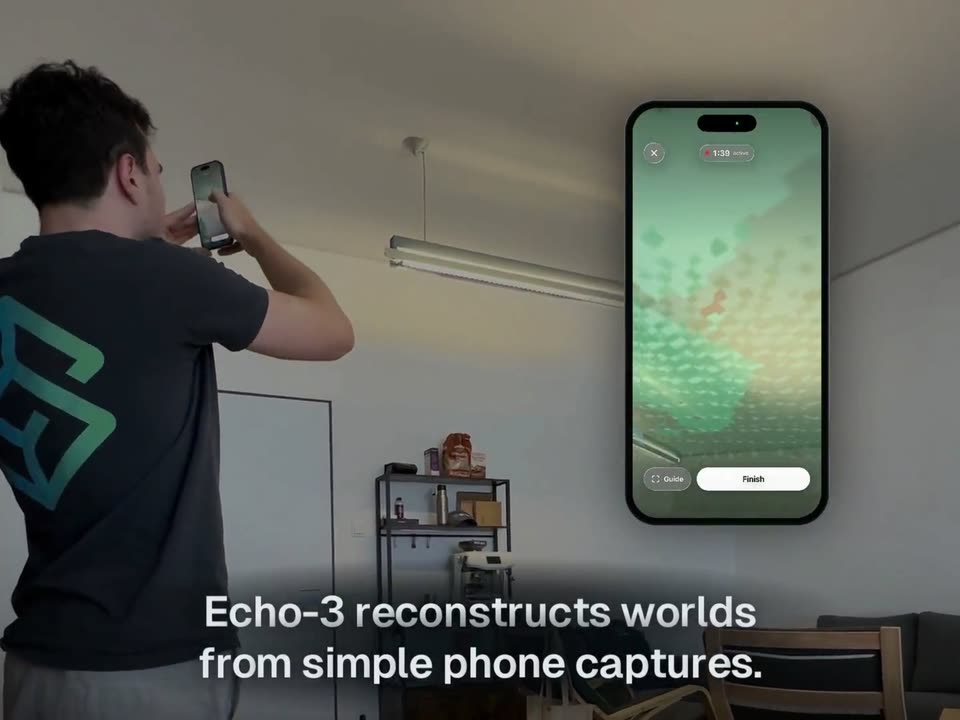
A man in a black t-shirt films the ceiling light of a white room with his phone. A phone mockup appears on the right, showing a green point-cloud scan. The footage dissolves into a 3D reconstruction of a sunlit room with a window and wooden floor.
On-screen text: “Echo-3 reconstructs worlds”, “from simple phone captures.”
Techniques: Morph, 3D mockup
Camera: Static
A tight view of a doorway with a patchwork curtain and wooden shutters pulls back to reveal a reconstructed cafe interior with a long wooden table, chairs and shelves. The camera glides backward and settles on the full room. White captions sit at the bottom.
On-screen text: “Echo-3 reconstructs worlds”, “from simple phone captures.”, “In high quality.”
Techniques: Parallax
Camera: Pan
A sunlit cafe interior with wooden tables, a cushioned sofa, and framed pictures on the wall pans slowly to the right. A white caption holds steady at the bottom center of the frame.
On-screen text: “In high quality.”
Camera: Push in
The headline “Echo-3 reconstructs all kinds of spaces.” pulls into focus on off-white, “Echo-3” filled with a multicolored point-cloud texture, as a fading “In high quality.” caption dissolves below. The text clears to reveal a 3D point-cloud model of a room with an arched ceiling in perspective.
On-screen text: “In high quality.”, “Echo-3 reconstructs all kinds of spaces.”
Techniques: Kinetic type, 3D mockup
Camera: Static
A 3D point-cloud model of an interior room, white dots forming the upper structure and tan dots forming the furnished ground floor, orbits slowly on a black background. A white caption sits centered at the bottom.
On-screen text: “Large spaces.”
Techniques: 3D mockup
Camera: Pan
A white point-cloud model of a multi-story interior with green plants holds on a black background, then a live-action office with a staircase and foliage emerges behind it. The white caption Large spaces. stays fixed at the bottom center.
On-screen text: “Large spaces.”
Techniques: Particles
Camera: Push in
A low-angle shot tilts up a glass elevator shaft rising through a building atrium, its white and dark frames stacked floor by floor. A potted plant sits at the lower right as the camera climbs. The caption “Large spaces.” holds at the bottom.
On-screen text: “Large spaces.”
Camera: Push in
The camera moves forward through a bright office courtyard with glass walls and a central seating area. The text “Large spaces.” is fixed at the bottom of the frame.
On-screen text: “Large spaces.”
Camera: Push in
A low-angle view of a multi-story glass office atrium with cantilevered balconies, hanging plants and a small cafe kiosk. The camera tilts and rotates slightly, tightening the frame on the upper floors while the caption holds at the bottom.
On-screen text: “Large spaces.”
Camera: Push in
A point-cloud 3D scan of a multi-floor building interior orbits slowly on a black background. A white caption at the bottom reads “Large spaces.” then swaps in place to “Multi-floor.”
On-screen text: “Large spaces.”, “Multi-floor.”
Techniques: 3D mockup
Camera: Push in
A moving camera travels through a bright multi-floor office, panning across a lounge with black armchairs, an orange branded wall, wooden staircases with black railings, a hallway and a red kitchen area, while the caption holds fixed at the bottom.
On-screen text: “Multi-floor.”
Camera: Push in
A real office with a desk, two monitors and black chairs sits inside a dark window frame. The camera pans left to reveal a glass wall holding a blue Technology Hub banner. A white bottom caption cross-fades from Multi-floor. to Offices, classrooms and labs.
On-screen text: “Multi-floor.”, “Offices, classrooms and labs.”
Techniques: Kinetic type
Camera: Push in
Three vertical panels show a classroom with a blue banner, an office with desks and monitors, and a lab with metal shelving. The camera pans slowly across each room while a white caption sits at the bottom.
On-screen text: “Offices, classrooms and labs.”
Techniques: Split screen
Camera: Pan
A rapid montage of an office with monitors, a garden pool, and a green-chairs classroom, each framed inside a black grid that flashes between views. A white caption stays fixed at the bottom throughout the cuts.
On-screen text: “Offices, classrooms and labs.”
Techniques: Split screen
Camera: Push in
Three vertical panels show outdoor scenes side by side: a baroque fountain before a classical building, a garden pool with a red-tiled pavilion, and a modern house with parked cars. The panels cross-dissolve in from a previous layout, then hold still. White text “Outdoors.” sits at the bottom center.
On-screen text: “Outdoors.”
Techniques: Split screen
Camera: Push in
A three-by-three grid of still photographs fills the frame, opening on an outdoor pavilion beside a pool, then swapping to industrial pipes and warehouse interiors. The bottom caption changes from Outdoors. to Industrial.
On-screen text: “Outdoors.”, “Industrial.”
Camera: Push in
A covered industrial yard with a corrugated metal roof, red and yellow pipes, and large cylindrical tanks. The camera drifts laterally across the space, revealing more of the pipework on the left. The word Industrial. holds at the bottom center.
On-screen text: “Industrial.”
Camera: Pull out
A crossfade moves from an industrial interior of red and yellow pipes and orange seats to a gallery room with framed paintings and track lighting. The centered caption reads Industrial. then switches to Cultural spaces.
On-screen text: “Industrial.”, “Cultural spaces.”
Camera: Push in
Three vertical panels show cultural interiors side by side: a shrine with red lanterns and a yellow urn, a gallery wall with framed art under track lights, and a room with a robed mannequin. Each panel pans slowly across its space. A white caption reads at the bottom center.
On-screen text: “Cultural spaces.”
Techniques: Split screen
Camera: Push in
A three-panel split screen shows cultural interiors: a yellow hall with red stools and a wall mural, a gallery with masks on a red board, and mannequins in traditional dress. Each panel pans slowly. A white caption reads Cultural spaces. along the bottom.
On-screen text: “Cultural spaces.”
Techniques: Split screen
Camera: Pan
A gallery interior with a ceiling fan and a wall of masks fills the frame, then splits into a four-panel grid showing an office, the gallery, a warehouse loft, and a cafe. The white caption stays fixed at the bottom.
On-screen text: “Cultural spaces.”
Techniques: Split screen
Camera: Static
A white shelf cubby holds a row of books, a desktop planet model, and a Monopoly Game of Thrones box on top; the camera tilts slightly as the caption Photoreal detail. sits at the bottom.
On-screen text: “Photoreal detail.”
Camera: Static
A white bookshelf holds books and small toys; a 3D dollhouse cutaway model fades in at the center and grows until it blocks the shelf.
On-screen text: “Photoreal detail.”
Techniques: 3D mockup
Camera: Static
A dense point-cloud model of a furnished home interior, with kitchen island, dining table, sofa and staircase, floats on black. The view tilts from an angled, blurred state into a level isometric orbit as the caption fades in at the lower left.
On-screen text: “Worlds from Echo-3 are 3D native.”
Techniques: 3D mockup
Camera: Pan
A top-down 3D house model starts as a grainy white point-cloud scan on black, then morphs into a fully textured interior with wood floors and furniture. The bottom caption crossfades from one line to the next.
On-screen text: “Worlds from Echo-3 are 3D native.”, “Ready to be edited.”
Techniques: Morph, 3D mockup
Camera: Pan
A top-down 3D model of a furnished house interior with blurred edges sits on a black background. The text “Ready to use.” is centered at the bottom.
On-screen text: “Ready to use.”
Techniques: 3D mockup
Camera: Pan
A dark 3D office render with the caption “Ready to use.” at the bottom brightens into a 2x2 grid: a low-poly office model on white, humanoid robots walking an office, a room of seated robots, and a robotic arm at a counter.
On-screen text: “Ready to use.”
Techniques: Split screen
Camera: Push in
A 3D cutaway apartment with torn-paper edges spins and settles into a top-down isometric view on a white background. The model shows a bedroom, kitchen and living area, and the caption fades in at the bottom as it comes to rest.
On-screen text: “Real estate.”
Techniques: 3D mockup
Camera: Pan
A 3D apartment floor plan rotates from a tilted perspective into a flat top-down view against a light gray background. The white caption 'Real estate.' stays fixed at the bottom of the frame.
On-screen text: “Real estate.”
Techniques: 3D mockup
Camera: Pan
A top-down apartment floor plan sharpens from a soft wash into a crisp line drawing. Room labels and dimension lines fade in around the perimeter, and a total-area line appears at the base. The caption Real estate. stays fixed at the bottom.
On-screen text: “Real estate.”
Camera: Pull out
A 3D office interior shows silver humanoid robots walking toward an elevator, each with a glowing colored ring and path line at its feet. A white floor-plan card occupies the left at the start, then the frame opens to the full room while the bottom caption animates.
On-screen text: “Real estate.”, “Simulation.”
Techniques: 3D mockup, Kinetic type
Camera: Push in
A 3D office with desks and an elevator. A line of white humanoid robots walks away from the camera, each ringed by a glowing colored circle and a light trail on the floor. The camera dollies forward through the space.
On-screen text: “Robot navigation.”
Techniques: Parallax
Camera: Push in
A 3D office render shows several white humanoid robots walking across a wood floor, each ringed by a colored circle and trailing a colored path line. The shot tightens into a framed card, then cuts to a brighter room with a floor-plan blueprint overlaid at the top.
On-screen text: “Robot navigation.”, “Simulation.”
Camera: Push in
A 3D lounge with floor-to-ceiling windows, white tables and black chairs holds a crowd of silver humanoid robots dancing in unison, arms swinging. A purple-green color wash crosses the frame while Simulation. sits centered at the bottom.
On-screen text: “Simulation.”
Camera: Static
A crowd of humanoid robots in purple and green walks through a stylized plaza of round tables and chairs, set in a magenta and green palette. The camera holds still as the figures advance toward it. The word Simulation. sits static at the bottom center.
On-screen text: “Simulation.”
Camera: Pull out
A four-panel split screen shows a floor plan, a point-cloud room, a 3D kitchen scan, and a rendered counter with floating food items. It cuts to the full kitchen view as the items settle onto the counter.
On-screen text: “Simulation.”, “Synthetic data.”
Techniques: Split screen
Camera: Push in
A rendered kitchen counter pans right from a gas stovetop with black grates to a stainless sink holding a faucet, a red cup, a yellow bottle, a can, a sugar box, and a mug. A white caption 'Synthetic data.' sits at the bottom.
On-screen text: “Synthetic data.”, “CLEAN”
Camera: Push in
A 3D rendered kitchen sink with a Santa mug and a sugar box drifts in frame as the items shift between basins, then cuts to a 3D wall of small image thumbnails in perspective. A white caption sits at the bottom.
On-screen text: “Synthetic data.”
Camera: Push in
On a black background, a loose row of small street and room video clips slides and snaps into the letterforms of the product name. The white tagline fades in beneath the assembled wordmark.
On-screen text: “Available today.”, “Echo-3”
Techniques: Morph
Camera: Static
A tilted 3D phone on the right shows a white point-mesh scan rotating inside the app's capture preview. On the left, the scan-textured title Echo-3 sits over a white bold line and a gray line, then the App Store badge and spAltial mark fade in on a black background.
On-screen text: “Echo-3”, “Try it with our new capture app.”, “Now on the App Store. Coming soon to Android.”, “Download on the App Store”
Techniques: 3D mockup, Kinetic type
Camera: Static