
1:08
Explore
Shopify - the Shopify AI Toolkit is here manage your store with your favorite
Shopify · Apr 2026 · 0:18 · AI-annotated
- Length
- 0:18
- Scenes
- 8 · 2.3 s avg
- Product on screen
- 0:00
- Voiceover
- No
00:00:00 / 00:18:04
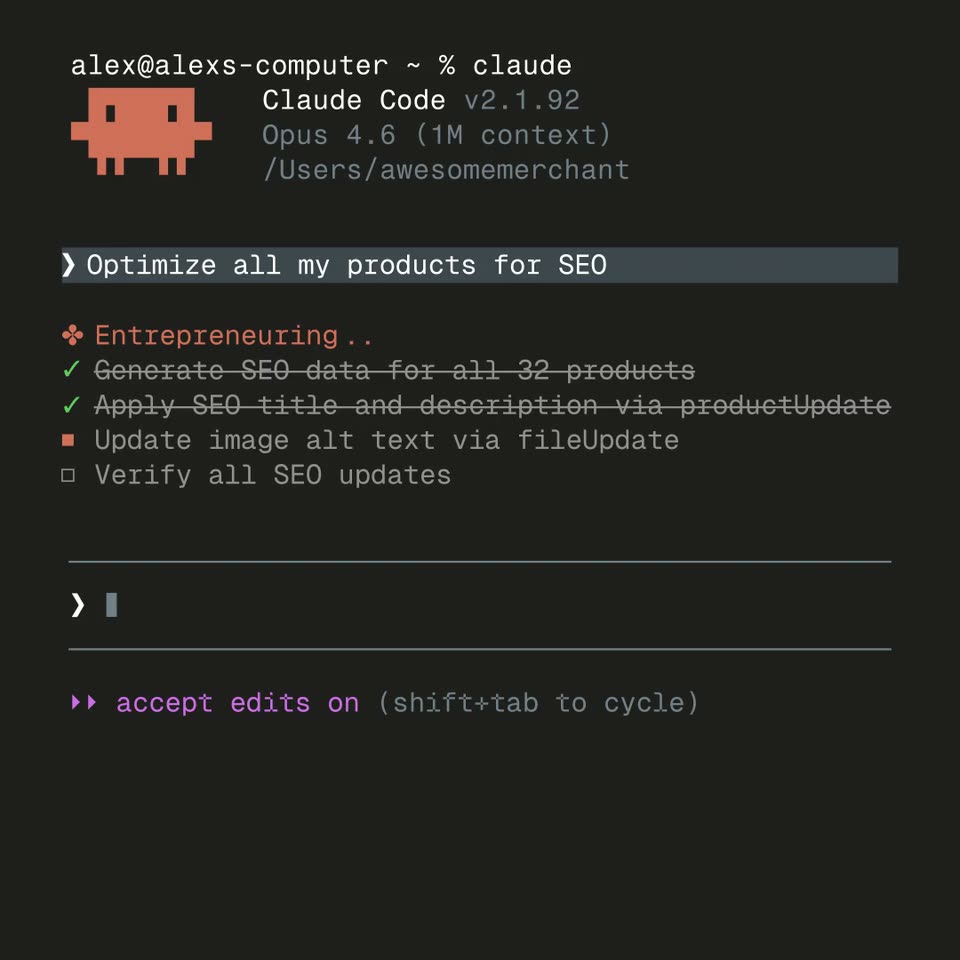
Shopify’s 0:18 launch film runs 8 scenes, about 2.3 s each. The product is on screen from the first frame. There is no explicit call to action. The video is built as one prompt told twice: a terminal task runs to completion, then the same typed command is replayed across a sequence of agent interfaces, each swap a hard cut or crossfade. Pacing is typewriter-driven, with blinking carets, check-off task lists, and scroll-up reveals on a dotted grid as the signature moves.
No filming indicatedEstimated needs: 3 capture groups — your screens or recordings
Is this your launch? to your site or press kit.
More like this
0:26
Shopify - New connectors just dropped: Connect to @grok to ask questions about
Shopify · Business software · Oct 2026
2:54


AI Revenue Cycle Automation for Hospitals | LunaBill
LunaBill · Healthcare · Sep 2026
Shopify - the Shopify AI Toolkit is here manage your store with your favorite, scene by scene
· 8 scenes as text
01 · Product intro · 0:00–0:01
A dark terminal window eases onto a light dotted grid. Inside, the version line and model line scale up into place beside a pixelated orange invader. A block cursor blinks at the prompt, and a teal plan-mode status anchors the bottom.
Camera: Static
02 · Demo · 0:01–0:10
A dark terminal window shows a command typed out letter by letter: Optimize all my products for SEO. A task list then fills in, each line gaining a green check and strikethrough as it completes, and the screen scrolls up to a summary table.
Techniques: Kinetic type
Camera: Pan
03 · Demo · 0:10–0:11
A dark terminal screen. A product table scrolls up out of frame, leaving the line SEO optimization complete for 32 products. A new prompt types Great, now apply a 15% discount to all of these behind a blinking caret, above a purple status line.
Techniques: Kinetic type
Camera: Static
04 · Demo · 0:11–0:13
A dark terminal view shows a result line above a bordered input box holding a typed discount command, with a path and model label below; the static frame fades to black.
Camera: Static
05 · Demo · 0:13–0:14
A Cursor prompt bar sits on a light background, the typed instruction ending in a blinking caret. The whole panel dims and crossfades to a second state, swapping the branch label for Local and Default approvals controls and adding a blue sparkle to the logo.
Camera: Static
06 · Demo · 0:14–0:15
A dark chat interface fills the frame. White monospace text reads 'SEO optimization complete for 32 products.' above a blue-bordered input box showing the typed command 'Great, now apply a 15% discount to all of these products' with a blinking caret; gray labels and a blue code logo sit below.
Camera: Static
07 · Demo · 0:15–0:17
A close-up of a chat input field on a light gray background holds the typed prompt about applying a 15% discount, with a caret at the end. Below it sit a model selector, microphone, send button, and Local, approvals, and Codex controls.
Camera: Static
08 · Demo · 0:17–0:18
The interface scrolls upward on a dotted grid background, bringing a second prompt card into view. The card holds the typed discount request, a GPT-5.4 model picker and a send button, with Local and Default approvals controls beneath.
Camera: Pan