1:56

Pomerado (YC F26) - faster, cheaper, more reliable browser use
Pomerado · B2B · Oct 2026
Scade · Jul 2025 · 0:42 · AI-annotated
Scade’s 0:42 launch film runs 30 scenes, about 1.4 s each. The product shows up at 0:01 and 2 features are revealed, with social proof. The call to action lands at 0:34 (81% in). Built as a rapid screen-recording tour: a blurred-feed hook, a step-by-step interface demo (storyboard, image generation, video compile) linked by whip pans, zooms and blur transitions, and type-on headlines that name each beat. The close shifts to a lime-green gradient where waitlist and prize cards punch in before the scade. lockup holds to black.
Is this your launch? to your site or press kit.
Pomerado · B2B · Oct 2026
Billow AI Labs · B2B
A dark, blurred grid of content cards brightens in the background while a white headline fades in across the center, the words entering in sequence to complete the phrase.
On-screen text: “Trends In. Content Out.”
Techniques: Kinetic type
Camera: Pull out
A bold white headline, “Trends In. Content Out.”, is centered over a blurred grid of social media posts. The headline fades out as the feed sharpens into a clear multi-column layout, with a cursor resting at the right edge.
On-screen text: “Trends In. Content Out.”
Camera: Pull out
A tilted 3D view of the app dashboard rotates flat as the Quick Actions panel yields to an open Copilot chat typing a greeting; on the right a phone mockup displays a perfume post while a cursor hovers over it.
Techniques: 3D mockup, Cursor demo
Camera: Static
A product interface displays a menu with options like 'Upload File or Image' and 'Custom prompt' on the left, next to a list of products. The text 'Scade analyzes. You construct.' appears on the right side of the screen.
On-screen text: “Scade analyzes. You construct.”
Camera: Push in
A light interface shows a left menu and a character roster with avatars. A hand cursor slides from the highlighted Character row up to the Emilia Hart entry, then the screen reframes to a post-creation bar holding a Character chip and a message field.
On-screen text: “Scade analyzes. You direct.”
Techniques: Cursor demo, UI zoom
Camera: Static
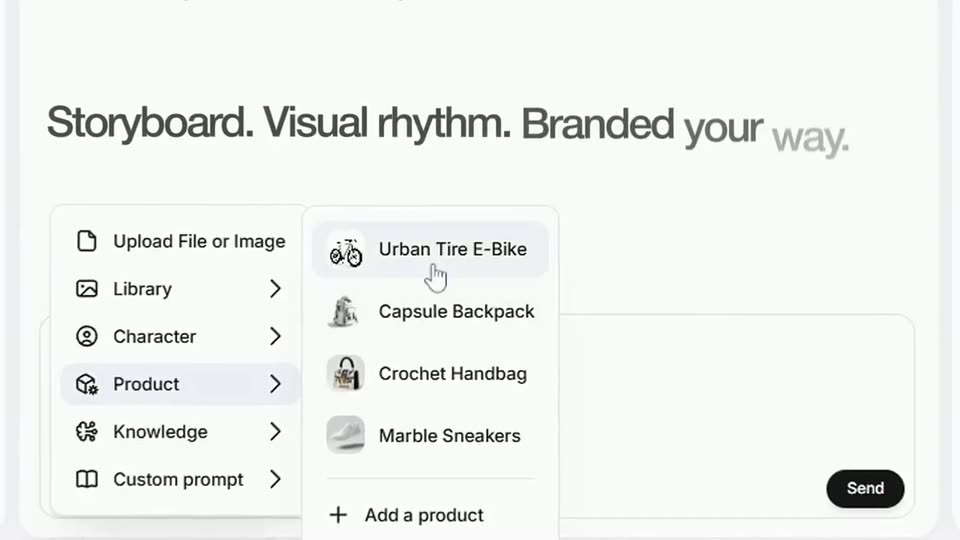
A white product interface shows an open dropdown menu as a cursor hovers over Product, pulling out a side submenu of item names that then fades out. Behind it, a dark-gray headline types in word by word against the plain background.
On-screen text: “Storyboard. Visual rhythm. Branded your way.”
Techniques: Cursor demo, Kinetic type
Camera: Pull out
A white AI assistant interface zooms out from a close-up of the message box, where a cursor clicks Send after a prompt is typed. The view then reframes onto a generated storyboard table listing shots for a white e-bike ad.
Techniques: Cursor demo, UI zoom
Camera: Pull out
A light-grey storyboard sheet fills the frame, its two-column table scrolling upward past a bold title. Rows of shot descriptions and rationale slide off the top as a down chevron pulses at the bottom edge.
On-screen text: “Storyboard: White E-Bike & Scarlet Dress (Shots 1-10)”
Camera: Pan
A white document view titled Flow rationale with a numbered list zooms in quickly. The type grows larger and softens into blur as the frame tightens on the list.
Techniques: UI zoom
Camera: Push in
A sharp rounded input bar shows the prompt 'generate images' over a blurred document view, then the frame fills with floating checkmark notification pills arranged at multiple depths and scales.
Techniques: 3D mockup
Camera: Push in
A rapid, blurred pull-back sweeps across a white grid of square generated-image thumbnails, each topped by a rounded status pill. The fast horizontal motion smears the whole interface into soft streaks, ending on the full four-by-four layout.
Camera: Push in
A locked-off close-up of the product UI shows a left column of numbered prompts with Recreate buttons beside a grid of sunset photo thumbnails; a hand cursor rests on a Recreate button as the prompt field types out the words slightly change the angle.
Techniques: Cursor demo
Camera: Push in
A blurred scene-generation interface sits behind a white prompt box that types out the command letter by letter, then a black pill button with a refresh icon slides in from the right into place.
Camera: Static
A split view of an AI design tool: the left chat panel scrolls up through numbered scene prompts, each with a row of four thumbnails, while the right panel holds a two-column image grid of a woman in red on a beach. A cursor hovers over the layout toggle at top right.
Techniques: Split screen, Cursor demo
Camera: Pan
A flat Copilot storyboard interface: the prompt list and thumbnail grid scroll up as a hand cursor selects images, blue checks appear, the right preview crossfades from a bicycle photo to a woman in a red dress, and a Confirm storyboard button fades in.
Techniques: Cursor demo
Camera: Pan
A blurred product screen shows a list and a video preview while a white headline types in across the top. Three model cards for Kling 2.1, Hailuo 2 and Veo 3 fade in in a row below it.
On-screen text: “AI-generated visuals, pacing, and sound — powered by 1,500+ AI models”
Techniques: Kinetic type
Camera: Push in
A light chat interface scrolls down as the assistant's reply completes, revealing a stack of video-generation status chips with check marks and timers; a mouse cursor rests idle in the middle of the panel.
Camera: Static
The frame opens zoomed into the left chat log, then pulls back to reveal the full two-panel editor. The left shows a Copilot chat with a list of generated clips; the right shows a video preview of a white bicycle on a wet beach at sunset.
Techniques: UI zoom
Camera: Pull out
A flat video-editor screen sits on a green background, showing a vertical clip of a white bike at sunset above a clip timeline. The view whips right and zooms into the right-hand settings panel and timeline, blurring the motion.
Techniques: UI zoom
Camera: Push in
A green screen shows the product interface split into two panels: left, a video editor with a beach bicycle preview and thumbnail timeline; right, a chat log where an assistant reports compiling and publishing the video as add sound is typed into the input field.
Techniques: Split screen
Camera: Static
A video editor window slides into the center of the frame over a dark green background. Its preview shows a white mountain bike on wet sand, and the timeline below holds labeled clips above a green music waveform.
Techniques: UI zoom
Camera: Push in
A white X post mockup sits on the left over a green gradient, its embedded video cycling through shots of a woman in a red dress with an e-bike, while a white two-line headline fades in on the right.
On-screen text: “Human-quality content — ready in a few clicks”
Camera: Pan
A dark pill-shaped box scales up from the center on a green gradient background, revealing white text that updates to Built with $1.8M in R&D.
On-screen text: “Built with $1.8M in R&D”
Techniques: Kinetic type
Camera: Static
A dark rounded card sits on a green-to-black gradient. The heading 'Backed by:' tops three logo tiles that fade from dim to bright white, revealing the XF WEB3, CyberFund, and Delphi Digital marks and their labels.
On-screen text: “Backed by:”, “XF WEB3”, “CyberFund”, “Delphi Digital”
Camera: Static
A lime-green gradient fills the frame with a yellow rounded button labeled Join Waitlist held in the center. A white arrow cursor drifts in from the lower right and hovers near the button's edge.
On-screen text: “Join Waitlist”
Techniques: Cursor demo
Camera: Static
A white cursor glides onto a centered yellow Join Waitlist button on a green gradient, then the button scales down and the background darkens until it becomes a small dot.
Techniques: Cursor demo
Camera: Static
A dark rounded card slides left and settles on the left of a green gradient as its dollar figure counts up to $17,734. On the right, three white lines, Get early., Get funded., Get seen., fade in one after another.
On-screen text: “Top users receive up to”, “$17,734”, “at launch”, “Get early.”, “Get funded.”, “Get seen.”
Techniques: Kinetic type
Camera: Static
On a dark green gradient, a rounded black card on the left ticks its white amount up to $15,000, while the right side holds three static white lines reading Get early, Get funded, Get seen.
On-screen text: “Top users receive up to $15,000 at launch”, “Get early. Get funded. Get seen.”
Techniques: Kinetic type
Camera: Static
A dark prize card on the left and three white tagline lines on the right sit on a green gradient. The composition bursts into digital glitch and static, then reassembles.
On-screen text: “Get early.”, “Get funded.”, “Get seen.”
Camera: Static
On a soft green gradient that brightens then dims, the bold white wordmark scade. and xyz fade in at center, with the smaller line is launching below. The static lockup holds, then everything fades to black.
On-screen text: “scade.”, “xyz”, “is launching”
Camera: Static