
1:47
Explore
00:00:00 / 01:30:01
- Length
- 1:30
- Scenes
- 44 · 2.0 s avg
- Product on screen
- 0:00
- Features shown
- 5
- Call to action
- 1:25 · 94%
- Voiceover
- Yes
- Views
- 187K on YouTube
as of November 25, 2026
Replit’s 1:30 launch film runs 44 scenes, about 2.0 s each. The product is on screen from the first frame and 5 features are revealed, with social proof. The call to action lands at 1:25 (94% in), over a voiceover. The video alternates flat gray title cards, gradient blob wipes and live-action office shots, pairing each claim with a generated-app mockup that assembles on screen. Signature moves are self-drawing line art, gradient arch wipes and word-by-word text reveals, all cut to a steady 125 bpm pulse.
Footage neededEstimated needs: 5 capture groups — your screens or recordings · 1 official logo — reused across the film · 10 filmed passages — shoot, supply or replace · 16 graphic passages — draw or supply · 3 3D passages — build or supply
Is this your launch? to your site or press kit.
More like this
1:36
ben - Introducing Contra Payments. The first payments platform that lets y
Contra Payments · Feb 2026
2:21

Similar soundtrack
Films whose music sounds like this one, voice left out
1:28

nico laqua - Today, we're launching Corgi Re: insurance for insurance companies.
Corgi · Electronic, Corporate
1:28

Meet Eno
Genesis · Modern corporate electronic
3:33

DJI - Introducing the Matrice 100 and Guidance
DJI · Modern electronic
Replit Enterprise: Turn Any Idea Into Software | No-code Needed, scene by scene
· 44 scenes as text
01 · Product intro · 0:00–0:00
On a flat light gray field, an orange-to-yellow line mark draws itself in the center. The stroke completes its square-and-stem shape, with a small dot trailing at the lower left as the line finishes.
Camera: Static
02 · Product intro · 0:00–0:00
On a light gray field, an orange logo of three linked rounded squares sits centered. It draws in as a thin outline, then the shapes fill solid orange.
Camera: Static
03 · Problem · 0:00–0:02
A smooth yellow to orange gradient holds the locked-off frame while the centered white line builds up word by word, settling into the full sentence.
On-screen text: “Every company runs on ideas.”
Techniques: Kinetic type
Camera: Static
04 · Product intro · 0:02–0:12
Orange gradient spheres drift across a light gray field, then clear away as the navy headline “Autonomy for” locks in center. An orange ribbon sweeps in from the right and hand-draws the word “all” in script beside it.
On-screen text: “Autonomy for”, “all”
Techniques: Particles, Kinetic type
Camera: Pan
05 · Product intro · 0:12–0:12
A light gray field holds the tagline “Autonomy for all”, the word “all” in orange script. A large orange blob grows from the left edge, sweeping right, with a yellow circle emerging behind it as it covers the text.
On-screen text: “Autonomy for all”
Camera: Static
06 · Product intro · 0:12–0:13
Diagonal yellow, orange and white panels sweep across the frame and clear, revealing a man in a patterned shirt walking away from the camera into a blurred office.
Techniques: Masking
Camera: Pan
07 · Product intro · 0:13–0:14
A close hand types on a laptop keyboard beside a window, then a curved white mask wipes across to a dark background with orange shapes as the centered headline appears.
On-screen text: “Ideas into”
Techniques: Masking
Camera: Static
08 · Product intro · 0:14–0:16
Centered on a light gray background, the black headline “Ideas into software.” holds still as a gradient orange-to-yellow rounded rectangle outline draws itself around it, its line trailing off the left edge, while the headline fades to gray.
On-screen text: “Ideas into software.”
Camera: Static
09 · Demo · 0:16–0:18
A rounded prompt box with an orange gradient border sits on a pale background; its placeholder text swaps from 'Build an app for...' to 'Build an automation to...' while the send icon grows. The frame then zooms onto the corner as the button becomes an orange circle fading to white.
Techniques: UI zoom, Morph
Camera: Static
10 · Demo · 0:18–0:19
On a pale gray background, a thin orange line expands into thick rounded bars with an orange-to-yellow gradient. The line sweeps right, one stroke bends upward, and a small circle grows into a pill shape.
Techniques: Morph
Camera: Static
11 · Demo · 0:19–0:20
Three rounded orange-to-yellow gradient bars drift sideways on a pale gray field as the centered black headline builds out word by word.
On-screen text: “Software in seconds.”
Techniques: Kinetic type
Camera: Static
12 · Social proof · 0:20–0:22
A man and a woman sit at an office desk facing two monitors with 3D software, while white text assembles the line “Build a customer survey tool.” word by word across the center of the frame.
On-screen text: “Build a customer survey tool.”
Techniques: Kinetic type
Camera: Static
13 · Social proof · 0:22–0:24
A tablet mockup in 3D perspective hovers over a blurred office background. The dashboard interface fills in with stat cards, a line chart, and a deals table while the camera stays locked off.
Techniques: 3D mockup
Camera: Static
14 · Social proof · 0:24–0:24
A tablet mockup showing the DashStack survey dashboard floats in 3D over a blurred background. The open account dropdown closes and the device scales down slightly, keeping the stat cards and line chart in view.
Techniques: 3D mockup
Camera: Static
15 · Social proof · 0:24–0:27
A blurred office with two figures at desks holds a centered line, Replacing $100K of SaaS spend., in white and orange, which resolves word by word. The shot then cuts to a dim close-up of hands typing on a backlit laptop keyboard.
On-screen text: “Replacing $100K of SaaS spend.”
Techniques: Kinetic type
Camera: Static
16 · Social proof · 0:27–0:28
A person in a tan shirt types on a backlit laptop at a dim desk, blinds in the background. White text builds up word by word across the frame as they type.
On-screen text: “Build vendor management portal.”
Techniques: Kinetic type
Camera: Static
17 · Social proof · 0:28–0:29
A person types on a laptop in a dim office while centered white text reads the headline. The frame then resolves into a dashboard showing two stat cards for total and active vendors.
On-screen text: “Build vendor management portal.”
Camera: Static
18 · Social proof · 0:29–0:31
A 3D dashboard mockup tilts in dark space while three glass cards, a stat tile and two charts, orbit around it. The cards fold away as the panel rotates to a flat frontal view, revealing the full vendor portal with sidebar, vendor table and two chart panels.
Techniques: 3D mockup
Camera: Static
19 · Social proof · 0:31–0:34
A blurred person in a dim room holds still while white text assembles across the center, the orange $1M+ landing mid-sentence before the final words fade in.
On-screen text: “adding over”, “$1M+ in business value.”
Techniques: Kinetic type
Camera: Static
20 · Social proof · 0:34–0:36
A woman and a man sit shoulder to shoulder at a laptop in a bright office with monstera plants and a yellow wall, both looking at the screen. The caption Build an AI slack bot. fades in centered over the two-shot and holds.
On-screen text: “adding over”, “$1M+ in business value.”, “Build an AI slack bot.”
Camera: Static
21 · Social proof · 0:36–0:37
A man and a woman sit at a desk facing a laptop, framed by plants and a yellow wall. The white headline holds center, then a 'Connect to Hubspot' button drops in above a second button.
On-screen text: “Build an AI slack bot.”, “Connect to Hubspot”
Camera: Static
22 · Social proof · 0:37–0:38
A blurred office with two people at a laptop sits behind a centered three-step flow. Three rounded cards stack vertically, each with an icon and a label, joined by downward dashed arrows.
On-screen text: “Connect to Hubspot”, “Pull customer data”, “Query customer data in Slack”
Camera: Static
23 · Social proof · 0:38–0:39
Three white step cards with icons stack vertically over a blurred office background, joined by dashed arrows. The top card fades out, then a large tan “2x” appears at left as the remaining two cards dim.
On-screen text: “Connect to Hubspot”, “Pull customer data”, “Query customer data in Slack”, “2x”
Camera: Static
24 · Social proof · 0:39–0:40
A blurred office shot of two people at a laptop holds a locked-off frame while the headline reveals word by word, the '2x' in orange and the rest in white.
On-screen text: “2x revenue in a single quarter.”, “Query customer data in Slack”
Techniques: Kinetic type
Camera: Static
25 · Feature reveal · 0:40–0:44
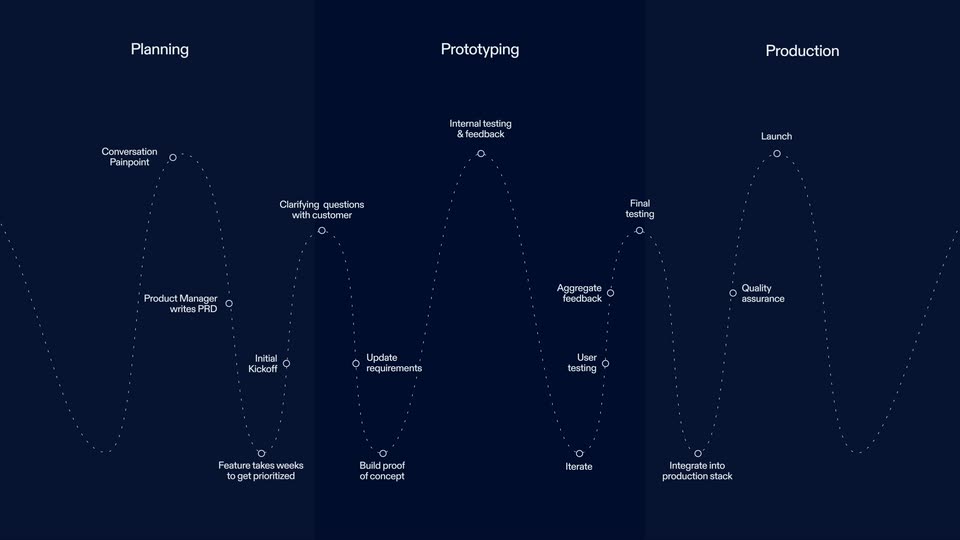
A dashed sine wave runs across a dark navy field. White step labels for planning, prototyping, and production fade in along the curve, hold, then fade out, leaving the bare wave.
On-screen text: “2x revenue in a single quarter.”
Camera: Static
26 · Feature reveal · 0:44–0:48
A dashed wave line undulates across a dark navy field, then flattens into a straight dashed line as four white labels fade in: Ideate, Prototype, Validate, Publish. The row holds, then dims as a timer panel and browser window fade in at the edges.
On-screen text: “Ideate”, “Prototype”, “Validate”, “Publish”
Techniques: Morph
Camera: Static
27 · Feature reveal · 0:48–0:51
On a dark navy field, a right-side browser window builds the CustomerFlow app: an empty view gains a sidebar, a customer list, then an Add New Customer modal a cursor opens. Left, a Time worked badge ticks up as step labels and blue code bars slide in.
On-screen text: “Time worked: 2 minutes”, “Created files”, “Time worked: 5 minutes”, “Installed Packages”, “Configured App”, “Propose test plan”
Techniques: Split screen, Cursor demo
Camera: Static
28 · Feature reveal · 0:51–0:52
A dark navy frame splits into an abstract block of blue code lines on the left and a flat CustomerFlow app window on the right. The app shows an open Add New Customer modal with pink form fields, a pointer arrow, and a tooltip reading Scanning form fields, while a Test app label scales in beside the code.
On-screen text: “Test app”
Camera: Static
29 · Feature reveal · 0:52–0:54
Two flat UI panels sit side by side on a dark navy field: a chat window titled Agent 3 on the left and an orange-bordered Stock Automation node graph on the right. The graph nodes draw in, the panels drift right, and a large Chat headline fades in at the left edge.
On-screen text: “Chat”
Camera: Static
30 · Feature reveal · 0:54–0:55
On a light gray background, a thick orange arc sweeps in from the left while the headline “Chat with the Agent to start building.” builds up word by word, then holds still.
On-screen text: “Chat with the Agent to start building.”
Techniques: Kinetic type
Camera: Static
31 · Feature reveal · 0:55–0:56
On a pale gray field, an orange arch and a yellow band sweep across the frame while a white rounded input card with a thin yellow outline draws in at center. The card grows over the static dark headline.
On-screen text: “Chat with the Agent to start building.”
Camera: Static
32 · Feature reveal · 0:56–0:58
A white rounded input card with a placeholder line and four pill buttons sits over thick orange and yellow arcs. The orange send button pops in, the text 'Build a customer portal dashboard' types out, then the card shrinks and disappears, leaving only the arcs.
Camera: Static
33 · Feature reveal · 0:58–0:59
A light gray field holds two overlapping orange and yellow arches. A bold black headline scales in at the center over the left arch, stating the design system line.
On-screen text: “Integrate your company's design system.”
Techniques: Kinetic type
Camera: Static
34 · Feature reveal · 0:59–1:01
A white prompt card with the line “Build a customer portal dashboard” and option pills sits over orange and yellow stripes. A cursor taps the “Company Design System” pill, then the card fades to reveal a “Connect” heading as the pill slides out.
On-screen text: “Integrate your company's design system.”
Techniques: Cursor demo
Camera: Static
35 · Feature reveal · 1:01–1:03
Two bold arch shapes, orange left and yellow right, sit on a light gray field. The black headline fades out, then a white rounded card with a thin orange line along its base fades in at the center.
On-screen text: “Connect to all your data & tools.”
Camera: Static
36 · Feature reveal · 1:03–1:05
A flat illustration centers a white app window with gray placeholder blocks over orange and yellow arcs on light gray. Six small app icons, cloud, share, database, drive, spreadsheet and an N logo, slide in around it and link to the window with dashed lines.
Camera: Static
37 · Feature reveal · 1:05–1:10
Three gray tiles labeled Apps, Agents, Automation sit centered, then the frame zooms out to a bento grid of feature cards in orange, navy and gray. The grid dims as white pill labels naming apps and agents fade in across the frame.
On-screen text: “Apps”, “Agents”, “Automation”, “Database”, “Private Deployments”, “SCIM”, “SSO”, “Design System Support”, “Org-wide connectors”, “Built-in Database”
Techniques: UI zoom
Camera: Pull out
38 · Other · 1:10–1:13
A full-screen grid of white rounded tags, each labeling an app concept, scrolls steadily toward the lower right. As the field moves, scattered tags light up with thin yellow or orange borders.
Camera: Static
39 · Other · 1:13–1:14
A white rounded button holding a globe icon and the word Publish sits centered on a plain light gray field, its thin border running from yellow to pink. The button scales down slightly across the locked-off shot.
Camera: Static
40 · Other · 1:14–1:18
A small white pill button with a globe icon and the word Publish sits centered on a yellow-to-orange gradient, then scales down and fades out. A white sentence fades in word by word at center, reading Built by the people who know your business best.
On-screen text: “Built by the people who know your business best.”
Techniques: Kinetic type
Camera: Static
41 · Social proof · 1:18–1:22
On a pale gray background, large orange and yellow rounded shapes sweep from the lower corners to the right edge while the sentence builds word by word in the left center.
On-screen text: “Across startups, scale-ups, and global leaders.”
Techniques: Kinetic type, Morph
Camera: Static
42 · Social proof · 1:22–1:25
A light gray field fills with a four-row grid of dark brand wordmarks (Google, duolingo, sears, WHOOP, scale, Zillow, SoFi, BCG, HubSpot, coinbase, Adobe, Hg, benity, Mercedes-Benz and more). The marks fade in with a slight stagger, settling into a crisp, evenly spaced logo wall.
On-screen text: “Across startups, scale-ups, and global leaders.”
Camera: Static
43 · CTA · 1:25–1:27
A white circular mask opens over an orange gradient as Replit Enterprise. slides into the center. The frame then cuts to a light gray card holding the black URL replit.com/enterprise.
On-screen text: “Replit Enterprise.”, “replit.com/enterprise”
Techniques: Masking, Kinetic type
Camera: Static
44 · Outro · 1:27–1:30
A plain light gray end card holds the centered black URL, then the text clears and the Replit mark draws in as a gradient outline before its three rounded squares fill with solid orange.
On-screen text: “replit.com/enterprise”, “Replit Enterprise.”
Camera: Static