2:43

Fish Audio - $52M seed round. 15M+ users. But this is what we're most proud of yet
Fish Audio · Oct 2026
Rentahuman · Sep 2026 · 0:44 · AI-annotated
Rentahuman’s 0:44 launch film runs 16 scenes, about 2.8 s each. The product is on screen from the first frame and 4 features are revealed, with social proof. The call to action lands at 0:38 (87% in). The video is built as a pixel title card, a five-step numbered walkthrough of a flat map booking UI, a polaroid proof strip, and a URL end card, all on a cream grid-paper ground. Signature moves: the marching brown pixel sign holders, mustard caption boxes with hard black borders and offset shadows, and tilted polaroids that drop in one by one with a slight wobble.
Is this your launch? to your site or press kit.
Fish Audio · Oct 2026
Rivet · B2B · Jul 2026
Runway · AI · Oct 2026
Pixel headline RENT A HUMAN builds up letter by letter above an orange BILLBOARD box on cream grid paper, while brown pixel figures march right holding green signs. A gray caption fades in, then the frame scrolls to reveal a pricing panel with a map on the right.
On-screen text: “RENT A HUMAN”, “BILLBOARD”, “Real people holding your sign on San Francisco corners.”
Techniques: Kinetic type, Split screen
Camera: Static
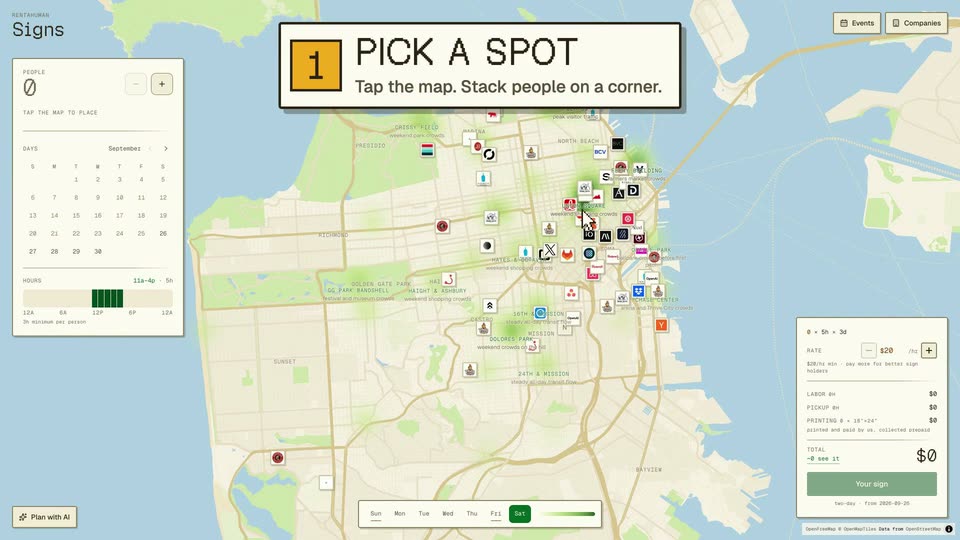
A San Francisco map covered in sign pins sits between a calendar panel on the left and a rate panel on the right. A white callout with an amber 1 badge fades in at top center reading PICK A SPOT, Tap the map. Stack people on a corner.
On-screen text: “1 PICK A SPOT”, “Tap the map. Stack people on a corner.”
Camera: Static
A 'PICK A SPOT' step card sits over a city map as a cursor taps down a pixel person on a corner. The view zooms in and the cursor clicks plus, stacking the count from one to three.
On-screen text: “1”, “PICK A SPOT”, “Tap the map. Stack people on a corner.”
Techniques: Cursor demo, UI zoom
Camera: Push in
A San Francisco map covered in company logos and green crowd heatmaps wipes in from the right as a cursor moves to the Events toggle. A caption block reading OUTSIDE AN EVENT, OpenAI DevDay - Fort Mason appears at the lower right.
On-screen text: “OUTSIDE AN EVENT”, “OpenAI DevDay - Fort Mason”
Techniques: Masking, Cursor demo
Camera: Static
A map with an events panel on the right zooms in on the OpenAI DevDay 2026 row, marked by a dashed outline and a hovering cursor. A white caption box with an orange plus icon at the bottom reads “OUTSIDE AN EVENT, OpenAI DevDay - Fort Mason”.
On-screen text: “OUTSIDE AN EVENT”, “OpenAI DevDay - Fort Mason”
Techniques: UI zoom, Cursor demo
Camera: Push in
A map view shows a Fort Mason popup with a people counter; a cursor taps the plus button to raise the count, then moves to a Companies button at top right. The map zooms out and a bottom caption swaps from Outside an Event to Outside a Company.
On-screen text: “OUTSIDE AN EVENT”, “OpenAI DevDay - Fort Mason”, “OUTSIDE A COMPANY”, “OpenAI DevDay - Inside of a building”
Techniques: Cursor demo, UI zoom
Camera: Pull out
A dimmed map sits behind a white Companies panel; a cursor types Corgi Cafe into the search box and the list swaps from tech firms to three Corgi Cafe rows. A white caption card with an orange plus icon reads OUTSIDE A COMPANY, Corgi Cafe, 9 Claude Lane.
On-screen text: “OUTSIDE A COMPANY”, “Corgi Cafe · 9 Claude Lane”
Techniques: Cursor demo
Camera: Static
A flat UI demo on a city map: a cursor adds pixel-corgi people to a Corgi Cafe pin, then the view reframes to a left panel where the cursor flips the calendar to October, marks days and drags the hours slider. Two caption boxes label the steps.
On-screen text: “+”, “OUTSIDE A COMPANY”, “Corgi Cafe · 9 Claude Lane”, “2”, “PICK DAYS + HOURS”, “Any days. 3-hour minimum.”
Techniques: Cursor demo, UI zoom
Camera: Push in
A pixel street map fills the background as a white Signs panel sits left, its people count ticking from 3 to 4 and a pixel walker popping in as a cursor taps the plus button. A caption box on the right reads HOW MANY PEOPLE.
On-screen text: “3 HOW MANY PEOPLE Up to 100 a day.”
Techniques: Cursor demo
Camera: Pan
A top-down city map pans across scattered logo tiles while a white booking panel with pixel figures and a calendar holds the left edge. Numbered caption cards switch from 3 to 4 as a cursor hovers over the plus button.
On-screen text: “RENTAHUMAN”, “Signs”, “3”, “HOW MANY PEOPLE”, “Up to 100 a day.”, “4”, “SEE THE PRICE”, “$20/hr floor. Fee and printing included.”
Techniques: Cursor demo
Camera: Static
A beige street map dotted with brand logo pins fills the left, a pricing panel sits on the right. A cursor glides from a map pin to the total row, and a dashed orange box snaps around the price. A caption reads 4 SEE THE PRICE at lower left.
On-screen text: “4 SEE THE PRICE”, “$20/hr floor. Fee and printing included.”
Techniques: Cursor demo
Camera: Static
A flat map interface covered in small company logo icons, framed by a left schedule panel, a top CHECK OUT step banner, and a right pricing panel. A cursor moves onto the green Your sign button. The full-screen view holds steady.
Techniques: Cursor demo
Camera: Pull out
A white checkout dialog floats over a dim map, topped by an orange-numbered 5 CHECK OUT card. A cursor moves over the form, then the panel slides aside to reveal a generated billboard mockup reading RENT A HUMAN while the frame tightens on the input fields.
On-screen text: “5 CHECK OUT”, “Upload your sign. We print it.”
Techniques: Cursor demo, UI zoom
Camera: Push in
A cream checkout panel sits over a dimmed map, showing a sign preview reading RENT A HUMAN and a Sign in to pay button with a cursor. A burst of small yellow squares pops out around the panel's lower edge.
Techniques: Particles
Camera: Static
On a cream grid-paper background, a black monospace headline reads REAL HUMANS. with REAL CORNERS. on a mustard box, over a small gray subtitle. Four tilted polaroid photos of people holding white signs drop in from left to right, then hold with a slight wobble.
On-screen text: “REAL HUMANS. REAL CORNERS.”, “Proof photos from RentAHuman sign holders in SF.”
Camera: Static
A cream grid background holds a pixel-font URL headline with a small brown uppercase tagline above it; a green CTA button fades in below. A row of brown pixel-art figures holding green signs walks in from the left along the bottom edge.
On-screen text: “HUMAN BILLBOARDS · SAN FRANCISCO”, “rentahuman.ai/signs”, “Place your people”
Camera: Pull out