1:06
Explore
Remotion — edit agent-made videos
Remotion · Nov 2026 · 0:34 · AI-annotated
- Length
- 0:34
- Scenes
- 31 · 1.1 s avg
- Product on screen
- 0:28
- Voiceover
- Yes
00:00:00 / 00:34:05
- Length
- 0:34
- Scenes
- 31 · 1.1 s avg
- Product on screen
- 0:28
- Voiceover
- Yes
Remotion’s 0:34 launch film runs 31 scenes, about 1.1 s each. The product shows up at 0:28. There is no explicit call to action; a voiceover carries the film. A fast montage of a web video editor: it opens on a stylized cascading timeline, then cuts through tilted 3D UI panels showing trimming, captions, effects and render, and ends on the brand mark. The style is defined by rapid 3D camera moves over dark interface panels, a saturated blue and orange clip palette, and a single red playhead that anchors every shot.
No filming indicatedEstimated needs: 10 capture groups — your screens or recordings · 1 official logo — reused across the film · 2 graphic passages — draw or supply · 10 3D passages — build or supply
Is this your launch? to your site or press kit.
More like this

Similar soundtrack
Films whose music sounds like this one, voice left out
0:51

The new Pika platform
Pika · High-energy electronic, blending trap, dubstep, and hyperpop elements.
0:16

MetaMask 🦊 - Introducing: Stablecoin Earn Start depositing your stablecoins and s
MetaMask · Hip-hop, trap, electronic dance music
0:33

Introducing Luma Dream Machine - Next Generation AI Video
Luma AI · Electronic Dance Music (House/Tech House)
Remotion — edit agent-made videos, scene by scene
· 31 scenes as text
01 · Hook · 0:00–0:01
A dark interface grid reveals a left column of labeled rows (Intro, Video, Captions) with a purple waveform caption, while blue rectangular blocks cascade diagonally across the right side.
Camera: Pan
02 · Hook · 0:01–0:03
A close-up of a video editing timeline scrolls left to right. Blue caption clips labeled Gear up and Uphill pass by above a video clip of a cyclist, a purple waveform track and an orange text track, until a thin orange playhead line stops at the right edge under the 00:30.00 timecode.
Techniques: UI zoom
Camera: Pan
03 · Hook · 0:03–0:05
A grid of colored tiles on a dark background scrolls left, carrying a bearded man in a field, a purple audio waveform, and white text that slides across the blue and orange rows. Blue blocks and a thin orange line shift on the right.
On-screen text: “What is”, “Eve”, “They do”, “Stand f”, “sometir”, “a gr”, “00:30.00”
Techniques: Kinetic type, Parallax
Camera: Pan
04 · Hook · 0:05–0:06
A close-up of a dark video editor timeline pans right. A blue track and the timecode 01:30.00 sit above blue clips labeled Best commute and Chi with film icons, video thumbnails and a purple waveform below.
Techniques: UI zoom
Camera: Pan
05 · Hook · 0:06–0:08
A slatted grid of vertical panels scrolls left across a dark field, each column holding a blue bar, a video strip of a man in a tan jacket, a purple audio waveform, and an orange bar. White caption text fades in over the dark right area as the panels move.
On-screen text: “Best commute”, “101:30.00”, “How it w”, “So let me”
Techniques: Masking, Kinetic type
Camera: Pan
06 · Demo · 0:08–0:09
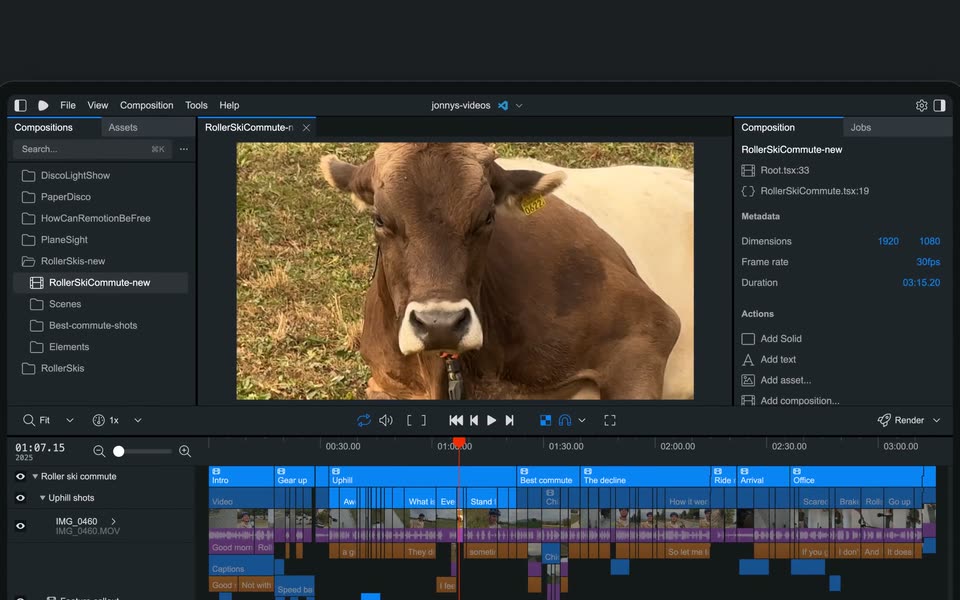
A video editor interface fills the frame in a locked-off shot. A central preview shows a brown cow facing the camera, with a project panel on the left, a metadata panel on the right, and a multi-track timeline of colored clips and a red playhead below.
Camera: Static
07 · Demo · 0:09–0:09
A dark video-editor interface fills the frame. A center preview window shows a brown cow resting in grass, a multi-track timeline with colored clips runs along the bottom, and side panels list compositions and metadata. The view holds still.
Camera: Static
08 · Demo · 0:09–0:10
A green audio-clip card showing a waveform rotates in 3D from a tilted vertical angle to a flat horizontal plane. A white icon of brackets with opposing arrows hovers at its center. Thin line graphics and a blue diagonal plane sit in the dark background.
Techniques: 3D mockup
Camera: Pan
09 · Demo · 0:10–0:11
A close-up of a dark video-editor timeline: a blue video clip sits above a green audio clip labeled Music (drop), with a red playhead line down the middle. A bracket trim icon slides left off the clip's edge as the clip gains a white selection outline, and a dark timecode tooltip pops in above it.
On-screen text: “Music (drop)”, “+00:00.04”, “02:14.22”
Techniques: UI zoom
Camera: Pull out
10 · Demo · 0:11–0:13
A tilted view of a video editor timeline with stacked color clips, audio waveforms and caption blocks. A white arrow cursor glides left across the tracks while the red playhead stays fixed.
Techniques: Cursor demo
Camera: Static
11 · Demo · 0:13–0:14
A video editor timeline is shown tilted in 3D perspective. The time ruler and colored clip tracks scroll left as the red playhead moves right, while a cursor arrow rests on a purple audio waveform track.
Techniques: 3D mockup
Camera: Static
12 · Demo · 0:14–0:15
A 3D-tilted video editing timeline fills the frame, camera gliding right across colored clip blocks and waveform tracks. Caption overlays inside the clips read out as the playhead timecode advances from 00:34 to 01:02.
Techniques: 3D mockup
Camera: Static
13 · Demo · 0:15–0:17
A tilted 3D view of a web video editor. The preview window shows a sunset field with cranes while outlined white captions update word by word. A red playhead travels right along the timeline, and a captions panel lists timestamped rows on the right.
Techniques: 3D mockup
Camera: Static
14 · Demo · 0:17–0:18
A close-up of a video editor timeline with a red playhead over a clip labeled Cow stare zooms out to reveal the full interface, with a preview window above showing a brown cow staring at the camera and a time tooltip on the track.
Techniques: UI zoom
Camera: Pull out
15 · Demo · 0:18–0:19
A dark Actions menu, listing Split, Freeze, Duplicate, HTML-in-canvas, Motion blur, Unwrap and Delete, sits at an angle in 3D perspective over a faint grid. A white cursor glides down the list, each row lighting up as it passes, ending on Delete.
Techniques: 3D mockup, Cursor demo
Camera: Static
16 · Demo · 0:19–0:19
A video editing interface fills the frame, a brown cow lying on grass plays in the center preview while a multi-track timeline runs below. The view zooms in slightly toward the preview window.
Techniques: UI zoom
Camera: Static
17 · Demo · 0:19–0:19
A close-up of a video editor interface pans right and zooms in, sliding from the dog preview and transport bar down to the timecode ruler and the stacked blue, purple and orange clips beneath it.
Techniques: UI zoom
Camera: Static
18 · Demo · 0:19–0:20
A tilted 3D view of a video editor window shows a sunset landscape clip with a magenta guide line. Two blue selection boxes frame the caption 'Guys, out of', the word 'of' in blue, as a cursor drags the lower box downward and the upper copy clears.
On-screen text: “Guys, out of”, “Guys, out of”
Techniques: 3D mockup, Cursor demo
Camera: Static
19 · Demo · 0:20–0:21
A dark effects panel, tilted a few degrees, fills the frame. A white cursor slides down the list from starburst to glow, where an fx icon pops in, then settles on the highlighted fisheye row showing its parameter values.
Techniques: Cursor demo
Camera: Static
20 · Demo · 0:21–0:22
A tilted dark menu lists actions with line icons. A white cursor moves down the list, highlighting Add text, then glides to the bottom row and highlights Download project.
Techniques: 3D mockup, Cursor demo
Camera: Static
21 · Demo · 0:22–0:24
A tilted video-editing timeline on a blue background scrolls left as a green playhead and a white trim bracket move right. A black timecode chip appears at the top, and an orange caption strip runs along the bottom edge.
Techniques: 3D mockup
Camera: Static
22 · Demo · 0:24–0:25
A dark video-editor timeline fills the frame. A blue Music track sits above a green Music track with an audio waveform, and a red playhead runs vertically. A cursor drags the right diamond handle of a blue clip to extend it, while the duration readout on the left ticks down from 0.65 to 0.60.
Techniques: Cursor demo
Camera: Static
23 · Demo · 0:25–0:26
A dark editor panel fills the left as playback rate and scale values tick up while a move cursor slides across them. On the right, a video preview shows a man speaking under a blue bar and an orange caption, with a red playhead line at the edge.
Techniques: Cursor demo
Camera: Static
24 · Demo · 0:26–0:28
A dark effects panel crossfades from a levels histogram to a curves graph. The white waveform fades as a diagonal curve line with a square handle appears over a grid, while a cursor moves across the panel.
Techniques: Cursor demo
Camera: Static
25 · Demo · 0:28–0:28
Close-up of a dark curves panel with a Channel label and rgb dropdown. A mouse cursor drags a square control point upward, bending the diagonal line into an S-curve while the grid and gray histogram bars stay static.
Techniques: Cursor demo
Camera: Static
26 · Product intro · 0:28–0:29
A dark input panel floats tilted in 3D perspective on a black background. A prompt types out character by character behind a blinking caret, while three labeled options sit along the bottom edge of the panel.
Techniques: 3D mockup, Kinetic type
Camera: Static
27 · Demo · 0:29–0:30
A tight close-up of a dark menu bar shows a white outline cursor gliding right across File, View and Composition, each click opening a dropdown with Render and Render in browser entries.
Techniques: UI zoom, Cursor demo
Camera: Pan
28 · Demo · 0:30–0:31
A dark inspector panel sits tilted in 3D perspective against a black void. The duration value counts up from 450 to 1134 in blue while the camera drifts up to reveal a dropdown above the code.
Techniques: 3D mockup
Camera: Pull out
29 · Demo · 0:31–0:31
A dark render dialog fills the frame, a blue Render video button scales up as a cursor arrow hovers over it, an MP4 dropdown sits below. Code lines on the left slide in beside the panel as the view reframes tighter on the button.
Techniques: Cursor demo, UI zoom
Camera: Pull out
30 · Demo · 0:31–0:32
A dark render-jobs panel sits in 3D perspective, tilted to the right. Two job rows show a completed file and a second row whose frame counter and time remaining tick down as the clip plays.
Techniques: 3D mockup
Camera: Static
31 · Outro · 0:32–0:34
A white rounded triangle with concentric gray rings sits centered on a near-black background. It scales down smoothly and continuously, shrinking to a tiny dot by the end of the clip.
Camera: Static