1:40

The new MacBook Pro with M5 Pro and M5 Max
Apple · Hardware · Mar 2026
Pigment’s 2:05 launch film runs 62 scenes, about 2.0 s each. The product shows up at 0:13 and 5 features are revealed, with social proof. The call to action lands at 1:57 (94% in). The video is built as a problem-to-promise arc: a dark desk set shows the message pile-up, then a pale 3D space walks through five feature blocks, each opened by a frosted headline card and closed by a UI demo. Pacing is steady at about 98 bpm, with signature moves of slow 3D camera drifts, parallax panel layers, and counting-up figures.
Is this your launch? to your site or press kit.
Apple · Hardware · Mar 2026
DigitalOcean · Sep 2026
Hera · B2B · Jul 2025
Films whose music sounds like this one, voice left out
Unitree · Hard rock / metal
Onlook · Electronic dance music
Higgsfield · Electronic, Synthwave
A closed silver laptop on a dark teal desk rises open to a blank white screen, flanked by binders, a pen cup and a lamp. The camera stays locked off.
Techniques: 3D mockup
Camera: Static
A silver laptop with a blank white screen sits on a dark desk beside a desk lamp, blue binders and a pen cup. The camera slowly pushes in toward the screen.
Camera: Static
Blue ring binders stand along the left edge against a bright white-to-blue gradient. Four notification cards pop up in 3D perspective one after another, fanning diagonally, each carrying a sender name, a time and a short question about the budget, the forecast, the actuals and a file still calculating.
Techniques: 3D mockup
Camera: Push in
A laptop rests on a dark desk, its white screen filled with chat cards bearing names and times. The cards drift outward in 3D, spilling past the left and right edges of the screen while the desk, lamp and books stay still.
Techniques: 3D mockup, Parallax
Camera: Static
A 3D office desk holds silver and blue binders, a notepad with two pens, and a blue notebook. Translucent message cards with sender names and timestamps tilt and drift across the frame at an angle, passing in front of the binders.
Techniques: 3D mockup
Camera: Static
A tilted laptop screen fills the frame, its white display in sharp focus against a blurred office set. A dark italic headline types itself out letter by letter with a blinking caret, centered on the screen.
On-screen text: “There's a better way to plan”
Techniques: Kinetic type
Camera: Static
A laptop sits centered on a dark desk, its white screen showing a thin gray headline that types out letter by letter behind a blinking caret. Desk props, a pen holder and a lamp, frame the device in a dim 3D room.
On-screen text: “There's a better way to plan”
Techniques: Kinetic type, 3D mockup
Camera: Static
Front view of a laptop on a dark desk, its white screen glowing. The centered headline crossfades from 'There's a better way to plan' to 'Introducing Pigment' with a blue circular logo between the words.
On-screen text: “There's a better way to plan”, “Introducing Pigment”
Techniques: 3D mockup
Camera: Static
A laptop on a dark desk faces the camera, its screen showing a white card with 'Introducing' and 'Pigment' around a two-circle logo. The camera slowly pushes in, tightening the frame on the screen.
On-screen text: “Introducing”, “Pigment”
Camera: Static
A laptop mockup on a dark desk faces the camera, its white screen showing “Introducing Pigment” beside two overlapping blue and teal circles. The title crossfades to the centered line “Integrated business planning for smarter decisions.”
On-screen text: “Introducing Pigment”, “Integrated business planning for smarter decisions”
Techniques: 3D mockup
Camera: Static
A black laptop sits on a dark desk, its white screen glowing against a deep blue background. The camera slowly pushes in on the device as the two-line headline holds centered on the display.
On-screen text: “Integrated business planning”, “for smarter decisions”
Techniques: 3D mockup
Camera: Push in
A 3D-rendered interface panel floats at an angle in a pale blue space. The camera drifts right, revealing the Pigment logo above a menu list, while blurred panels sit in the background.
On-screen text: “Integrated business planning”, “for smarter decisions”
Techniques: 3D mockup
Camera: Push in
A row of white dashboard cards floats in 3D perspective on a pale blue set with shallow depth of field. The center card counts its figure from 52% to 64% while a blue progress ring fills, and a green line chart plus an ARR card sit blurred at the edges.
Techniques: 3D mockup, Parallax
Camera: Push in
A glass metric card floats at an angle in 3D, layered over translucent panels on a soft pastel backdrop. The dollar figure counts up and the percentage ticks from 0.3% to 0.4% as a small line chart draws in on the right.
Techniques: 3D mockup, Light sweep
Camera: Static
A tilted financial dashboard in 3D perspective fills the frame, its right edge receding into a dark diagonal. The interface scrolls vertically, the revenue chart and KPI cards sliding up as the Summary P&L and Cash Flow Summary tables rise into view.
Techniques: 3D mockup
Camera: Pan
A laptop mockup sits at an angle on a pale background, the screen showing the Pigment finance dashboard. The camera drifts right, sliding from the left sidebar across the Executive Overview metrics and revenue figures.
Techniques: 3D mockup
Camera: Pan
A 3D laptop sits on a desk in a bright office, its screen showing a finance dashboard with KPIs, data tables and a green bar chart. The camera slowly dollies in toward the screen as the plant and pen holder stay in frame.
Techniques: 3D mockup
Camera: Push in
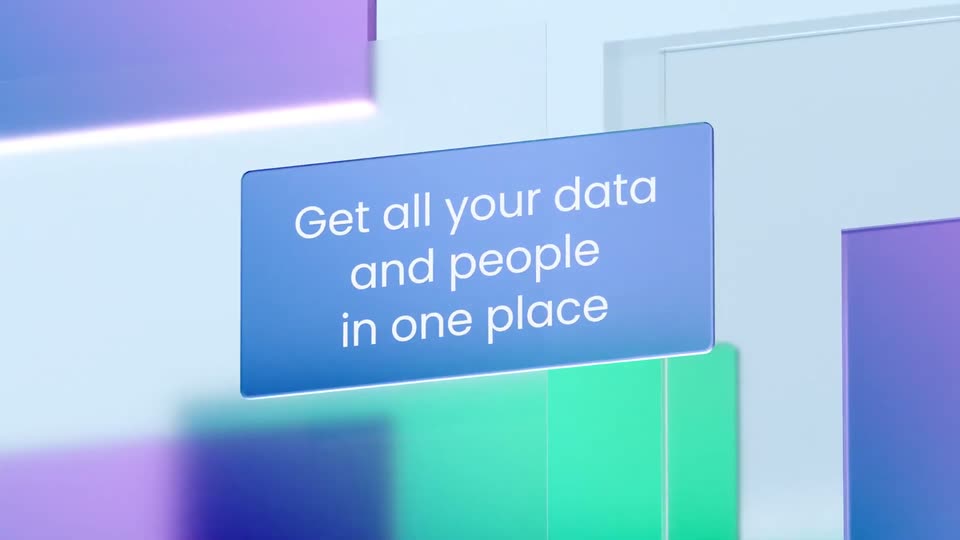
A frosted blue glass card holding white text floats in a 3D field of soft purple and green gradient panels. A vertical panel slides out of frame to reveal the card while the camera pans right, background layers drifting at different speeds.
On-screen text: “Get all your data”, “and people”, “in one place”
Techniques: Masking, 3D mockup, Parallax
Camera: Static
A 3D tablet with a dashboard tilts as glass cards carrying app logos (Salesforce, Drive, Workday) drift past at different depths; a light background holds soft color blocks. The headline “Get all your data and people in one place” scales in.
On-screen text: “Get all your data”, “and people”, “in one place”
Techniques: 3D mockup, Parallax, Kinetic type
Camera: Push in
A stepped stack of colored interface bars sits in 3D perspective, each row showing a planning label and a person icon. The view tilts down the list and the focus shifts from the upper rows to the Pigment logo at the bottom.
Techniques: 3D mockup
Camera: Pull out
A blue rounded card with white text floats in 3D perspective over blurred pastel panels. The card tilts and drifts left as the text scales up, while the background layers shift at a different speed.
On-screen text: “Build a plan around”, “your business goals”
Techniques: 3D mockup, Parallax
Camera: Push in
A 3D laptop screen sits in perspective, showing the Pigment app's P&L Target Setting page with a Revenue Target card reading $101,000,000. The camera pushes in to a frontal view as the headline scales in.
On-screen text: “Build a plan around”, “your business goals”
Techniques: 3D mockup, Kinetic type
Camera: Push in
A tilted product dashboard titled P&L Target Setting settles into focus as a ghosted duplicate layer slides away, revealing four metric cards with revenue, growth and margin figures.
Techniques: Parallax, 3D mockup
Camera: Push in
A laptop in 3D perspective displays a P&L target setting dashboard, showing revenue and margin targets above a dense financial table. The device tilts and rotates gently as the view settles into a centered angle.
Techniques: 3D mockup
Camera: Push in
A translucent blue card with white text floats among colored glass panels in 3D space. The card flips on its vertical axis to swap the word better for together while the camera drifts through the panels.
On-screen text: “Make your plan better”, “Make your plan together”
Techniques: 3D mockup, Parallax
Camera: Push in
A tilted spreadsheet interface shows a P&L table with FY columns as a blue HR Manager cursor tag drifts left across the rows. The headline Make your plan together reveals and scales over the grid.
On-screen text: “Make your”, “plan together”
Techniques: Kinetic type, Cursor demo, 3D mockup
Camera: Push in
A close-up of a financial spreadsheet fills the frame, rows of P&L line items and figures ticking as a blue pointer rests on the Operating Expenses cell, which gains a blue outline. A green tag reading + 10 FTE scales in above the pointer while a blue HR Manager pill with a small avatar sits at the lower right.
On-screen text: “+ 10 FTE”, “HR Manager”
Techniques: Kinetic type
Camera: Push in
A product interface shows a flat left sidebar listing integrations beside a financial table tilted in perspective. A green box marks +10 FTE and a blue HR Manager bubble points to the operating expenses row.
Camera: Static
A tilted 3D view of a P&L spreadsheet zooms in on the Sales & Mktg row; a blue box outlines the FY 22 figure as a green '+ 20% ads' tag pops in above it, while a blue 'Head of Marketing' callout with an avatar points at the cell.
On-screen text: “Head of Marketing”, “+ 20% ads”
Techniques: UI zoom
Camera: Push in
A P&L spreadsheet table fills the frame with a blurred ratio panel on the left. A green tag reading + 20% ads expands over the revenue row, and a blue callout with a small portrait points to a highlighted cell in the Sales & Mktg row.
On-screen text: “+ 20% ads”, “Head of Marketing”
Camera: Push in
A blue rounded card with white copy tilts from a three-quarter angle to face the camera as the view pushes in, while translucent purple, teal, and blue panels drift in the background. The line in real time reveals below the headline.
On-screen text: “Visualize scenarios”, “in real time”
Techniques: 3D mockup, Kinetic type, Parallax, UI zoom
Camera: Push in
A perspective-tilted spreadsheet table floats over pastel purple and teal 3D blocks. A blue cursor arrow glides left to right, pausing over cells in the Target and Revenue Forecast columns. The table stays angled throughout.
On-screen text: “Visualize scenarios”, “in real time”
Techniques: 3D mockup, Cursor demo
Camera: Static
A tilted spreadsheet table with columns of figures and percentages floats in 3D over a blurred pastel backdrop. A blue arrow cursor rests on a pink row, then a blue selection box draws around the 85% cell as the cursor slides down.
Techniques: 3D mockup, Cursor demo
Camera: Static
A 3D perspective view slowly pulls back over a spreadsheet with a red 85% cell. A blue cursor hovers by the cell while a comment card types a message about hiring in Asia, then the cursor glides to the Comment button.
Techniques: 3D mockup, Cursor demo
Camera: Pull out
A tight 3D close-up of a light blue dialog card reads “could we create a scenario with hiring in Asia?” above a white Cancel button and a blue Comment button. A blue arrow cursor drops down and presses Comment.
Techniques: 3D mockup, Cursor demo
Camera: Static
A 3D-rendered laptop shows the Pigment P&L Target Setting page at an angle on a pale blue background. A blue cursor clicks the Scenario dropdown, a panel opens listing Base case and a New scenario button, then the panel closes.
On-screen text: “gh - could we create a scenario with”, “hiring in Asia?”
Techniques: 3D mockup, Cursor demo
Camera: Push in
A white Scenarios panel hovers in 3D perspective over a blurred background card showing $101.1M. A blue cursor arrow glides down from the Base case row to the + New scenario button, which enlarges as the cursor lands on it.
Techniques: 3D mockup, Cursor demo
Camera: Static
A Create a new Scenario dialog sits over a dimmed revenue-forecast dashboard. A blue cursor clicks the Name field, APAC Expansion is typed, then the cursor presses Create while the frame slowly zooms in on the dialog.
Techniques: Cursor demo, UI zoom
Camera: Static
A white financial table titled Operating Expenses per Region floats at a tilted angle in 3D space against blue and purple panels. A blue CFO badge with a small avatar slides in at the lower right.
Techniques: 3D mockup
Camera: Static
A tilted 3D spreadsheet shows rows of large figures. A blue APAC expansion tag sits over a highlighted row, then a green + 10% FTE tag pops in as that row's number updates. A blue CFO badge with a headshot points at the row.
On-screen text: “APAC expansion”, “CFO”, “+ 10% FTE”
Techniques: 3D mockup
Camera: Static
A tilted spreadsheet mockup in 3D perspective fills the frame. A blue APAC expansion label sits above a highlighted cell reading 19,798,022, while a blue CFO tag with a headshot and a cursor arrow point at the row. Black figures line the white rows.
Techniques: 3D mockup
Camera: Static
A 3D spreadsheet mockup titled Operating Expenses per Region is shown in perspective. A green tag reading + 10% FTE slides up to reveal the APAC Expansion header. A blue callout highlights a cell, and a speech bubble with a CFO avatar floats in the foreground.
Techniques: 3D mockup, Parallax
Camera: Static
A bar chart with EMEA, AMER and APAC columns sits on a soft blue-green gradient. The panel scales up gently while the APAC column's figure climbs from 18,002,700 to 20,944,278.
Camera: Static
Close-up of a 3D bar chart on a soft blue-green gradient: two frosted bars labeled AMER and APAC, the taller APAC bar capped with a red line. The camera slowly pushes in as the lower value 20,680,552 fades out, leaving 22,107,000.
Techniques: 3D mockup
Camera: Push in
A blue gradient card reading “Share business insights faster” floats among translucent 3D panels in purple, green, and blue. The camera slowly pushes in, bringing the card into sharp focus while the surrounding panels blur and slide past at different speeds.
On-screen text: “Share business insights faster”
Techniques: 3D mockup, Parallax
Camera: Push in
A dimmed board grid sits behind a centered Create Board dialog. A blue cursor clicks the name field, types Executive Summary, then moves down and presses Create and configure as the frame zooms in on the dialog.
On-screen text: “Share business”, “insights faster”
Techniques: Cursor demo, UI zoom
Camera: Push in
A 3D-tilted onboarding screen with frosted widget cards (Grid, Chart, List, KPI) and a blue cursor arrow gliding across them; the camera pans right to reveal more cards beneath the headline.
On-screen text: “Let's create your Board”, “Get started by adding a widget”
Techniques: 3D mockup, Parallax, Cursor demo, Kinetic type
Camera: Push in
Three frosted-glass widget tiles with icons and labels sit in 3D perspective on a pale blue gradient. The camera dollies in on the KPI tile while a blue cursor arrow hovers over its crosshair icon.
Techniques: 3D mockup, Cursor demo, UI zoom
Camera: Push in
A tilted 3D dashboard shows the Executive Summary heading with Scenario and Product filter pills. The camera pushes in as a light blue bar rises from the bottom edge, capped by a dark blue tab.
Techniques: 3D mockup, Parallax, UI zoom
Camera: Push in
A tilted 3D dashboard titled Executive Summary sits on a pale background. A blue bar under Revenue Target extends from left to right while the figure $109.1M fades in at its center, and the filter chips and headings slide into place.
Techniques: 3D mockup
Camera: Push in
A translucent blue bar floats in 3D perspective over a blurred light interface, the black italic value on its face and a blue arrow pointer at the lower right edge. The camera holds a locked-off angle while the bar and arrow drift slightly.
On-screen text: “Executive Summary”, “Scenario:Base Case”, “Revenue Target”, “$101.1M”
Techniques: 3D mockup
Camera: Static
A dashboard interface sits in 3D perspective on a light background, tilted toward the right. A blue card labeled Revenue Target holds the figure $101.1M, with a blue cursor arrow resting at its lower corner. The frame stays locked.
Techniques: 3D mockup
Camera: Push in
An angled close-up of a laptop shows a planning dashboard with a rising two-line chart. The cursor hovers a plus button on the quarter timeline, an Add Widget tooltip pops up, a row of widget icons appears, and the cursor selects Chart, raising a second tooltip.
Techniques: 3D mockup, Cursor demo
Camera: Push in
A laptop sits at an angle on a desk, its screen showing a planning dashboard with a line chart and quarter timeline. A cursor clicks the Chart icon and a blue donut chart titled Geo Targets appears below the timeline.
Techniques: 3D mockup, Cursor demo
Camera: Static
A 3D field of pastel blue, purple and teal panels recedes as the camera pushes in, focus sharpening on a central glass card where the line “the right decisions” scales in beneath “to make”.
On-screen text: “to make”, “the right decisions”
Techniques: Parallax, Kinetic type, 3D mockup
Camera: Push in
A blue rounded card floats in a soft 3D field of blurred pastel panels. White text on the card reads 'to make the right decisions,' then crossfades to 'and be board meeting ready,' with each line scaling in.
On-screen text: “to make the right decisions”, “and be board meeting ready”
Techniques: Kinetic type
Camera: Push in
A laptop on a desk shows a financial dashboard with KPI cards, a line chart and bar charts. The camera pushes in to center the screen while a blurred foreground hair clears, a notebook and pen sit at left, and a two-line headline scales in over the shot.
On-screen text: “and be board”, “meeting ready”
Techniques: Kinetic type
Camera: Push in
A silver laptop on a gray desk displays a spreadsheet dashboard with colored revenue boxes, a donut chart and a bar chart. A blue notebook rests at the left edge. The camera drifts slowly left across the still screen.
Camera: Static
A low-angle close-up of a silver laptop on a dark desk shows a white dashboard with a table of percentages and colored bars. A cursor glides to the yellow Update all button and clicks it, and the 3 updates available banner vanishes.
Techniques: Cursor demo
Camera: Push in
A black tablet in 3D perspective shows a presentation slide with a blue $101.1M target card and a teal $99.5M forecast card. The camera pushes in as both cards lift out of the screen and float toward the viewer.
Techniques: 3D mockup
Camera: Push in
The Pigment logo, two overlapping green and blue circles, sits centered with the wordmark on a pale, soft-focus background. The tagline and URL hold below it, then the logo and tagline fade out, leaving only the URL on the empty background.
On-screen text: “Pigment”, “Integrated business planning”, “for smarter decisions”, “www.gopigment.com”
Camera: Static
On a pale background with soft diagonal light bands, the centered line “Trusted by world-leading organizations” holds still while eight brand logos fade in one by one across two rows. A small URL is locked at the bottom edge.
On-screen text: “Trusted by world-leading organizations”, “www.gopigment.com”
Camera: Static