0:54

Introducing Gemini Omni: Create Anything from Anything
Google · AI · May 2026
Perplexity · Nov 2026 · 1:11 · AI-annotated
Perplexity’s 1:11 launch film runs 19 scenes, about 3.7 s each. The product is on screen from the first frame and 4 features are revealed. There is no explicit call to action; a voiceover carries the film. The video is built as a series of monochrome studio vignettes where a single person works while dark chat cards type, expand and scroll live logs at the frame edge, punctuated by abstract UI feeds on black. Signature moves include slow push-in and pull-back camera moves, glossy 3D blobs orbiting serif headlines, and cards that morph from forms into chats.
Is this your launch? to your site or press kit.
Google · AI · May 2026
OpenAI · AI · Jul 2025
Adobe · Apr 2025
A cream serif title, Introducing teammates, scales up over an orange ridged background as glossy 3D blobs in pink, blue, green and orange drift outward and blur away. The shot then cuts to a 3D miniature diorama of a person at a desk beside orange cabinets and a cart.
On-screen text: “Introducing”, “teammates”
Techniques: Kinetic type
Camera: Push in
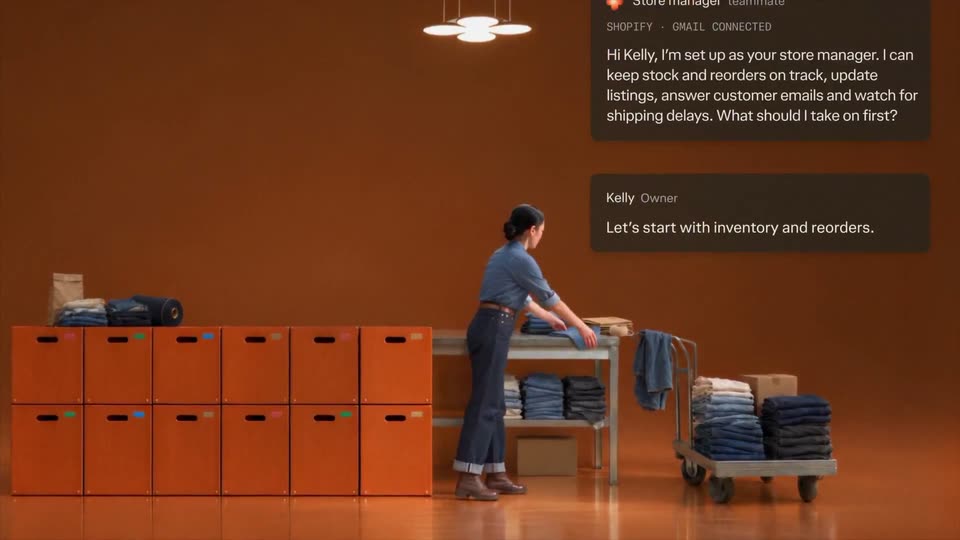
A woman types on a laptop at a table in a terracotta room lined with orange crates and a cart of folded jeans. A UI card on the right types “Store manager” into a teammate form, then turns into a chat as she holds up jeans.
Techniques: Morph
Camera: Push in
A woman in a denim warehouse folds a pair of jeans as a dark task panel builds line by line on the right. Cut to a man in an orange hoodie reclining in a chair, phone in hand, facing a monitor in a teal studio.
Camera: Static
A person in an orange hoodie and headphones reclines in a lounge chair at a glass desk, phone in hand, as the camera slowly pushes in. Dark chat cards slide in on the right, showing an Engineer update then a QA update. Two dog figurines perch on the monitor.
On-screen text: “Engineer teammate”, “Fixed the password-reset crash and opened a PR. Sending it to the QA teammate for testing.”, “QA teammate”, “Tested the password-reset fix on desktop and mobile. The crash no longer reproduces. PR is ready for review.”
Camera: Push in
A man in a beige tee and headphones types on a laptop at a wooden desk against a green wall. A dark pill badge labeled QA teammate slides in at upper right, then expands into a card with a message. The camera pulls back to reveal pendant lights, a potted tree and a record shelf, then fades to black.
On-screen text: “QA teammate”, “Jaime's password-reset fix passed testing on desktop and mobile. The PR and test results are ready for your review.”
Techniques: Masking
Camera: Pull out
A dark “Ads Manager” card with a Live badge drifts upward as its campaign log scrolls, new timestamped lines sliding in at the bottom. A separate “E-comm Manager” pill sits below and exits the frame. A faint warm glow ring fills the dark background.
Camera: Static
On a near-black field with a glowing orange four-lobed shape, flat agent cards float in front. The Ads Manager card slides up and out as the E-comm Manager card expands to show its inventory list, then collapses to a small chip; a Customer Support pill stays at the bottom.
Camera: Static
A dark inventory card titled E-comm Manager with a Live badge floats centered over a blurred orange bloom. Its timestamped log lines scroll upward one by one, while a Customer Support pill with a drop icon stays fixed at the bottom.
Camera: Static
A vertical stack of dark agent cards scrolls upward, the E-comm Manager card sliding off the top as the Customer Support card centers with a ticket list, the Engineer pill holding at the bottom. Soft orange bokeh circles and a diagonal blue light beam sit behind.
Camera: Static
A dark Customer Support panel with a Live badge floats centered on a black background lit by a soft blue cone of light. Its ticket list scrolls upward continuously, new rows sliding in from the bottom, while an Engineer pill button stays fixed below.
Camera: Static
Two stacked UI cards sit on a dark field with a soft glow. The top Customer Support card, listing live tickets, slides up and out as the bottom Engineer card slides to center, revealing a code block and build status. The glow shifts from blue to green.
Camera: Static
A dark live-feed card titled Engineer sits over a slowly rotating green blob. Inside, a code diff for PR #482 scrolls vertically while a timestamped status log slides up, adding lines such as Build passed and PR #482 ready for review.
Camera: Static
A 3D man in a brown shirt works at a wooden table with a laptop in a mustard-yellow room, an easel of prints to the right. Dark chat bubbles with white text stack top-left and scroll up as new messages arrive. He then walks to the easel.
On-screen text: “Ads Manager teammate”, “Our creator ads are outperforming our CAC target. I've prepared an expanded campaign and sent the creator's contract extension to Legal.”, “Emmanuel Brand Director”, “Great call. Always send contract changes to Legal. No need to ask next time.”, “Ads Manager teammate”, “Got it. Contract changes go straight to Legal from now on.”
Techniques: Kinetic type
Camera: Push in
A woman in a white shirt sits at a desk, writing in an open notebook under a black lamp, against a blue backdrop. A laptop rests beside her. Yellow spheres drift across the frame, shrinking as they move toward the lamp.
Camera: Pull out
A woman in a white suit sits at a glass desk in a purple studio, typing on a laptop, then signing a notebook with a pen. Dark chat cards fade in on the right as the camera slowly pulls back to reveal file cabinets and boxes.
Camera: Pull out
On a black background, the white serif headline 'Teammates work for you.' scales up at the center while colorful 3D shapes, flowers, hearts and blobs in pink, yellow, green and purple, pop in around it into a loose ring.
On-screen text: “Teammates”, “work for you.”
Techniques: Kinetic type
Camera: Static
On a black background, a ring of glossy 3D blobs in green, cyan, orange, pink, purple and blue orbits and spreads outward around a centered white serif headline. The headline scales slowly while the blobs rotate and drift apart.
On-screen text: “Teammates”, “work for you.”
Techniques: Kinetic type
Camera: Static
A white serif headline 'Teammates work for you.' sits centered on black beside a glossy orange blob and a blue blob. The blobs exit, the text scales to a thin bar, then morphs into a white outlined star mark.
On-screen text: “Teammates work for you.”
Techniques: Kinetic type, Morph
Camera: Static
A white geometric line mark and the lowercase wordmark sit centered on a black field. They settle from a brief blur into a crisp, static hold, framing the brand sign-off.
On-screen text: “perplexity”
Camera: Static