0:49


Introducing Chimera
ElevenLabs · AI · Oct 2026
Perceptron AI · Sep 2026 · 1:53 · AI-annotated
Perceptron AI’s 1:53 launch film runs 22 scenes, about 5.2 s each. The product shows up at 0:01 and 2 features are revealed. The call to action lands at 1:38 (87% in), over a voiceover. The video is built as one long split screen: live drone footage on the left and a cream Thinking panel that types reasoning in real time on the right, bookended by a live-action hook, a pixel-text product card, and a logo close. Signature moves are text resolving out of orange pixel blocks, orange highlight sweeps across reasoning lines, and the persistent two-panel layout that holds for the whole task.
Is this your launch? to your site or press kit.
ElevenLabs · AI · Oct 2026
OpenHack · B2B · Nov 2026
A white quadcopter drone rests on dirt ground in a wooded area, a folding table and a person's legs blurred in the background. The rotors spin up and the drone lifts off, drifting left and upward out of frame. The camera holds a low, static angle.
Camera: Static
A man leans over an outdoor folding table with a laptop and drone while the drone hovers behind. The shot blurs and letterboxes as pixelated text types Perceptron Mk 1.5, a sans-serif subtitle, then Sees, Hears, Reasons, Acts appear in a staggered list before the image sharpens.
On-screen text: “Perceptron Mk 1.5”, “Real-time”, “embodied reasoning model”, “Sees”, “Hears”, “Reasons”, “Acts”
Techniques: Kinetic type
Camera: Static
A white drone hovers with spinning propellers beside an outdoor table where a person rests hands over a laptop and controller. A white “Voice Prompt” card slides in lower right, its caption typing in word by word, then the frame wipes to a cream panel reading “Thinking...”.
On-screen text: “Voice Prompt”, “The gate's been stuck open since last night. Can you go see what's wrong with it?”, “Thinking...”
Techniques: Kinetic type, Masking
Camera: Pan
A white drone hovers before blurred green foliage on the left. On the cream right panel, a Thinking label tops a sentence that types out word by word, a highlight box flashing over its first phrase, a small drone icon fading in, and a Voice Prompt card fixed below.
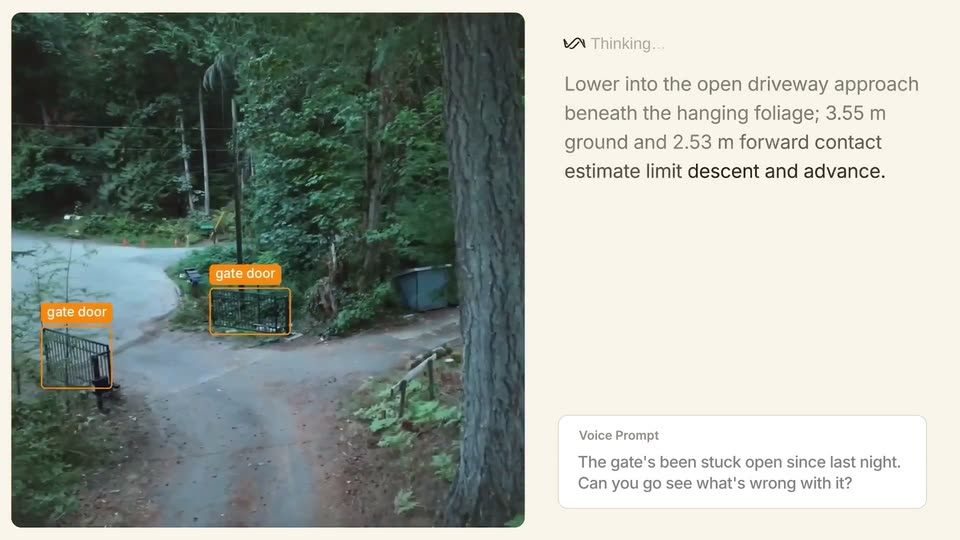
On-screen text: “Thinking...”, “Voice Prompt”, “The gate's been stuck open since last night. Can you go see what's wrong with it?”, “Gate is not yet visible; look left along the driveway to locate it and check the approach before translating near vegetation.”
Techniques: Split screen, Kinetic type
Camera: Pan
Left: live footage of a gray quadcopter hovering before green trees, drifting upward. Right: a cream panel with an animated icon beside 'Thinking...', a reasoning line with 'Gate is not yet visible' in an orange highlight, an orange wireframe drone and a descending dot, plus a Voice Prompt card.
Techniques: Split screen
Camera: Static
A split layout pairs a live drone view of a driveway on the left with a cream panel. The panel's thinking text highlights phrases in orange, then swaps to a new line as a wireframe drone icon tilts and an orange arrow traces its turn.
Techniques: Split screen
Camera: Push in
A split-screen layout pairs a forward-moving forest video on the left with a cream panel on the right. The panel holds a Thinking label, a paragraph with orange-highlighted phrases, a wireframe mesh with an orange arrow, and a Voice Prompt card.
Techniques: Split screen
Camera: Static
A split layout pairs a forest video feed on the left with a cream panel on the right. The feed cuts from dense trees to an elevated driveway view as the panel's reasoning text updates with an orange highlight. A white voice prompt card anchors the bottom right.
Techniques: Split screen
Camera: Push in
A split-screen view shows a high-angle video of a garden on the left and a text interface on the right. The text panel updates with new instructions below a 'Thinking' status, while a voice prompt box remains static at the bottom.
On-screen text: “Thinking...”, “An elevated over-shrub approach: advance 2 m, developing toward the open lawn, keeping branches and the 6.5 m front return in contact limit.”, “Advance to the shrub edge, looking over the open lawn. Position: 4 m ahead of the contact limit near the 6.5 m front return.”, “Voice Prompt”, “The gate's been stuck open since last night. Can you go see what's wrong with it?”
Techniques: Split screen
Camera: Static
A split view shows a drone feed of a wooded driveway on the left, orange gate-door boxes tracking the metal gate as the camera advances, while a right panel streams navigation instructions word by word above a static voice prompt card.
Techniques: Split screen, Kinetic type
Camera: Push in
Split screen: left, a shot of a black metal gate on a driveway pulls back to reveal a yellow fire hydrant; right, a cream panel types out new Thinking instructions above a static voice prompt card.
Techniques: Split screen, Kinetic type
Camera: Static
Left half holds a still photo of a black metal gate with opener arm and hinge box; right panel types the assistant's thinking notes word by word, then flips from light to dark cards showing a focus crop, an image search with result thumbnails, and a web search.
Techniques: Split screen, Kinetic type
Camera: Pull out
Two phone screens sit side by side; the left dark panel's search text settles into place while the right light panel holds a static blog article about a gate opener, a cursor resting at its lower corner.
Techniques: Split screen
Camera: Pan
A split view shows a dark AI assistant panel on the left streaming search results and explanatory text, while a white article page on the right scrolls down through step-by-step troubleshooting headings.
Techniques: Split screen, Kinetic type
Camera: Pan
A dark assistant panel sits on the left showing a Thinking for 11s header, five source links, and a paragraph of diagnostic text, while a faded JAY360 support page with a gate switch photo sits behind it on the right. The panel holds still as the timer ticks.
Camera: Static
A dark AI-agent card on a cream background scrolls its source list and body text into place, then slides left to reveal a white diagnosis card beside it. The white card states a gate-cable fault and lists the model, with a sources pill and icons below.
Camera: Pan
Split screen on a cream background: left, a live-action clip of a black automated gate in a leaf-strewn yard; right, a black card with a white AI diagnostic report that fades in. The report lists model, issue, cause, fix, and confidence, then a sources pill and feedback icons.
Techniques: Split screen, Kinetic type
Camera: Static
A split screen pairs a robot camera panning from a black metal gate beside a yellow hydrant up into a pine forest on the left with a dark diagnostic report panel on the right listing the gate fault and fix.
Techniques: Split screen
Camera: Static
Split screen on a cream background. Left: an aerial drone shot of a white house among pines, the camera tilts down and pushes in to the roof. Right: a dark report card with a diagnosis line and a bulleted summary, held static.
Techniques: Split screen
Camera: Static
Split screen: a low-angle robot camera feed of a forest path drifts forward on the left while a dark report card on the right lists a gate diagnosis, cause, fix and confidence. The whole frame fades to pale cream at the end.
Techniques: Split screen
Camera: Static
A UI report card fades out to a plain cream field. Centered dark text builds phrase by phrase, each resolving out of orange pixel blocks: “Mk 1.5.”, then “Any task.”, “Any embodiment.” and “Available today.” The full line holds, then fades out.
On-screen text: “Mk 1.5.”, “Any task.”, “Any embodiment.”, “Available today.”
Techniques: Kinetic type
Camera: Static
On a cream field, a thin black wave mark draws in at center, then the word Perceptron resolves to its right, the final letters fading up from a pixelated state. The lockup holds, then the frame clears to blank.
Camera: Static