1:15

Framer 3.0 with Agents, Branching, and a new Community
Framer · Design · Jun 2026
Moonlake AI · Nov 2026 · 0:30 · AI-annotated
Moonlake AI’s 0:30 launch film runs 15 scenes, about 2.1 s each. The product shows up at 0:01 and 2 features are revealed. There is no explicit call to action. A captioned product demo built from locked-off screen recordings and 3D turntables: a scrolling dashboard hook, a product intro, two feature blocks (articulated asset generation, then learned rigging workflows), and a logo outro. Pacing is slow with long takes and fixed white captions, punctuated by a fast 4x4 grid montage and white-stage object reveals.
Is this your launch? to your site or press kit.
Framer · Design · Jun 2026
Apple · Hardware · Oct 2026
Libra Robotics · Industrials · Oct 2026
A dark project dashboard fills the frame with a grid of 3D scene thumbnails, each card showing a Running status and a 2d ago timestamp. The list scrolls slowly upward, revealing a new row at the bottom, while a white caption line stays fixed at the base.
On-screen text: “Bringing Computer Use Capabilities to our World Modeling Agent”
Camera: Static
A dark UI grid of scene cards, each with a 3D thumbnail, green Running tag and title, scrolls up to reveal more rows while several cards swap thumbnails for chat panels of agent replies. A vertical letter strip lines the left edge; a white caption sits at the bottom.
On-screen text: “Bringing Computer Use Capabilities to our World Modeling Agent”
Camera: Static
A locked-off dark app window fills the frame. A left text panel scrolls while the center 3D viewport rebuilds a warehouse from a flat floor plan into an isometric rack layout, with a hierarchy panel on the right. A bottom caption explains the feature.
On-screen text: “our agent can create fully editable 3D scenes from a single image input”, “Moonlake”
Camera: Static
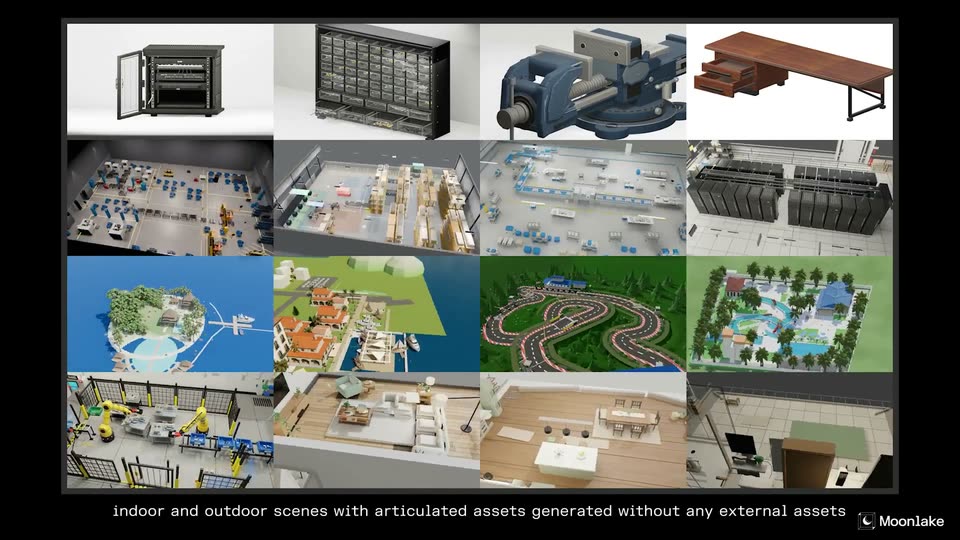
A 4 by 4 grid of 3D scenes fills the frame, each cell animating its assets: a server door swings open, desk drawers slide out, and a vise turns. The grid scales up slowly. A white caption runs along the bottom edge.
On-screen text: “indoor and outdoor scenes with articulated assets generated without any external assets”
Camera: Static
A 4x4 grid of dimmed 3D scene renders fades to black, then a new layout appears: a column of four object thumbnails on the left and a large 3D server cabinet with its door open on the right. The Moonlake logo sits in the bottom corner.
On-screen text: “indoor and outdoor scenes with articulated assets generated without any external assets”, “infers hinge points, pivots, and constraints”
Techniques: 3D mockup
Camera: Static
A black server rack is rendered in 3D on a white stage; its door swings open on a hinge to reveal the equipment. A left rail lists four product thumbnails. At the end, the rack gives way to a wooden desk with drawers sliding open, tilted in 3D.
On-screen text: “Moonlake”, “infers hinge points, pivots, and constraints”
Techniques: 3D mockup
Camera: Static
A 3D wooden table with black legs on a white field, its left drawers sliding open and closed. A left column stacks four furniture thumbnails. A white caption sits at the bottom.
On-screen text: “infers hinge points, pivots, and constraints”
Techniques: 3D mockup, Split screen
Camera: Static
A 3D trash can model sits centered on a gray stage, its lid lifting open. A column of four product thumbnails lines the left edge. The shot cuts to a 3D parts organizer cabinet with rows of drawers, angled in perspective.
On-screen text: “ready for animation and simulation”
Techniques: 3D mockup
Camera: Static
A 3D parts organizer cabinet with rows of clear drawers sits in perspective on a white studio floor. The bottom row of drawers slides out while a left-side thumbnail strip lists other models and a caption sits at the bottom.
On-screen text: “ready for animation and simulation”
Techniques: 3D mockup
Camera: Static
A locked-off screen recording of the Blender interface shows a wireframe dragon model in the 3D viewport as the view orbits around it. A white caption holds at the bottom while a bordered apply workflow button fades in near the end.
On-screen text: “our agent can learn from human demonstrations”, “Moonlake”
Camera: Static
A dark 3D modeling interface splits into two viewports. The left shows a wireframe creature scaling up into a dragon, the right a wireframe bird opening its wings. A white caption sits centered below the panels.
On-screen text: “and apply it at scale on various tasks”
Techniques: Split screen
Camera: Static
Two side-by-side 3D software viewports show wireframe creature models, a dragon and a pterosaur, on black. The viewports shrink upward as rendered versions of the same models fade in below. A small white caption sits at the bottom.
On-screen text: “and apply it at scale on various tasks”, “Moonlake”
Techniques: Split screen
Camera: Pull out
Black screen with a 2x2 grid: two small Blender viewport captures of wireframe dragon and goose rigs on top, rendered models flapping their wings on a gray grid below. The static text '<--Learned Workflow-->' sits between the top panels, and captions label the bottom ones.
On-screen text: “<--Learned Workflow-->”, “Character Rigging 1: Dragon”, “Character Rigging 2: Goose”, “Moonlake”
Techniques: Split screen
Camera: Static
A 2x2 grid of stills shows a dragon and a goose rig: Blender viewports on top, final renders below, with a center label and captions. The grid fades to black, then the Moonlake logo and wordmark fade in at center and out.
On-screen text: “<--Learned Workflow-->”, “Character Rigging 1: Dragon”, “Character Rigging 2: Goose”, “Moonlake”
Techniques: Split screen
Camera: Static
The Moonlake logo, a white wireframe cube holding a crescent moon, sits centered beside the wordmark on black, then fades to dark on a locked-off frame.
Camera: Static