1:09
Explore
Mirage - Introducing Clips. Turn any long video into 30+ viral clips, instant
Mirage · Aug 2026 · 0:37 · AI-annotated
- Length
- 0:37
- Scenes
- 17 · 2.2 s avg
- Product on screen
- 0:00
- Features shown
- 5
- Call to action
- 0:33 · 90%
- Voiceover
- No
00:00:00 / 00:37:25
Mirage’s 0:37 launch film runs 17 scenes, about 2.2 s each. The product is on screen from the first frame and 5 features are revealed. The call to action lands at 0:33 (90% in). The video is a feature parade: a serif title card, then one feature per beat, each announced by a bold headline sliding in beside rounded phone-shaped demo cards. Pacing runs at about six cuts per minute, with blur-and-scale transitions and snap-in thumbnail grids as the signature moves.
No filming indicatedEstimated needs: 4 capture groups — your screens or recordings · 1 official logo — reused across the film · 3 graphic passages — draw or supply
Is this your launch? to your site or press kit.
More like this
0:57


Whitespace Launch
Whitespace · B2B · Jul 2026
1:00

Introducing Canvas in Gemini
Google · AI · Mar 2025
Mirage - Introducing Clips. Turn any long video into 30+ viral clips, instant, scene by scene
· 17 scenes as text
01 · Product intro · 0:00–0:01
A dark teal blurred gradient fills the frame. The word Introducing scales up from a small fragment to full size at center, white sans-serif, then holds.
On-screen text: “Introducing”
Techniques: Kinetic type
Camera: Static
02 · Product intro · 0:01–0:01
On a dark green gradient, a small white 'Introducing' sits above a large gradient-serif 'Clips'. A teal rounded-rectangle outline draws itself around the word, then a second pink outline blooms just outside it.
On-screen text: “Introducing”, “Clips”
Techniques: Kinetic type
Camera: Static
03 · Product intro · 0:01–0:03
A dark green gradient background holds a centered white title lockup: thin sans Introducing above a large serif Clips inside a rounded rectangle, with by Mirage and a fan-shaped logo mark below. The logo mark rotates into place and the word completes as the border settles to white.
On-screen text: “Introducing”, “Clips”, “by”, “Mirage”
Techniques: Morph
Camera: Pan
04 · Feature reveal · 0:03–0:06
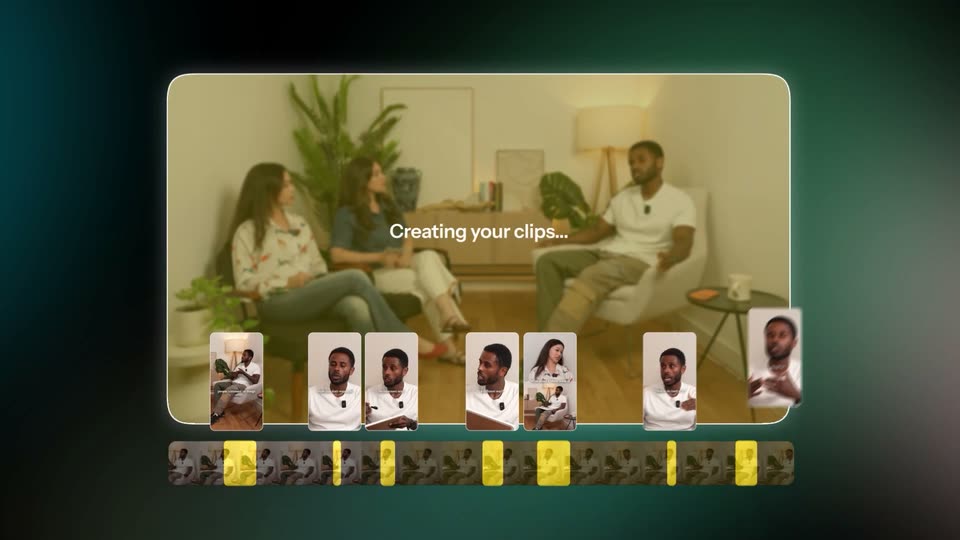
A video editor interface frames a living-room interview in a rounded preview window above a filmstrip timeline. Centered white text reads “Creating your clips...” as clip thumbnails populate the row, then the window blurs and shrinks while a large headline types in at the top left.
On-screen text: “Creating your clips...”, “Create 30+ viral clips”
Techniques: Kinetic type
Camera: Static
05 · Feature reveal · 0:06–0:09
On a dark green gradient, a white headline tops a grid of eight vertical clip thumbnails, each tagged with a green score. The clips fly in from a blurred scatter and snap into place, while a larger player on the right sharpens to show a talking man.
On-screen text: “Create 30+ viral clips ranked for performance”
Camera: Static
06 · Feature reveal · 0:09–0:09
A dark teal gradient background holds a white headline at the top, a 4-by-2 grid of vertical clip thumbnails with green scores on the left, and a larger vertical preview player with two buttons on the right; the layout blurs and slides out at the end.
On-screen text: “Create 30+ viral clips ranked for performance”
Camera: Static
07 · Feature reveal · 0:09–0:14
A vertical phone screen shows a man talking with a subtitle overlay. An Erase chip and a 100% progress ring appear, and the subtitle fades out. On the right, three white headline lines slide in one by one over a dark green gradient.
On-screen text: “And remove”, “any existing edits”, “with just a click”
Techniques: Kinetic type
Camera: Static
08 · Feature reveal · 0:14–0:17
A teal gradient slide holds a before/after comparison: the left panel shows three seated people with green face-detection boxes, the right panel stacks two reframed clips with captions. The headline and subline slide in above the panels.
On-screen text: “Before”, “After”, “Intelligent framing”, “Every face, perfectly centered”
Techniques: Kinetic type, Split screen
Camera: Static
09 · Feature reveal · 0:17–0:19
A white headline with a pink word slides in over a dark teal gradient, then resizes as a small video thumbnail scales up into a full player showing three people in a plant-filled room, under a dark bar with a cyan button. The layout holds steady for the rest.
On-screen text: “Want a spicier take?”
Techniques: Kinetic type
Camera: Static
10 · Feature reveal · 0:19–0:20
On a dark green gradient, a white headline with one pink word sits above a dark control bar. Four vertical video cards enter one by one from left to right, each showing a short interview clip with a green number and caption.
On-screen text: “Want a spicier take?”
Camera: Static
11 · Feature reveal · 0:20–0:23
A dark teal gradient holds a centered white headline whose middle word cycles from red spicier to blue funnier to green inspiring, above a dark prompt bar with a cyan button. Four vertical clip cards with green score badges fade in and swap beneath it.
On-screen text: “Want a spicier take?”, “Want a funnier take?”, “Want an inspiring take?”
Techniques: Kinetic type
Camera: Static
12 · Feature reveal · 0:23–0:24
A white headline with a green accent word sits over a dark green gradient. Below a dark pill bar, four video clip cards with green score numbers slide up and fade in to form a row.
On-screen text: “Want an inspiring take?”
Camera: Static
13 · Feature reveal · 0:24–0:25
A dark green product screen shows the headline 'Want an inspiring take?' over a toolbar and four vertical clip cards with green score labels. A blur transition cuts to a vertical clip of a blonde woman in a pink hoodie speaking into a mic.
On-screen text: “Want an inspiring take?”
Camera: Pull out
14 · Demo · 0:25–0:30
A white headline overlays a single vertical card of a woman at a microphone on a dark green field. The card shrinks as a grid of varied content clips fills the frame, then the whole grid blurs out.
On-screen text: “Built for every kind of content”
Techniques: Kinetic type
Camera: Pull out
15 · Feature reveal · 0:30–0:33
A vertical phone video of a bearded man speaking into a mic sits left on a dark green glow. Instagram, YouTube and TikTok icons pop in to its right, each with an Uploading progress bar that fills from left to right while the headline stands above.
On-screen text: “Edited for you”, “Ready to share anywhere”
Camera: Static
16 · Feature reveal · 0:33–0:33
A dark green gradient holds a white two-line headline above a vertical video card of two men, its yellow caption cycling. To the right, Instagram, YouTube and TikTok icons sit beside progress bars that fill left to right.
On-screen text: “Edited for you”, “Ready to share anywhere”
Camera: Pull out
17 · CTA · 0:33–0:37
On a dark field with a drifting blue and peach gradient, the stacked-oval logo and the captions wordmark resolve from blur into focus, then the App Store badge and the captions.ai URL appear below and hold.
On-screen text: “Now available in”, “Download on the App Store”, “captions.ai”
Camera: Static