3:54

Introducing Claude Code
Anthropic · AI · Feb 2025
Mercury · Jun 2026 · 0:24 · AI-annotated
Mercury’s 0:24 launch film runs 10 scenes, about 2.5 s each. The product shows up at 0:16. There is no explicit call to action. The video is cut-free: it opens on the drifting particle field and a rotating wireframe cylinder, then holds on a continuous screen recording of the assistant running an invoice and a categorization task, and ends with a rotating Command your tagline that condenses into the Command mark and the Mercury emblem. Signature moves are the dot-mesh 3D forms, the terminal prompt glyph as a recurring icon, and quiet crossfades on a near-black field.
Is this your launch? to your site or press kit.
Anthropic · AI · Feb 2025
Ramp · Finance · Jun 2026
A near-black field of fine white and teal dots drifts in slow, wavy streams. The particles trace flowing, organic lines, with a soft depth-of-field blur turning the outer dots into pale bokeh.
Techniques: Particles
Camera: Static
A near-black field of tiny white and pale-green dots flows in wavy ribbons. The swarm shifts from a dense central swirl into horizontal undulating bands that drift across the frame.
Techniques: Particles
Camera: Static
A fine white wireframe cylinder, built from a grid of dots and lines, rotates slowly at the center of a dark navy field. A mirrored reflection of the mesh sits directly below it, as if on a glossy plane.
Camera: Static
A dark rounded-square icon holds a white terminal prompt glyph over a faint dotted wireframe cylinder that fades out. The icon then slides left and shrinks with motion blur while a second dark rounded square fades in on the right.
On-screen text: “2”
Camera: Static
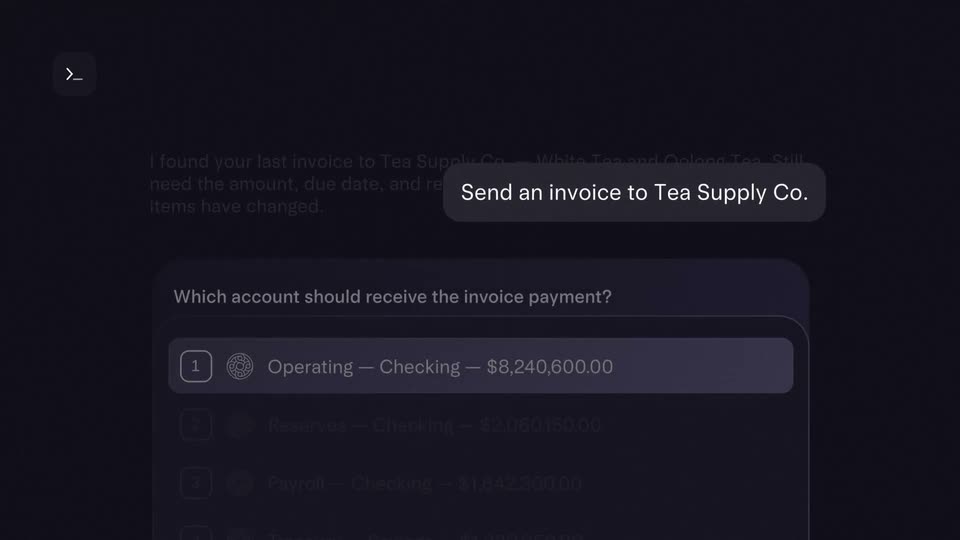
A dark command interface shows a centered prompt bubble reading “Send an invoice to Tea Supply Co.” The frame crossfades and pulls back to reveal the assistant’s reply and a numbered list of four checking and savings accounts.
Techniques: UI zoom
Camera: Static
A dark interface shows an invoice prompt and a card listing four bank accounts. The cursor moves down, the highlight shifts from Operating to Reserves, and the list scrolls up to reveal a fifth option, Select an account.
Techniques: Cursor demo
Camera: Pan
A dark chat UI scrolls up from a dim account list to a prompt and a vendor card listing Rocco's, DoorDash and UberEats, then scrolls down to the footer as a cursor hovers over the Assign button.
Techniques: Cursor demo
Camera: Pan
A dark panel lists Rocco's, DoorDash and UberEats with transaction totals. The cursor slides onto the blue Assign button, which brightens, and a white caption fades in beneath the panel.
On-screen text: “Command your transactions”
Techniques: Cursor demo
Camera: Static
On a dark navy field, the centered line “Command your” holds still while its last word crossfades through a list: transactions, receivables, permissions, accounting, operations, statements, policies, payments. The line then condenses into a small terminal prompt pill reading “Command”, and the Mercury emblem with wordmark closes the scene.
On-screen text: “Command your transactions”, “Command your receivables”, “Command your permissions”, “Command your accounting”, “Command your operations”, “Command your statements”, “Command your policies”, “Command your payments”, “Command”
Techniques: Kinetic type, Morph
Camera: Static
A dark navy background holds a centered white Mercury logo and wordmark. Small gray legal text sits near the bottom, all locked off with no motion.
On-screen text: “MERCURY”, “Mercury is a fintech company, not an FDIC-insured bank. Banking services provided through Choice Financial Group and Column N.A., Members FDIC.”
Camera: Static