1:05


Palisade: Personalized sales agents for online marketplaces
Palisade · B2B · Aug 2026
Make · Apr 2025 · 0:56 · AI-annotated
Make’s 0:56 launch film runs 27 scenes, about 2.1 s each. The product shows up at 0:02 and 8 features are revealed. The call to action lands at 0:51 (92% in). Deep purple gradient field, bold white sans-serif headlines, white UI cards, bright app icon accents.
Is this your launch? to your site or press kit.
Palisade · B2B · Aug 2026
Watch.fun · Nov 2026
A solid black screen fills the frame for the short duration of the clip.
Camera: Static
A near-black frame warms into a deep purple gradient. Soft, out-of-focus light blobs drift slowly across the middle while a brighter purple glow intensifies along the right edge.
Camera: Static
White text 'Automation is evolving' sharpens at center on a purple gradient, then blurs as a network of colored app icons linked by dotted lines snaps into focus around the edges, before a second line 'Make AI Agents' fades in below.
On-screen text: “Automation is evolving”, “Make AI Agents”
Techniques: Kinetic type
Camera: Pull out
A purple gradient field holds clusters of colorful app icons linked by dotted lines in the top-left and bottom-right corners. The white two-line headline “Meet Make AI Agents” sits centered and racks from soft blur into sharp focus as the icon nodes drift slowly across the frame.
On-screen text: “Meet”, “Make AI Agents”
Camera: Pull out
A white two-line headline, Meet Make AI Agents, sits centered over a purple field of blurred app icons linked by dotted lines. The headline then spins and collapses into a swirling ring, heavily motion-blurred, as the icons fade out until only the plain purple gradient remains.
On-screen text: “Meet Make AI Agents”
Techniques: Kinetic type
Camera: Pan
A purple circular badge with a white ring and star icon is centered on a white dot-grid background. The gray tagline “Make AI Agents” scales in below it, then the badge and text shrink steadily until a glowing white star bursts from the center to fill the frame.
On-screen text: “Make AI Agents”
Camera: Static
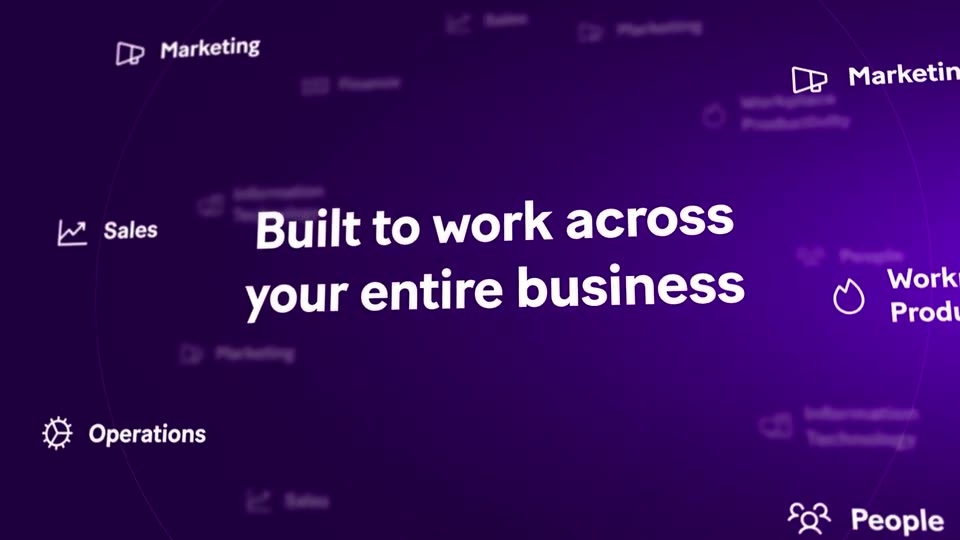
On a purple gradient, a centered white headline sharpens from blur into focus while department labels with line icons orbit the center on a circular path. The labels sit at different depths, some large and crisp, some small and soft, giving the orbit a sense of depth.
On-screen text: “Built to work across your entire business”, “Marketing”, “Sales”, “Operations”, “People”, “Workplace Productivity”, “Information Technology”
Techniques: Parallax
Camera: Push in
A purple circular badge with a white sparkle icon materializes on the right as a three-line white headline slides in on the left. The badge then moves to center while blurred white task chips fly in from the edges toward it.
On-screen text: “Make AI Agents”, “think and adapt”, “in real time”
Techniques: Kinetic type
Camera: Pan
A purple 3D space holds a glowing circular sync icon ringed by floating white task cards at varying depths, drifting with parallax. The composition then reframes to a flat purple field where the icon shrinks to the left and a large white headline slides in at right.
On-screen text: “Notify stakeholders”
Techniques: 3D mockup, Parallax
Camera: Push in
Four circular app icons sit in a horizontal row on a purple gradient, linked by dotted lines. A glowing dot travels left to right, lighting each icon in turn, then the whole row blurs into a horizontal streak as it exits.
Camera: Static
On a dark purple gradient with a brighter glow at the right, the white headline “Set a goal” scales up from small to full size in the center, then holds as a white card with a purple left bar slides up from the bottom edge.
On-screen text: “Set a goal”
Techniques: Kinetic type
Camera: Static
On a purple backdrop, the white headline “Set a goal” scales in above a white form card that slides up from the bottom. The view then zooms into the System prompt field as a prompt is typed, blurring the rest of the form.
On-screen text: “Set a goal”
Techniques: Kinetic type, UI zoom
Camera: Push in
A blurred zoom on the form's system prompt field pulls back to reveal a white agent-creation panel tilted in 3D on the left, slowly rotating flat, while a white tagline holds on the right over a purple gradient.
On-screen text: “and your AI Agent will do the rest”
Techniques: Kinetic type, UI zoom, 3D mockup
Camera: Pull out
A white agent-creation form floats in 3D perspective over a purple gradient, spinning as the camera orbits it. The right-hand headline, and your AI Agent will do the rest, gives way to Each Agent connects to scenarios on the left while the panel blurs with motion.
On-screen text: “and your AI Agent will do the rest”, “Each Agent connects to scenarios”
Techniques: 3D mockup
Camera: Pan
A purple gradient panel holds a white headline that builds line by line on the left, while a white configuration screen on the right scrolls down and zooms into a list of three scenario rows.
On-screen text: “Each Agent connects to apps and even external solutions”
Techniques: Kinetic type, UI zoom
Camera: Push in
A solid black frame fills the screen with no text, logo, or motion, holding as a blank beat between scenes.
Camera: Static
A large blurred word slides across a purple gradient behind the centered tagline 'to get the job done'. The tagline clears, a green circle pops in with its sparkle icon morphing into a checkmark, then orange and pink app badges appear, linked by dotted lines.
On-screen text: “to get the job done”
Techniques: Kinetic type, Morph
Camera: Static
On a purple gradient, three flat circular icons in orange, green and red sit in a row linked by dotted lines. The white symbols inside swap, two thin white rings pop in at the right, and a blurred headline slides in across the top.
On-screen text: “across workflows”, “W”
Techniques: Morph, Kinetic type
Camera: Pull out
A flat vector network of colorful app icons linked by dotted lines drifts across a purple gradient. The bold white headline Reusable across workflows slides in the opposite direction, so the title and the node graph move at different speeds for a parallax depth effect.
On-screen text: “Reusable across workflows”
Techniques: Kinetic type, Parallax
Camera: Pull out
A purple gradient holds a network of colorful circular icons linked by dotted lines. The caption Reusable across workflows fades as the camera pushes in and the icons blur into bokeh, while the centered headline Customizable for every use case scales up.
On-screen text: “Reusable across workflows”, “Customizable”, “for every use case”
Techniques: Kinetic type
Camera: Pull out
On a purple gradient background, a white headline fades in above a row of three circular badges; the Make logo scales in beside an ampersand and an AI mark that pulses with a ring.
On-screen text: “Make AI Agents bring automation and intelligence”
Techniques: Kinetic type
Camera: Static
A purple gradient field holds a circular logo, a white open ring with sparkles, that scales up from a small blurred dot to full size. The lowercase word together below slides up and sharpens into place.
On-screen text: “together”
Camera: Static
A glowing circular logo sits on a purple field as the word 'together' slides in beneath it, then the view whips into a fast 3D fly-through of app icons joined by dotted lines, the line 'do your workflows don't just run...' scaling past.
On-screen text: “together”, “do your workflows don't just run...”
Techniques: Speed ramp, Parallax
Camera: Pull out
A row of circular app icons linked by dotted lines sits on a purple gradient. A purple sparkle badge inserts into the middle of the chain while the branch icons slide and shift color, under the headline, with a closing line fading in below.
On-screen text: “So your workflows don't just run...”, “...they adapt”
Techniques: Morph
Camera: Pull out
A plain black screen carries three lines of white text that scale in and settle in sequence: “don't just run...”, then “So your workflows”, then “...they adapt”. The lines hold in place, centered, with no other elements.
On-screen text: “don't just run...”, “So your workflows”, “...they adapt”
Techniques: Kinetic type
Camera: Static
On a dark purple gradient, the make wordmark with three purple bars sits centered, then the frame cuts to AI Agents beside a purple rounded-square icon, then to Available now in large white type. The URL www.make.com stays fixed at the bottom.
On-screen text: “www.make.com”, “AI Agents”, “Available now”
Camera: Static
A centered headline reads on a dark purple gradient with a soft glow at the right edge. The word shifts from white to a pink gradient while the small URL stays fixed at the bottom center.
On-screen text: “Available now”, “www.make.com”
Camera: Static