1:27

Superserve - Computers for long-running agents
Superserve · B2B · Oct 2026
LLM Dojo · Oct 2026 · 0:48 · AI-annotated
LLM Dojo’s 0:48 launch film runs 23 scenes, about 2.1 s each. The product shows up at 0:04 and 10 features are revealed, with social proof. The call to action lands at 0:43 (89% in). Built as a fast numbered montage: a conceptual hook, a logo-and-tagline intro, then a run of two-second concept demos (training, attention, tokens, temperature, labs, overfitting, agents, drawing) cut on a steady beat, followed by company interview questions, the prep UI, a module overview, and a free-in-browser offer ending on a URL card. Signature moves are word-by-word and typed monospace text, thin line-draw animations on black (logo, attention arcs, loss curves, the heart), and a single the
Is this your launch? to your site or press kit.
Superserve · B2B · Oct 2026
Promethee · Oct 2026
On black, a fan of thin rainbow lines tilts diagonally, then bends and contracts into a tight spiky orb at center, shrinking to a dot. Below, the caption builds to “Every model learns” and swaps to “by going downhill.”
On-screen text: “Every model learns”, “by going downhill.”
Techniques: Morph
Camera: Static
On a black field, a white roof line, orange dot and underline draw in at center, then scale down and slide left as the white wordmark llm dojo fades in beside them, locking the logo into place.
On-screen text: “llm dojo”
Camera: Static
A thin white line mark with an orange dot and the rounded wordmark llm dojo hold center on black, then a white sans headline builds on the left as the words The free course enter in sequence.
On-screen text: “The free course”
Techniques: Kinetic type
Camera: Static
On a black background, three lines of gray sans-serif text fade in one after another, with the words course and actually in bold white. A smaller gray subline then fades in below the headline.
On-screen text: “The free course”, “that shows you how”, “AI actually works.”, “Built from the books. Run in your browser.”
Techniques: Kinetic type
Camera: Static
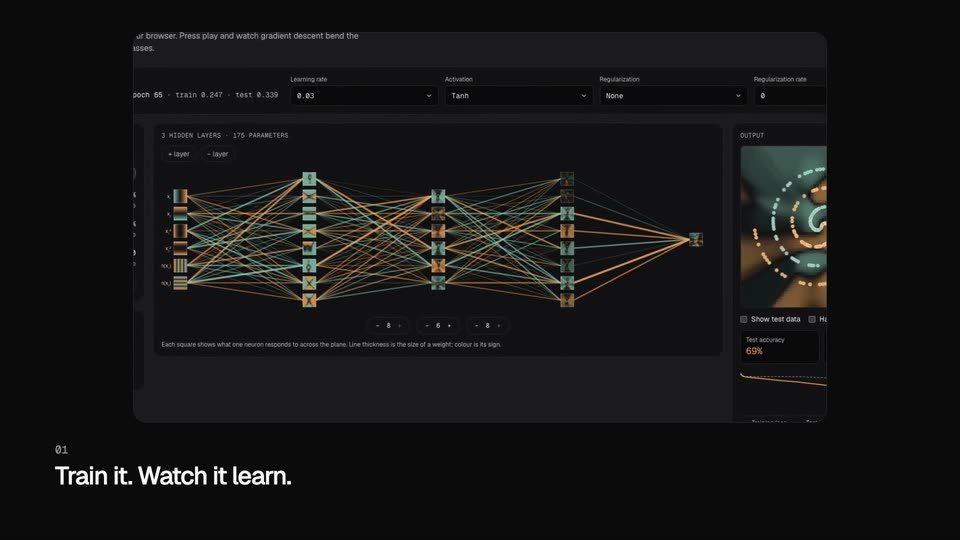
A dark neural-network trainer UI fills the frame on black; its weight lines shift between teal and orange, the output spiral spins, and the test-accuracy figure ticks upward while the caption “01 Train it. Watch it learn.” holds in the lower left.
On-screen text: “01”, “Train it. Watch it learn.”
Camera: Static
On a black field, a monospace sentence sits in a row with “ladder” and “it” in orange. Gold arcs draw in above it, the thickest linking “it” back to “ladder”. A small monospace caption marks the top right, and a bold white headline fades in at the lower left.
On-screen text: “02”, “See what attention looks at.”
Camera: Static
On a black field, a row of bordered monospace words reads “Token izers _turn _text _into _integers .” while teal numbers fade in beneath each box. A small caption “03 Text becomes tokens.” sits in the lower left.
On-screen text: “Token izers _turn _text _into _integers .”, “03 Text becomes tokens.”, “4421 24223 3716 2201 1511 54912 13”
Techniques: Kinetic type
Camera: Static
On a black field, ten orange-to-red bars labeled with words sit in a row; their heights rise from uneven to equal as a monospace temperature readout counts up from 0.28 to 1.00 in the top right, while a white headline brightens in the lower left.
On-screen text: “04”, “Every token is a choice.”
Camera: Static
A dark UI card shows a loss-versus-weight parabola with an orange dot at the minimum. The learning-rate pill slides from 0.1 to 0.5 as the orange step dots along the curve retract, and the card fades up from black. A white caption sits at lower left.
On-screen text: “05”, “A lab in every lesson.”
Camera: Static
Two lines draw in left to right on black: a green curve drops and flattens while a red curve spikes, then climbs steadily. Monospace labels in the top right tick to 0.000 and 0.544. A white caption and a small gray numeral hold the bottom left.
On-screen text: “06”, “Then watch it overfit.”
Camera: Static
A four-step flow diagram of pills (Plan, Call a tool, Observe, Done?) sits on black, joined by thin lines and a return loop. An orange highlight moves through the nodes, and the Done? pill turns green as a caption fades in lower left.
On-screen text: “07”, “Agents that know when to stop.”
Camera: Static
On a black field, a thin white line traces a heart outline in the center, a small stylus tip marking the moving drawing point. Above it, the headline scales down from large to its final size at the top.
On-screen text: “Draw anything.”
Techniques: Kinetic type
Camera: Static
On a black field, a faint gray heart outline sits center while a thin blue line redraws it, tightening from a loose diagonal stroke into a clean heart as a top-right counter climbs. The headline stays fixed above; the line then snaps into a solid coral heart.
On-screen text: “Draw anything.”, “Neurons learn it back.”, “2 neurons”, “70% right”, “8 neurons”, “93% right”, “16 neurons”, “99% right”, “32 neurons”, “97% right”
Techniques: Morph
Camera: Static
On black, an orange heart holding a quotation mark sits under the line “Neurons learn it back.”, then gives way to the blue Meta logo and the scaling headline “Asked at Meta.” as a monospace prompt starts typing below.
On-screen text: “Neurons learn it back.”, ““”, “Asked at Meta.”, “Implement a embedd”
Techniques: Kinetic type
Camera: Static
A blue infinity logo sits above the white headline “Asked at Meta.” on black, which scales in and holds center as a monospace prompt types out beneath it, character by character, ending on a blinking caret.
On-screen text: “Asked at Meta.”, ““Implement batched multi-head self-attention with a causal mask.””
Techniques: Kinetic type
Camera: Static
On a black background, the white Anthropic mark and the headline sit centered and still. A monospace quote types in below them, character by character, wrapping onto a second line as it completes.
On-screen text: “Asked at Anthropic.”, ““Turn an LLM into a binary classifier using its log-probs and log-sum-exp.”
Techniques: Kinetic type
Camera: Static
On a black background, the OpenAI logo and the line “Asked at OpenAI.” sit centered at the top. Below, a monospace prompt types itself out letter by letter with a blinking caret, filling two lines.
On-screen text: “Asked at OpenAI.”, ““Here's a small transformer with a few bugs. Fix them,”, “then add a KV cache for decoding.””
Techniques: Kinetic type
Camera: Static
A dark interview-prep screen sits centered as a caret types “KV cache” into the search field, filtering the question list and the right-hand count down from 492 to 31. A white caption holds static at lower left.
On-screen text: “492”, “Questions, each with a model answer.”
Techniques: Cursor demo
Camera: Static
On a black field, six rounded pill labels with thin colored outlines fade in one after another. Lessons, Labs, Quizzes, Review and Playground form a row, with Interview prep centered below.
On-screen text: “Lessons”, “Labs”, “Quizzes”, “Review”, “Playground”, “Interview prep”
Techniques: Kinetic type
Camera: Static
A black screen. The text “Runs in your browser.” appears in the center, with “no install · no GPU · no setup” below it.
On-screen text: “Runs in your browser.”, “no install · no GPU · no setup”
Camera: Static
The word Free. in white sits centered on a warm orange gradient that runs lighter at the top left to deeper orange at the bottom right. The frame is locked off and the text holds still for the full clip.
On-screen text: “Free.”
Camera: Static
On a black background, the llm dojo logo and wordmark fade in centered, then a gray tagline, a white pill holding the URL, and a small monospace line appear below, holding still as the sign-off.
On-screen text: “The free course that shows you how AI actually works.”, “llmdojo.dev”, “Free · 492 interview questions · Runs in your browser”
Camera: Static
On a near-black background, the llm dojo line logo and wordmark sit above a tagline, a gray pill button reading llmdojo.dev, and a small line of details. The locked-off end card holds, then fades to black.
On-screen text: “The free course that shows you how AI actually works.”, “llmdojo.dev”, “Free · 492 interview questions · Runs in your browser”
Camera: Static