1:06


Y Combinator - Lightsprint (@lightsprintai) is a collaborative platform that helps t
LightSprint · B2B · May 2026
Liveblocks · Feb 2023 · 1:23 · AI-annotated
Liveblocks’s 1:23 launch film runs 31 scenes, about 2.7 s each. The product shows up at 0:47 and 3 features are revealed. The call to action lands at 1:11 (85% in), over a voiceover. The video alternates 3D device shots with flat abstract graphics, one idea per cut, paced to a steady beat. Signature moves are camera pushes into screens, shapes morphing between squares, circles and triangles, and neon glow accents on a dark grid.
Is this your launch? to your site or press kit.
LightSprint · B2B · May 2026
Hundred · Industrials · Nov 2026
A 3D brick phone with a long antenna floats centered on a dark grid backdrop ringed by glowing blue neon circles. The phone rotates to an edge-on angle, revealing a slim modern smartphone standing beside it.
Techniques: 3D mockup
Camera: Pull out
A smartphone with a blue and purple abstract wallpaper floats inside a circular glass disc on a dark blue grid. Glowing glass neon outlines form the characters 800R and 2208 on either side. The phone slowly rotates from a tilt to face the camera.
On-screen text: “800R”, “2208”
Techniques: 3D mockup
Camera: Push in
A bright white bloom fades to reveal a laptop mockup on a glowing pedestal, set in 3D perspective against a purple backdrop. Blue neon loop shapes float around it. The screen displays a dark task list headed Team Tasks.
Techniques: 3D mockup
Camera: Push in
A laptop mockup rests on a glowing disc in a dark blue space framed by neon loop shapes. The camera pushes in on the screen, where a dark dashboard and the heading “Team Tasks” scale up.
Techniques: 3D mockup, UI zoom
Camera: Push in
A glowing laptop in 3D perspective displays a dark Team Tasks list with placeholder rows. The camera pushes into the screen, and one blue task row snaps into sharp focus while the rest of the interface blurs out.
Techniques: 3D mockup, UI zoom
Camera: Push in
Three rows of glowing light-blue circles and horizontal bars sit on a dark grid background. The bars stretch and retract horizontally in a slow pulse, the middle bar longest, while the circles stay fixed and their soft glow flickers.
Camera: Static
Three glowing rows of checkmark circles and bars, top purple and the rest blue, shrink and dim on a dark background. The list then slides right and compresses as a large blue circle and a smaller purple circle scale in from the left.
On-screen text: “三”
Camera: Static
Four glowing colored circles drift and rearrange across a dark background, then morph into rounded chat bubbles, each paired with a small cursor arrow, suggesting live presence and messaging.
Techniques: Morph
Camera: Static
Abstract collaboration scene on a dark field: gray rounded panels hold glowing pills in teal, peach, blue and purple, each with a matching cursor arrow. A teal line traces a curve in the left panel, which then fills with a small grid, as the pills and cursors shift positions.
Camera: Static
A glass frame in 3D perspective with glowing corner dots holds an abstract interface: dark panels, two cursor arrows and pill buttons. The interface fades out and a code snippet of gray bars with braces and semicolons fades in at the bottom.
Techniques: 3D mockup
Camera: Static
A framed dark screen with four glowing blue corner dots holds blurred purple code lines with visible syntax symbols. The lines drift and scroll while the view zooms in, ending on an abstract field of floating dashes.
Techniques: UI zoom
Camera: Push in
A dark field of blurred rounded bars and faint purple code symbols drifts forward, the shapes growing and softening as the view pushes through them.
Techniques: Parallax
Camera: Static
A node diagram on a dark background: a purple square above four colored squares joined by dashed lines. The shapes morph into circles, then triangles, while a cursor arrow hovers over them and the links and shapes turn red.
Techniques: Morph, Cursor demo
Camera: Push in
On a dark grid, a dashed-line node diagram of circles, a pill and red triangles drifts as the frame pans; a small cursor arrow hops from one node to another.
Techniques: Cursor demo
Camera: Static
A dark comment card floats over two stacked cards. A blue cursor moves into the Reply field, and a new comment from Marc B slides in below Taylor W. The card then tilts into 3D perspective, exposing a green panel with dots beneath it.
Techniques: Cursor demo, 3D mockup
Camera: Static
A low-poly teal cart with small wheels sits centered on a dark background. Pink and yellow flames rise from its open top, growing larger then flickering and shifting shape.
Camera: Static
Two dark rounded panels sit side by side on a near-black field. Inside each, a peach chat pill and a teal chat pill drift diagonally while small triangular pointers track them, suggesting a real-time message exchange.
Camera: Static
Two rounded panels sit side by side on a dark field. In the left, warm-tinted panel, teal blobs and pink pills with small arrow markers condense and fade out, leaving the panel empty. The right gray panel holds one pink and one teal pill, each with an arrow marker, unchanged.
Techniques: Split screen, Morph
Camera: Static
Two rounded cards sit side by side on a near-black background, the left tinted red and the right gray. Each holds glowing pill shapes in peach and mint with small triangular markers, abstracted UI elements. The frame eases out to reveal a third card at the right edge.
Camera: Pull out
A dark dashboard of floating UI cards assembles: whiteboards with moving cursors, an Invite panel, a file list, and a connections chart whose number counts up. A red warning triangle pops in at center, then the whole grid tilts into 3D perspective.
Techniques: UI zoom, 3D mockup
Camera: Push in
On a dark navy field, two white cursor arrows drift toward a rounded square tile at center. The tile brightens and reveals a white two-triangle logo mark as the cursors exit, then the tile fades out.
Camera: Static
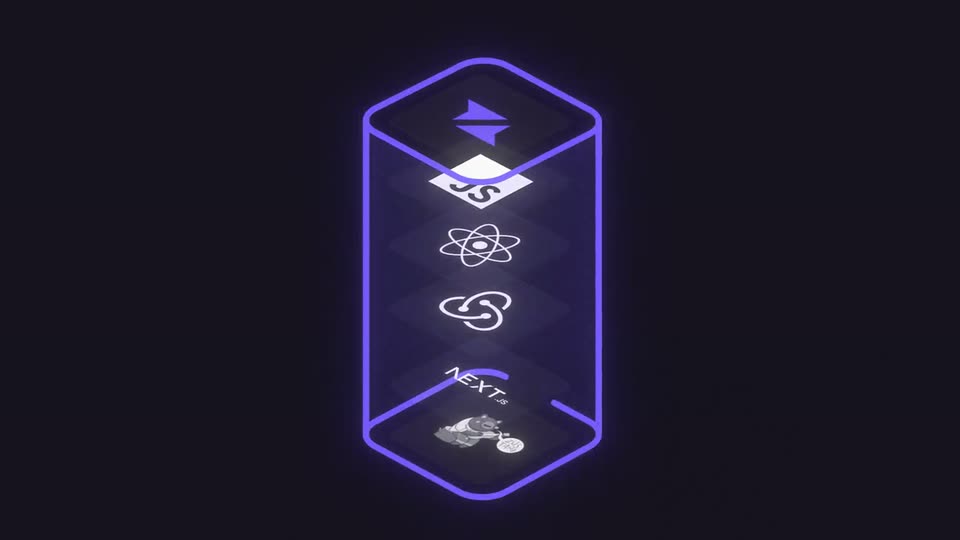
A vertical stack of tilted diamond tiles holds white tech logos, TypeScript, JavaScript, React and Next.js, over a small grayscale figure, on a dark field. A glowing violet line draws itself around the stack, closing into a rounded rectangle frame as the top tile flashes bright.
Camera: Static
A glowing purple hexagonal tube holds a vertical column of tech logos, Svelte, React, a swirl mark and Next.js, that drift upward. The camera pans left and pulls back to reveal three outlined feature cards on the left and a faint project panel on the right.
Techniques: 3D mockup, Parallax
Camera: Static
A dark project dashboard pans right as a cursor clicks the feature cards on the left rail, then fades them out. The view lands on a live document where text types in and a comments panel slides in from the right, the frame zooming in.
Techniques: Cursor demo, UI zoom
Camera: Push in
A dark collaborative editor fills the frame, a document on the left and a comments thread on the right with colored cursor labels. The view zooms in toward the comments as a small segmented spinner spins beside a user avatar.
Techniques: UI zoom
Camera: Push in
A 3D cylindrical speedometer gauge floats in dark space, its dial glowing green then red as thin lines cross behind it. The camera pulls back to reveal a grid of lines with a small gauge at every node.
Techniques: 3D mockup
Camera: Pull out
A grid of glowing blue and white tiles with a diagonal light beam dissolves into a tilted dark browser window set in a neon blue frame. Inside, a list shows a highlighted red row and a toggle, while cursor arrows point at pill shapes on the right.
Techniques: Light sweep, 3D mockup
Camera: Pull out
A tight crop on a laptop screen shows a dark interface with checkmarks, text bars and colored pills; the camera pulls back to reveal the full laptop on a glowing blue surface as the pills drift and rearrange across the panels.
Techniques: UI zoom, 3D mockup
Camera: Pull out
A blurred 3D laptop mockup with a dark app window recedes out of frame over a dark grid backdrop. The white wordmark live sits in a blue outline box with a cursor arrow, then blocks. slides in at the lower right.
On-screen text: “live”, “blocks.”
Techniques: 3D mockup, Kinetic type
Camera: Static
On a dark grid, 'live' and 'blocks' sit apart, 'blocks' in a selection box, beside a blue and a purple triangle. The words slide together into 'liveblocks' as the triangles merge into the white logo mark; the grid fades and the logo holds, then cuts to black.
On-screen text: “liveblocks”
Techniques: Kinetic type, Morph
Camera: Static
A solid black screen holds for the full duration of the clip. No elements, text, or motion appear, reading as a fade or transition point between scenes.
Camera: Static