0:51


Polygon Open Money Stack Enters Technical Preview- SaaS Animate
Polygon · Oct 2026
Langfuse · Nov 2026 · 0:46 · AI-annotated
Langfuse’s 0:46 launch film runs 20 scenes, about 2.3 s each. The product shows up at 0:12 and 6 features are revealed. The call to action lands at 0:42 (92% in). The video plays as one continuous dotted-grid canvas where headlines swap in place and a hub-and-spoke diagram redraws itself from a tangled mess into a governed gateway, then settles into plain stat and list cards. Its signature moves are the self-drawing connector lines, the yellow highlight sweep on key phrases, and slow zooms that re-center the frame on the langfuse mark.
Is this your launch? to your site or press kit.
Polygon · Oct 2026
Moonshot AI · Jul 2026
Erinys · B2B · Aug 2026
On a pale dotted grid, a chat icon in a dashed box labeled “Support agent” sits left of an “OpenAI” pill. A curved line draws itself between them as the headline “It started with a single API call” fades in, a yellow highlight then filling the last line.
On-screen text: “It started with a single API call”
Techniques: Kinetic type
Camera: Static
A dotted off-white diagram shows a support-agent icon linked to an OpenAI pill under the headline “It started with a single API call”, yellow-highlighted. The headline swaps to “Now, AI apps and agents run everywhere” as four app nodes appear and lines draw to Anthropic and OpenAI.
On-screen text: “It started with a single API call”, “One request. One response. Easy.”, “Now, AI apps and agents run everywhere”
Techniques: Kinetic type
Camera: Static
On a light dotted canvas, a left column of agent labels and icons fades in, each tied by thin curved lines to Anthropic and OpenAI boxes on the right. Small dashes flow along the lines beneath a headline that highlights 'everywhere' in yellow.
On-screen text: “Now, AI apps and agents run everywhere”
Techniques: Particles
Camera: Static
Gray flow lines tangle from agent labels into Anthropic and OpenAI boxes. “With no central view on cost” appears, “cost” highlighted, then “or risk” is added. A counter climbs to $94,310 beside a rising bar chart, then a red line runs through a warning triangle as the frame pans left.
On-screen text: “With no central view on cost”, “or risk”, “Many teams don't”
Techniques: Kinetic type
Camera: Push in
On a dotted off-white grid, thin gray lines flow in from the left and converge on two rounded pills labeled Anthropic and OpenAI. Small gray dashes drift across the frame. A bold black headline with a yellow highlight sits at the top, locked off.
On-screen text: “Many calls not observed at all”
Techniques: Particles
Camera: Static
A light gray card shows 'Introducing' in monospace, then 'Langfuse AI Gateway' appears over a yellow bar with a small red-blue mark. It cuts to a diagram: a left column of agent labels routes through the central mark to two provider boxes on the right, dashes moving along the lines.
On-screen text: “Introducing”, “Langfuse AI Gateway”
Techniques: Kinetic type
Camera: Static
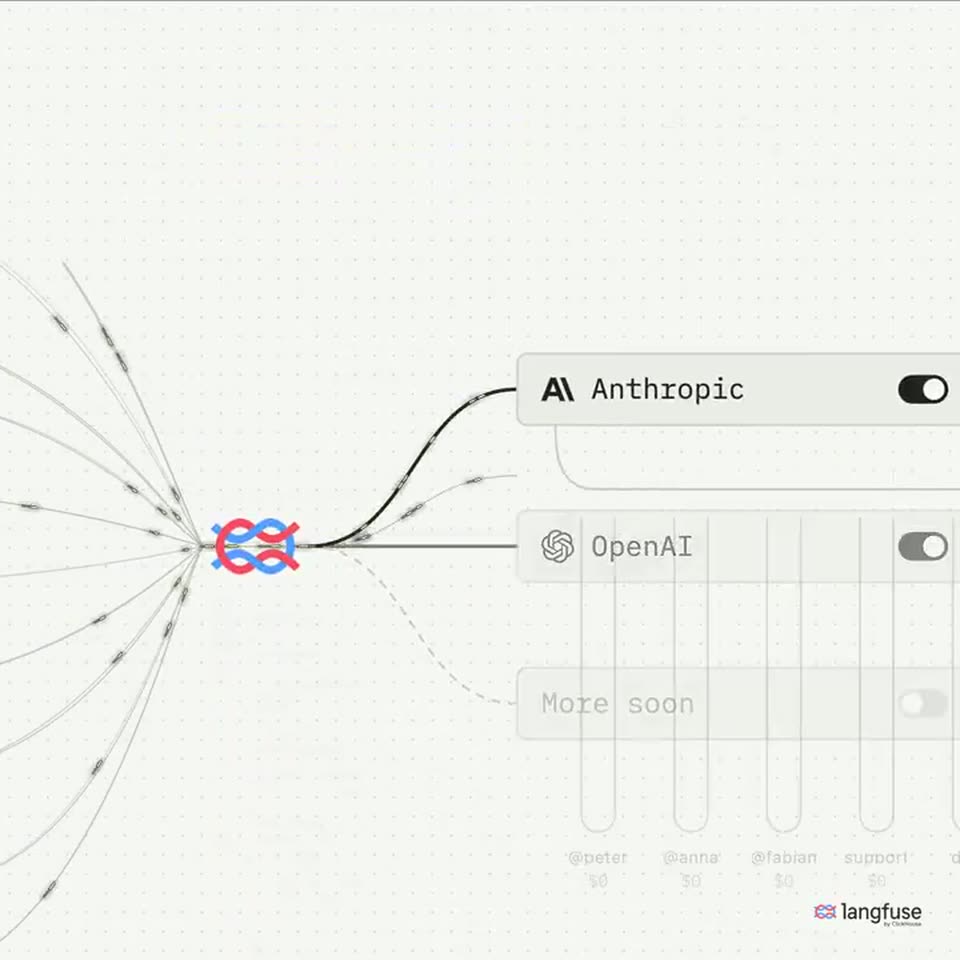
Curved lines from ten labeled agents flow into a central red-and-blue logo, then out to Anthropic and OpenAI toggle rows. A black headline with a yellow highlight fades in word by word, then the frame zooms to the hub as a trace list appears and the title changes.
On-screen text: “A central entry point to govern all AI traffic”, “Trace all traffic”
Techniques: Kinetic type
Camera: Push in
Lines fan in from the left and converge on the red and blue Langfuse mark, branching to Anthropic and OpenAI toggle bars over a dotted grid. The diagram then slides left and fades as the headline Attribute every call to appears above vertical bars labeled with user names.
On-screen text: “Trace all traffic natively in Langfuse”, “Attribute every call to”
Camera: Push in
On a dotted cream grid, a black headline with “Attribute” highlighted in yellow sits above toggle bars, Anthropic then OpenAI, that feed colored liquid into five labeled test tubes. The tubes fill from the bottom as dollar amounts count up beneath each name.
On-screen text: “Attribute every call to a model, person or team”
Camera: Static
A dotted grid holds a fan of thin arrows converging on the Langfuse logo, which links via curved lines to three toggle cards. A cursor flips the toggles, fading the Anthropic row in and out, as a yellow highlight appears behind the headline.
On-screen text: “Approve or block models centrally”
Techniques: Cursor demo
Camera: Pan
A dotted-grid canvas shows a network of thin lines converging on the langfuse mark, branching right into three rounded model rows with toggles. A yellow-highlighted headline sits above. The camera pans right and down to reveal the client labels on the left.
On-screen text: “Approve or block models centrally”
Camera: Pan
On a dotted grid, a yellow-highlighted headline sits above an API key table. A cursor opens a row menu and revokes Peter's key, turning its row red while the matching connection line below turns red and its data flow halts. The scene dissolves into a chat assistant screen.
On-screen text: “Deactivate any API key, traffic stops instantly”
Techniques: Cursor demo
Camera: Static
A bold black headline with yellow highlight boxes fades in above a flat white chat card. The card types a question into its input field, then swaps to a bar chart answer whose bars fill and percentages count up.
On-screen text: “Understand how AI is used and learn from it”
Camera: Static
A faded interface card with a usage bar chart dissolves out as a plain slide fades in. A bold dark headline reads “Built in Rust”, a subline “to be fast and reliable” sits under a yellow highlight, and a bracketed card shows the stat “<3 ms”.
On-screen text: “Understand how AI is used and learn from it”, “Built in Rust”, “to be fast and reliable”, “<3 ms”, “median latency with tracing on”
Camera: Static
A light gray slide shows the headline “Built in Rust to be fast and reliable”, the second line on a yellow highlight. A two-by-two grid of stats fades in below, its small chart drawing a rising line with a yellow dot, then the headline blurs out.
On-screen text: “Built in Rust”, “to be fast and reliable”, “<3 ms”, “median latency with tracing on”, “1,000+”, “concurrent streams on a single 2 vCPU node”, “22 MB”, “compressed Docker image size”, “Predictable memory footprint that scales in line with load”
Techniques: Kinetic type
Camera: Static
A plain light gray card holds three centered lines of text that fade in from faint to full opacity, the middle line sitting on a yellow highlight bar, with a small langfuse logo fixed in the bottom right corner.
On-screen text: “Available today”, “in public beta”, “Self-hosted or in Langfuse Cloud”
Camera: Static
A pale gray slide holds a black Coming soon headline over a yellow highlight. Three bullets fade in below: Spend limits in black, Fallbacks in gray, Guardrails in light gray.
On-screen text: “Coming soon”, “Spend limits”, “Fallbacks”, “Guardrails”
Techniques: Kinetic type
Camera: Static
A light gray slide holds the heading Coming soon on a yellow highlight. A bulleted list of items fades in line by line from top to bottom, then the whole slide fades out. The langfuse logo sits in the bottom right corner.
On-screen text: “Coming soon”, “Spend limits”, “Fallbacks”, “Guardrails”, “PII redaction”, “User provisioning (SCIM)”, “More providers”, “Model routing”, “and much more”
Techniques: Kinetic type
Camera: Static
On a light gray background, the langfuse logo with its red-and-blue infinity mark sharpens into focus, then a gray 'Visit' caption and a yellow-highlighted URL appear below it.
On-screen text: “Visit”, “langfuse.com/gateway”
Camera: Static
A gray end card centers the langfuse logo with its red and blue mark, the by ClickHouse line, a Visit caption, and a yellow highlighted URL. The frame stays locked and fades to black.
On-screen text: “Visit”, “langfuse.com/gateway”
Camera: Static