0:58

Introducing App Studio | Runway
Runway · AI · Oct 2026
Kino · Oct 2026 · 1:35 · AI-annotated
Kino’s 1:35 launch film runs 59 scenes, about 1.6 s each. The product shows up at 0:03 and 7 features are revealed. The call to action lands at 1:28 (94% in), over a voiceover. A self-referential launch film in which the team edits this very video inside Kino, cutting between dim live-action office beats and tilted 3D fly-throughs of the interface over a blue ray-lit backdrop. Its signature moves are prompt cards that type themselves out to trigger each feature, shallow depth of field on the floating UI, and fast cuts locked to a driving 129 bpm track.
Is this your launch? to your site or press kit.
Runway · AI · Oct 2026
Runway · AI · Oct 2026
Lemlist · Oct 2026
A man with glasses stands on a rooftop film set beside a red pagoda and a camera crane. A white comic speech bubble pops in reading THAT'S A WRAP!! as he raises a hand, then he turns and stretches both arms toward the lens.
On-screen text: “THAT'S A WRAP!!”
Camera: Pull out
A man in a dark jacket and glasses gestures and points on a rooftop film set, a camera crane and crew working behind him. A lit red-and-green pagoda and a tall building fill the background. Shot on a wide lens with a handheld shake.
Camera: Static
A black rectangular camera bearing the KINO logo starts small and motion-blurred, then scales up to fill the frame as the city skyline behind it blurs into soft bokeh.
Techniques: 3D mockup
Camera: Push in
A dark, faceted KINO device with a cable on its right edge holds the center of the frame against a blurred dusk street glowing with red bokeh. The camera drifts sideways, sliding the out-of-focus buildings past while the device stays sharp and angled in 3D perspective.
Techniques: 3D mockup, Parallax
Camera: Pull out
A black KINO microphone on a cable sits in sharp focus in the foreground while the camera tracks forward down a blurred city street at dusk, a white van and a person reaching out from its window passing below.
Techniques: Parallax
Camera: Push in
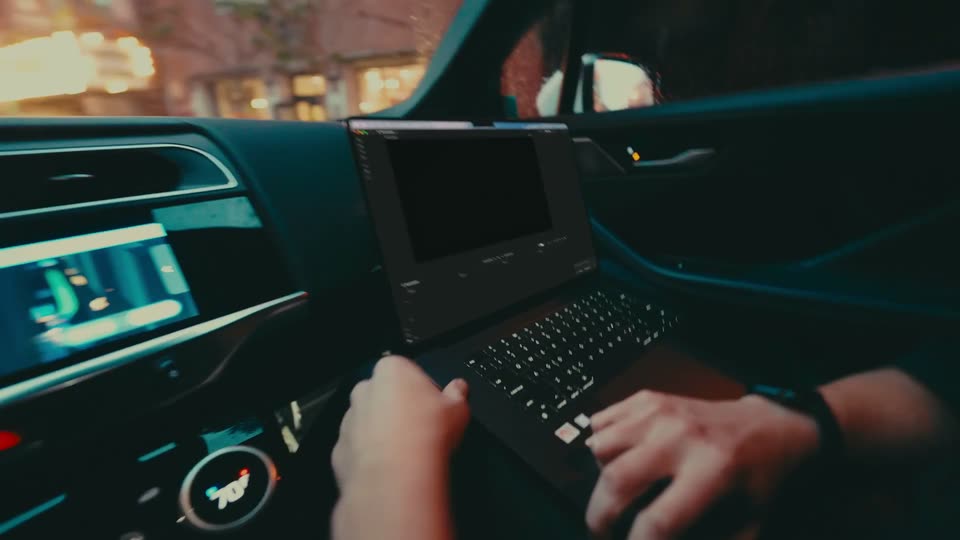
Inside a moving car at night, a person's hands work a laptop propped on the center console while a phone rests in the other hand. Blurred city lights streak past the window in teal-tinted low light.
Camera: Push in
A dark prompt card tilts in 3D over a blue, ray-lit backdrop. The line “i just plugged in my drivel” types itself out letter by letter, with Skip and Opus 5.5 controls and a round send button along the bottom edge.
Techniques: 3D mockup, Kinetic type
Camera: Push in
A dark card of video thumbnails floats in 3D perspective over a blue field of light rays, tilting from a steep angle to a flatter front view. Three clips gain blue checkmarks while the counter shifts from 38 clips to 9 highlights and the status reads Picking.
Techniques: 3D mockup
Camera: Static
A dark panel floats in 3D perspective over a blue, ray-lit backdrop, showing a grid of video clips. Several thumbnails glow with blue borders and checkmark badges. The bottom-left counter counts up from 6 to 9 highlights while the panel tilts.
Techniques: 3D mockup
Camera: Pull out
A 3D mockup of a video editing timeline on a dark background. The main track fills with video clips and an audio waveform, then a second track of clips slides in below.
On-screen text: “Highlight reel”, “9 highlights · 50 clips”, “Picking...”, “00:04|00:13”
Techniques: 3D mockup
Camera: Static
A tilted 3D render of a video editing app with a video call panel floats in the dark, then cuts to a car interior where hands type on a laptop showing the same interface. The shot dissolves to a desk monitor displaying the app.
On-screen text: “Hey, text me when the footage is up.”
Techniques: 3D mockup
Camera: Pull out
Close-up of two hands at a desk: the left fingers rest on a laptop keyboard while the right hand taps a steady rhythm on the wooden surface. Shallow focus keeps the right hand and laptop edge sharp against a dark teal background.
Camera: Static
A young man with curly hair speaks into a studio microphone, shown in profile against the white back of an Apple monitor in a dim room. A small audio-level widget sits in the lower left corner. The caption is locked off.
On-screen text: “Hey Kino, fully recreate macOS.”
Camera: Static
A translucent macOS-style dock floats in 3D against a blurred blue backdrop, its app icons shifting as the bar tilts into a diagonal. A white caption sits at the bottom, then fades out.
On-screen text: “Hey Kino, fully recreate macOS.”
Techniques: 3D mockup
Camera: Pan
A hand types on a silver keyboard resting on a wooden desk, captured in a low close-up with shallow depth of field. The fingers press a key in a quick motion against a dark, blurred background with soft teal bokeh.
Camera: Static
A close-up profile of a man speaking into a microphone on a dark set with soft green bokeh. A white two-line caption fades in at the lower center while the locked-off frame holds.
On-screen text: “We could do so much better”, “on liquid glass refraction.”
Camera: Static
A frosted-glass toolbar holding blue folder icons and a glass trash bin floats in 3D perspective over a blurred blue backdrop. The camera drifts slowly right, revealing waveform thumbnails along the top edge. A two-line white caption stays locked at the bottom.
On-screen text: “We could do so much better”, “on liquid glass refraction.”
Techniques: 3D mockup
Camera: Static
A dim teal-graded close-up of two hands typing on a slim black keyboard on a wooden desk. The right hand taps the keys in shallow focus while the left rests at the edge, and a two-line caption overlays the still frame.
On-screen text: “We could do so much better”, “on liquid glass refraction.”
Camera: Static
A man in a dark polo shirt speaks into a studio microphone, shown in profile close-up against a dim, blurred background. A white two-line caption fades in at the lower center as he talks.
On-screen text: “Use Hopper to reverse engineer those animations.”
Camera: Static
A desktop screen shows the Hopper disassembler: a code window and a class-list panel over a mountain-and-clouds wallpaper, with a centered white caption. The caption stays fixed while the app windows shift and resize.
On-screen text: “Use Hopper to reverse”, “engineer those animations.”
Camera: Static
A screen recording of the Hopper disassembler fills the frame: a dark code view with a colored call graph, a left symbol list, and a bottom timeline. A static white two-line headline, 'Use Hopper to reverse engineer those animations,' sits centered over the lower half.
On-screen text: “Use Hopper to reverse engineer those animations.”
Camera: Static
A dark code editor window sits over a mountain desktop background, showing a Hop script with syntax highlighting and a colorful coverage bar. A white cursor hovers at the top of the left panel beside the search field, the rest of the interface static.
Techniques: Cursor demo
Camera: Static
A full-screen dark code editor pulls back into a 3D window floating over a filmed office, where a masked man gestures toward a seated colleague at a desk with a microphone and plant. A white caption appears at the bottom.
On-screen text: “Luke, did you see the halation?”
Techniques: 3D mockup, Light sweep
Camera: Pull out
A man in a black shirt and glasses enters from the left, gesturing toward a seated colleague whose face is hidden behind a large monitor. The brick-walled office desk holds a multi-arm lamp and a potted plant. A white caption sits at the bottom.
On-screen text: “Luke, did you see the halation?”
Camera: Static
Two men in a dim studio, one with glasses facing the camera and one in profile, stand behind a microphone near an iMac. White subtitles appear centered at the bottom, swapping between two lines on a locked-off frame.
On-screen text: “Luke, did you see the halation?”, “Where's the sound design?”
Camera: Static
A dark chat interface sits in 3D perspective over a blue light-streak background. A prompt box types out a sound-design request behind a blinking caret, while a grid of video thumbnails and clip metadata sit above it.
On-screen text: “Where's the sound design?”
Techniques: 3D mockup
Camera: Pull out
A tilted monitor in 3D perspective displays an editing timeline: car interior clips sit above labeled audio tracks such as Rooftop wind and EV cabin hum, while blue marker chips line the top. The view pans right across the screen to reveal a Ring marker and a City night track.
Techniques: 3D mockup
Camera: Pull out
A screen capture of a video editor's timeline, tilted in 3D over a blue reflective floor, pans right across video and audio clips labeled City night and Office room tone. A green comment bubble reading Luke! pops in on a clip near the end.
Techniques: 3D mockup
Camera: Pan
A flat close-up of a video-editing timeline with green comment bubbles zooms out to reveal the full app window, tilted in 3D perspective on a blue gradient, with a chat panel on the right.
Techniques: UI zoom, 3D mockup
Camera: Pull out
A tilted 3D window of a video editing app floats over a blue backdrop, its preview showing a dim office with a person carrying a laptop. The view then pushes into the preview, filling the frame with the office scene while the bottom toolbar and timecode stay visible.
Techniques: 3D mockup, UI zoom
Camera: Push in
In a dimly lit brick-walled workshop, the camera arcs from behind a man holding a tablet to a two-shot of two men talking, then settles on a profile of the man with glasses. White subtitles carry the dialogue at the bottom of the frame.
On-screen text: “Yo, intro's pretty much ready.”, “Could you send it over to your people?”, “Yes sir.”
Camera: Push in
A woman with a high ponytail, seen from behind, holds a phone in her left hand and wears earbuds on a dim night street, blurred red lights bokeh behind her. The caption 'Yes sir.' holds at the bottom center of the frame.
On-screen text: “Yes sir.”
Camera: Static
A hand holds a phone up on a dim night street, its screen showing a scrollable photo feed. The focus racks from the soft bokeh of street lights to the sharp screen as the camera drifts along the railing.
Camera: Static
A woman holds a phone in a dim night street, softly out of focus, while a frosted message card slides in from the right. The card shows a sender name, a video preview with a play button, and a delivery title.
Camera: Push in
Two hands hold a smartphone in a dark, green-lit room. The screen shows a video editing app with a video preview and a comment field, and a thumb taps the on-screen keyboard while small captions slide in over the shot.
On-screen text: “sent you the cut”, “KinoLaunchIntro”, “Alec”
Camera: Static
A hand holds a phone upright against a dark, green-and-red bokeh background. The screen plays a short street video inside the app, the top title bar and bottom comment field remaining fixed. The shot is locked off.
Camera: Static
A man in glasses sits at a desk in a dim office, typing at a monitor showing code. He pauses and lifts a black telephone receiver to his ear. A dark foreground figure and a vertical light bar frame the locked-off shot as the caption appears at the bottom.
On-screen text: “I need it converted to every format.”
Camera: Push in
A man in a dark sweater sits at a desk, holding a phone receiver to his ear, seen from behind in a softly blurred office with monitors and plants. The frame reframes slightly tighter on his head as white captions appear at the bottom.
On-screen text: “I need it converted to every format.”, “YouTube, Instagram, TikTok,”
Camera: Pan
A dark editor UI fills the frame, a centered preview playing a man on a phone. A format dropdown opens over the preview listing social dimensions, the cursor hovering it. A white caption YouTube, Instagram, TikTok, sits at the bottom.
On-screen text: “YouTube, Instagram, TikTok,”
Techniques: Cursor demo
Camera: Pull out
Dark editor interface with a centered video preview. A cursor opens the format dropdown and selects TikTok, and the preview re-dresses from a landscape Instagram post into a vertical TikTok post with a side like rail. A white headline sits across the bottom above the timeline.
On-screen text: “YouTube, Instagram, TikTok,”
Techniques: Cursor demo, Morph
Camera: Static
A dark editor UI: the center preview switches from a vertical TikTok layout to a horizontal one as a format dropdown opens. A right panel lists conversions. A large white caption at the bottom reads “YouTube, Instagram, TikTok,” then “MySpace, everything.” A cursor hovers the dropdown.
On-screen text: “YouTube, Instagram, TikTok,”, “MySpace, everything.”
Techniques: Cursor demo
Camera: Static
A video editor canvas holds a MySpace profile mockup with a playing clip of a man on the phone, captioned “MySpace, everything.” below. The view then zooms into the canvas, reframing on the clip and the format list in the right panel.
On-screen text: “MySpace, everything.”
Techniques: UI zoom
Camera: Push in
A dark prompt card on a black background types out the line about a Kino demo behind a blinking caret while its timecode chip counts up. The card slides up, revealing a second card below with the line about assembling and editing.
Techniques: Kinetic type, Cursor demo
Camera: Static
A tilted macOS video-editor window sits over a dark blurred backdrop. Its Browser pane holds a grid of clip thumbnails with timecodes and a search field, and a cursor drifts across the clips as a white “2009” title fades from the frame.
On-screen text: “2009”
Techniques: 3D mockup, Cursor demo
Camera: Pull out
A tilted close-up of a video editor's browser panel zooms in on the search field, framed by a dashed selection outline. A cursor arrow rests on the field as the thumbnail grid behind it falls out of focus.
Techniques: UI zoom, Cursor demo
Camera: Static
A tilted 3D media grid fills the frame. A search field types a query, a people dropdown lists names, then the field completes and a match label pops over a highlighted clip as the cursor moves.
Techniques: 3D mockup, Cursor demo
Camera: Static
A tilted 3D view of a video editing timeline shows keyframe rows and a yellow playhead. The camera then pushes into the preview monitor, where a dotted tracking outline traces a man's head in profile and a cursor rests on his face.
Techniques: 3D mockup, UI zoom, Cursor demo
Camera: Push in
Tilted 3D mockup of a video editor with shallow focus; the camera pans right as a cursor selects Film Look from the filters list and drags the Halation slider, the Strength tooltip ticking from 0.45 to 0.48.
Techniques: 3D mockup, Parallax, Cursor demo
Camera: Push in
A video editing timeline, tilted in 3D perspective on a white background, shows three clips and colored keyframe tracks for scale, position and rotation. A yellow playhead line moves across the tracks as the view pushes in slightly.
Techniques: 3D mockup, UI zoom
Camera: Static
A tilted 3D view of a video editing app, with depth-of-field blur on the edges. Orange and green chat bubbles float in front of the preview, the orange one stretching as its letters grow, while the camera dollies in toward the parameters panel and whips across the interface.
Techniques: 3D mockup, Parallax, UI zoom, Speed ramp
Camera: Pull out
A 3D mockup of a search interface displays a query and image results, then zooms into the query text which appears alone on a black background.
On-screen text: “luke when is the kino launch video gonna be done”
Techniques: UI zoom
Camera: Push in
A gray chat bubble with a tail at the lower left grows into place on a near-black background. Large white text reads 'luke when is the launch video gonna be done', lines sliding and scaling in across the bubble, while the timestamp 'Tue, Oct 27, 2026 9:31 AM' fades in above.
On-screen text: “luke when is the launch video gonna be done”
Techniques: Kinetic type
Camera: Static
iMessage bubbles on a dark canvas: a gray question, a blue “working on it” reply, a gray “bro” bubble. The view zooms out to reveal a design tool toolbar, then in on “bro” as it gets a selection frame and a panel types “make it do the haha reaction”.
Techniques: UI zoom, Cursor demo
Camera: Push in
A dark chat view holds gray and blue message bubbles reading bro, HA and working on it as they slide and scale into place, while a row of tool icons pops in along the bottom edge.
Techniques: Kinetic type
Camera: Pull out
A hand types on a silver laptop keyboard on a wooden desk, shot low against a dark blurred background. Text fragments scale and slide across the frame over the live footage.
On-screen text: “bro”, “wor”, “HA”, “T”
Techniques: Kinetic type
Camera: Static
A high-angle shot shows four people huddled around a large monitor in a dim studio at night. A white curved line sweeps from the top of the frame toward the bottom. A white caption sits at the lower edge.
On-screen text: “Kino, how should we end this video?”
Camera: Pull out
A close-up of a dark video-editing interface, showing a clip of a team at a monitor, gives way to a person in a gray hoodie with boots on the desk, editing on a laptop beside a large monitor.
Camera: Pull out
A person in a grey hoodie sits with boots propped on a desk, typing on a laptop. A monitor behind shows a video editing timeline. The person then closes the laptop lid.
Camera: Static
The blue KINO logo sits centered on black, its outline traced by white node points that fade away. The white tagline appears below in two stages, settling into a clean lockup.
On-screen text: “Your turn. Visit kino.ai”
Camera: Static