4:43

DJI - Introducing the DJI Mavic
DJI · Hardware · Sep 2016
Input Systems · Feb 2025 · 1:18 · Full motion · AI-annotated
Input Systems’s 1:18 launch film runs 35 scenes, about 2.2 s each. The product shows up at 0:14 and 3 features are revealed. The call to action lands at 1:10 (90% in), over a voiceover. The video opens with a slow rack-focus reveal of the dark UI, names the product on a smoky logo card, then alternates 3D-tilted interface flythroughs with flat light-gray demo cards. Signature moves: the camera glides through tilted panels with focus racks, headlines streak with horizontal motion blur, and the palette flips from near-black to pale gray for the human-approval beat.
Is this your launch? to your site or press kit.
DJI · Hardware · Sep 2016
Superhuman · Productivity · Jan 2024
CarSignal · Aug 2026
A near-black frame holds as a faint diagonal edge of a dark shape emerges, suggesting a slow reveal from black. The motion is minimal and the pace is slow.
Camera: Static
A near-black matte surface fills the frame; a faint thin double edge line drifts diagonally across it as the camera glides slowly, revealing the corner of a dark panel.
Camera: Pull out
A dark dashboard interface sits in 3D perspective, tilted to the right. A left sidebar lists Agents, Knowledge, Behavior and Actions beside an inbox of customer names. The frame starts soft and out of focus, then racks sharp as the panel rotates toward the camera.
Techniques: 3D mockup
Camera: Pull out
A dark details panel tilts in 3D and scrolls upward, revealing status, priority, contact and company fields, while a conversation pane with a message sits to the left.
Techniques: 3D mockup, UI zoom
Camera: Push in
A dark helpdesk interface tilts in 3D perspective as the camera slowly pulls back from a close-up Details panel to reveal the left sidebar and an Agents list.
Techniques: 3D mockup
Camera: Push in
A dark settings panel sits tilted in 3D perspective, starting out of focus. The camera racks focus and pushes in as the list sharpens, revealing an Actions column with small icons and rows such as Send Email, which slides into place.
Techniques: 3D mockup, UI zoom
Camera: Push in
A near-black frame opens with a faint diagonal light streak sweeping across, then a dim, blurred logo shape slowly resolves in the center as the darkness lifts.
Techniques: Light sweep
Camera: Pull out
On a near-black background, the Lemni mark, two overlapping diamond shapes beside the wordmark, starts blurred and slowly comes into focus on a locked-off frame.
Camera: Static
The Lemni logo and wordmark fade in over a dark smoky background, then the scene cuts to three tilted notification cards floating in 3D perspective, labeled Support, Order Confirmation and Intake.
Techniques: 3D mockup
Camera: Static
Three dark rounded bars float in 3D perspective over a black smoky void, tilted and stacked. Each carries a colored icon and white label: green phone, purple envelope, blue nodes. The Intake and Order Confirmation labels scale gently while Support holds still.
Techniques: 3D mockup
Camera: Static
Three dark rounded cards with a green phone, purple envelope and blue headset icon read Intake, Support and Order Confirmation, floating in 3D perspective over a smoky black background. The cards tilt and scale gently on a locked-off frame.
Techniques: 3D mockup
Camera: Static
Three dark rounded cards float in 3D perspective over a smoky black background. Each pairs a colored icon with a label: green phone for Intake, purple envelope for Support, blue cloud for Order Confirmation. The cards drift and scale gently.
Techniques: 3D mockup
Camera: Push in
A dark contact card for Jane Doe sits center frame with a phone number, an audio waveform and an Interacting pill. The view slowly pulls back, revealing a left-hand task list and a right-hand Details panel. A Play button fades in beside the waveform.
Camera: Pull out
A dark CRM interface floats at a 3D angle. The camera pulls back from a call-summary card to reveal a contact list on the left and a details panel on the right, while a confirmation toast fades in at the bottom.
Techniques: 3D mockup, UI zoom
Camera: Pull out
A dark support-ticket interface fills the frame, centered on an email from Jane Doe about a missing discount, with an invoice attachment and an Interacting pill. The view eases out to reveal a ticket list on the left and a details panel on the right.
Techniques: UI zoom
Camera: Pull out
A dark helpdesk interface tilts in 3D, centered on a drafted refund reply email with an Approve button. The view eases out to reveal an inbox list on the left and a contact form on the right.
Techniques: 3D mockup, UI zoom
Camera: Pull out
A dark email support interface floats in 3D perspective, tilted toward the left. It shows a contact list, a refund email thread with Decline and Approve buttons, and a customer detail panel on the right. The camera slowly pushes in on the layout.
Techniques: 3D mockup
Camera: Pull out
A dark support app screen begins tilted in 3D with overlapping panels, then straightens as the camera pans to a customer detail list, scrolling down past plan and price rows to a drafted email to [email protected].
Techniques: 3D mockup, UI zoom
Camera: Pull out
A dark CRM interface in 3D perspective shows an email draft to [email protected] filling in, then a Gmail button morphs into a created-draft pill with a shimmering progress bar, while dimmed contact fields sit angled in the background.
Techniques: 3D mockup, Light sweep
Camera: Pull out
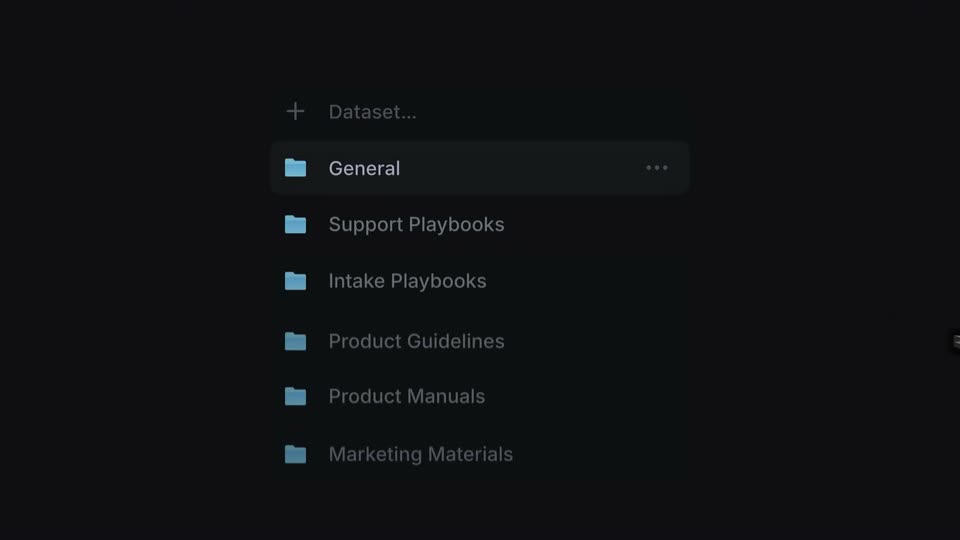
On a dark screen, a folder list with the General row highlighted sits over a blurred email and contact panel. The background fades to black as green dollar bills fly out from the row.
Camera: Static
On a dark folder list, a hand cursor drags a green spreadsheet and a red PDF toward the highlighted General row, dropping each in turn, then the whole list fades to black.
Techniques: Cursor demo
Camera: Static
A dark folder list of named items is replaced by a centered Gmail sync panel: the multicolor Gmail mark sits above the Sync Gmail title, a two-line caption, and an outlined Enable button.
Camera: Static
A centered sync panel on a black background cycles through four integrations: Gmail, HubSpot, Shopify, Stripe. Each shows a colored logo, a Sync title, a one-line description, and an Enable button that becomes a loading spinner on the last, then the panel fades out.
Camera: Static
On a black background, four white labels appear one by one from left to right, each preceded by a circle that draws in and fills green with a check. A large defocused headline, Plug and play, then fades in behind the row.
On-screen text: “Customers”, “Subscriptions”, “Payments”, “Products”, “Plug and play”
Techniques: Kinetic type
Camera: Static
Large white “Plug and play” is centered on a black field, flanked by faint “Customers” and “Products” labels. The main phrase then streaks with horizontal motion blur while the side labels fade out.
On-screen text: “Customers”, “Products”, “Plug and play”
Techniques: Kinetic type
Camera: Static
A tight crop on a purple 'Emily' speech-bubble tag over a light gray screen pulls back to reveal the full task line, '2. Write an email to answer the question and send it using gmail.'
Techniques: UI zoom
Camera: Static
A purple Emily comment bubble sits on a line of instruction text, then the view zooms out to reveal the full dashboard with agent and actions lists. A cursor moves to Send Email, and the right panel switches to its setup form with approval options.
Techniques: UI zoom, Cursor demo
Camera: Pull out
A tilted white settings panel floats in 3D on a pale gray backdrop. A cursor clicks the black Enable Agent button, which spins then turns green with Enabled. Colorful 3D app icons drift in around the panel as a large black Approve pill scales up in the foreground.
Techniques: 3D mockup, Cursor demo
Camera: Push in
A black pill-shaped button reading Approve floats on a pale gray field. A cursor arrow slides in from the bottom right, switches to a pointing hand, and clicks the button, which dips down under the press.
On-screen text: “Krijn approved”
Techniques: Cursor demo
Camera: Static
On a light gray field, a yellow circle holding a black-and-white profile photo sits at right while the gray text 'Krijn approved' scales up and fades in to its left.
On-screen text: “Krijn approved”
Techniques: Kinetic type
Camera: Static
A refund card is centered on a light gray field, its approval label popping in large then settling into place, while a status pill types out the agent's action. The view then pulls back to reveal the full three-column inbox interface, which darkens at the end.
Techniques: Kinetic type, UI zoom
Camera: Pull out
On a black background, the large word Scale appears centered with a soft blur, then gives way to the smaller centered line without losing the personal touch. The frame stays locked off throughout.
On-screen text: “Scale”, “without losing the personal touch”
Techniques: Kinetic type
Camera: Static
A single line of white lowercase text reads across the center of a black background, settling in with a brief motion blur before holding still.
On-screen text: “without losing the personal touch”
Techniques: Kinetic type
Camera: Static
A slate-gray logo of two overlapping rounded squares sits centered on a near-black background with drifting smoke. It eases slightly larger as a caption types in below it, then the URL fades in over the logo as it dims.
On-screen text: “Available worldwide, today”, “lemni.com”
Techniques: Kinetic type
Camera: Static
A near-black frame holds a single white URL, lemni.com, centered and perfectly still. The camera is locked off with no motion or animation across the shot.
On-screen text: “lemni.com”
Camera: Static