2:20
we built an ai that draws on your screen.
HeyClicky · Consumer · Jul 2026
HeyClicky’s 2:20 launch film runs 32 scenes, about 4.4 s each. The product shows up at 0:11. The call to action lands at 2:10 (93% in), over a voiceover. The video alternates locked-off live-action shots of the presenter with screen recordings that zoom from a floating window to full frame, cutting at a brisk pace of about 11.5 cuts per minute. Its signature move is a red cursor drawing labels and shapes directly over the app, with the browser window floating in 3D over the filmed room.
Is this your launch? to your site or press kit.
HeyClicky · Consumer · Jul 2026
Aspect · B2B · Sep 2026
Skillsync · B2B · Jan 2026
Films whose music sounds like this one, voice left out
Meta · Upbeat, modern electronic music with a four-on-the-floor beat.
Airbnb · Promotional, Documentary
Nintendo · Upbeat electronic
A man with round glasses in a navy quarter-zip walks in from the left and stops beside a glass whiteboard holding a hand-drawn browser window sketch. He talks to camera, gesturing with a white marker, while subtitle lines appear at the bottom.
On-screen text: “so we built a system that can draw”, “directly on your screen”
Camera: Pull out
Locked-off close-up of a bearded man in glasses drawing on a transparent panel with a white marker. He adds a polygon, an arrow and a curved line to a sketched browser window, a dark brick wall behind. White subtitles run along the bottom.
On-screen text: “It can draw polygons, arrows, curved”, “lines, and a lot more.”
Camera: Static
A man with glasses and a dark zip-up stands right of frame before a glass whiteboard marked with a hand-drawn browser window and arrows. He holds a marker, gestures, and speaks to camera while white subtitle lines swap in at the bottom.
On-screen text: “lines, and a lot more.”, “It can teach you literally anything no”, “matter what app you're in.”, “So let's say I'm watching this YouTube”
Camera: Static
A bearded man in glasses and a dark zip-up jacket holds a laptop toward the camera, tilting it to show a YouTube video of a handwritten math lesson on the Pythagorean theorem. He glances between the screen and the lens while speaking. Locked-off medium close-up.
On-screen text: “So let's say I'm watching this YouTube”, “video about the”, “Pythagorean theorem on Khan Academy,”, “and if I don't quite”, “understand it, I can just say,”
Camera: Pan
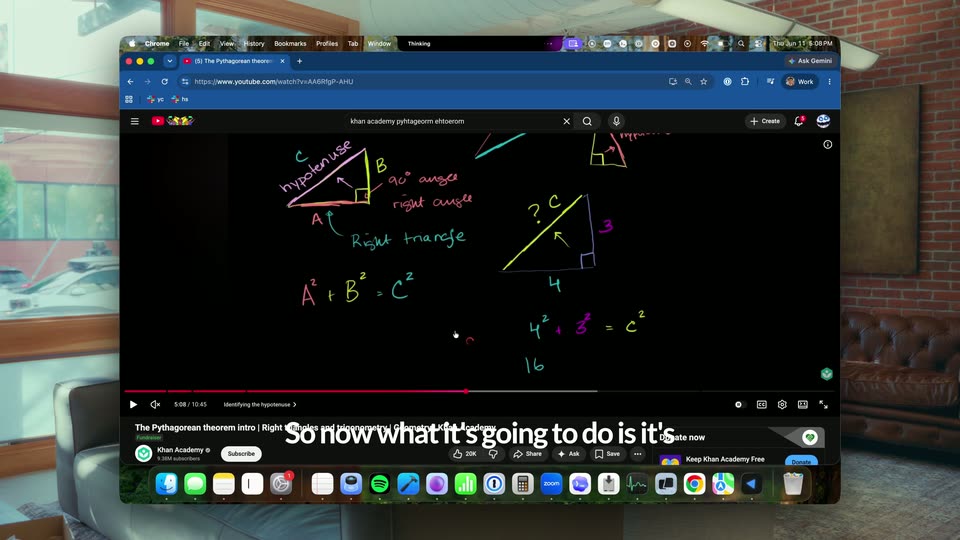
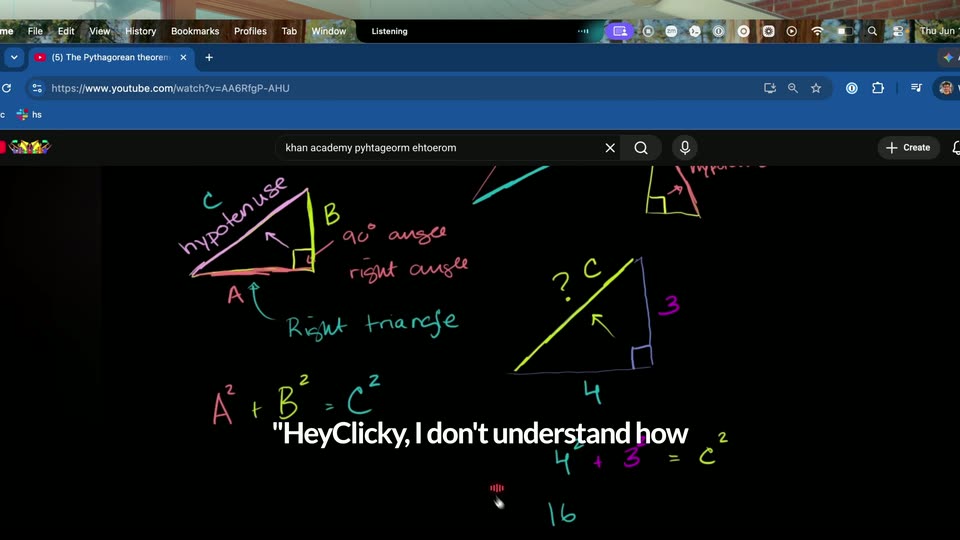
A Mac screen recording zooms from a floating Chrome window to full frame on a Khan Academy video of a blackboard with hand-drawn colored triangles and the Pythagorean formula. White subtitle lines appear one after another at the bottom.
On-screen text: “understand it, I can just say,”, “HeyClicky, I don't understand how”, “a²+b²=c²”
Techniques: UI zoom
Camera: Push in
A bearded man with glasses sits in profile before a laptop, watching a hand-drawn Pythagorean lesson of colorful triangles and equations on a dark canvas. White captions at the bottom state the formula and his request. The camera holds a locked-off medium close-up.
On-screen text: “a²+b²=c²”, “Can you draw my screen”, “directly and show me?”
Camera: Static
A desktop screen capture shows a Chrome browser playing a Khan Academy lesson: hand-drawn right triangles and the formula A² + B² = C² on a black background. A white subtitle line appears at the bottom of the player while the room behind the window stays static.
On-screen text: “So now what it's going to do is it's”
Camera: Pull out
A man with round glasses holds a laptop showing a blackboard-style math app, his open palm gesturing across the screen. Locked-off medium close-up as he explains the feature.
On-screen text: “going to take a screenshot”
Camera: Static
A Chrome window playing a Khan Academy Pythagorean theorem video floats in 3D perspective over a filmed living room with brick wall and sofa. A white caption reads at the bottom center while the mouse cursor rests on the blackboard drawing.
On-screen text: “going to take a screenshot”, “to return coordinates of drawings”
Techniques: 3D mockup, Cursor demo
Camera: Static
A man with round glasses holds a laptop showing a dark canvas with colorful hand-drawn triangle diagrams, gesturing at the screen as he speaks. White subtitle captions appear at the bottom of the frame.
On-screen text: “to return coordinates of drawings”, “that it's going to”
Camera: Static
A browser window floats in 3D over a blurred living room, then the view dives into the black canvas of a Khan Academy video where a red pen cursor marks the right angle of a hand-drawn triangle. The white caption sits centered at the bottom throughout.
On-screen text: “paint on my screen directly.”
Techniques: 3D mockup, UI zoom, Cursor demo
Camera: Push in
A browser window frames a black whiteboard covered in neon hand-drawn right triangles and the formula A² + B² = C². A red cursor points at the right-angle marker, then draws a red line along the bottom leg while subtitles explain each step.
On-screen text: “This little square is the right angle.”, “That's what makes the theorem work.”, “This bottom leg is A.”
Techniques: Cursor demo
Camera: Static
A bearded man with glasses sits in profile beside a laptop, watching a screen full of hand-drawn right triangles and the Pythagorean equation. A white caption scales in at the bottom as he explains a side.
On-screen text: “This side is B.”
Camera: Static
A dark search bar holds the query “khan academy pythagorm ehteorom” above a chalk-style blackboard. Neon triangles sit on black as a right triangle is traced in red and pink; red pills pop in labeling leg A, leg B and hypotenuse C. White subtitles run along the bottom.
On-screen text: “This side is B.”, “And this slanted side”, “across from the right angle is C.”
Camera: Static
A bearded man with glasses sits in profile on the right, talking toward an open laptop on the left that shows a blackboard math app with colorful right-triangle diagrams. The locked-off frame holds while white subtitles replace each other at the bottom.
On-screen text: “Squared means area.”, “So build the square on the four leg.”
Camera: Static
A locked-off browser screen plays a Khan Academy video on a black board: a right triangle with a red square on the 4-leg and colorful handwritten formulas. White subtitle lines swap at the bottom of the player.
On-screen text: “https://www.youtube.com/watch?v=AA6RfgP-AHU”, “So build the square on the four leg.”, “Its area is four times four.”, “And it's just gonna keep showing me”
Camera: Static
A bearded man in round glasses sits beside an open laptop, gesturing with one hand while he talks. The laptop screen displays a dark whiteboard with hand-drawn right-triangle diagrams and colored equations. White subtitles run along the bottom of the frame.
On-screen text: “And it's just gonna keep showing me”, “how a² + b² = c²”
Camera: Static
A Chrome window shows a Khan Academy blackboard video. On the right, a red right triangle with two squares on its legs is drawn, then a third square labeled area 25 is sketched onto the hypotenuse. White subtitles change at the bottom center while a cursor rests in the middle.
Camera: Static
A man with round glasses in a dark zip-up jacket talks to camera, then lifts his laptop to show a YouTube video with a red Pythagorean theorem diagram over a blackboard. White subtitles sit at the bottom.
On-screen text: “And just like that, it drew”, “directly on a YouTube video”, “to explain the Pythagorean theorem.”, “Pretty cool.”
Camera: Pan
A man in a dark zip-up jacket and round glasses speaks to camera in front of a glass wall. He lifts a laptop into frame showing the FL Studio interface, then lowers it and gestures with open hands while explaining he wants to learn music production.
On-screen text: “Alright, so that's kind of cute.”, “But what if I wanted to do something a”, “little bit more complicated?”, “What if I wanted to learn FL Studio,”, “which is a program that”, “people use to make music.”, “And I've always wanted to make music,”, “but I find myself always”, “going to YouTube videos”, “where they're 40 minutes long”
Camera: Static
A bearded man in round glasses leans over a laptop whose screen fills the frame, showing a teal audio program. The shot widens to reveal his face in profile as he watches the screen. White subtitles appear at the bottom.
On-screen text: “What if I could learn it”, “all in the program directly?”, “Let's try.”
Camera: Push in
A bearded man in round glasses sits in profile beside an open laptop showing a teal DAW interface, speaking toward the screen. White subtitles appear at the bottom in two lines. A chalk device outline is drawn on the dark wall behind him.
On-screen text: “HeyClicky, can you show me how to make”, “my first beat? I am new to FL Studio.”
Camera: Pan
The FL Studio window sits small on a Mac desktop, then the view zooms into the Channel rack. A cursor clicks the first, fifth, ninth, and thirteenth squares of the kick row, each tagged with a red step label, while captions explain the pattern.
On-screen text: “Here's the channel rack again.”, “Every row is one drum sound.”, “On the kick row, click this first square.”, “kick step one”, “Then step 5, the start of beat 2.”, “kick step five”, “Then step 9, beat 3.”, “kick step nine”, “And step 13, beat 4.”, “kick step thirt”
Techniques: UI zoom, Cursor demo
Camera: Push in
A bearded man in rimless glasses sits in profile, smiling at a laptop showing a DAW step sequencer with teal tracks. The shot stays locked off while white subtitles appear at the bottom of the frame.
On-screen text: “And step 13, beat 4.”, “That's a kick on every beat.”, “Now drop down to this 808 snare row.”
Camera: Static
A bearded man with glasses sits in profile at a laptop, watching a DAW session with a drum step sequencer. The frame is locked off, and a white caption sits along the bottom edge.
On-screen text: “Now drop down to this 808 snare row.”
Camera: Static
A FL Studio channel rack grid sits inside a red dashed selection box. A cursor moves to the 808 Snare row and clicks step 5, then step 13, lighting two red cells. White captions at the bottom explain each click in turn.
On-screen text: “Now drop down to this 808 snare row.”, “Click step 5 here.”, “That's the snare on beat 2.”, “And step 13, beat 4.”
Techniques: Cursor demo
Camera: Static
A bearded man with glasses sits in profile beside an open laptop showing a music sequencer, smiling as he watches the screen. White captions appear at the bottom right over the locked-off shot.
On-screen text: “Kick plus backbeat.”, “Press space to hear it groove.”
Camera: Static
The FL Studio step sequencer fills the screen with a red dashed selection box around the drum pattern and a cursor resting on a step. The view dims and cuts to the presenter looking down, the window now floating at left.
On-screen text: “Press space to hear it groove.”, “All right.”
Techniques: Cursor demo
Camera: Static
A man with round glasses and a beard sits in front of an open laptop showing a music production interface, talking to the camera and gesturing. The locked-off medium shot alternates between his face and the screen, with white subtitles at the bottom.
On-screen text: “And so there we go.”, “We made our first beat,”, “literally, in like 10 seconds.”, “And we had everything pointed out for us.”, “I feel like I can keep going.”, “I can keep asking more questions about”, “how to add loops, bass, whatever.”, “And this is just a brand new interface”, “for you to actually”, “talk to your computer.”
Camera: Pan
A bearded man with round glasses speaks to camera in front of a dark wall with a whiteboard sketch, a laptop running editing software visible at the start. He gestures and gives a thumbs-up as captions cycle his lines, then it cuts to a black card reading tryitforfree.
On-screen text: “Check it out.”, “It's live.”, “It works in literally any program.”, “Try it out.”, “Try to break it.”, “I dare you.”, “And enjoy.”, “tryitforfree”
Camera: Pull out
On a black background, white lowercase text builds word by word, starting with “try it” and extending to “try it for free”, the newest word fading in gray. The frame stays locked off.
On-screen text: “try it for free”
Techniques: Kinetic type
Camera: Static
A black screen holds the centered white tagline 'try it for free', then crossfades into the bold 'heyclicky' wordmark, which dims and fades out to black.
On-screen text: “try it for free”, “heyclicky”
Camera: Static