1:09


Almanac - The agent with a company brain
Almanac · B2B · Aug 2026
Hebbia · Jun 2025 · 0:15 · AI-annotated
Hebbia’s 0:15 launch film runs 10 scenes, about 1.6 s each. The product shows up at 0:00 and 1 feature is revealed. There is no explicit call to action. Built as a three-beat arc: a card-based flow diagram, a fast screen-recording demo of the export pipeline, and a static dual-logo close. Signature moves: cards that expand into the live UI, rapid crossfading slides under a fixed status header, and a slow drifting collage of the generated deck.
Is this your launch? to your site or press kit.
Almanac · B2B · Aug 2026
Vercel · Developer tools · Sep 2022
A white card labeled VDR with a document-plus icon sits centered, then expands into a horizontal row: the document card on the left, an arrow, a blue tile holding a grid of white slide shapes, and a small card on the right. The indigo headline fades in above.
On-screen text: “From VDR to formatted slides in minutes”
Camera: Static
A light-gray frame holds a centered headline above a three-card flow diagram, white VDR and Slide Deck cards flanking a blue Hebbia card, joined by arrows. The headline shifts from indigo to black, then the plain background fills with the Hebbia app interface while the diagram stays centered on top.
On-screen text: “From VDR to formatted slides in minutes”, “VDR”, “Hebbia”, “Slide Deck”
Camera: Static
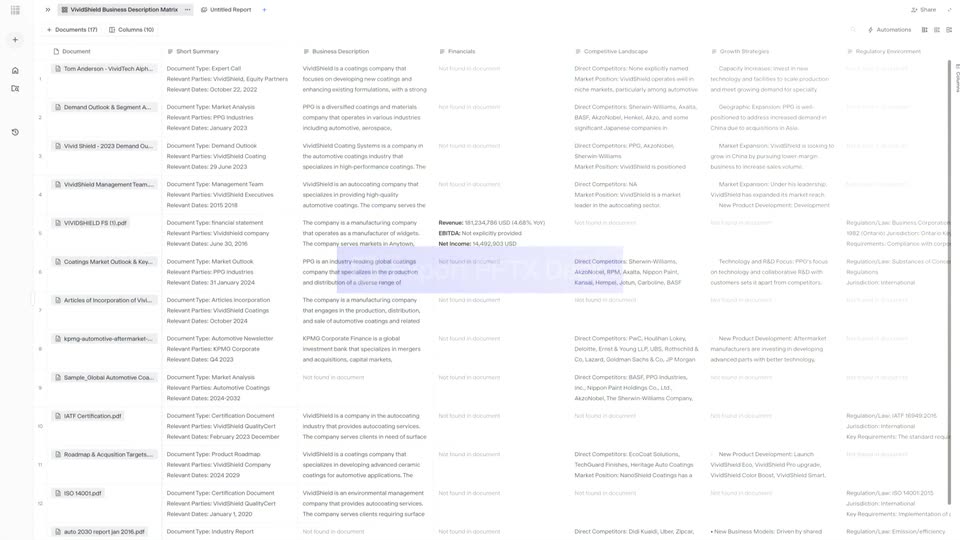
A wide document-analysis table fills the screen, columns of extracted fields beside a file list. A cursor hovers the blue Export PPTX Deck button, then a FlashDocs panel slides in from the right listing Generating Slides with slide thumbnails.
Techniques: Cursor demo
Camera: Pull out
A dark green slide titled M&A Deal Review, with a light blue curved-line graphic on the right, fades in and sharpens beneath a Generating Slides header and the FlashDocs logo on a pale gray background.
Camera: Static
A white slide card sits on a pale gray background, its agenda layout showing a blue photo banner, a serif headline, a numbered list and a gray paragraph box. Above it, the status line “Generating Slides...” and the FlashDocs logo hold still. The frame is locked off.
On-screen text: “M&A Deal”
Camera: Static
A dark green highlights slide with four numbered columns is replaced by a white executive summary slide holding a three-row table, beneath a fixed Generating Slides header and FlashDocs logo.
Camera: Static
A slide area under the fixed “Generating Slides...” header and FlashDocs logo swaps from a company-overview slide to a mission-and-objectives slide, the two layouts crossfading so their headlines and body text overlap mid-transition.
Camera: Static
A pale gray interface shows a centered slide, a dark green panel with serif M&A Deal Review beside a blue building illustration, under a Generating Slides status. White and green slide cards pop in from all edges, scaling up to fill the frame with figures and section lists.
Camera: Pull out
A flat collage of document mockups and stat panels drifts slowly across the frame. A dark green card reading M&A Deal Review sits at the center, surrounded by white report pages, a teal building photo, and large figures like 58%, $840M and $1.2B. The whole composition pans gently to the left with no cuts.
Camera: Pull out
The FlashDocs and Hebbia wordmarks, each paired with its icon, sit side by side behind a thin vertical divider, centered on a blue gradient. A soft glow drifts slowly across the background while the logos stay locked off and still.
On-screen text: “FlashDocs”, “Hebbia”
Camera: Static