
1:01

Framer: Stop Waiting. Start Shipping.
Framer · Design · Nov 2025
Gradium · Sep 2026 · 0:51 · AI-annotated
Gradium’s 0:51 launch film runs 13 scenes, about 4.0 s each. The product shows up at 0:04. The call to action lands at 0:39 (77% in), over a voiceover. The video is built on a single centered line of type that types out and triggers dark UI cards on a pure black field, with classical artworks drifting in and out as the visual metaphor for each generated voice. Pacing is measured at about 103 bpm with long holds on the sliders, and the signature moves are the upward text cascade where each line dims as the next scales in, plus the dot-condensing Gradium lockup at the close.
Is this your launch? to your site or press kit.
Framer · Design · Nov 2025
Sovera · May 2026
Interact AI · May 2026
A grayscale classical bust scales up on a black background and drifts left, then a dark portrait and a Renaissance painting of standing figures slide in from the right beside it.
Camera: Static
On a black field, framed classical artworks, a marble bust, a portrait of a couple, the Mona Lisa, a flower-crowned woman, standing statues, drift horizontally at different scales and focus, the large bust soft and the smaller frames sharp, in a continuous overlapping flow.
Techniques: Parallax
Camera: Static
A black screen holds a quick montage of classical art, a Klimt figure, a marble bust, and a couple portrait, which scale and shift positions as the gray caption at center reads 'a brand' then 'Get a brand'.
On-screen text: “a brand”, “Get a brand”
Techniques: Kinetic type
Camera: Static
A vertical wipe clears a live-action sliver from the left edge, revealing white centered text on black. A small dark rounded rectangle slides in behind the words near the center.
On-screen text: “Get a brand new voice”
Techniques: Masking
Camera: Static
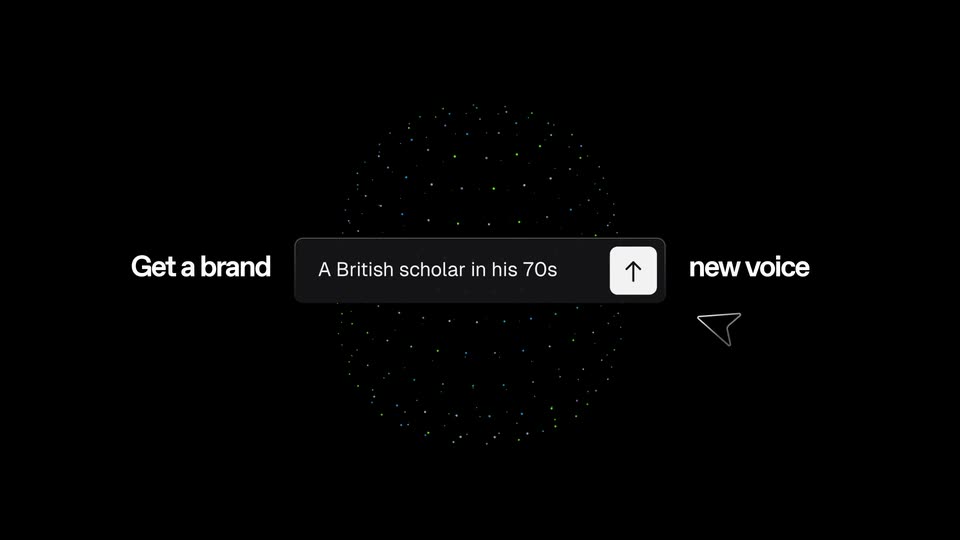
A dark input box types a prompt between the still words “Get a brand” and “new voice” on black. A cursor clicks the up-arrow, a particle sphere blooms behind, and the box fades into a card holding a multicolored point-cloud head beside six voice sliders.
On-screen text: “Get a brand”, “new voice”
Techniques: Cursor demo, Particles
Camera: Push in
A dark control panel pairs a bearded stone bust on the left with eight voice sliders on the right. The bust starts as a pixelated blue-green mosaic and resolves into a clean statue as a white outline cursor drags the sliders. A shimmering particle ring drifts behind on black.
Techniques: Morph, Cursor demo, Particles
Camera: Pull out
A dark input bar flanked by “Get a brand” and “new voice” sits on black, cursor on the send arrow. Voice prompts type out as matching classical artworks, Mona Lisa, Greek busts, a Medusa portrait, fade in around it, then the frame pulls back and “Imagine it.” appears large.
On-screen text: “Imagine it.”
Techniques: Cursor demo
Camera: Pull out
On a black background, the phrase 'Imagine it.' holds center, then the line rises and dims as 'Describe it.' scales in below it; 'Hear it.' and 'Ship it.' follow the same upward cascade, each phrase bold white sans-serif.
On-screen text: “Imagine it.”, “Describe it.”, “Hear it.”, “Ship it.”
Techniques: Kinetic type
Camera: Static
On a black background, three bold lines, Describe it., Hear it., Ship it., shrink and drift upward, then fade out as a large two-tone title, Voice Design, appears, with Voice in white and Design in gray.
On-screen text: “Describe it.”, “Hear it.”, “Ship it.”, “Voice Design. Live today.”
Techniques: Kinetic type
Camera: Static
White bold sans-serif on black: “Describe it.” scales in and holds, then “Voice Design.” appears as “Live today.” types in word by word. The line fades out and the Gradium logo scales in as the sign-off.
On-screen text: “Describe it.”, “Voice Design. Live today.”, “Gradium”
Techniques: Kinetic type
Camera: Static
The gray wordmark Gradium is centered on a black field, shown with a 3D extruded edge that flattens to a flat fill while the letters scale gently in a locked-off frame.
On-screen text: “Gradium”
Techniques: Kinetic type
Camera: Static
On a black background, the gray wordmark Gradium holds center, then scales down and its letters dissolve into a horizontal row of small gray dots, with one brighter dot and one separated dot on the right.
On-screen text: “Gradium”
Techniques: Kinetic type, Morph
Camera: Static
On a black field, a row of small gray dots drifts together and condenses into a thin square frame around the letters Gr. The mark holds steady at center, then fades to black.
On-screen text: “Gr”
Techniques: Morph
Camera: Static