1:07

Introducing ElevenAgents Architect
ElevenLabs · AI · Oct 2026
GodHands · Nov 2026 · 0:47 · AI-annotated
GodHands’s 0:47 launch film runs 10 scenes, about 4.7 s each. The product shows up at 0:13 and 3 features are revealed. There is no explicit call to action. The video is a four-point feature tour built from flat browser and app mockups that type and fill themselves in, each point announced by a numbered caption in the top left. Pacing is steady and calm, with slow fades, cell-by-cell typing and underline links as the signature moves, closing on a centered logo and tagline card.
Is this your launch? to your site or press kit.
ElevenLabs · AI · Oct 2026
Anthropic · AI · Jun 2026
Perplexity · AI · Jul 2025
A browser mockup of a Gmail inbox is centered on a pale gray field, framed by a soft drop shadow. The email rows fade from a dim state to full opacity beneath a numbered headline at the top left.
On-screen text: “01 It learns from the work your team already does”
Camera: Static
A light-gray browser frame holds a Gmail inbox list. A green ring marks the top sender, then the list reframes into that email's open message, which holds still. A numbered caption sits above the window.
On-screen text: “01 It learns from the work your team already does”
Techniques: UI zoom
Camera: Static
A flat browser mockup of a Jira board with a Create issue dialog fading in. The Summary field types out Wayne Logistics: delete personal data, two label chips appear, and a dark code chip shows the action before the dialog fades out.
On-screen text: “01 It learns from the work your team already does”, “textfield “Summary” = “Wayne Logistics: delete personal data””
Techniques: Cursor demo
Camera: Static
A flat browser mockup of a Jira board sits on a light background, dimmed under an overlay. A white toast with a green check appears at the bottom left as the board's cards and create-issue form fade out. A numbered caption line sits above the window.
On-screen text: “01 It learns from the work your team already does”
Camera: Static
A browser window shows a Google Sheets spreadsheet titled Support Log. A new row fills in cell by cell, typing the customer, request, ticket and outcome values. A code tooltip appears at the bottom confirming the new row.
On-screen text: “01 It learns from the work your team already does”
Camera: Static
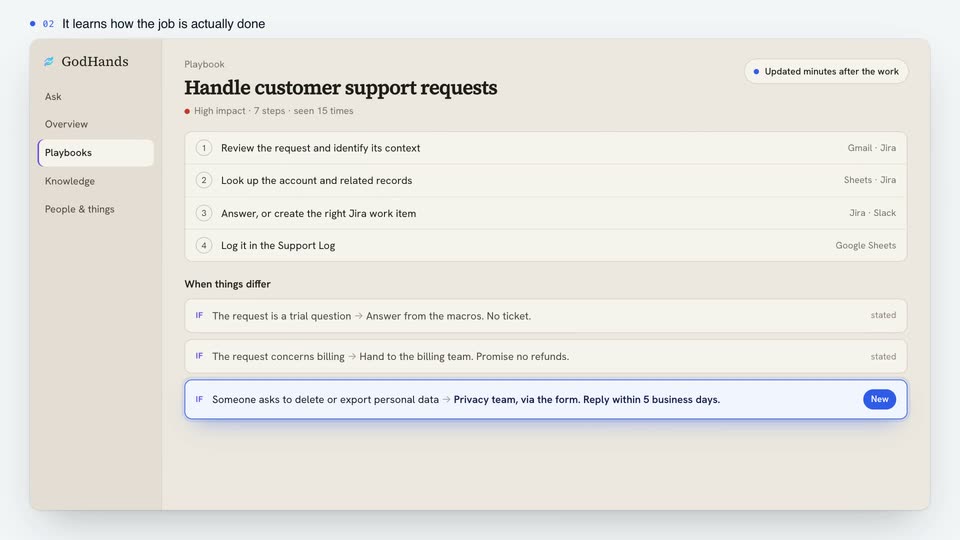
A flat GodHands playbook screen fades in under a top caption. Step rows and IF rows populate top to bottom, the last IF row gains a blue outline and a New tag, then an Updated minutes after the work badge appears top right as the scene holds.
On-screen text: “02 It learns how the job is actually done”
Camera: Static
A beige app page titled “Routing personal-data deletion and export requests” fades in, then three source cards stack in below it under a “Learned from” label. Matching phrases inside the cards get underlined one by one, linking the body text to its sources. A small caption sits above the window.
On-screen text: “03 Every line points to the work it came from”
Camera: Static
A flat GodHands app screen on a pale background, sidebar menu at left. A question types into the ask field, then resolves into a bold heading with a status pill and answer paragraph, while a Sources box fades in below. A caption line sits above.
On-screen text: “04 Your whole team can ask. So can your AI agents.”
Techniques: Morph
Camera: Static
A split screen pairs a cream support app on the left, showing a GDPR question and its answer, with a dark terminal on the right. The terminal types a reply command, prints playbook steps, then a drafted message, while a static headline sits above both panels.
On-screen text: “04 Your whole team can ask. So can your AI agents.”
Techniques: Split screen
Camera: Static
On a pale gray field, a small blue logo of two angled strokes scales up and rises as a two-line dark headline fades in beneath it, followed by a gray compliance line and a blue URL; the frame then holds.
On-screen text: “The company brain,”, “learned from the work.”, “SOC 2 · HIPAA · Deploys on-prem”, “godhands.ai”
Camera: Static