1:13

Odin Robotics (YC F26) - Launch Video
Odin Robotics · Industrials · Oct 2026
Factory · Jun 2026 · 0:50 · AI-annotated
Factory’s 0:50 launch film runs 23 scenes, about 2.2 s each. The product is on screen from the first frame and 4 features are revealed, with social proof. The call to action lands at 0:44 (88% in). The video is built as a series of short acts: a locked-off headline card names each capability, then a single dark UI card animates the proof with progress bars, status flips, and count-up numbers. Motion stays minimal on the grainy black field, using red for failure states and green for success, with slow fades and still holds between beats.
Is this your launch? to your site or press kit.
Odin Robotics · Industrials · Oct 2026
Zomma · B2B · Aug 2026
Context.dev · Developer tools · Oct 2026
A static black frame centers the white Factory asterisk mark beside the wordmark FACTORY Router, with the tagline AUTOMATED MODEL SELECTION in small type below. A faint diagonal light gradient sits in the upper right corner over a grainy texture.
On-screen text: “FACTORY Router”, “AUTOMATED MODEL SELECTION”
Camera: Static
A dark, faintly textured background fills the frame. A single centered line of white text, “Same tasks. Lower cost.”, sits in the middle and stays static. Two smaller labels, “FACTORY Router” and “AUTOMATED MODEL SELECTION”, are present but barely visible. The frame is locked-off.
On-screen text: “FACTORY Router”, “AUTOMATED MODEL SELECTION”, “Same tasks. Lower cost.”
Camera: Static
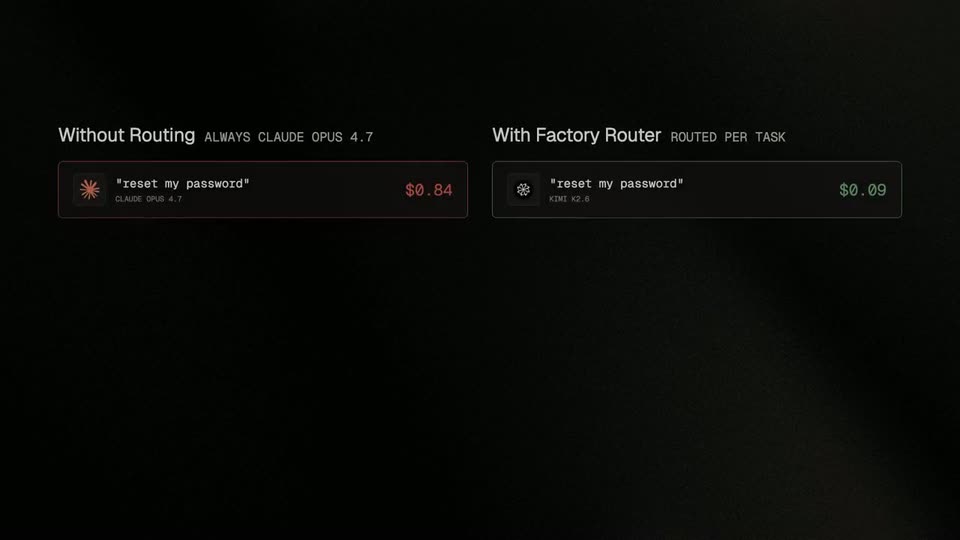
On a black background, a faint centered headline reads 'Same tasks. Lower cost.' Two comparison cards fade in side by side. The left, labeled Without Routing, lists a task row with a red $0.84 price; the right, labeled With Factory Router, lists the same task with a green $0.09 price.
On-screen text: “Same tasks. Lower cost.”, “Without Routing”, “ALWAYS CLAUDE OPUS 4.7”, “reset my password”, “CLAUDE OPUS 4.7”, “$0.84”, “With Factory Router”, “ROUTED PER TASK”, “reset my password”, “KIMI K2.6 (K2.6?) $0.09”
Camera: Static
A dark two-column comparison builds up: the left Without Routing and right With Factory Router stacks each add a task card with prompt and cost, then a total cost line appears and its bar fills as the numbers tick up, the left red bar longer than the right green one.
On-screen text: “Without Routing”, “ALWAYS CLAUDE OPUS 4.7”, “With Factory Router”, “ROUTED PER TASK”, “TOTAL SESSION COST”, “$2.87”, “TOTAL SESSION COST”, “$1.62”
Techniques: Split screen
Camera: Static
A dark comparison graphic splits into two columns: a red cost bar for Without Routing and a green one for With Factory Router, each tagged with a dollar figure. A large thin 43% settles in below the word SAVINGS, then the frame fades to black.
On-screen text: “Without Routing”, “ALWAYS CLAUDE OPUS 4.7”, “TOTAL SESSION COST”, “$2.87”, “With Factory Router”, “ROUTED PER TASK”, “TOTAL SESSION COST”, “$1.62”, “SAVINGS”, “43%”
Techniques: Kinetic type
Camera: Static
On a black grainy field, a centered white headline appears, then a small dark card with orange and white monospace text enters at the left edge while the headline fades out.
On-screen text: “Governance, customization, and policy built in”
Camera: Static
Three dark text cards fade in left to right on a grainy black background, each pairing an orange uppercase label with white monospace copy. The trio holds briefly, then all three fade out together.
On-screen text: “STANDARD MODEL POLICY”, “Allow or block Factory Router org-wide, like any other model.”, “ROUTING GUIDANCE”, “Add org-level context: risky subsystems, routine work, toolchains.”, “ROUTING-ONLY FILTER”, “Exclude specific models from auto-routing while keeping them pickable.”
Camera: Static
A grainy black background holds two centered lines of white text that fade in and lock still: “When an endpoint degrades, sessions reroute”. The frame is locked off with no further motion.
On-screen text: “When an endpoint degrades,”, “sessions reroute”
Camera: Static
A gray two-line headline on black fades out as a dark session card fades in, showing an active streaming state, a model name with an orange starburst icon, and a thin progress bar.
On-screen text: “When an endpoint degrades, sessions reroute”
Camera: Static
A dark UI card sits centered on a black grainy background, showing an active session with a model badge and a green streaming indicator. A thin progress bar fills left to right beneath the line “Generating implementation plan...”. The frame stays locked off.
Camera: Static
A reddish session card holds static, centered on a black background. It pairs an ACTIVE SESSION header with a FAILED tag, a Claude Opus 4.7 row bearing an orange spark icon, and a half-filled bar above the line Endpoint error. Connection lost.
Camera: Static
A flat dark session panel shows two provider cards joined by a reroute arrow. The status flips from FAILED to COMPLETED while the progress bar fills green, then a green caption fades in beneath the panel.
On-screen text: “SESSION CONTINUES WITHOUT INTERRUPTION”
Camera: Static
A dim dark UI panel fades in showing an active session rerouting from Bedrock to Vertex with a complete progress bar, then cuts to a black card holding a two-line white headline.
On-screen text: “SESSION CONTINUES WITHOUT INTERRUPTION”, “If a model struggles,”, “the session escalates”
Camera: Static
Two lines of white text sit centered on a dark, grainy background. The frame is locked off and the text holds still for the full duration, with no movement or reveal.
On-screen text: “If a model struggles,”, “the session escalates”
Camera: Static
A faint two-line headline holds on black as a dark task card scales in over it at center. The card shows a model chip with a white asterisk glyph and the name Kimi K2.6, a green WORKING tag, and a task line above a thin progress bar.
On-screen text: “If a model struggles, the session escalates”
Camera: Static
A dark task card with an ACTIVE TASK header and green WORKING status sits centered on a grainy black background. The Kimi K2.6 chip slides in, and a white progress bar fills left to right beneath the status line.
Techniques: Kinetic type
Camera: Static
A dark status card with a red outline sits centered on a grainy black field. It reads ACTIVE TASK with a STRUGGLING flag, a model chip labeled Kimi K2.6, and a red line Stuck in retry loop. Confidence dropping. above a partly filled progress bar. Labels slide in; the frame stays locked.
Camera: Static
A dark task card shows two model chips linked by an escalate arrow. Its status badge cycles through states as the progress bar fills green, then a tagline fades in below the card.
On-screen text: “RELIABLE QUALITY, EVERY SESSION”
Camera: Static
A dark task card showing Kimi K2.6 escalating to Claude Opus 4.7 over a green progress bar, captioned below, slides away, and the centered headline Enterprise engineering benchmarks appears on the black background.
On-screen text: “RELIABLE QUALITY, EVERY SESSION”, “Enterprise engineering benchmarks”
Camera: Static
A plain black background holds the white headline “Enterprise engineering benchmarks”, set centered on two lines. The frame is locked with no motion, and the text stays still for the full duration.
On-screen text: “Enterprise engineering”, “benchmarks”
Camera: Static
A centered gray title reads Enterprise engineering benchmarks on a black textured background, then fades out as a dark stat card slides in from the left, showing a gray 0% and an orange 0% with small monospace captions.
On-screen text: “Enterprise engineering benchmarks”, “TERMINAL-BENCH 2”, “0%”, “of Claude Opus 4.7 pass rate”, “0%”, “lower cost per session”
Techniques: Kinetic type
Camera: Static
On a dark textured background, a rounded dark card appears at left, its white pass-rate figure counting up to 99% and orange cost figure to 20%. A second card slides in from the right, labeled LEGACY-BENCH, with figures counting up to 96% and 25%.
On-screen text: “TERMINAL-BENCH 2”, “99%”, “of Claude Opus 4.7 pass rate”, “20%”, “lower cost per session”, “LEGACY-BENCH”, “96%”, “of Claude Opus 4.7 pass rate”, “25%”, “lower cost per session”
Techniques: Kinetic type
Camera: Static
A centered line of light gray text, preceded by a small orange square, fades in on a dark grainy background, holds still, then fades out to black. The frame is locked off throughout.
On-screen text: “AVAILABLE TODAY IN PRIVATE RESEARCH PREVIEW”
Camera: Static