1:38

Best SaaS Product Demo Video | Teamble
Teamble · Feb 2025
editframe · Apr 2026 · 1:20 · AI-annotated
editframe’s 1:20 launch film runs 25 scenes, about 3.2 s each. The product is on screen from the first frame and 8 features are revealed. There is no explicit call to action. The video is a chain of bold two-line headlines on a flat cream field, each handing off to a short flat-UI or 3D demo of one capability before the next beat begins. Signature moves: type sliding in from the left and locking off, flat mockups (terminal, browser, card grids) animated with progress bars and counters, and 3D compositions that tilt, fan out and snap back.
Is this your launch? to your site or press kit.
Teamble · Feb 2025
OS3 · Industrials · Aug 2026
The EDITFRAME wordmark in heavy black type sits centered on a cream field, three small triangles in red, yellow and blue beneath it. The mark holds, then the tagline slides in, Make videos in dark gray above with code. in red.
On-screen text: “Make videos”, “with code.”
Techniques: Kinetic type
Camera: Static
On a flat off-white background, two lines of bold type slide in from the left and lock off: “Make videos” in dark navy above “with code.” in red, left-aligned in the lower-left quadrant.
On-screen text: “Make videos”, “with code.”
Techniques: Kinetic type
Camera: Static
A plain cream background carries a bold two-line headline. The words slide into place and settle left of center: navy text over a red line, with the frame locked off.
On-screen text: “Make videos”, “withcode.”, “Any kind of”, “video.”
Techniques: Kinetic type
Camera: Static
A bold two-line headline, “Any kind of video.”, sits left of center on a plain cream background, then is replaced by “Agent-ready skills.” sliding in on the right side of the frame.
On-screen text: “Any kind of”, “video.”, “Agent-ready”, “skills.”
Techniques: Kinetic type
Camera: Static
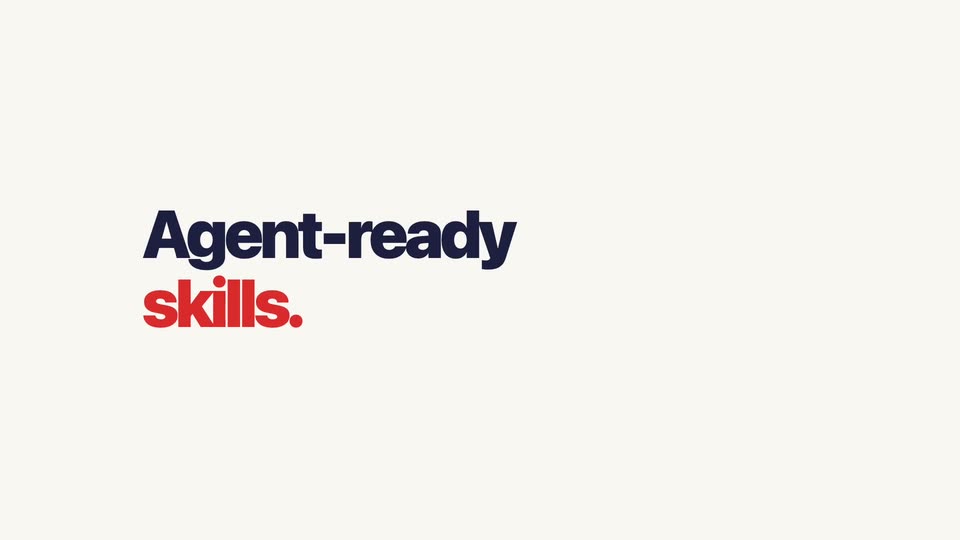
A two-line headline sits on a plain cream background: “Agent-ready” in navy above “skills.” in red. The block slides down into frame, holds briefly, then slides off, leaving the background empty.
On-screen text: “Agent-ready”, “skills.”
Techniques: Kinetic type
Camera: Static
A terminal window titled claude, with traffic-light dots, sits centered on a cream field. The command npm create @editframe@latest types out behind a red block caret, then a reply line prints with yes in red. A large two-line headline Agent-ready skills. slides in.
On-screen text: “Agent-ready”, “skills.”
Techniques: Kinetic type
Camera: Static
A tilted 3D stat card of a baseball batter holds center as its FG, SUBJECT and BG layers fan out and snap back together. A dark blue 'Video Compositing' title sits below on a plain light background.
On-screen text: “Video Compositing”
Techniques: 3D mockup, Parallax
Camera: Static
A bold navy headline sits centered on a cream background. Three video cards pop in below, each playing the same soccer clip cropped to 16:9, 1:1 and 9:16, with aspect-ratio labels and a scrolling marquee strip on the wide card.
On-screen text: “Design with HTML + CSS”
Camera: Push in
A flat bar chart of eight colored bars grows in beneath a navy-and-red headline. The backdrop dims to gray as low-poly 3D shapes float in and a large iridescent SCRIPTING word scales over the chart, with three.js below.
On-screen text: “Design with HTML+CSS”, “1:1”, “9:16”, “SOCIAL”, “If you can code it, you can render it.”, “SCRIPTING”, “three.js”
Techniques: Kinetic type
Camera: Static
On a black background, the word SCRIPTING appears as extruded 3D letters with a green-to-purple gradient, slowly rotating in perspective while a sphere, an icosahedron, and a small diamond float above and beside it. A white three.js wordmark sits at the bottom.
On-screen text: “SCRIPTING”, “three.js”
Techniques: Kinetic type
Camera: Static
Pastel 3D letters spelling SCRIPTING tilt diagonally between floating three.js primitives on dark gray, the group scaling out as the scene flips to cream, where the headline Any framework. Any toolkit. lands above a grid of framework icon cards that pop in one by one.
On-screen text: “SCRIPTING”, “three.js”, “Any framework. Any toolkit.”
Techniques: Kinetic type
Camera: Static
A bold navy-and-red headline sits above a 3x4 grid of white rounded cards on a cream background, each card pairing a colored framework icon with its name. The bottom row fades in early, the grid holds, then the scene ends on a blank cream frame.
On-screen text: “Any framework. Any toolkit.”
Camera: Static
A flat browser mockup sits under the headline “Render in your browser.”; a nested preview window’s progress bar fills and its frame counter counts to 240. It then cuts to the headline “Render via the CLI.” over an empty terminal window.
On-screen text: “Render in your browser.”, “Render via the CLI.”, “Renders your composition to a local MP4 file.”
Camera: Static
On a cream background, a bold navy headline and gray subheading sit above a flat macOS-style terminal. Inside, a render command runs: output lines appear in sequence, a blue progress bar fills to 100%, and a green result line lands. The headline and subheading fade out at the end.
On-screen text: “Render via the CLI.”, “Renders your composition to a local MP4 file.”
Camera: Static
A cream card holds a small gray uppercase line, LOCAL MP4 · NO UPLOAD · NO CLOUD COSTS, above a large red FREE. The composition settles, then cuts to a large dark navy headline, Perfected your masterpiece?, centered on the same plain cream field.
On-screen text: “LOCAL MP4 · NO UPLOAD · NO CLOUD COSTS”, “FREE.”, “Perfected your masterpiece?”
Camera: Static
A bold navy headline sits centered on a plain off-white field. A red second line appears beneath it, then both lines hold still in a locked-off frame.
On-screen text: “Perfected your masterpiece?”, “Render at scale.”
Camera: Static
A white cloud icon with red, yellow and blue play triangles sits centered on a cream field. The bold red wordmark Editframe Render Cloud appears beneath it, then the logo shrinks into a white pill at the top of the frame as thin gray lines radiate downward from the pill.
On-screen text: “Perfected your masterpiece?”, “Renderatscale.”
Camera: Static
A white cloud pill labeled Editframe Render Cloud anchors the top, thin lines fanning down to a grid of photo thumbnails that fill in across the frame. A bold counter in the lower right climbs from 24 to 84 as a small caption fades in at the lower left.
On-screen text: “Editframe Render Cloud”, “RENDERS DISPATCHED”, “RENDERED IN PARALLEL ON EDITFRAME'S FULLY MANAGED CLOUD”
Camera: Static
On a cream field, the dark navy line “Works with everything you already use.” settles in from a soft offset shadow. A red line, “Prompt a workflow.,” then drops in beneath it and locks into place.
On-screen text: “Works with everything you already use.”, “Prompt a workflow.”
Techniques: Kinetic type
Camera: Static
A navy headline “Works with everything you already use. Prompt a workflow.” cuts to “Integrate anything.” above a terminal card typing a prompt. Runway, ElevenLabs, Suno and Gemini cards pop in with dashed lines, then Editframe and a video.mp4 card appear. The board fades and “Prompt a GUI.” appears.
On-screen text: “Works with everything you already use.”, “Prompt a workflow.”, “Integrate anything.”, “Prompt a GUI.”
Techniques: Kinetic type
Camera: Static
On a cream background, the bold headline 'Prompt a GUI.' holds above a white prompt box that types out '> Build me a video editor' with a red block caret. Three green-check status lines tick in below, then a flat video editor UI mockup fades in behind the text.
On-screen text: “Prompt a GUI.”, “> Build me a video editor”, “scaffolding component graph...”, “binding tool integrations...”, “generating editor GUI...”
Techniques: Kinetic type
Camera: Static
A flat video editor mockup sits on a cream background beneath a large headline that fades in from pale gray to dark navy. The timeline playhead travels across the colored clips, then the entire interface fades out at the end.
On-screen text: “Built with Editframe components.”
Camera: Static
A flat browser window with four pastel panels, each holding a code tag, sits under the heading “Built with Editframe components.” The heading swaps to “Backed by Editframe Cloud.” as a cloud icon with three colored chevrons fades in and the window slides down.
On-screen text: “Built with Editframe components.”, “Backed by Editframe Cloud.”, “Editframe Video Cloud”
Techniques: Kinetic type
Camera: Static
A cream card holds a bold navy headline, a white cloud icon with three colored arrows, and three pill badges above a flat browser-window mockup of the editor split into colored panels. The headline and badges fade out, leaving the window, then a large gray EDITFRAME wordmark fills the frame.
On-screen text: “Backed by Editframe Cloud.”, “Editframe Video Cloud”, “Cloud rendering”, “Instant playback”, “No infra to run”, “EDITFRAME”
Camera: Static
On a cream background, the black EDITFRAME wordmark sits centered above three colored play triangles and a gray monospace tagline. Six agent badges, Claude, Cursor, Codex, OpenCode, Gemini, VS Code, fade in left to right, then an italic credit line appears below.
On-screen text: “EDITFRAME”, “Use your favorite coding agent.”, “Claude”, “Cursor”, “Codex”, “OpenCode”, “Gemini”, “VS Code”, “This video made with Editframe's Agent Skills”
Camera: Static