1:19


Edgerun: The 10 lb Military Exoskeleton
Edgerun · Industrials · Aug 2026
Clicks · Jan 2026 · 0:29 · AI-annotated
Clicks’s 0:29 launch film runs 16 scenes, about 1.8 s each. The product shows up at 0:15. There is no explicit call to action. The piece is a macro to wide reveal: focus racks and slow drifts over keys, edges and the notification screen build up, then the logo and title card land at the end. Cutting is fast at about 28 cuts per minute, driven by continuous 3D orbits, focus pulls and the recurring red button glow.
Is this your launch? to your site or press kit.
Edgerun · Industrials · Aug 2026
Rabbit · Hardware · Jan 2024
Nothing · Hardware · Jul 2022
Macro view of black pill-shaped keyboard keys with white letters and numbers on a seamless white surface, tilted diagonally. The frame opens soft and out of focus, then racks into sharp focus across the grid of keys.
Techniques: 3D mockup
Camera: Pull out
An extreme close-up of a white device with a black display and oval black keys. The camera drifts slowly across the surface, settling on the key marked with a hash and a Q, set against a pale gray backdrop.
Camera: Pull out
A white device edge fills the frame in extreme close-up, a pill-shaped side button in sharp focus while the perforated pink back and a dark screen with a blurred grid fall soft behind. A slow drift holds the button centered against a gray gradient.
Techniques: 3D mockup
Camera: Static
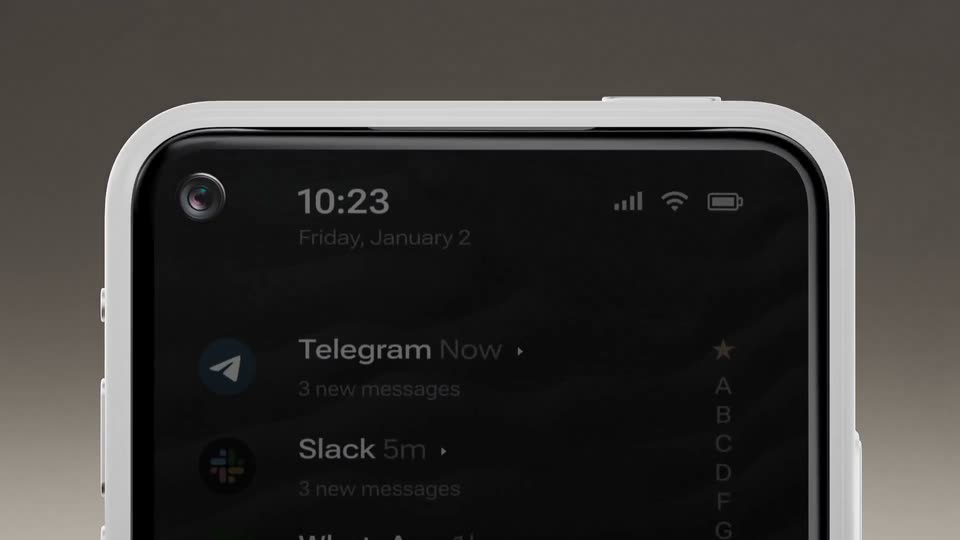
A white-cased phone renders in 3D on a gray gradient, its dark screen listing Telegram, Slack, WhatsApp and Gmail. The camera tilts up, revealing the device's top edge and front camera.
Techniques: 3D mockup
Camera: Pan
A white device with round black keys floats against a soft gray backdrop. The camera glides along its front edge, catching a red dotted strip, then the corner lifts and the keys tilt into view.
Techniques: 3D mockup
Camera: Push in
A black smartphone lies on a white surface beside a white keyboard, its dark screen listing notifications from Telegram, Slack, WhatsApp and Gmail. The camera orbits from a tilted side angle to a top-down view of the screen.
Techniques: 3D mockup
Camera: Pull out
A white phone floats in side profile against a soft gray gradient, its red action button and two side keys facing the camera. The view pulls back as the device lifts slightly while app names and a clock scale and slide in over the top edge.
On-screen text: “WhatsApp”, “Gmail”, “Telegram”, “Slack 5m”, “10:23”
Techniques: 3D mockup, Kinetic type
Camera: Static
A white device edge sits at a diagonal in a 3D render, its side showing a round button set in a maroon slot and a longer pill button. A perforated maroon band runs along the left edge. The camera drifts slowly, shifting the angle against a soft gray gradient.
Techniques: 3D mockup
Camera: Pan
A silver smartphone floats on a plain gray gradient, shown edge-on. The device rotates slowly, turning the top edge with a pill-shaped mute switch and a round headphone jack toward the camera. A perforated mesh texture covers the top and bottom faces.
Techniques: 3D mockup
Camera: Static
A macro close-up of a white device edge shows a brushed metal button above a dark circular sensor. The camera drifts slowly, revealing the textured dark base and the rounded top surface.
On-screen text: “J”
Techniques: 3D mockup
Camera: Static
A dark maroon perforated panel sits in 3D perspective, edged by a white frame. The camera pushes in toward the white Clicks logo, which scales up and drifts toward the center of the frame.
Techniques: 3D mockup
Camera: Static
A tight 3D close-up of a perforated device face, the dot grid tilted at an angle with a white rim. The surface color grades from green to blue while the white CClicks mark stays fixed center-right.
Techniques: 3D mockup
Camera: Pull out
A rounded rectangular device with a pink perforated surface lies on a white background, the white Clicks wordmark and C mark centered as the frame pulls back slightly.
Camera: Pull out
Macro on the white device's side, a pill button whose ring ignites red, then the camera orbits the top corner and pulls back to a centered front view. The screen holds a dark notification list with a vertical alphabet index, the round-keyboard body below.
Techniques: 3D mockup
Camera: Pull out
A white phone with a physical keyboard and a dark message list on its screen is centered on a flat gray background. White text on the left reads the product name and tagline, and the Clicks logo sits in the bottom right corner.
On-screen text: “Clicks Communicator”, “The ultimate communication companion”, “Clicks”
Camera: Static
A dark phone mockup in 3D perspective holds a static screen: a clock, a row of letters, and the Clicks Communicator title with a tagline. A glint sweeps across the device's curved edge.
Techniques: 3D mockup, Light sweep
Camera: Static