1:01
Explore
Szymon Chmal - Introducing Simlock: a free, open-source tool that turns your machine
Callstack · Oct 2026 · 1:49 · AI-annotated
- Length
- 1:49
- Scenes
- 23 · 4.8 s avg
- Product on screen
- 0:30
- Features shown
- 3
- Call to action
- 1:33 · 85%
- Voiceover
- Yes
00:00:00 / 01:49:16
Callstack’s 1:49 launch film runs 23 scenes, about 4.8 s each. The product shows up at 0:30 and 3 features are revealed. The call to action lands at 1:33 (85% in), over a voiceover. The video is built as numbered feature chapters over a black dot-matrix field, moving from agent workflow to product, one machine, fleet, and physical devices. It relies on schematic diagrams, terminal typing, dashed connectors, and flickering orange phone grids to explain self-managed simulator leasing at a calm, precise pace.
No filming indicatedEstimated needs: 5 capture groups — your screens or recordings · 14 graphic passages — draw or supply
Is this your launch? to your site or press kit.
More like this
0:55


Skymerse - Autopilot for Flight Operations
Skymerse · Industrials · Aug 2026
0:26

Limnion Teaser
Limnion · B2B · Oct 2026
Szymon Chmal - Introducing Simlock: a free, open-source tool that turns your machine, scene by scene
· 23 scenes as text
01 · Hook · 0:00–0:04
A small window titled 'you' sits centered on a dark halftone field, its gray placeholder bars animating. Eight more windows labeled agent-02 through agent-13 fade in around it in a grid while the bottom caption changes.
On-screen text: “Software engineering is changing. Fast.”, “One developer now runs a whole team of coding agents.”
Camera: Static
02 · Hook · 0:04–0:08
On a dark dotted background, a grid of panels labeled agent-01 to agent-14 and 'you' shows animated horizontal bars with a moving cursor block each; the 'you' panel has a white outline. A white caption sits at the bottom. Near the end, most panels fade out.
On-screen text: “One developer now runs a whole team of coding agents.”
Camera: Static
03 · Problem · 0:08–0:16
Six agent rows of solid and hatched gray blocks shuffle continuously across a dark halftone Gantt chart beneath a write, build, test legend. Dashed lines then link each row to a vertical column of empty device slots on the right.
On-screen text: “[00] IN PARALLEL”, “They write, build and test in parallel, around the clock.”, “And to test a mobile app, every one of them needs a device.”
Camera: Push in
04 · Problem · 0:16–0:17
Over a dark halftone dot field, two mock CLI windows labeled agent-01 and agent-02 fade in on the left, while a macOS window holding an iPhone 17 Pro wireframe appears on the right, linked by a dashed line. A white caption sits at the bottom.
On-screen text: “[00] IN PARALLEL”, “[00] ONE SIMULATOR”, “Point them all at one simulator, and they fight over it.”
Camera: Static
05 · Problem · 0:17–0:24
Three terminal windows on the left type out conflicting simctl commands, each linked by a dashed line to a single iPhone simulator on the right. The phone screen flickers with stripes, error lines fill the terminals, then the windows fade out.
On-screen text: “[00] ONE SIMULATOR”, “Point them all at one simulator, and they fight over it.”, “One installs, another erases, a third shuts it down.”
Camera: Static
06 · Problem · 0:24–0:30
A dark panel labeled your-mac fills row by row with phone outlines while the RAM and DISK bars extend to full. A bottom caption reads Give each its own, and your Mac fills up, then swaps to with devices nobody cleans up.
On-screen text: “SIMLOCK BY CALLSTACK”, “[00] ONE MAC”, “Give each its own, and your Mac fills up”, “with devices nobody cleans up.”
Camera: Static
07 · Product intro · 0:30–0:31
A dark grid holds a flat Mac status panel labeled your-mac, with RAM and DISK bars both reading full. The panel then fades out, leaving only the empty grid and the Simlock by Callstack lockup in the top-left corner.
On-screen text: “SIMLOCK BY CALLSTACK”, “[00] ONE MAC”
Camera: Static
08 · Product intro · 0:31–0:37
A black field of dotted orange phone outlines; a central phone holds an orange SIMLOCK badge that scales in, then the phones flicker and fill with dots as they power on. The caption swaps from “Meet Simlock.” to a tagline, and the badge drops out at the end.
On-screen text: “SIMLOCK”, “Meet Simlock.”, “It turns your Mac into a simulator cloud that manages itself.”
Techniques: Kinetic type
Camera: Static
09 · Feature reveal · 0:37–0:44
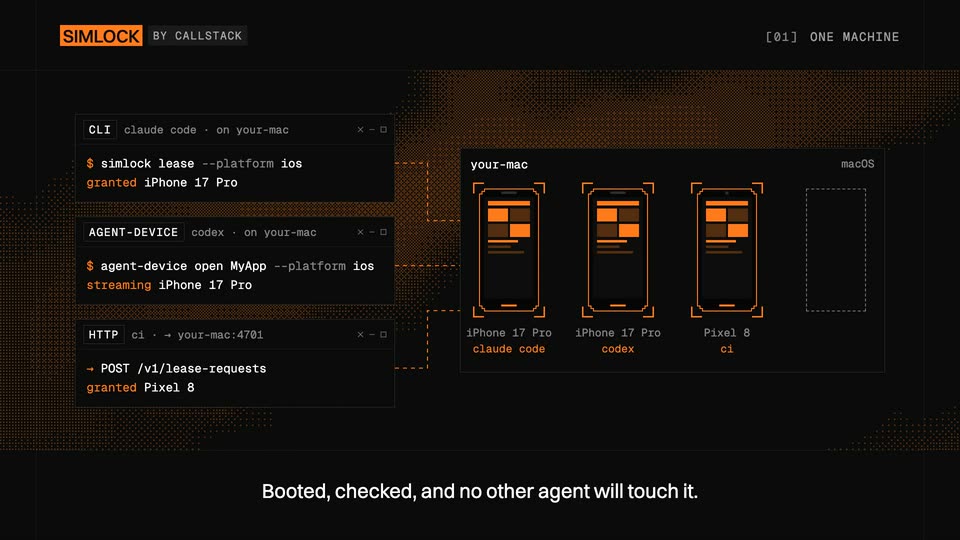
A dark interface pairs a terminal on the left with a device grid on the right. Command lines type out and gain orange status text as three phone outlines fill with orange screens, each linked to a command by a dashed line. A bottom caption swaps.
On-screen text: “Each agent asks for a device and gets its own.”, “Booted, checked, and no other agent will touch it.”
Camera: Static
10 · Feature reveal · 0:44–0:52
A dark schematic on a black field with an orange halftone wave. A white square travels along a dashed path past a QUEUE box into a your-mac panel, filling and emptying four phone mockups as ON DEMAND, QUEUE and CLEANUP light up in turn.
On-screen text: “[01] ONE MACHINE”, “Simlock creates devices on demand,”, “queues requests when the Mac is full,”, “and cleans up what sits idle.”
Camera: Static
11 · Feature reveal · 0:52–0:58
A flat schematic on a black field: four command rows (CLI, MCP, HTTP, AGENT-DEVICE) fade in on the left, dashed lines link them to a your-mac panel holding three orange-outlined phone mockups. Small squares travel along the connectors as an orange dot texture drifts behind.
On-screen text: “[01] ONE MACHINE”, “Agents reach it through the CLI, MCP, HTTP or agent-device.”
Techniques: Particles
Camera: Static
12 · Feature reveal · 0:58–0:59
A dark frame with an orange halftone dot field. A your-mac panel holding three outlined phones and an empty slot exits, the top-right tag flips from [01] ONE MACHINE to [02] FLEET, leaving an empty grid.
On-screen text: “[01] ONE MACHINE”, “[02] FLEET”
Camera: Static
13 · Feature reveal · 0:59–1:11
Three machine panels stack on the right over an orange dot-matrix field; a gateway card fades in at center and three terminal windows type commands on the left. Dashed connectors draw between them, phone icons fill orange as leases are granted, and bottom captions swap.
On-screen text: “Need more room? Add machines.”, “Run a gateway, and point your Macs and Linux boxes at it.”, “Agents anywhere lease through one URL.”, “The gateway sends each one to a machine with room.”
Camera: Static
14 · Feature reveal · 1:11–1:13
A grid of orange dotted device silhouettes fills a black screen as a small UI panel in the center expands and swaps its content to show a connection row ending in granted. A white caption fades in at the bottom.
On-screen text: “SIMLOCK BY CALLSTACK”, “[02] FLEET”, “Your own simulator cloud, on hardware you already own.”
Camera: Static
15 · Feature reveal · 1:13–1:16
A dark terminal window floats over a grid of orange dotted phone outlines. Inside, rows of agent, device, and target names fill in line by line, each ending in an orange granted tag. The background devices dim as the list completes. A white caption sits below.
On-screen text: “SIMLOCK BY CALLSTACK”, “[02] FLEET”, “Your own simulator cloud, on hardware you already own.”
Camera: Static
16 · Feature reveal · 1:16–1:17
A grid of dotted orange device outlines scrolls down a black field as a translucent fleet panel, listing device pairings with granted statuses, fades out. The SIMLOCK badge and [02] FLEET label stay fixed in the top corners.
On-screen text: “SIMLOCK”, “BY CALLSTACK”, “[02] FLEET”
Camera: Static
17 · Feature reveal · 1:17–1:17
A dark field of dotted orange shapes arranged in a grid re-forms into neat rows of vertical rounded rectangles. The SIMLOCK by Callstack lockup sits top left while a PHYSICAL DEVICES label fades in top right.
On-screen text: “[03] PHYSICAL DEVICES”
Techniques: Morph
Camera: Static
18 · Feature reveal · 1:17–1:18
A black field holds a grid of dotted orange phone silhouettes. Internal horizontal bars light up cell by cell in a scanning wave, while a brand tag and a section label sit in the top corners.
On-screen text: “SIMLOCK BY CALLSTACK”, “[03] PHYSICAL DEVICES”
Camera: Static
19 · Feature reveal · 1:18–1:21
The camera is locked on a wall of pixelated phone shapes drawn in orange dots on black. Their screens flicker as the dot patterns shift, and one phone in the top row blanks to a dark dotted outline before refilling. A white caption sits at the bottom.
On-screen text: “SIMLOCK BY CALLSTACK”, “[03] PHYSICAL DEVICES”, “Oh, and one more thing.”, “Real phones.”
Camera: Static
20 · Feature reveal · 1:21–1:22
A wall of amber dot-matrix phone silhouettes fills the black frame, one unit rendered solid orange. The grid pans slowly left while a white caption, “Real phones.”, sits centered at the bottom.
On-screen text: “[03] PHYSICAL DEVICES”, “Real phones.”
Camera: Push in
21 · Feature reveal · 1:22–1:23
A dark field of orange halftone phone silhouettes fills the frame, one solid black phone boxed by a white dotted selection at center. Its screen flips from orange to black as the bottom caption swaps from “Real phones.” to “Plug in an iPhone or an Android phone,”.
On-screen text: “Real phones.”, “Plug in an iPhone or an Android phone,”
Camera: Static
22 · Feature reveal · 1:23–1:33
Over a flowing orange dot field, two line-art phones with app grids sit above a mac-studio label as two terminal windows slide in from the left and type lease commands. Dashed orange lines link them; the phones flash orange, then the added icons vanish.
On-screen text: “[03] PHYSICAL DEVICES”, “Plug in an iPhone or an Android phone,”, “and your agents lease it like a simulator.”, “When the lease ends,”, “Simlock removes every app that wasn't there before.”
Techniques: Particles
Camera: Static
23 · CTA · 1:33–1:49
On a black field, the headline builds line by line in white and orange sans-serif, above a flickering grid of dotted orange phone outlines. A monospace install command and license note fade in below, and the top-right tag swaps to a GitHub URL.
On-screen text: “[03] PHYSICAL DEVICES”, “Turn your Mac into”, “a simulator cloud”, “that manages itself.”, “$ npm i -g simlock”, “FREE · OPEN SOURCE · MIT”, “GITHUB.COM/CALLSTACKINCUBATOR/SIMLOCK”
Techniques: Kinetic type, Particles
Camera: Static