3:06

Arbaaz Khan - After years working on robot memory at @NASAJPL, @GoogleDeepMind , @M
Graphon Labs · Nov 2026
C5R Corp’s 1:46 launch film runs 35 scenes, about 3.0 s each. The product shows up at 1:15 and 1 feature is revealed. There is no explicit call to action; a voiceover carries the film. The video alternates live lab walkthroughs, first-person bench actions, and monochrome 3D facility diagrams, advancing a checklist from prompt to verified sample. Its signature is clean white subtitles, orange object callouts, and a persistent task panel that turns lab work into a step-by-step interface.
Is this your launch? to your site or press kit.
Graphon Labs · Nov 2026
Airbnb · Consumer · May 2023
Architect Labs · Aug 2026
A man in a green jacket walks toward the camera through a bright lab with scientists in white coats at benches. Large white captions read “THIS ENTIRE FACILITY IS RUN BY AI”; colored tags pop up over equipment, people, and inventory, then he turns to a laptop.
On-screen text: “THIS ENTIRE FACILITY”, “IS RUN BY AI”, “Right now, everything you see”, “EQUIPMENT”, “the equipment, the people”, “PEOPLE”, “and the inventory”, “INVENTORY”, “is currently being controlled”, “by GPT-6 Astra. Let me show you how it works. Hey, Astra,”
Camera: Push in
A laptop in 3D perspective shows a dark terminal where a prompt line types out a request to an AI agent, then bulleted response text scrolls in below. The camera is locked-off against a blurred room background.
Techniques: 3D mockup, Kinetic type
Camera: Static
A man in a green jacket stands in a bright lab, gesturing, then turns toward a bench. Subtitles run along the bottom, a PREPARING TASK bar sits top-left, and an orange LAPTOP tag with a leader line pops onto the bench. The camera pushes in.
On-screen text: “PREPARING TASK”, “Meanwhile, let me show you”, “what Astra is working with.”, “Each bench in the facility”, “has a laptop,”, “LAPTOP”
Camera: Push in
A locked-off wide shot of a bright lab bench where a man in a green shirt gestures toward the equipment while lab-coated staff work in the background. Orange outline boxes and callout labels for the laptop and instruments scale in over the scene as the camera holds still.
On-screen text: “has a laptop,”, “instruments”
Camera: Static
Six live-action clips of lab technicians play in a 2x3 grid on a dark background. A progress bar under PREPARING TASK fills at top left while white bottom captions swap from 'and multiple camera feeds.' to 'We've reverse-engineered'.
On-screen text: “PREPARING TASK”, “and multiple camera feeds.”, “We've reverse-engineered”
Techniques: Split screen
Camera: Static
A man in a green jacket walks toward camera through a lab, gesturing as he speaks, while two technicians in white coats work at instruments behind him. A 'PREPARING TASK' progress bar holds top-left and white subtitles appear along the bottom edge.
On-screen text: “PREPARING TASK”, “We've reverse-engineered”, “the firmware of each instrument”, “So the model can talk through it”, “over software.”, “Everything in the facility”, “is perfectly represented in data:”
Camera: Push in
A gloved hand holds a phone in a lab as its camera view scans shelves of red-capped bottles and white containers. Subtitles change from “is perfectly represented in data:” to “where it is” and “and how much is available,” while a “PREPARING TASK” progress bar fills at top left.
On-screen text: “PREPARING TASK”, “is perfectly represented in data:”, “where it is”, “and how much is available,”, “MILTON”
Camera: Static
A gloved hand holds a phone in a lab; the app's camera view scans a red-capped bottle, then the screen switches to a stock list showing SKU and item details. A top-left progress bar reads PREPARING TASK.
On-screen text: “PREPARING TASK”, “and how much is available,”, “down to the microliter.”
Camera: Static
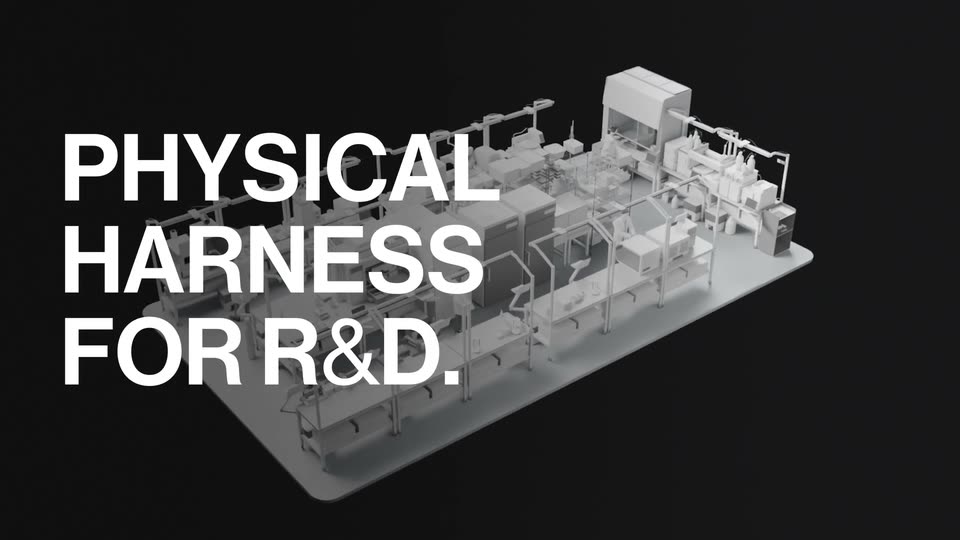
A monochrome 3D model of a factory floor with machines, benches and gantries orbits slowly on a black background. On the left, large white words PHYSICAL HARNESS FOR R&D. scale in and lock off.
On-screen text: “PREPARING TASK”, “PHYSICAL”, “HARNESS”, “FOR R&D.”
Techniques: 3D mockup, Kinetic type
Camera: Static
A monochrome 3D model of a lab facility with humanoid figures and robotic arms at workstations. A central machine highlights in orange as three orange callout labels point to it, and a bottom caption changes from “Models can control and inspect” to “equipment,”.
On-screen text: “PHYSICAL”, “HARNESS”, “FOR R&D.”, “Models can control and inspect”, “CARVER 3851”, “DECO BALL MILL”, “HAMILTON STARLET”, “equipment,”
Techniques: Kinetic type, 3D mockup
Camera: Static
A white 3D lab set with shelved equipment and two operators, each framed by a blue bounding box labeled OPERATOR 3 and 4. The camera holds still while lower-third captions swap from equipment, to people and inventory.
On-screen text: “equipment,”, “people and inventory”
Techniques: 3D mockup
Camera: Static
High-angle 3D render of a white warehouse aisle: green wireframe outlines highlight egg cartons on a metal shelf, and a green INVENTORY tag with a thin leader line points to them. The camera slowly drifts over the shelving while captions run along the bottom.
On-screen text: “INVENTORY”, “people and inventory”, “in order to achieve their goal.”, “Let's go check on the task”
Techniques: 3D mockup
Camera: Static
A young man in an olive jacket stands in a bright lab, subtitled, then turns and walks toward the bench of machines. Top-left, a progress pill shifts from orange 'PREPARING TASK' to green 'READY' and grows into a dark card reading 'Synthesize benzylammonium'.
On-screen text: “PREPARING TASK”, “Let's go check on the task”, “READY”, “we started earlier.”, “Synthesize benzylammonium”
Techniques: Morph
Camera: Push in
A man in a green jacket walks toward the camera down a lab aisle between wire shelves of reagent bins, a dark task card on the left highlighting “Retrieve reagent” in green, a laptop in the foreground, and white captions at the bottom.
On-screen text: “Synthesize benzylammonium”, “Retrieve reagent”, “Confirm at bench”, “Transfer liquid”, “Load Opentrons”, “Complete reaction”, “Verify via LC-MS”, “Dante got assigned to this task,”, “and the model just prompted him”
Camera: Push in
A man in a green jacket stands in a storage room, gesturing at a laptop on a stool while a gloved hand reaches in from the left. A dark checklist panel reading Synthesize benzylammonium overlays the left edge. The camera tilts down as he moves.
On-screen text: “Synthesize benzylammonium”, “Retrieve reagent”, “Confirm at bench”, “Transfer liquid”, “Load Opentrons”, “Complete reaction”, “Verify via LC-MS”, “and the model just prompted him”
Camera: Push in
A researcher in a green jacket points at a laptop screen on a rolling cart while a blue-gloved hand rests on the bench. A dark checklist panel titled Synthesize benzylammonium with Retrieve reagent highlighted in green sits at the left. The camera whip-pans away at the end.
On-screen text: “Synthesize benzylammonium”, “Retrieve reagent”, “Confirm at bench”, “Transfer liquid”, “Load Openrons”, “Complete reaction”, “Verify via LC-MS”, “and the bot has just prompted him”, “to bring this reagent”, “from the inventory”
Camera: Pan
A blue-gloved hand reaches into a crowded lab shelf and grasps a dark bottle with a red cap. A translucent task checklist hovers at left with the first step highlighted green, and an orange tag marks a bottle as REAGENT BOTTLE inside corner brackets while a caption sits at the bottom.
On-screen text: “We can see Dante find”
Camera: Push in
First-person view of a blue-gloved hand reaching for a red-capped reagent bottle on a lab shelf. A dark checklist panel sits at left with the first step highlighted green, and an orange tag points to the bottle. A subtitle reads at the bottom.
On-screen text: “the right amine,”
Camera: Static
First-person gloved hand sets a dark reagent bottle with a red cap on a lab bench, framed by orange corner brackets tagged REAGENT SCAN. A left-side checklist panel highlights Confirm at bench while bottom subtitles read the narration.
On-screen text: “Synthesize benzylammonium”, “Retrieve reagent”, “Confirm at bench”, “Transfer liquid”, “Load Opentrons”, “Complete reaction”, “Verify via LC-MS”, “REAGENT SCAN”, “scan it with the machine,”, “and confirm that it made it,”
Camera: Push in
First-person view of blue-gloved hands typing on a laptop at a lab bench. A dark checklist card on the left lists synthesis steps, with 'Confirm at bench' highlighted in green as the screen content updates.
On-screen text: “Synthesize benzylammonium”, “Retrieve reagent”, “Confirm at bench”, “Transfer liquid”, “Load Openrons”, “Complete reaction”, “Verify via LC-MS”, “and confirm that it made it”, “to the bench.”
Camera: Static
First-person view of a gloved researcher at a dark lab bench, drawing liquid from a bottle with a pipette. A left checklist overlay advances item by item in green, and orange corner-bracket labels tag the pipette and the sample vial. A caption sits at the bottom.
On-screen text: “Synthesize benzylammonium”, “Retrieve reagent”, “Confirm at bench”, “Transfer liquid”, “Load OpenTrons”, “Complete reaction”, “Verify via LC-MS”, “PIPETTE”, “Then, Dante's instructed”, “SAMPLE VIAL”
Camera: Static
Over-the-shoulder shot of a gloved scientist pipetting liquid from a brown bottle into a vial on a lab bench. A dark checklist panel on the left highlights 'Transfer liquid', and an orange 'SAMPLE VIAL' tag with dashed brackets marks the vial. Subtitle: 'from the bottle into the vial.'
On-screen text: “Synthesize benzylammonium”, “Retrieve reagent”, “Confirm at bench”, “Transfer liquid”, “Load Opentrons”, “Complete reaction”, “Verify via LC-MS”, “SAMPLE VIAL”, “from the bottle into the vial.”
Camera: Static
First-person lab view: a gloved hand holds a small vial, an orange callout tags it SAMPLE VIAL. A dark checklist panel on the left marks Load Openrons in green. The camera pans with motion blur as a caption reads Load the vial into the tray.
On-screen text: “Synthesize benzylammonium”, “Retrieve reagent”, “Confirm at bench”, “Transfer liquid”, “Load Openrons”, “Complete reaction”, “Verify via LC-MS”, “SAMPLE VIAL”, “Load the vial into the tray”
Camera: Pan
A gloved hand in a white lab coat lowers a small vial into a blue rack on a black lab device, the camera panning to follow. A dark checklist panel stays fixed on the left while an orange callout label tracks the tray.
On-screen text: “Synthesize benzylammonium”, “Retrieve reagent”, “Confirm at bench”, “Transfer liquid”, “Load OpenTrons”, “Complete reaction”, “Verify via LC-MS”, “SAMPLE VIAL”, “Load the vial into the tray of the OpenTrons”
Camera: Push in
A 3D perspective view of a lab robot arm with a black gripper above a deck of vials and plates. A dark checklist panel on the left highlights steps in sequence while an orange SAMPLE VIAL callout points to a vial.
On-screen text: “Synthesize benzylammonium”, “Retrieve reagent”, “Confirm at bench”, “Transfer liquid”, “Load Opentrons”, “Complete reaction”, “Verify via LC-MS”, “SAMPLE VIAL”
Techniques: 3D mockup
Camera: Static
Gloved hands slide a blue rack of dark vials into a benchtop instrument while the handheld camera follows. Orange leader lines tag the rack as the sample rack, a dark checklist panel lists the synthesis steps with the last line highlighted green, and a bottom caption reads the verification step.
On-screen text: “Synthesize benzylammonium”, “Retrieve reagent”, “Confirm at bench”, “Transfer liquid”, “Load Openrons”, “Complete reaction”, “Verify via LC-MS”, “SAMPLE RACK”, “and verify the molecule via LC-MS.”
Camera: Pull out
In a bright lab, a man in a lab coat and blue gloves takes a small vial from a woman in a green jacket. An orange SAMPLE VIAL tag with corner brackets slides in beside the vial while a subtitle line appears at the bottom.
On-screen text: “SAMPLE VIAL”, “And now we have a sample containing”
Camera: Pan
A man in a green jacket holds a small vial to the camera in a busy lab while a technician works at machines behind him. An orange SAMPLE VIAL tag with corner brackets slides in beside the vial. The camera tracks left as he walks and speaks.
On-screen text: “SAMPLE VIAL”, “And now we have a sample containing”, “the molecule that we asked for.”, “So how good is Al”, “at actually doing science?”, “Today, we're releasing SciUniverse,”
Camera: Pull out
On a dark background, a large panel shows a researcher in a lab coat opening a freezer, labeled Biology. Two smaller panels fade in on the right, labeled Materials science and Chemistry, while a white caption sits at the bottom.
On-screen text: “SciUniverse”, “LEVEL 1”, “Biology”, “Materials science”, “Chemistry”, “A growing collection of scientific benchmarks”
Camera: Static
A dark product screen shows the SciUniverse wordmark with a LEVEL 1 badge over a three-panel grid of lab footage: a large Biology clip of a scientist opening a frost-covered freezer, plus smaller Materials science and Chemistry clips. Bottom captions swap phrase by phrase with the voiceover.
On-screen text: “A growing collection of scientific benchmarks”, “across biology,”, “material science and chemistry.”, “We built our first facility”
Techniques: Split screen
Camera: Static
A man in a green jacket stands in a research lab, talking to camera and gesturing with one hand. The camera drifts backward, revealing shelves of samples and a yellow cabinet on the right. White subtitles caption his words along the bottom edge.
On-screen text: “We built our first facility”, “to understand what the models can do,”, “the risks of them having”, “a physical space to research,”, “and where they have to improve.”, “And our ambition is”, “to help AI”, “make discoveries”, “that are entirely new.”
Camera: Pull out
A near-black field holds the white wordmark C5R CORP. dead center, a locked-off frame with no motion. The type sits still for the full duration, a flat sign-off card.
On-screen text: “C5R CORP.”
Camera: Static
A white C5R CORP. wordmark sits centered on a near-black field, locked off and perfectly still for the full duration. No animation, no camera move; the sign-off holds as a flat, static card.
On-screen text: “C5R CORP.”
Camera: Static
A white “C5R CORP.” wordmark holds centered on a near-black background. The frame is locked off with no motion, presenting the brand mark as a static sign-off.
On-screen text: “C5R CORP.”
Camera: Static
A near-black background holds the white wordmark C5R CORP. dead center. The frame is locked off and the text stays still for the full second, serving as a brand sign-off.
On-screen text: “C5R CORP.”
Camera: Static